
Here is what's new in Atwork for October 2026: five changes that each take one manual step out of agency work. AI autofill fills a column from the rest of the row, every sheet can have its own email address, clients can open a support ticket without an account, skills teach every agent one process, and agents read the PDFs and Office files you give them. Eight smaller changes follow.
| Feature | Where you find it | The step it replaces |
|---|---|---|
| AI autofill | Column header › Autofill | Copying values into columns by hand |
| Email to this sheet | The arrow next to New › Email to this sheet | Retyping client emails as tasks |
| Guest tickets | Contact support on your client portal | Chasing a client to set up a portal login |
| Agent skills | Settings › Skills | Pasting the same checklist into every agent |
| Agents read files | Attach file in any agent chat | Pasting a brief's text into a chat |
How does AI autofill fill a column for you?
AI autofill lets a column fill itself. Click the column header, choose Autofill, then AI, write a one-line instruction and pick the fields the AI may read. Atwork then picks or writes the value for every new row, and Fill existing rows… does the rows already in the sheet.
In a client-requests sheet, set Category to AI with the instruction "Bug if something is broken, Change request if it alters existing work, New work if it needs a quote", let it read Title and Description, and every new request arrives sorted.
A value a person sets is never changed by a fill. Only a refill you start yourself replaces it.
A formula fill uses no AI credit. An AI fill uses one AI run per row from your monthly AI budget: $1 per org on Free, $5 per seat on Pro and $15 per seat on Business (see pricing). Fill existing rows… shows the estimated cost before it runs. The AI Text field is retired; existing ones became Long text fields with their values kept.
Set it up: Fill a field automatically. The full story: which columns should fill themselves.
Can clients email work straight into a sheet?
Yes. Every sheet can now have its own email address, and anything sent or forwarded to it becomes a new row: the subject becomes the title, the body lands in the first document field, and attachments go to the first File List field.
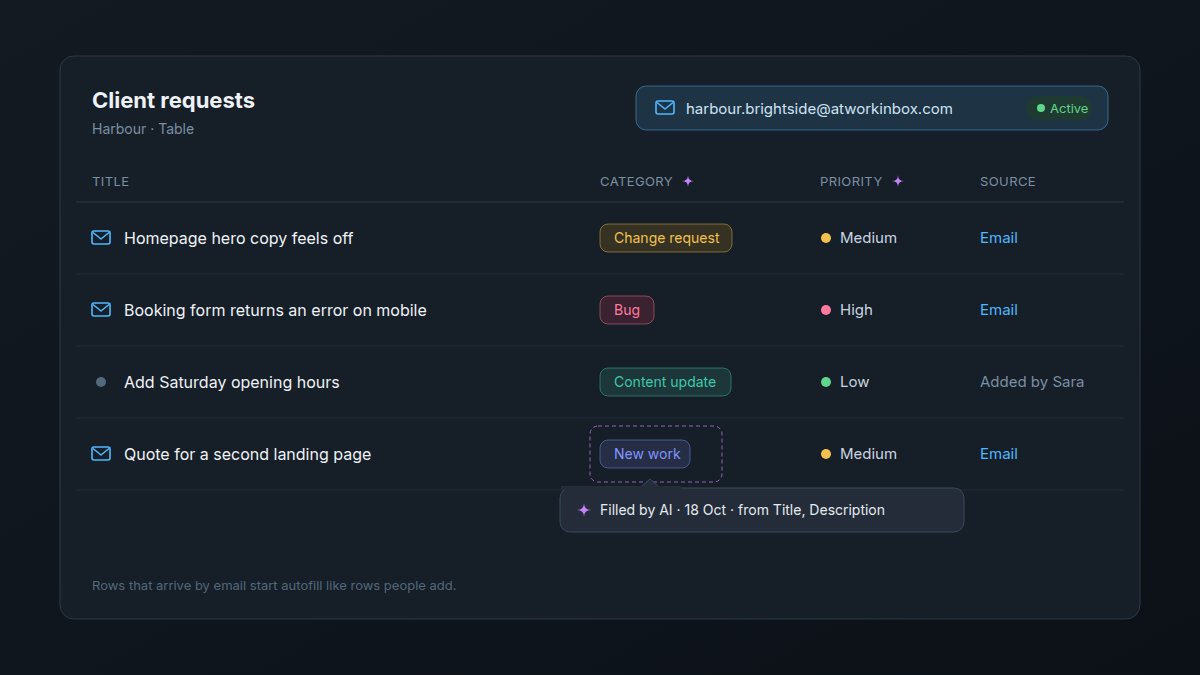
Give each client project its own address, such as [email protected] for a client called Harbour, and forward their requests to it. With autofill on Category and Priority, a forwarded email arrives as a sorted row.
Publish the address from the arrow next to New in a Table, Board or Calendar view. Who can send is Members by default; switch it to an Allow list or Anyone, and Block always wins. Each email is a new row, so thread replies aren't merged, and auto-replies and mailing-list mail are refused.
Set it up: Email to this sheet. The full story: one address per client.
Can clients open a support ticket without an account?
Yes. A client without a portal login fills in a short Contact support form on your client portal. They get an email with a View your ticket link, where they see the ticket's status and every public reply, and can answer.
A client's marketing lead with no login reports a broken booking form; your team answers in its usual ticket thread, and each public reply reaches them by email.
Guest tickets need three things on the portal: the Support Desk app, a My tickets widget, and Allow customer registration switched on. The link lasts 30 days, and every reply email carries a fresh one. Guests can't attach files or close a ticket from the link; they ask in a reply on the ticket page.
Set it up: the Support Desk app. The full story: client requests without another login.
How do you teach every agent the same process?
Write it once as a skill: reusable instructions, plus the tools the job needs, for one kind of work such as onboarding a client. The workspace owner writes it in Settings › Skills and adds it to any custom agent; an edit reaches every agent that uses it from its next job.
An agency with two client pods can start from Atwork's Client report skill, choose Duplicate to edit, add its own sections, and give the copy to both pod agents.
Five ready-made Atwork skills (Build, Write, Client report, Content calendar and Meeting recap) can be used as they are or copied. An agent holds up to 10 skills. Custom agents are on the Pro plan and up (see pricing); if you are new to them, start with custom AI agents in Atwork.
Set it up: Skills for custom agents. The full story: teach every agent your process once.
Which files can Atwork agents read now?
Atwork's AI agents now read the files you attach in a chat and the files on an item in a workflow: PDFs (the first 50 pages), Word, Excel and PowerPoint files, and text, CSV and HTML files. Agents on a model with vision also see images. Dana, and any custom agent with Files set to Read & write, can also create PDF, Word, Excel and CSV files for you.
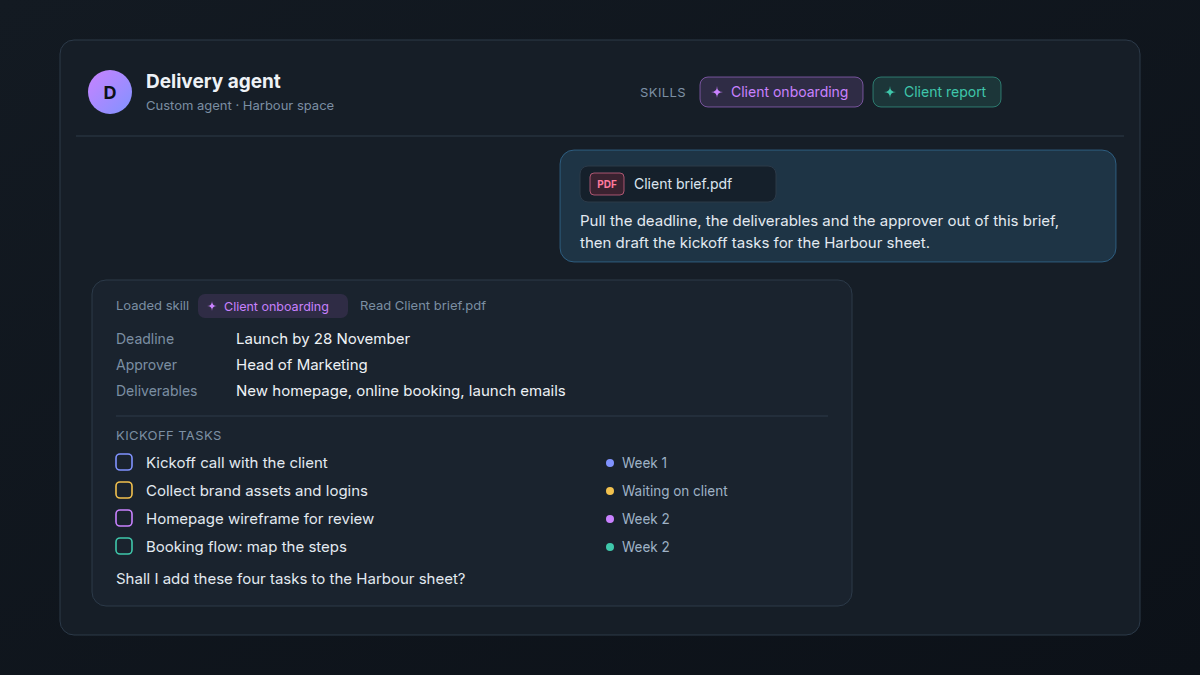
Attach the client's brief in an agent chat and ask for the deadline, the deliverables and the approver, then the kickoff tasks. In a workflow, turn on Read files attached to the item in the Agent step, and the agent reads the files in the row's File List fields.
An agent reads up to 5 files per message or run, at up to 10 MB each. Scanned PDFs and old .doc, .xls and .ppt files aren't read, and pictures inside a PDF aren't seen.
Set it up: Files and agents. The full story: turn a client brief into tasks.
What else changed this month?
Eight smaller changes shipped too: archiving rows, changing a field's type with a way back, quick search in views, Telegram notifications, an Inbox popup, a redesigned page editor, approvals and undo for agents, and a choice of model and reasoning per agent.
- Archive rows. Archive a finished row instead of deleting it, and unarchive it when you need it back. Archive and restore rows
- Change a field's type, and change it back. Change type in the column header previews what converts, and Restore previous type undoes it within 30 days. Field types explained
- Quick search in a view. The Search box in table and board views finds a row by its title or #number. Table view
- Notifications in Telegram. Link your own Telegram bot in your notification preferences and turn it on per category; it stays off until you do. Profile and notifications
- The Inbox popup. Click Inbox in the dock for All, Mentions and Assignments tabs and Mark all read. The Inbox
- A redesigned page editor. Pages read more clearly, with a new heading scale, styled links, mentions as pills with an avatar, callout (Alert) blocks, and code blocks with a Copy button.
- Agent approvals and undo. An agent asks for approval before it sends a Slack message, an email or anything else through a connected tool, unless you choose Always allow in this conversation. It previews an update to more than 20 rows by filter, and gives a bulk change one Undo for 7 days. Assign work to an agent · how agent safeguards work
- Model and reasoning per agent. Pick each custom agent's model, and its reasoning level where the model offers one. Create an agent
Frequently asked questions
What's new in Atwork in October 2026?
Five lead changes: AI autofill, an email address for every sheet, guest support tickets, agent skills, and agents that read PDF and Office files. Eight smaller ones include archiving rows and quick search.
Does AI autofill use AI credit?
An AI fill does: each row it writes is one AI run from your monthly AI budget. Formula and default fills use none, and autofill is on every plan, Free included.
Which plan do agent skills need?
Skills are added to custom agents, which are on the Pro plan and up. Only the workspace owner writes and edits them.
Can a client open a ticket without signing up?
Yes, when your portal runs the Support Desk app with a My tickets widget and customer registration switched on. The client follows the ticket from an email link that lasts 30 days.
Can Atwork agents read PDFs and spreadsheets?
Yes: the first 50 pages of a PDF and the text in Word, Excel, PowerPoint and CSV files, up to 5 files of 10 MB each. Scanned PDFs and old .xls or .doc files aren't read.
Where should you start?
Start with the change that removes a step you did by hand this week, and try it on one client first.
Give one client's sheet its own email address and let autofill sort what arrives. Every plan includes an AI budget. Start free