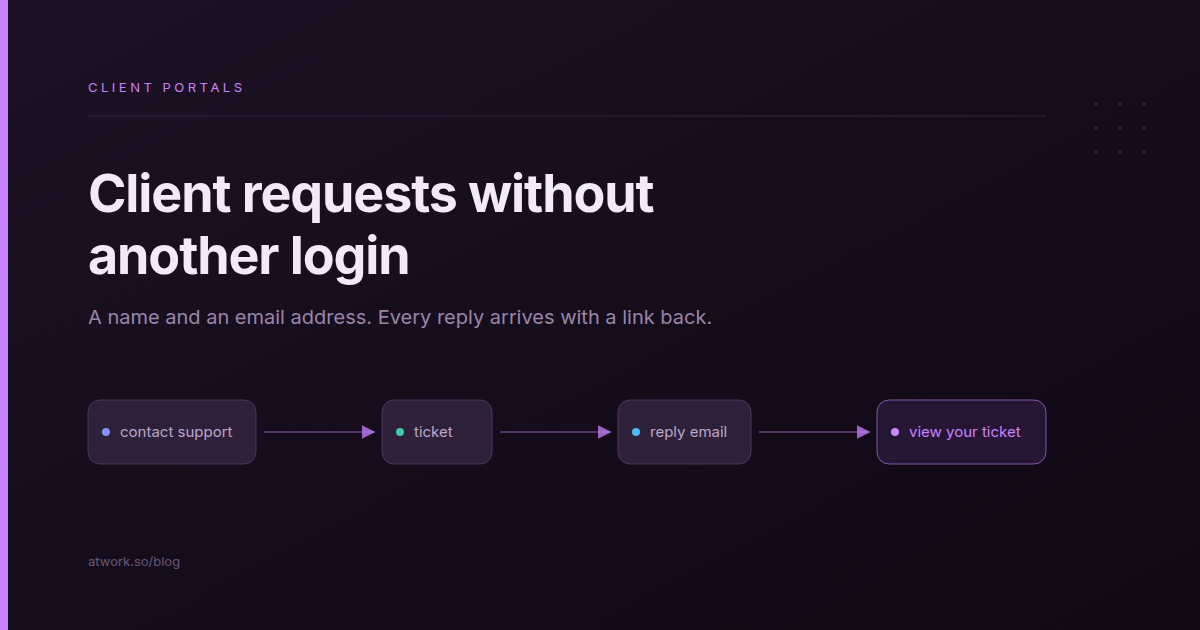
The people who most need something from your agency this week are often the ones without a working login: the client's new marketing manager, their finance contact, the person who forgot their password. In Atwork, they can now raise client support tickets without a login. They fill in a short form on your client portal, and every reply reaches them by email with a link back to the ticket. It works on any portal that runs the Support Desk app, has a My tickets widget and has customer registration switched on.
Below: who on the client side needs an account, what a guest sees, what lands on your side, how safe it is, and how to switch it on.
Why do client requests end up back in your inbox?
Client requests land back in your inbox because the request form asks for a login the requester doesn't have. A new stakeholder, a finance contact chasing an invoice and a client who forgot their password all do the same thing: they email the account manager. The request then lives in a CC thread that nobody owns and nobody can report on.
Each of those emails is work that never reaches the board. The account manager forwards it, answers it from memory, or loses it until the client asks again. Nothing records that it happened, so at month end the retainer looks quieter than it was, and nobody can show the client how much was handled outside the scope.
The usual fix is an account for everyone. That swaps one problem for another: invitations to send, passwords to reset, and logins for people who will use theirs twice a year.
Who on the client side actually needs a portal account?
Only the people who come back every week need a portal account. On a retainer that is usually the day-to-day contact, who checks status, approves deliverables and reads the history. Everyone else raises one request now and then, and needs only a name and an email address you can reply to.
| Requester | How often they come | Needs an account? | How they follow up |
|---|---|---|---|
| Day-to-day contact | Every week | Yes | Signs in to the portal and sees their tickets |
| Finance or billing contact | A few times a year | No | Reply emails, each with a link to the ticket |
| A new stakeholder | Once, maybe more later | Not yet | Reply emails; an account once they keep coming back |
| Someone locked out | Until they are back in | They have one that isn't working | The confirmation email's link for 30 days; signs in once back in |
| The client's own customers, if you run support for them | Once per problem | No | Reply emails |
Client portals for agencies asks whether people should sign in to view the portal. Raising a request is a different question, because the person raising it is often someone who has never seen the portal.
One boundary: a guest ticket is for support, such as a question, a problem or a correction. New work and changes of scope belong in your intake, and classifying client requests with AI shows how to tell them apart.
What does your client see when they open a ticket without an account?
A client without an account sees a Contact support form on your portal. They give their name, email, a subject and a message, pass a bot check, and get a confirmation email with a View your ticket button. That page shows the ticket's status and every public reply, and has a box to answer in.
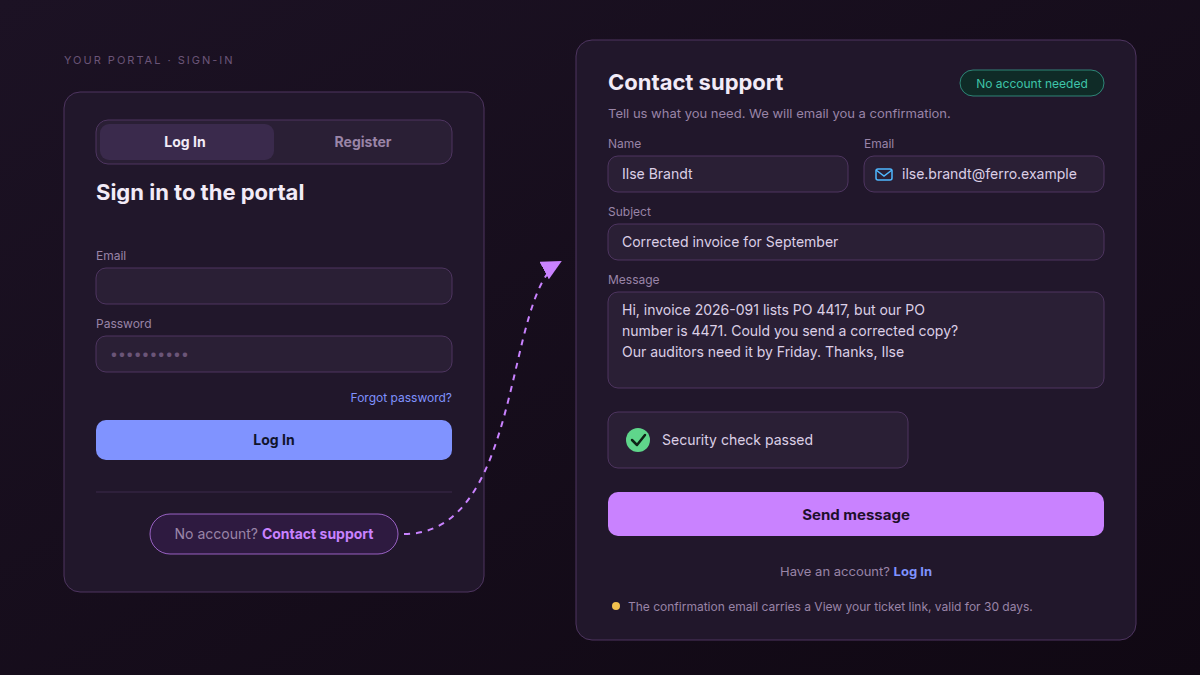
The form is one click from the portal's sign-in card, which reads No account? Contact support, so a client who can't sign in finds it where they got stuck. You can also send the form's address, /portal/contact on your portal, to anyone directly.
Take Ilse, who handles accounts payable at Ferro Logistics, a fictional retainer client. September's invoice carries the wrong PO number. Ilse has never signed in to your portal and has no reason to start now, so Ilse fills in the form, and the confirmation email is the only thing left to keep.
- The link lasts 30 days, and every reply email to a requester without an account carries a fresh one, so a ticket that runs long stays reachable. If the address already has a portal account, reply emails link to the signed-in ticket page instead.
- Replies arrive at most once per ticket every 10 minutes, so a quick back-and-forth on your side doesn't flood their inbox.
- They answer on the ticket page. The emails ask them to, and what they type there lands in the thread your team works in.
What happens on your side when a guest ticket arrives?
A guest ticket lands on the portal's Ticket sheet like any other ticket. The requester is a CRM contact, matched by email address or created on the spot, so the person is in your CRM from their first request and their later tickets join the same contact.
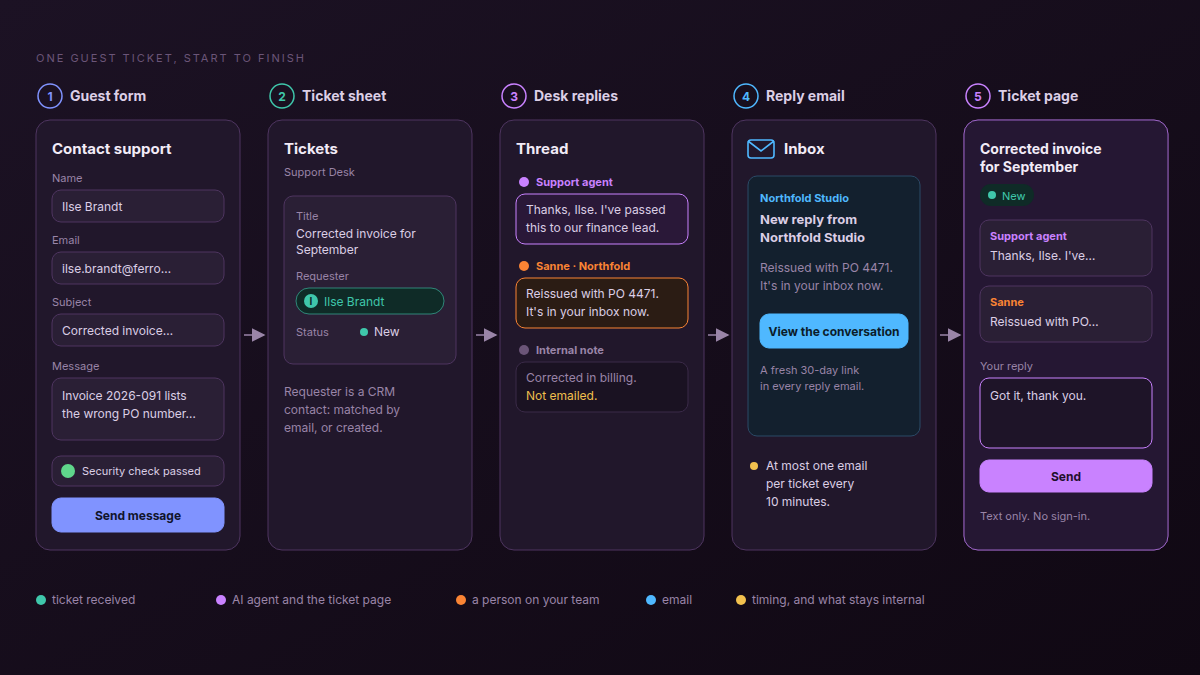
From there it is an ordinary ticket. Assign it, change its status and work it from the same views as the rest of the desk.
- The agent answers first when new tickets are assigned to your support agent, for example by making the agent the default for the Assignee field, and hands over to a person in the same thread when it can't help. Build a support triage agent covers that setup.
- Every public reply emails the requester, whether a person or the agent wrote it.
- Internal notes never do, so your team can discuss the invoice on the record without the client reading along.
Is a support form without a login safe?
A support form without a login is safe enough for support requests, with one real gap: an email address typed into a form is not proven, so anyone can file a ticket in someone else's name. What limits the damage is where the answers go. Replies and the ticket link reach only the inbox that was typed in, and the link opens that one ticket and nothing else.
- Replies go to the address given. Someone filing in Ilse's name never sees your answer. Ilse does, and can tell you it wasn't them.
- A bot check and a submission limit stop the form being used to flood your desk.
- One ticket, nothing else. The link shows that ticket's status and public replies, and no other tickets, records or files from your portal.
Jira Service Management's guide to its login-free portal makes the same point about unverified email addresses, and it is right. A guest ticket suits a question or a correction. It is the wrong place to ask for a change to who can see what.
Two more things to know before you switch it on. Anyone a ticket link is forwarded to can read the ticket and reply, and the confirmation email says so. And guest tickets need Allow customer registration, so the same portal also lets visitors create an account. Check what a newly registered account can see on your portal first.
The account is for the person who comes back every week. A request needs only an address to reply to.
| What they can do | Guest, no account | Signed-in client |
|---|---|---|
| Open a ticket | Yes, from the Contact support form | Yes |
| Follow status and replies | Yes, from the emailed link | Yes, on the portal |
| Reply | Yes, in text on the ticket page | Yes |
| Attach files | No | Yes |
| Close or reopen | No: ask in a reply | Yes, with Close ticket and Reopen |
| See other tickets and records | No | Yes, whatever the portal shows them |
How do you switch on guest tickets in Atwork?
Guest tickets need three things on a portal you already have: the Support Desk app installed, a My tickets widget on the portal pointed at the Ticket sheet, and Allow customer registration switched on. Once all three are in place, the Contact support form and the link on the sign-in card appear.
- Install Support Desk from the launchpad. It creates a space with a Ticket sheet.
- Go to Settings › Customer Portal › Portal.
- Add the My tickets widget and point it at the Ticket sheet.
- On the Page tab, tick Allow customer registration.
- Publish the portal.
- Open your portal in a private window, click No account? Contact support, and file a test ticket with your own email address.
- Send the form's link to one client's finance contact.
The Support Desk help article covers the rest of the desk: who handles tickets, a default assignee and the support agent. For how the portal sits next to projects, retainers and the CRM, see Atwork for agencies.
Frequently asked questions
Can clients submit a support ticket without an account?
Yes, on a portal that runs the Support Desk app, has a My tickets widget and has Allow customer registration switched on. They give their name, email, a subject and a message on the Contact support form.
How does a client follow a ticket without logging in?
Through the View your ticket link in the confirmation email. The page shows the status and the public replies, and has a box to answer in.
Is it safe to accept tickets from people without a login?
For support requests, yes, with one gap: the email address isn't proven. Replies and the ticket link go only to the address given, and the link shows that one ticket and nothing else.
Will the client get an email every time we reply?
For every public reply, from a person or the agent, with at most one email per ticket every 10 minutes. Internal notes send nothing.
How long does the ticket link work?
The link in the confirmation email works for 30 days. Every reply email to a requester without an account carries a fresh one; if the address already has a portal account, reply emails link to the signed-in ticket page instead.
Can a client close their own ticket?
A client signed in to the portal can, with Close ticket, and can Reopen it later. A guest can't close it from the link; they can say so in a reply, and your team closes it.
Does the AI agent answer guest tickets?
Yes, when new tickets are assigned to your support agent, for example by making the agent the default for the Assignee field. It answers first and hands over to a person in the same thread.
Where should you start this week?
Pick one retainer client. File a test ticket from a private window with your own address, read the confirmation email, and reply to yourself from the desk. Then send the client's finance contact the link to your Contact support page, and see where their next invoice question arrives.
Switch on guest tickets for one client and send their finance contact the link. Start free