Your client stops emailing you for updates
Most agencies run delivery across a project tool, a portal add-on, a form tool and a spreadsheet for freelancers. Atwork puts the work, what your clients can see, and AI teammates that handle the busywork in one system.

Why running an agency on a project tool stops working
Nothing breaks on day one. It breaks somewhere around the eighth client, when the setup that used to be fine has quietly turned into six tools nobody fully trusts.
Every new client starts from scratch
You rebuild the same project structure for every account — the same stages, the same checklist, the same folder shape. It costs half a day, it drifts a little each time, and nobody is sure which version is the good one.
Feedback lives in four places
The brief is in a doc, revisions arrive by email, the approval is a Slack message, and the last comment sits under a file nobody can find. Chasing one sign-off takes longer than making the change.
You find out about over-servicing late
The retainer says forty hours. Whether you spent thirty-one or fifty-eight is a question you answer at the end of the quarter, once it is already lost money.
Your freelancers are in a spreadsheet
Who is booked, at what rate, on which job, and whether they have been paid — all of it sits outside the system where the actual work happens.
What you can do
Stop rebuilding the same setup
Install a template and the whole client workspace already exists — sheets, views, statuses, dashboards. Every new client starts from the same shape instead of a blank board.
Get feedback out of email
The brief, the work and the client's comments sit on the same item. No more chasing one approval across three threads, a Slack DM and a comment on a doc.
Give the AI the busywork
Assign an agent the status roll-up or the weekly client report. Every action it takes is traceable, and you can see exactly what it cost.
How Atwork runs client delivery
Four steps from an empty account to a client who can see their own project. Most agencies get through the first three in an afternoon.
Install a template instead of building a system
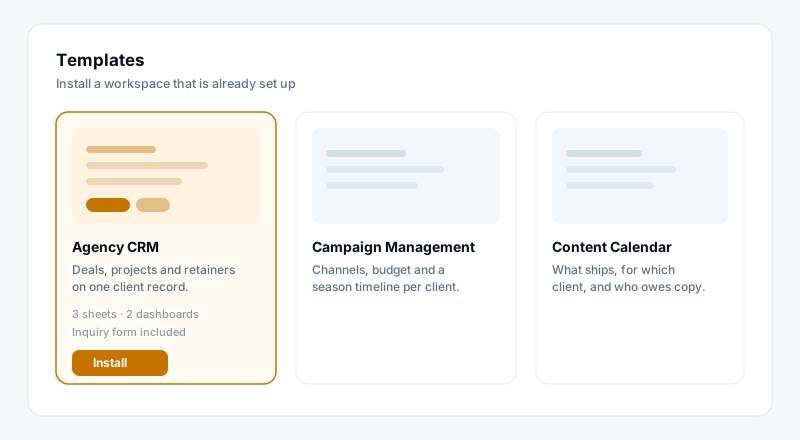
Pick Agency CRM and Atwork creates the sheets, views, statuses, relations and dashboards for you, with sample rows already in place. You are editing a working workspace rather than designing one from a blank board.
Give each client their own space
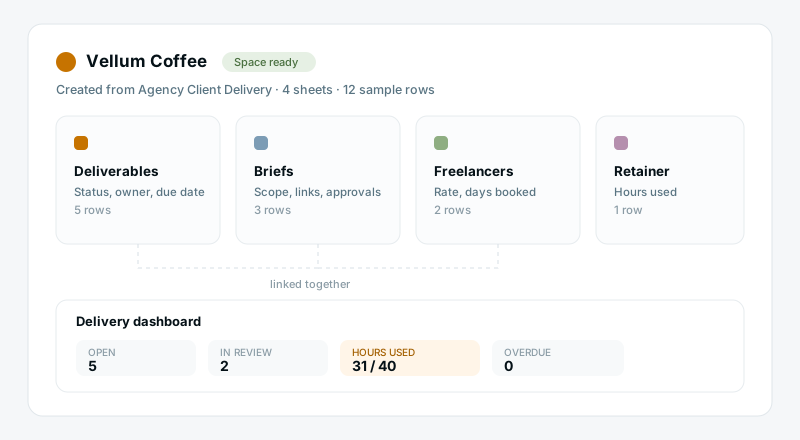
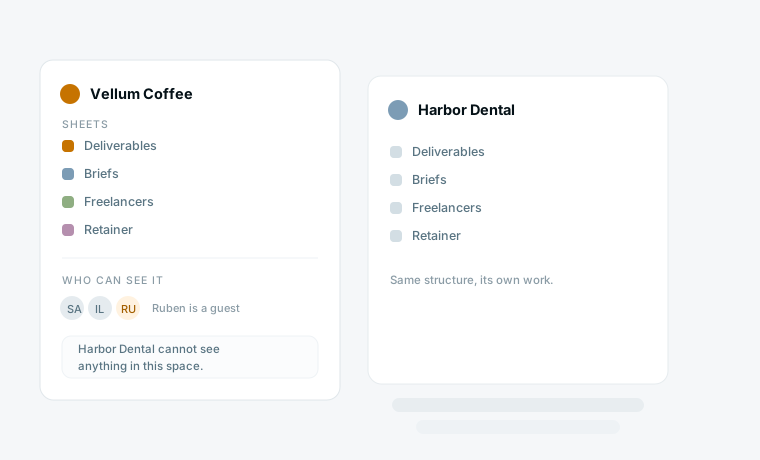
Every client gets the same structure — deliverables, briefs, freelancers, retainer — in a space of its own. The shape is identical across accounts, so anyone on your team can pick up any client, while the work and the access stay separate.
Put the brief, the work and the feedback on one item
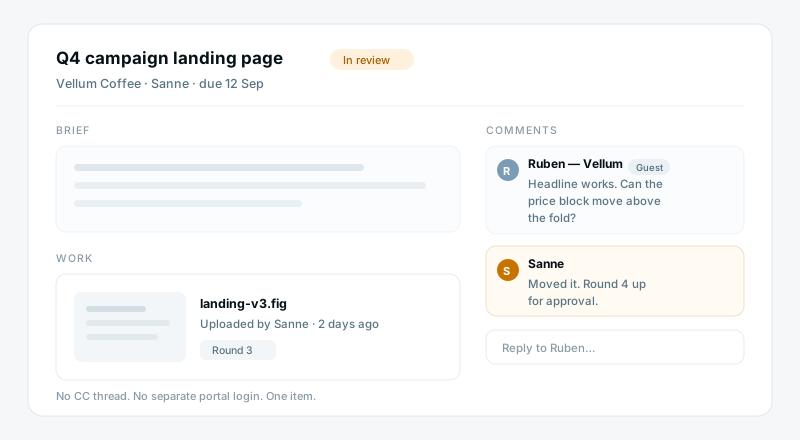
The scope, the file, the round number and the client's comment all sit on the same deliverable. Invite the client as a guest and they comment in place, so an approval is a reply instead of a thread you have to reconstruct.
Hand the reporting to an agent
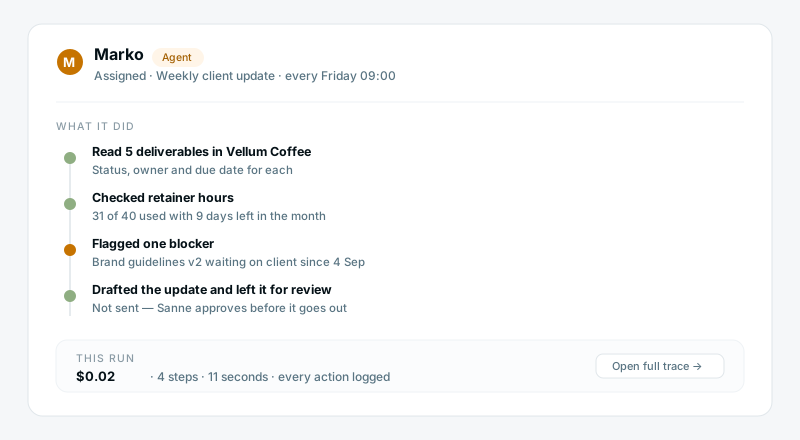
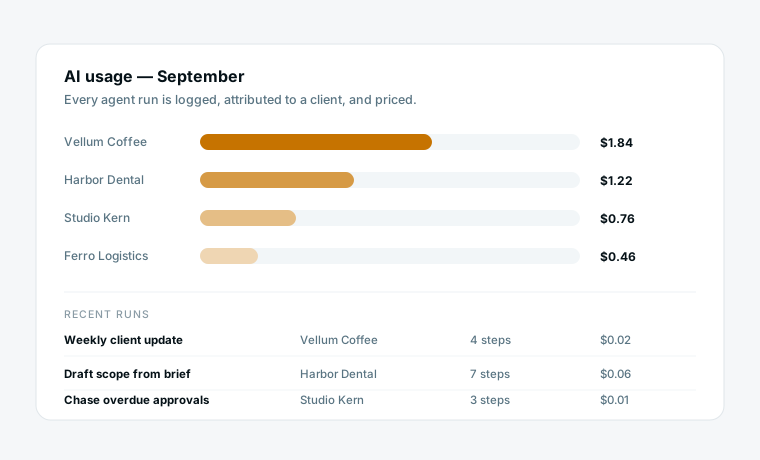
Assign an AI teammate the weekly client update or the overdue-approval chase. It reads the real rows, drafts the update, and leaves it for you to approve. Every step it took is logged, and so is what the run cost.
What you get that a project tool doesn't give you
A space per client, all the same shape
Client work stays genuinely separated — Harbor Dental cannot see anything belonging to Vellum Coffee. But because every space came from the same template, your team never has to relearn where things are when they switch accounts.
Clients see exactly one thing
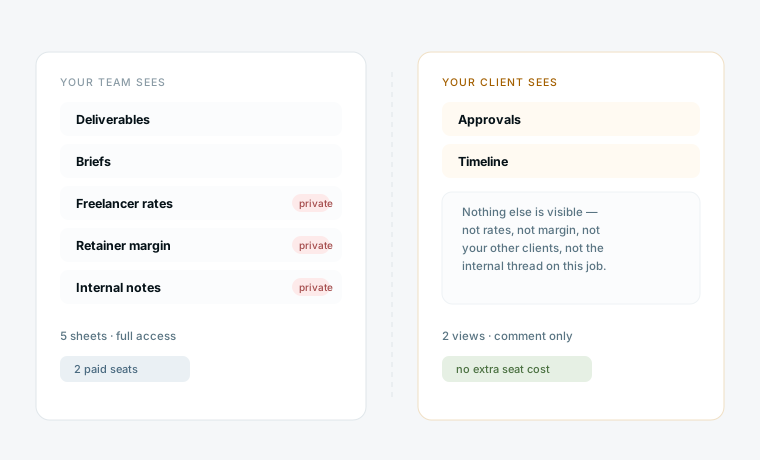
Guests get the views you choose — approvals and a timeline, say — and nothing else. Rates, margin, internal notes and your other clients stay invisible, and a guest does not consume a paid seat.
AI you can actually account for
Agents are teammates you assign work to, not a chat box in the corner. Every run is attributed to a client and priced, so at the end of the month you can see what the AI did and what it cost per account.
What changes
Half a day rebuilding the setup for each new client
Approvals chased across email, Slack and a doc
Retainer overrun discovered at the end of the quarter
Freelancer bookings and rates in a separate sheet
A status update written by hand every Friday
A template install, then edit what is different
The client comments on the deliverable itself
Hours used against hours sold, visible today
Freelancers linked to the jobs they are booked on
An agent drafts it, you approve and send
Start from a template
Each one installs a working space in a few minutes. You can change anything afterwards.
Questions agencies ask
Does Atwork replace our project management tool?
Yes. Atwork is where the work lives, so it replaces the project tool rather than sitting next to it. Most agencies drop a separate client-portal add-on, a form tool and the freelancer spreadsheet at the same time.
How is this different from Scoro or Productive?
Those are agency suites built around agency finance — rate cards, quote-to-cash, utilisation reporting. They are genuinely better at the accounting than we are, and they take about a month to onboard. Atwork is for agencies where the founder is still the ops hire.
Do our clients need a paid seat?
No. Clients join as guests, see only the views you share with them, and do not count against your seat total. You pay for your team, not for the people you report to.
How long does setup take?
Installing a template takes a few minutes and gives you a working space with sample data. Moving one real client into it usually takes an afternoon. We suggest running a single client in parallel for thirty days before you move everything.
What do the AI agents actually do?
You assign them work like any teammate — drafting the weekly client update, chasing overdue approvals, summarising a brief. They act on your real data, every step is logged so you can check what happened, and each run is priced so you can see what it cost.
Where is our data stored?
Atwork is built by a Netherlands-based company and hosted in the EU, and we can provide a data processing agreement. If you need specifics for a client security review, contact us and we will send the current details.
Bring your team’s work together
Start free today — invite your team and shape a workspace that fits agencies & consultancies.
Start free