Plan, ship and measure campaigns in one place
From the content calendar to the launch checklist to the results dashboard — run every campaign end-to-end in Atwork, with AI to draft and summarize along the way.

Why marketing plans stop matching what marketing is doing
The quarter plan was agreed in a deck. Six weeks later half of it has shifted, two unplanned requests took a fortnight each, and nobody can say what the team actually spent its time on.
The calendar and the plan are different documents
There is a quarterly plan in a slide deck and a content calendar in a spreadsheet. They agreed in week one. Keeping them agreeing is a job nobody owns, so by mid-quarter only one of them is real.
Requests arrive with no shape
Sales wants a one-pager, the founder wants a landing page, someone wants the deck updated. Each arrives as a message with no brief, no deadline and no sense of what it displaces.
Approvals happen in three threads
Copy in a doc, design in a file, the final sign-off in chat. Chasing one approval takes longer than the edit, and the version that shipped is not always the version that was approved.
Nobody can say what the effort produced
Spend by channel sits in one place, output in another, results in the analytics tool. Assembling all three for a monthly review takes a day, which is why it happens quarterly at best.
What you can do
One content calendar
See every post, campaign and asset on a shared calendar the whole team trusts.
Briefs that link to the work
Docs and tasks stay connected, so a brief always points at the latest asset and status.
Prove impact
Live dashboards turn campaign data into results you can share with the team and leadership.
How to run marketing as one system
Four steps. The second one — a real intake for requests — usually buys back the most time in the first month.
Put the plan and the calendar in the same place
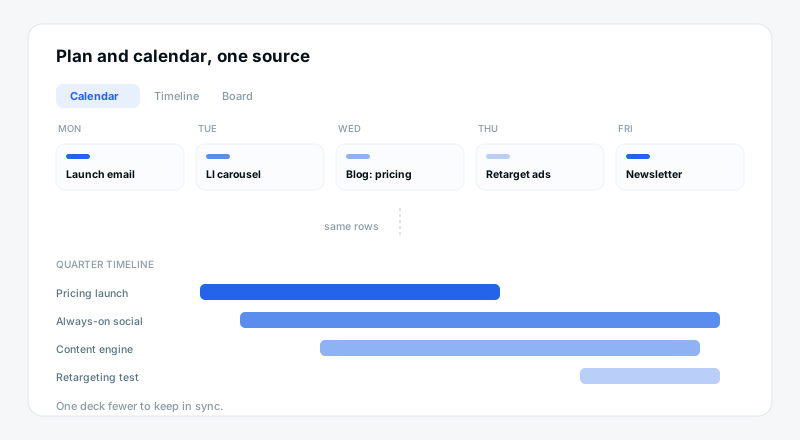
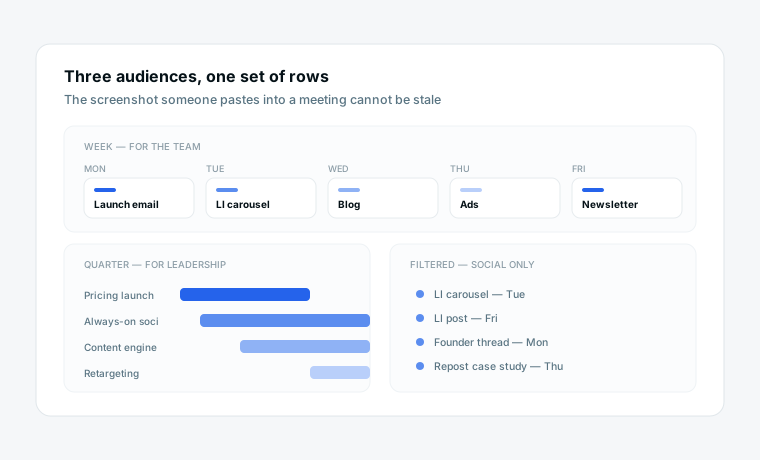
Campaigns, channels and dates as rows, shown on a calendar for the week and a timeline for the quarter. The plan is the calendar, viewed differently, so there is no second document that quietly goes stale.
Give creative requests a front door
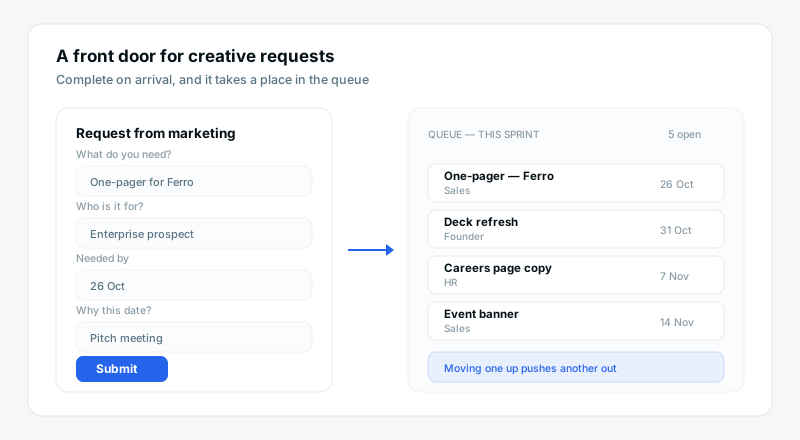
One form for anyone who wants something from marketing: what, why, when and who it is for. A request arrives complete and takes a place in the queue, rather than jumping it because it was asked in person.
Keep copy, asset and approval on one item
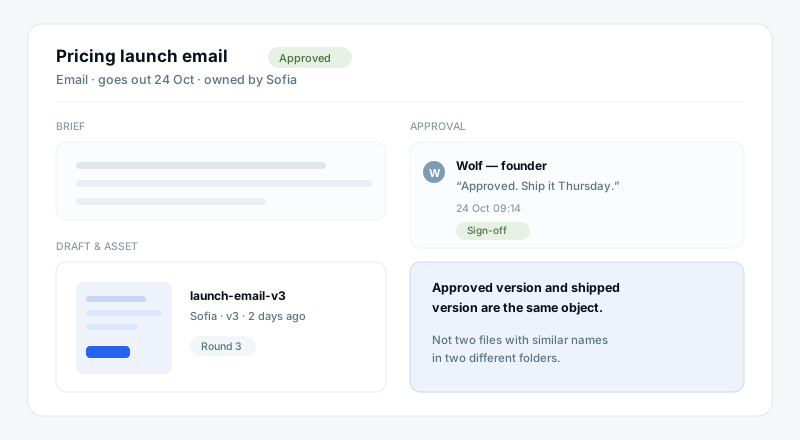
The brief, the draft, the design and the sign-off live on the deliverable. Reviewers comment in place, so the approved version and the shipped version are the same object rather than two files with similar names.
Report from the work, not from memory
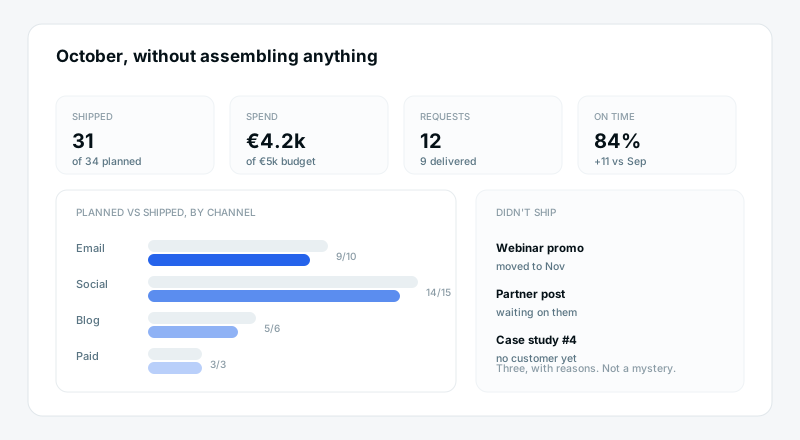
Because campaigns carry channel, budget and status as fields, the monthly view builds itself. What went out, on which channel, at what cost, against what was planned.
What a marketing team gets from one workspace
One calendar everyone actually reads
Week view for the team, quarter timeline for the leadership update, and a filtered view per channel. Same rows every time, so the version someone screenshots for a meeting cannot be out of date.
A request queue with a visible cost
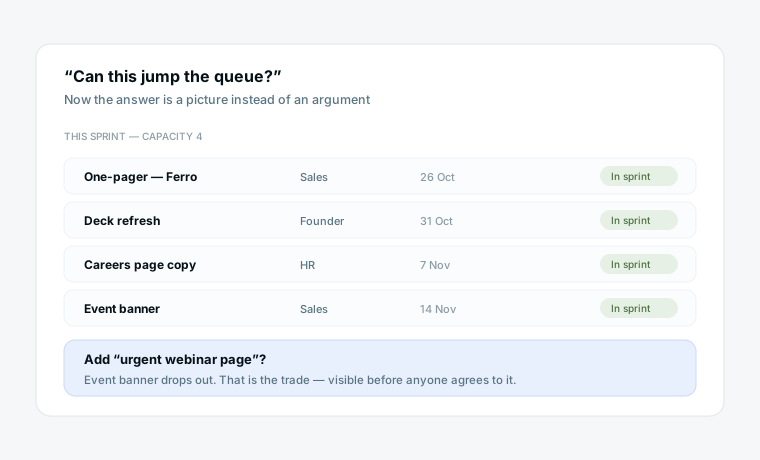
Every incoming ask is a row with an owner and a due date. When someone wants their thing moved up, the conversation is about what it displaces — which is a much shorter conversation than the one you have now.
Drafting help that knows the campaign
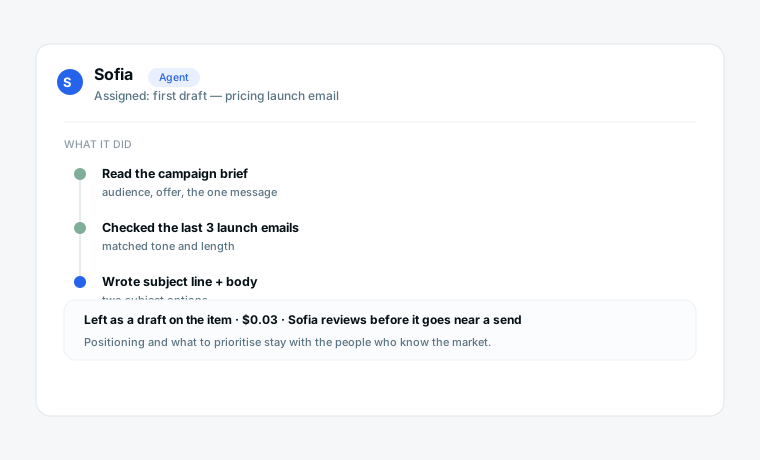
Assign an agent the first draft of a post, a summary of a campaign brief, or the monthly roundup. It works from the real rows, and every run is logged and priced so the AI line is not a mystery.
What changes
A plan in slides and a calendar in a sheet
Requests arrive as messages with no brief
Approvals chased across doc, file and chat
Urgent asks jump the queue invisibly
The monthly review takes a day to assemble
One set of rows, two views
One form, complete every time
Sign-off on the deliverable itself
You can see what they displace
It is already on the dashboard
Start from a template
Three starting points that cover planning, publishing and intake.
Questions marketing teams ask
Does this replace our content calendar spreadsheet?
Yes, and the plan deck with it. Campaigns and content are rows with channel, owner, status and date, shown as a calendar, a timeline or a board. The point is having one source rather than a calendar and a plan that drift apart.
Can external freelancers and agencies work in it?
Yes, as guests on the specific views you share, without consuming a paid seat. They see the briefs and deliverables they are working on and nothing else — not budget, not the rest of the calendar.
Does it connect to our analytics or ad platforms?
Not natively today, and we would rather say so than imply otherwise. Results still live in your analytics tool. What this gives you is the output and effort side — what shipped, on which channel, at what cost — which is the half that usually has no system at all.
How do we handle approvals from people outside marketing?
Add them as guests on the approval view. They comment on the deliverable itself, so the sign-off is attached to the thing being approved rather than sitting in a chat thread nobody can find later.
What can AI agents do for marketing work?
First drafts and assembly: a post from a brief, a summary of last month's output, a checklist of assets a campaign still needs. Keep the judgement — positioning, messaging, what to prioritise — with the people who understand the market.
We are a team of three. Is this overkill?
For three people running one channel, probably. It starts paying off when requests come from outside the team and more than one person needs to know what is going out next week — usually somewhere around four or five people.
More on planning and automating the work
Bring your team’s work together
Start free today — invite your team and shape a workspace that fits marketing teams.
Start free