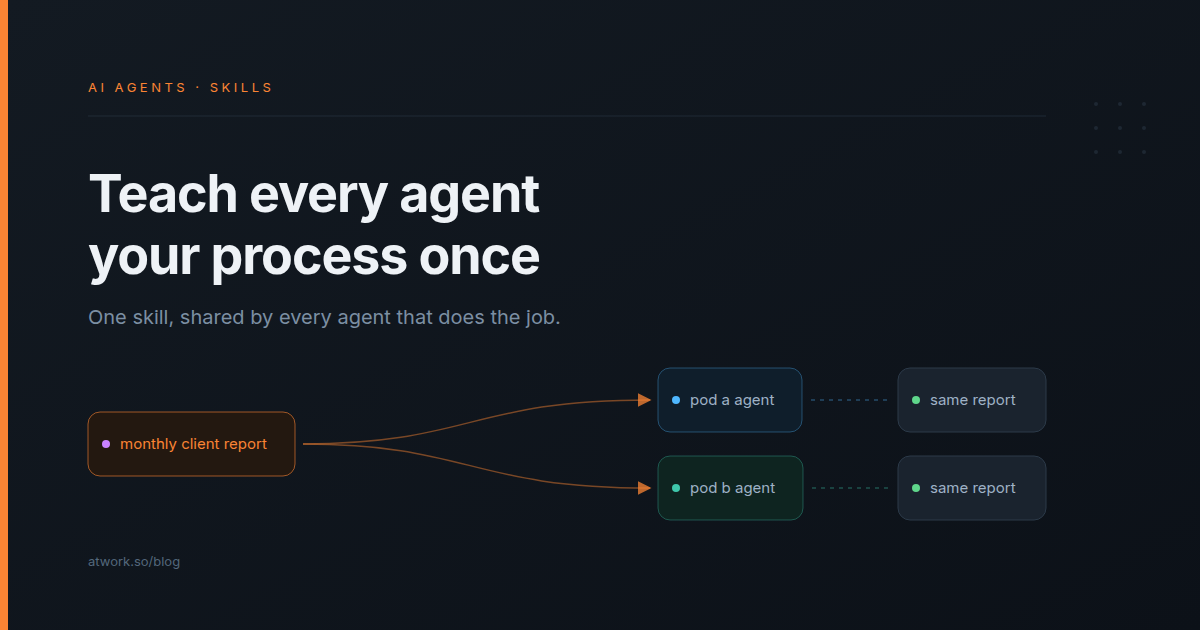
Your client onboarding checklist lives in three places. You pasted it into the account agent's persona, then into the kickoff agent, then into the agent that drafts client updates. Then the checklist changed: the named approver now has to be confirmed in writing on day three. You updated one agent. The other two still run last quarter's version, and nobody notices until a draft goes to the wrong person.
AI agent skills fix this by keeping the process in one place. You write the procedure once, attach it to every agent that does that job, and when it changes, you change it once. Here is what a skill is, which agency processes make good ones, and how to set one up in Atwork.
What is an AI agent skill?
An AI agent skill is a named, reusable set of instructions for one kind of work, plus the tool groups that work needs. An agent loads the skill when a job calls for it, and several agents can share the same one. In Atwork, skills live in Settings → Skills and attach to custom agents.
It is the written-down version of "how we do this here": the onboarding checklist, the monthly report format, the way meeting notes turn into tasks. Each skill also has a description, which is what an agent reads to decide whether a job needs it. A clear description gets the skill picked up for the right work and left alone for the rest.
How is a skill different from a persona or knowledge?
The persona says who the agent is, and the agent reads it on every job. Knowledge is the reference pages it reads before every reply. A skill says how one kind of job is done, and the agent loads it only when the work calls for it. Only a skill brings tools with it.
| Dimension | Persona | Knowledge | Skill |
|---|---|---|---|
| Answers | Who is this agent? | What is true? | How do we do this job? |
| When the agent reads it | Every job | Before every reply | When the job needs it |
| Brings tools | No | No | Yes, the groups you switch on |
| One copy serves many agents | No, written per agent | Yes, attach the same pages | Yes, attach the same skill |
The practical test: if you keep pasting the same numbered steps into personas, those steps are a skill. Keep the persona short: who the agent works for, its tone, and where it hands over to a person. The guide to writing an AI agent persona covers that part.
Which agency processes make good skills?
Good candidates are processes you have already written down, that repeat for every client, that have stable steps, and that end in an output you can check. If a new account manager could follow it from a doc and you could tell whether they got it right, an agent can follow it as a skill.
- Client onboarding. The kickoff tasks, the access list and the named approver, the same for every new retainer.
- The monthly client report. A fixed shape, filled from each client's numbers.
- Meeting recap. The notes become a recap page, and every action becomes a task with an owner and a date.
- The content calendar. A month of posts planned as rows: channel, date, angle and status.
- Change-request intake. The agent checks a client's new ask against the brief and logs it as in scope or out, so over-servicing is caught at the door.
Poor fits are one-off judgment calls, which have no steps to write down, and fixed rules such as "when the status is Approved, notify the account lead", which belong in an automation. AI agent or automation walks through where that line sits.
How do you write a client-onboarding skill?
Name the skill after the job, write the description as "when to use this", write the content as numbered steps that end in a defined output, and switch on only the tool groups those steps use. If you already run the nine-step client onboarding checklist, you have most of the content.
Name and description
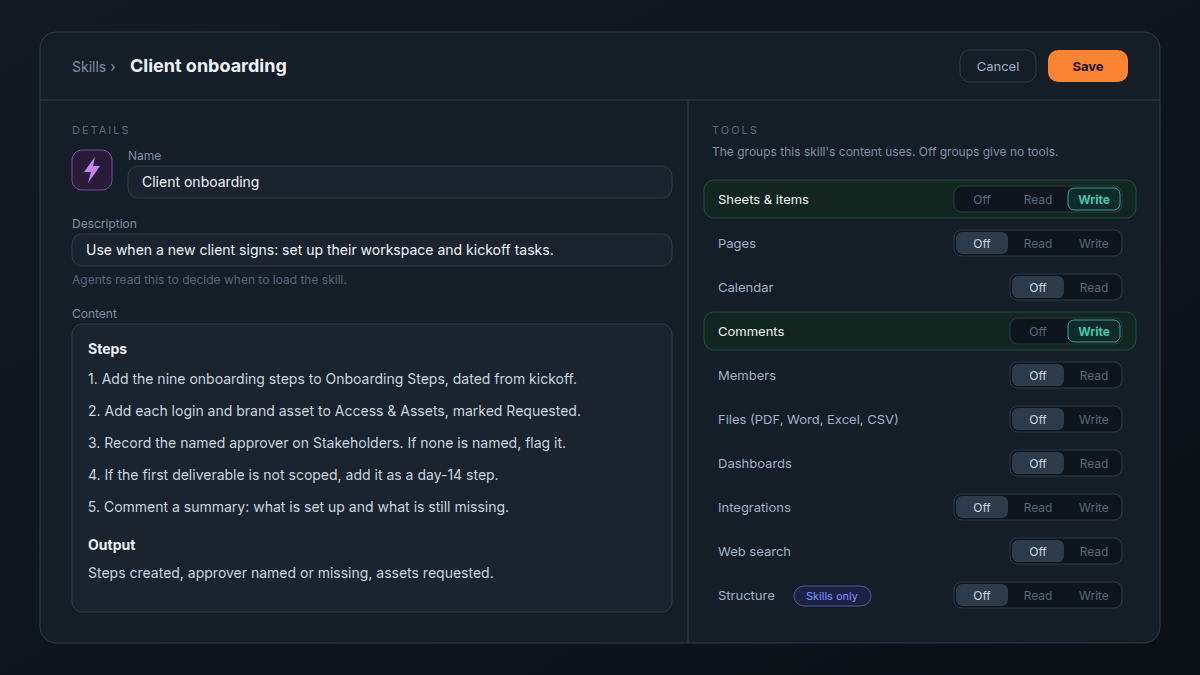
Call it "Client onboarding", not "Onboarding helper v2". Write the description as a trigger: "Use when a new client signs: set up their workspace and kickoff tasks." A vague one, such as "helps with clients", gets the skill loaded for the wrong jobs, or not at all.
The steps
Write the content the way you would brief a new account manager, one action per step:
- Add the nine onboarding steps to the Onboarding Steps sheet, dated from the kickoff day.
- Add each login and brand asset to Access & Assets, marked Requested.
- Record the client's named approver on the Stakeholders sheet. If nobody is named yet, flag it.
- If the first deliverable is not scoped, add it as a step for day 14.
- Comment a summary on the first step: what is set up and what is still missing.
End with the output you expect back: steps created, approver named or missing, assets requested. That is what the account lead checks before the kickoff call.
The tools it needs
Each skill carries its own tool groups, set to Off, Read or Write. This one creates rows and leaves a comment, so Sheets & items and Comments are on Write and everything else stays Off. A skill that asks for less is easier to trust.
How do two agents share one monthly-report skill?
Attach the same skill to both agents. Each agent still works only inside its own data access, so each sees only its own clients, but both produce the report in the same shape. When you change the skill, both agents follow the new version from their next job.
Say your agency runs two client pods, each with an account agent scoped to that pod's client spaces. You want one report format across the agency:
- In Settings → Skills, open the Atwork Client report skill and duplicate it.
- Edit your copy to your format: the sections, the tone, and where the report page goes. If the report draws on a dashboard, also set the Dashboards tool group to Read.
- Add the skill to both agents. The Skills page now shows it as used by 2 agents.
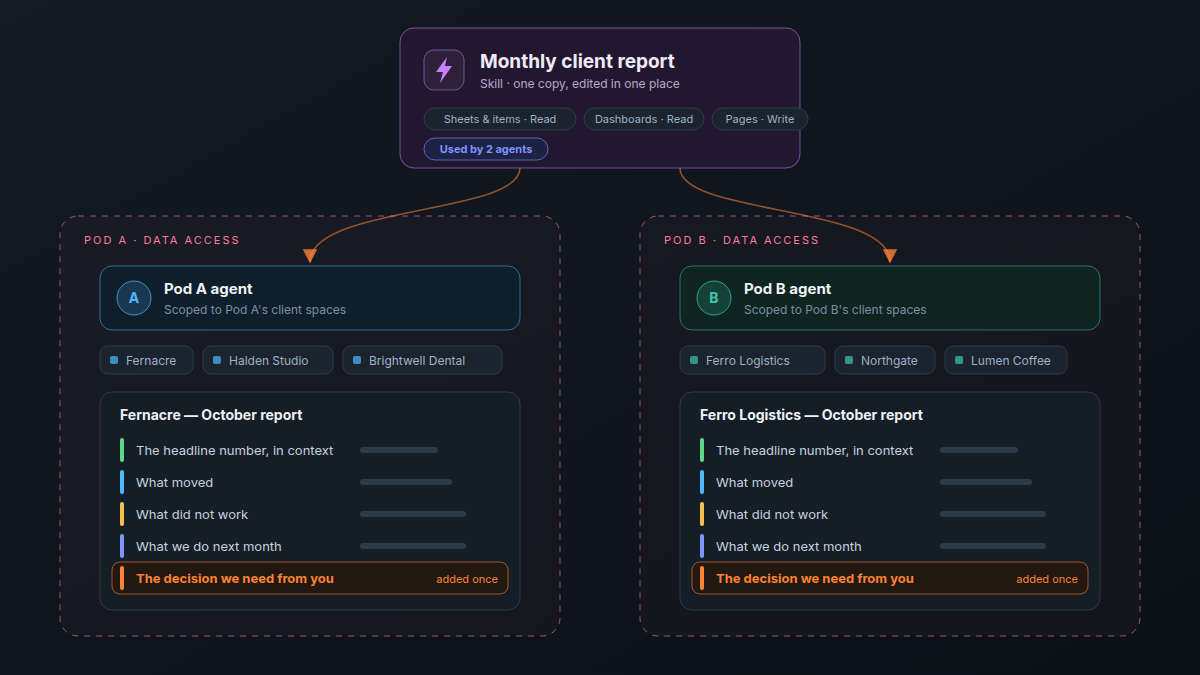
A month later, you decide every report should end with the one decision you need from the client, as the monthly client report guide recommends. You add that section to the skill once. Both agents include it from their next report on, and neither pod lead touches their agent.
Write the process once. Every agent that does the job runs the same version.
What can a skill let an agent do?
A skill brings the tools its job needs, but only inside the agent's data access. It cannot open a space or sheet the agent is not scoped to, so the Pod A agent cannot read Pod B's clients, whatever the skill says. Only the workspace owner creates and edits skills; teammates see them read-only.
| Skill | Tool groups | Why |
|---|---|---|
| Client onboarding | Sheets & items (Write), Comments (Write) | Creates the steps and asset rows, then leaves a summary comment |
| Monthly client report | Sheets & items (Read), Dashboards (Read), Pages (Write) | Reads the client's numbers and writes the report page |
| Meeting recap | Pages (Write), Sheets & items (Write) | Writes the recap page and files the action items as tasks |
The tools come with the skill: the agent has them while it is doing that job, not on every reply. Actions in connected apps, such as sending an email through an integration, still ask for your approval in chat before they run. What an AI agent can see in your workspace covers the rest of the access model.
How do you set up skills in Atwork?
Go to Settings → Skills and choose New skill, or duplicate one of the Atwork skills. Fill in the name, description, content and tools, then save. Open the custom agent in Settings → AI Agents, add the skill on its Skills card, and save the agent.
- Settings → Skills → New skill, or open an Atwork skill such as Client report and choose Duplicate to edit.
- Write the name, the description (when to use it) and the content (the steps).
- Set each tool group to Off, Read or Write, then Save.
- Open the agent in Settings → AI Agents, choose Add skill on its Skills card, pick the skill, and Save the agent.
An agent can carry up to 10 skills. Custom agents are on the Pro plan and up (see pricing). The help article on skills for custom agents covers limits, editing and deleting, and custom AI agents in Atwork covers what agents can do beyond skills.
Frequently asked questions
What are AI agent skills?
Reusable instructions for one kind of work, packaged with the tools that work needs. An agent loads a skill when a job calls for it, and one skill can serve many agents, so the process lives in one place.
What is the difference between a skill and a prompt?
A prompt is what you type for one job. A skill is saved and shared: the agent finds it by its description, loads it whenever that kind of job comes up, and gets the tool groups the skill switches on.
Can several AI agents use the same skill?
Yes. Attach it to each agent that does the job. The Skills page shows how many agents use each skill, and an edit reaches all of them from their next job.
Does a skill give an agent access to more data?
No. A skill can add tools, but they stay within the agent's data access. An agent scoped to one pod's client spaces cannot reach another pod's sheets through a skill.
What happens to my agents when I edit or delete a skill?
An edit applies to every agent that uses the skill, from its next job. Before you delete a skill, Atwork tells you how many agents use it; they stop loading it, and their other settings stay as they are.
Which Atwork plan includes skills for custom agents?
Custom agents, and the skills you attach to them, are on the Pro plan and up. The Free plan does not include custom agents.
Start with the checklist you paste most
Find the checklist you have pasted into a persona most often. Take it out, make it a skill with only the tools it needs, and attach it to every agent that does that job. The next time the process changes, you edit it in one place. To see what else a custom agent can take on, look at the agents page.
Turn your most-pasted checklist into a skill and give it to every agent that does the job. Start free