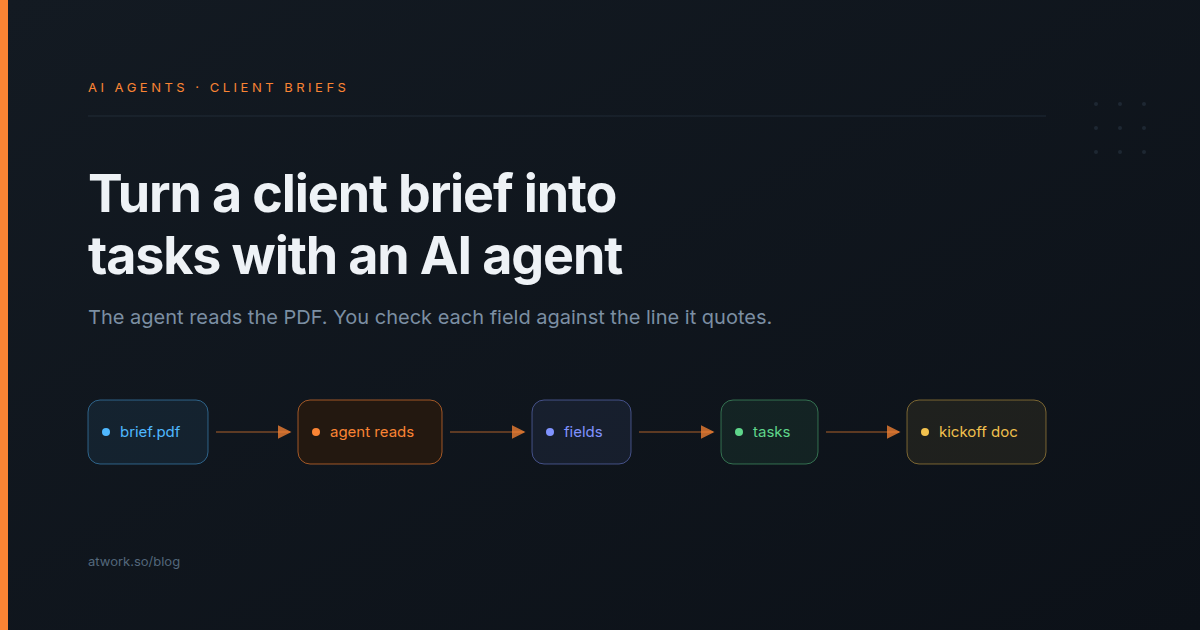
At Northfold Studio the brief arrives as "Marlow Cycles – Spring launch brief.pdf", fourteen pages long. Someone on the account team retypes the deliverables, the deadline and the approver into the project tracker, and the questions the client brief leaves open turn up in week two. An AI agent can do that first read: attach the PDF and get back the fields your setup uses, the open questions and a task list, each with the line it came from. Below: doing it in a chat with Dana, Atwork's AI assistant, running every brief through a workflow, checking what the agent read, and what it can't read. Northfold Studio and Marlow Cycles are fictional.
Can an AI agent read a client's brief PDF?
Yes. Atwork's agents read PDF, Word, PowerPoint and Excel files as text, up to 10 MB a file and the first 50 pages of a PDF. Images are seen as pictures when the agent's model has vision, as Dana's does. What an agent can't read is a scan: a page photographed into a PDF has no text in it.
| What the client sends | What the agent gets |
|---|---|
| A PDF brief exported from Word or Google Docs | The text of the first 50 pages |
| A Word document (.docx) | The text |
| A kickoff deck (.pptx) | The text on the slides, not the pictures |
| A budget or asset list in Excel (.xlsx) or CSV | The cell values as text |
| A mood board as PNG or JPEG | The picture, on a model with vision, up to 3.75 MB |
| A scanned, signed PDF | Nothing: there is no text layer |
| An old .doc, .ppt or .xls file | Not read: save it in the newer format first |
Pictures inside a PDF or a deck aren't seen, only the text around them. If the mood board matters, attach the key images as files of their own.
What should the agent pull out of a brief?
Ask for the fields your next step acts on, not a summary. A summary is pleasant to read and does nothing for a rule, while a Deadline field can feed a due date and a Missing information list can go straight to the account lead. Ask for the line each value came from, so checking it takes a minute.
| Field | Type | Why it earns a column |
|---|---|---|
| Client | Text | Links the brief to the client's row |
| Deliverables | List | Becomes the task list |
| Deadline | Text, the date as written | Sets due dates and the kickoff plan |
| Budget mentioned | Yes/no | No means a conversation before work starts |
| Approver | Text | Who signs off, named before the first review round |
| Audience | Text | What the creative team works from |
| Missing information | List | The questions to send back to the client |
Missing information pays for the setup. A brief that names no approver, or asks for point-of-sale materials without a store count, is the start of the change request nobody sends. Listing the gaps puts them in front of the account lead before kickoff.
A prompt that works: "Read this brief. Return Client, Deliverables, Deadline, Budget mentioned (yes or no), Approver, Audience and Missing information, and quote the line each value came from. If the brief doesn't say, write Not stated."
How do you hand a brief to an agent in chat?
Open Ask Dana, attach the PDF with the paperclip, and ask for the fields and a task list in the same message. Dana reads the file and answers in the conversation. When you ask, it creates the tasks on your Tasks sheet and writes a kickoff summary as a Word document to download.
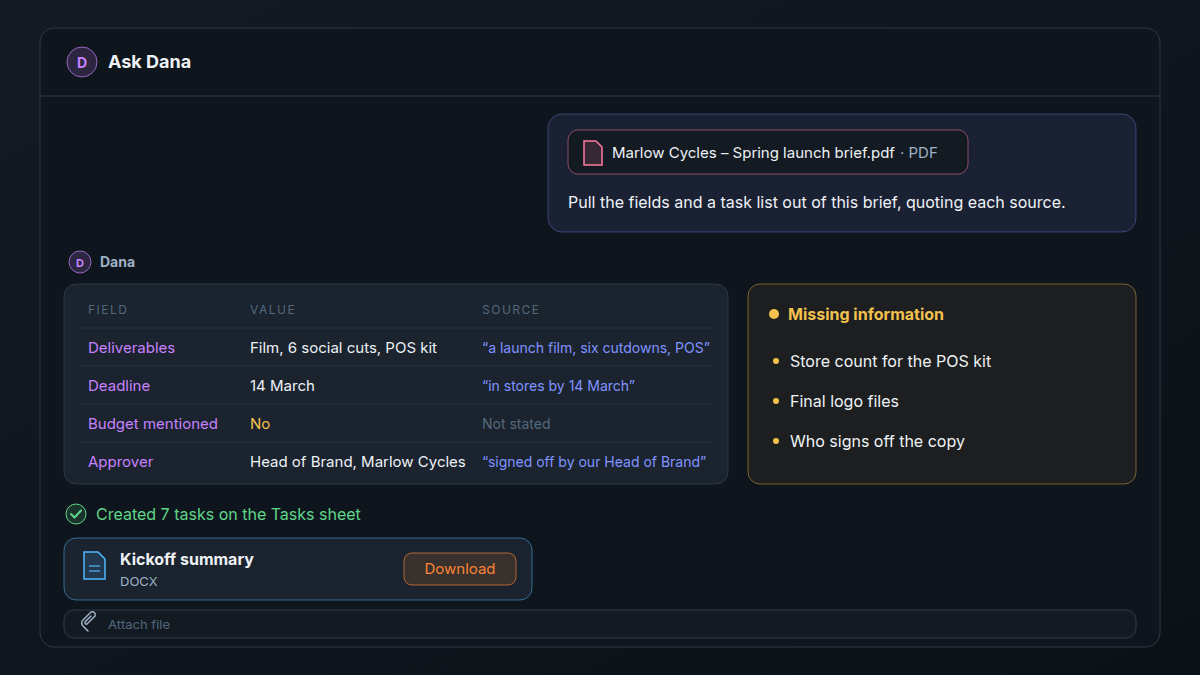
- Attach the file. Click Attach file, the paperclip in the message box. Each click adds one file, and the agent reads up to five per message.
- Ask in plain words. Use the prompt above, or "Pull the fields and a task list out of this brief, and quote where each one came from."
- Read the answer. Check each field against the line it quotes first; the checks are two sections down.
- Ask for the tasks. "Create these as tasks on the Tasks sheet, due before 14 March, assigned to me." Dana works as you, within your access, and shows each change as a step in the conversation. It doesn't ask before it writes, so ask once the fields are right.
- Ask for the kickoff document. "Write a one-page kickoff summary as a Word document." It appears as a file chip; click Download.
The document stays in the conversation, not on the client's row, so download it and add it there. Your own agents can create files too once their Files (PDF, Word, Excel, CSV) capability is set to Read & write in Settings → Agents.
How do you run every new brief through a workflow?
Keep a Client briefs sheet with a File List field for the PDF. A workflow starts when a row's Status changes to Brief in. Its Agent step, with Read files attached to the item turned on, reads the PDF and writes the fields back to the row, and a notification sends the account lead the open questions.
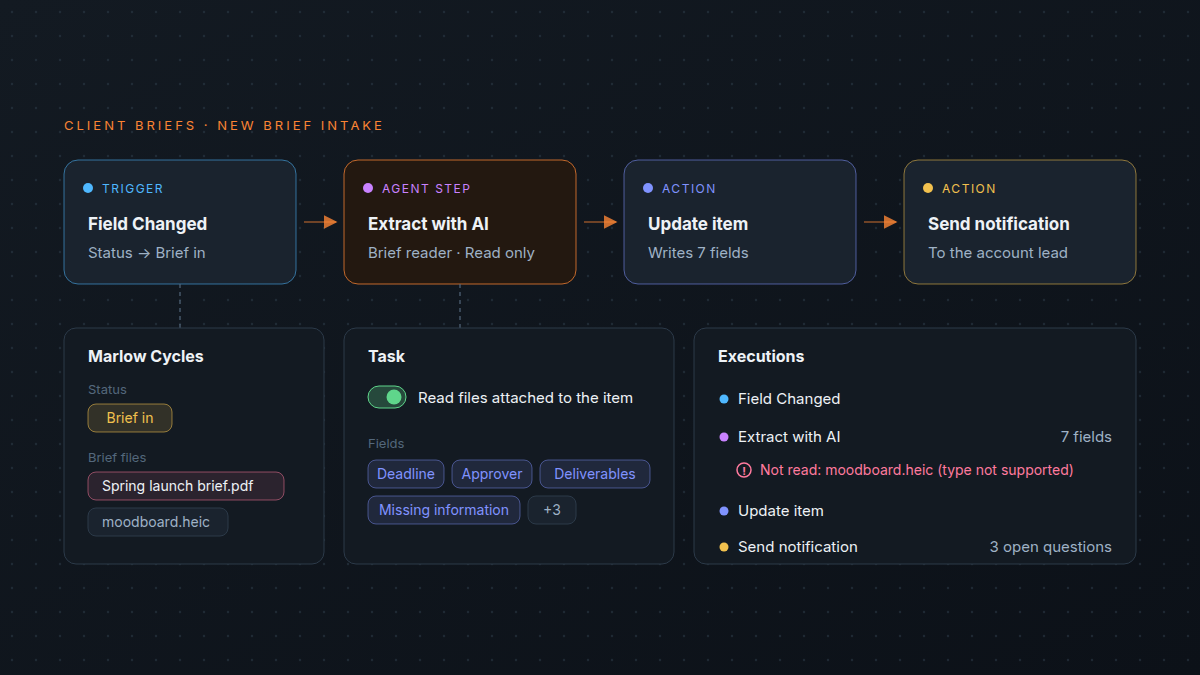
- Trigger: Field Changed on Status, set to Brief in. Item Created fires when the row is created, usually before anyone drops the PDF in, and the step gets the row as it was at that moment.
- Extract with AI, with Read files attached to the item turned on in the Task tab and Read only on under Advanced. Use the fields from the table above.
- Update item writes the fields onto the brief's row.
- Send notification to the account lead, with the Missing information list.
The step reads files on the brief's own row, not a contract on the client's row; classifying client requests with AI shows how to give an agent the scope as text. The Agency Client Delivery template keeps every client's brief, work and approval in one place. Every setting is in the Agent step help, and AI agents in workflows covers when a step beats a rule. Event automations like this one come with Business on the pricing page.
How do you check the agent read the brief correctly?
Compare each field with the line it quotes, and read the Not read: line in run history before you trust an empty field. An agent that couldn't read a file still answers, so an empty Approver can mean the brief names nobody, or that the agent never saw the page.
- Quoted lines. Search the PDF for each quote and read around it. A few minutes a brief, and it catches a deadline lifted from last year's campaign. Ask for quotes rather than page numbers: a PDF's text reaches the agent without its page breaks, so a page number can be a guess, while a deck's slides arrive numbered.
- Not read: reasons. In the workflow's Executions, a skipped file shows under Not read: with the reason: over 10 MB, type not supported, no text layer, or the model can't see images.
- Pictures aren't read. A sizes table pasted into the deck as a screenshot is invisible to the agent. Check those parts by hand.
- Page 51 onwards. Only the first 50 pages of a PDF are read. A long tender with the budget in an appendix needs the appendix sent as its own file.
- A person sends the questions. The agent drafts the Missing information list, and the account lead decides what the client hears and when. Nothing in this flow writes to the client.
An empty field is a question, not an answer. Check whether the brief left it out or the agent never read the page.
What are the limits on files an agent reads?
An agent reads 10 MB a file, five files per message or workflow run, the first 50 pages of a PDF and the first 30,000 characters of each file. Images up to 3.75 MB are seen only on a model with vision. When a file runs longer, the agent is told it read only the start.
The limit that matters most for agencies is scans. A brief that was printed, signed and scanned has no text layer, so the agent reads nothing from it. Ask the client for the original file, or attach photos of the key pages to an agent whose model has vision. Older .doc, .xls and .ppt files aren't read either; save them in the newer formats first.
Reading draws on the AI budget like any agent work, and a fourteen-page brief is far more text than a question; what AI actually costs an agency per month does the arithmetic.
Frequently asked questions
Can an AI agent read a scanned PDF?
No. A scan has no text layer, so there is nothing to read. Ask for a PDF exported from the original file, or attach photos of the key pages to an agent whose model has vision.
How long a brief can the agent read?
The first 50 pages of a PDF and the first 30,000 characters of any file, up to 10 MB. The agent is told when it read only the start, so it can tell you.
Does the agent see the mood board or the pictures in the brief?
Not inside the PDF or the deck, where only the text is read. Attach the key images separately, as PNG or JPEG under 3.75 MB, to an agent whose model has vision, such as Dana.
Does the agent send anything to the client?
No, not in this flow. The agent writes fields, tasks and a kickoff document inside your workspace, and the account lead decides what goes to the client.
Where does the kickoff document go?
Into the conversation, as a file chip. It isn't attached to any row, so download it and add it to the brief's row.
What does reading a brief cost?
It draws on your workspace's monthly AI budget. A long brief costs more than a short question, and run history shows the AI cost of each workflow run.
Where should you start this week?
Take one brief from last month, ideally one where something went wrong. Attach it in Ask Dana, ask for the seven fields with a quote for each, and compare the answer with what the account lead wrote down. If the Missing information list would have caught the week-two question, add the workflow. The agents page shows what Dana and your own agents can do, and what an AI teammate actually does in an agency covers the rest of the job.
Attach last month's brief in Ask Dana and compare its fields with what your account lead wrote down. Start free