Your profile and notifications
Everything personal lives under Profile → Settings.
What is in there
- Account — your name, avatar and the email you sign in with.
- Preferences — language, calendar, theme, sidebar position.
- Security — change your password.
- Sessions — where you are signed in. Sign out a device you no longer use.
- Notifications — what reaches you, and how.
- Connections — your calendar, email, chat and meeting tools.
- Working hours — your hours and your timezone.
- Start page — the screen Atwork opens on.
Notifications, per category and per channel
Each category has three independent switches: In-app, Push and Email.
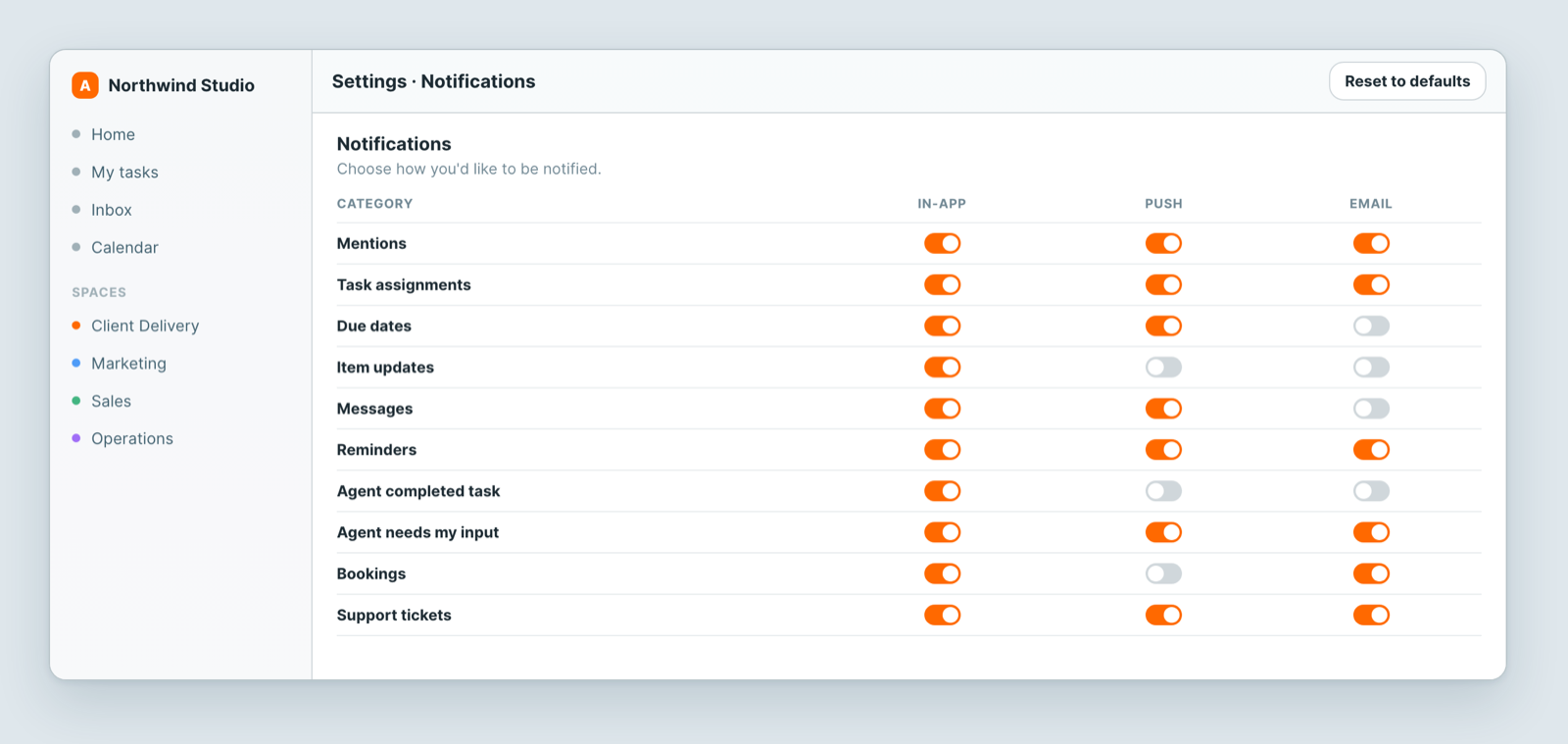
Categories: Mentions · Task assignments · Due dates · Item updates · Messages · Reminders · Agent completed task · Agent needs my input · Bookings · Support tickets.
A reasonable starting point: keep in-app on for everything, push for things that need you today (mentions, assignments, agent needs my input), and email only for what you would want to see if you were not in the app that day.
Reset to defaults undoes any amount of fiddling.
Live updates
The toggle at the top of Notifications controls a toast when teammates change items in sheets you can see. Turning it off does not stop your data updating — sheets always update live — it only hides the pop-up.
Your avatar
Worth setting. Assignee fields, comments and boards all show faces, and a workspace of grey initials is harder to scan.
Related: Set your language, calendar and timezone · Notifications aren't arriving