Notifications aren't arriving
Notifications are set per category and per channel, so "I get some but not others" is normal and usually intended. Start at the settings, not at the browser.
1. Check the switches
Click your avatar, then Preferences → Notifications. Each category has four independent switches: In-app, Push, Email and Telegram.
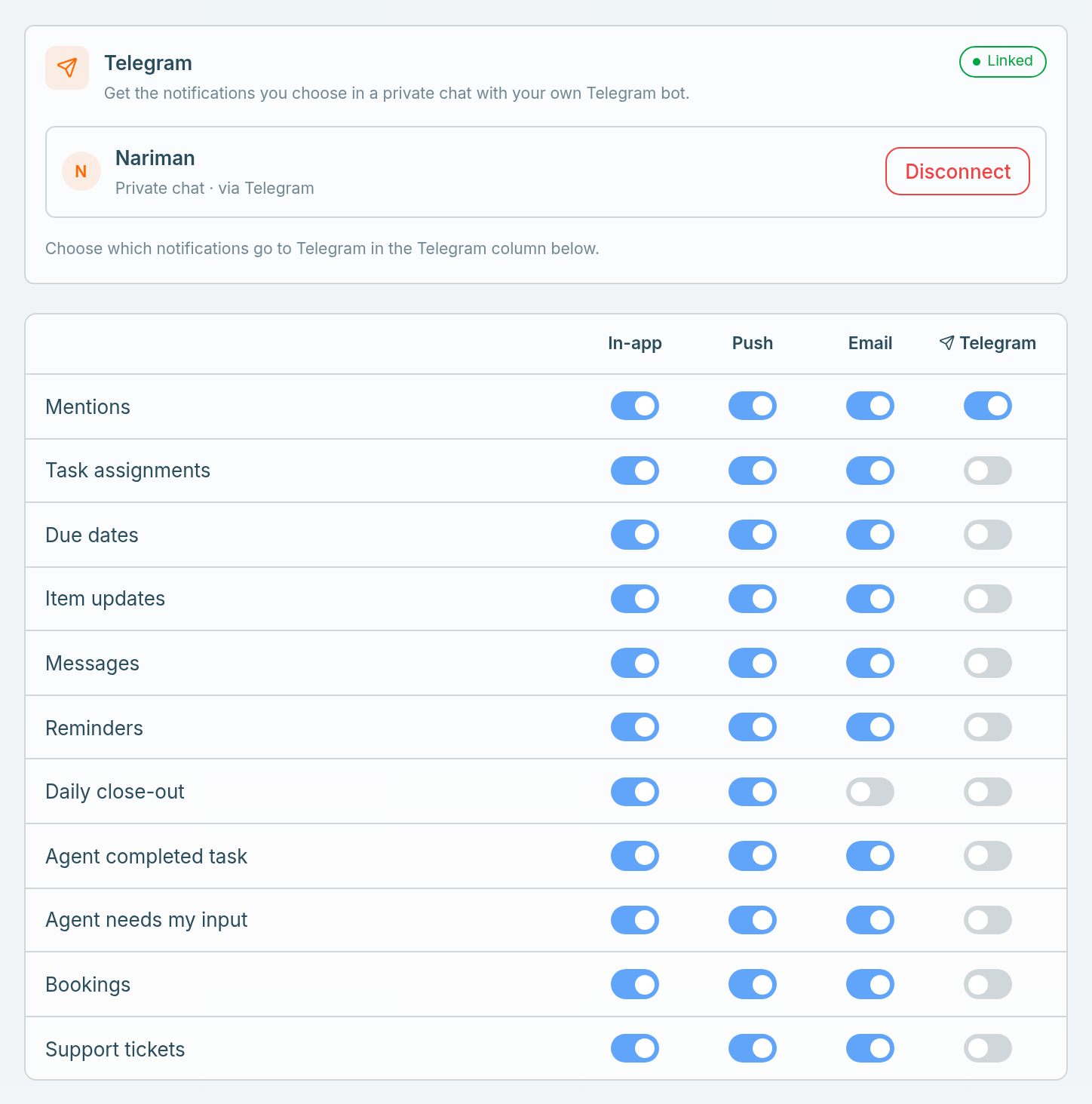
The categories are: Mentions · Task assignments · Due dates · Item updates · Messages · Reminders · Daily close-out · Agent completed task · Agent needs my input · Bookings · Support tickets.
If you stopped a category from an email (Stop these emails, or your mail app's Unsubscribe), its Email switch is off here. Turn it back on to get those emails again.
If you have changed a lot of these and lost track, Reset to defaults puts everything back: In-app, Push and Email on, Telegram off.
2. If push specifically is missing
Two rules in Atwork come first:
- Push goes out only when In-app is also on for that category.
- Push holds back while you're active in Atwork, because you already see the notification there.
Then check the browser. Push needs your browser's permission, which is separate from anything in Atwork.
- Check the site permissions for your workspace address and make sure notifications are Allowed. If you dismissed the prompt once, the browser may have quietly blocked it.
- Operating-system focus modes (Do Not Disturb, Focus) suppress browser notifications too.
- Push arrives only while the browser is running.
3. If email specifically is missing
Notification email subjects start with your workspace name in square brackets, which makes them easy to search for, spam folder included. If you once clicked Stop these emails on that kind of email, its Email switch is off: see step 1.
Check spam, and check that the address on your profile is the one you actually read. See Emails aren't arriving.
4. If Telegram specifically is missing
Telegram gets only the categories you switched on, and only while a chat is linked. Check in this order:
- The Telegram card in Notifications says Linked. If it doesn't, Your profile and notifications has the steps to link a chat.
- That category's Telegram switch is on. Linking a chat turns nothing on, and Reset to defaults or Disconnect turns every Telegram switch off.
- An Inbox notice, Telegram notifications were turned off, means the bot was blocked or removed, or its connection was deleted. Link a chat again, then switch your categories back on.
- Can't link? Send
/startto your bot in Telegram, click Refresh if the chat list is empty, and pick a private chat with your own bot. If Connect shows Couldn't connect Telegram, the test message didn't get through: check that the bot can message that chat, then try again.
Daily close-out arrives at the wrong time
Daily close-out follows your working hours: it comes around the end of your working day, in your timezone, on working days only. It doesn't come at all once you've closed out that day. Check your hours and timezone in Working hours and availability.
Live updates is a different thing
The Live updates toggle at the top controls a toast when teammates add, edit or remove items in sheets you can see. Turning it off does not stop your data updating — sheets always update live. It only hides the pop-up.
Still nothing?
Tell us which category, which channel (in-app, push, email or Telegram), and roughly when you expected it. Those three details are what let us trace it.
Related: Your profile and notifications · Emails aren't arriving · Contact support