Organization settings
Organization settings hold what applies to the whole workspace: its name and logo, the default language, calendar and start of the week, and its locations. Only the workspace owner can open them.
Who can change organization settings?
Only the Owner, the person who created the workspace. Open your profile menu, choose Administration, then Organization. Other members do not see Administration in their profile menu.
Name, logo and URL
Click the name to rename the workspace, and use the edit button on the logo to upload a logo of 1 MB or less. The URL is your workspace's address: it is set when the workspace is created and cannot be changed here. See Create your first workspace.
Default language, calendar and start of week
Click Edit defaults, pick the three values, then click Save.
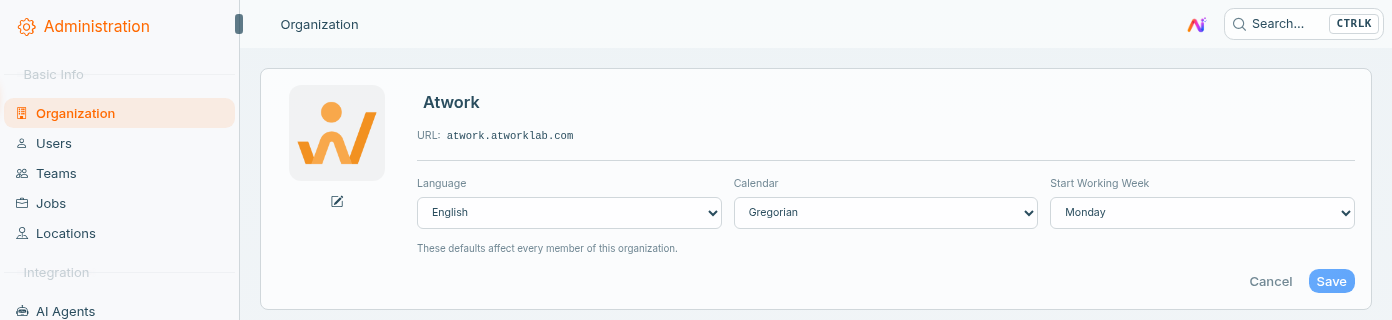
- Language: English or Persian.
- Calendar: Gregorian or Jalali.
- Start Working Week: the day each week begins, Monday to Sunday.
As the screen says, "These defaults affect every member of this organization." Each person can still choose their own Language and Calendar under Preferences in their profile menu, and their own choice wins over the default. See Set your language, calendar and timezone.
What does the start of the week change?
It sets the day a week begins in Goals. Recurring goals, such as sprints, OKRs, KPIs and habits, start each weekly period on that day. The setting is applied when a goal is saved, so existing goals keep their periods until you edit them.
Locations
Locations are the offices or sites your team works from. Open Administration, then Locations, and click New Location.
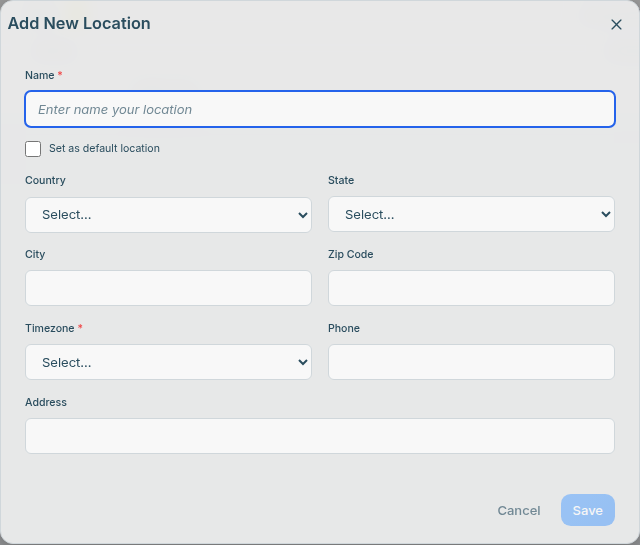
- Name and Timezone are required. Country, State, City, Zip Code, Phone and Address are optional.
- Tick Set as default location for your main site. Only one location is the default.
- A new member who is added without a location gets the default location and its timezone.
- The Location field type lets any sheet pick from these locations.
The Free plan includes 1 location. Paid plans have no limit. See Pricing.
What is not in organization settings?
- Timezone: there is no workspace-wide timezone. It is set per location, and each person sets their own under Working hours in their profile settings.
- People, teams and jobs: they have their own pages under Administration: Users, Teams and Jobs. See Teams and jobs and Members, guests and portal users.
- Billing: your plan is under Administration → Subscription. See Plans & billing explained.
Frequently asked questions
Why can't I see Administration?
Only the workspace owner has Administration in the profile menu. If you need a setting changed, ask the person who created your workspace.
I changed the default language. Why does a colleague still see English?
Their own choice under Preferences wins over the workspace default. They can switch it themselves in their profile menu, under Preferences.
Can I change my workspace URL?
Not from Organization settings. The URL is set when the workspace is created.
Where do I set the timezone?
On each location under Locations, and per person under Working hours in their profile settings. If dates or times look off, see Dates look wrong.
Related: Set your language, calendar and timezone · Teams and jobs · Roles and permissions · Plans & billing explained