Members, guests and portal users
Atwork has three kinds of people. Members work in your workspace and take a paid seat. Guests open a view, page or form you have published, without an account. Portal users are your customers, who sign in to your portal to see their own records. Only members cost money.
Members, guests and portal users at a glance
| Member | Guest | Portal user | |
|---|---|---|---|
| Who they are | Your colleagues | Anyone with a published link | Your customers |
| How they get in | Added by the owner in Users | A link you have published, with Guest access set to Yes | Create Portal Access on their contact, or self-registration |
| Signs in? | Yes | No | Yes, at your portal |
| What they see | The spaces and sheets they have access to | Only what you published | Their own records, plus what you publish with Customer access |
| Takes a seat? | Yes | No | No |
| Managed in | Administration → Users | The item's Publish dialog | Administration → Customers |
Members
Members are your colleagues. They sign in, work in your spaces and take a paid seat each. The owner is a member too and takes a seat.
- Adding a member: the owner opens Administration → Users and adds a row with New Item. Atwork emails the new member their sign-in details, and they choose their own password the first time they sign in.
- What they can open: the spaces and sheets they have been given access to, with the role they were given. See Roles and permissions.
- Cost: the Free plan includes up to 5 members. Paid plans are charged per seat. See Seats: adding and removing people and Plans & billing explained.
Guests
A guest is anyone who opens something you have published with Guest access set to Yes. Guests have no account and take no seat.
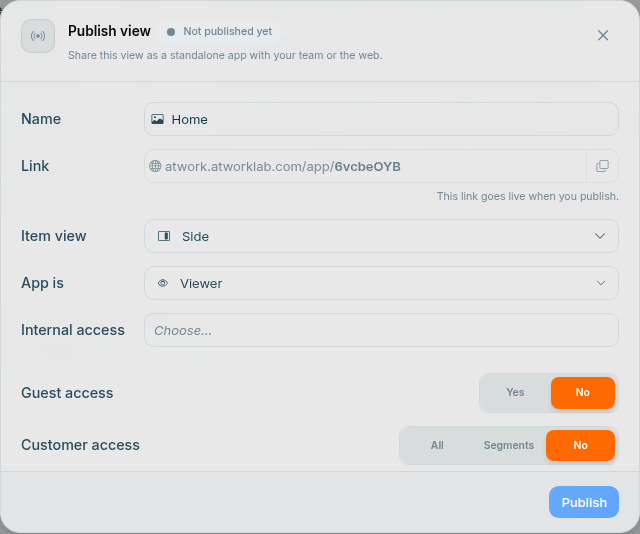
- You choose what guests can do when you publish. App is sets the role the app's audience gets. With Viewer, they can look without changing anything.
- Set Guest access to No, or unpublish, and the link stops working for guests.
- Publish a view from its menu with Publish. Forms have their own share link. See Share a view and Share and embed a form.
Portal users
Portal users are your customers. They sign in at your portal and never enter your workspace.
- Adding a portal user: open their contact and click Create Portal Access. The contact needs a name and an email. If your portal has Allow customer registration turned on, customers can also sign up themselves.
- What they see: their own records, such as their requests and tickets, plus anything you publish with Customer access set to All or to chosen Segments.
- Where to find them: Administration → Customers. They take no seat.
See What is the client portal? and Portal users and access.
Which one should a client be?
- One deliverable to look at or approve: publish it with Guest access and send the link.
- An ongoing relationship, such as requests, status updates and shared documents: make them a portal user.
- Never a member: a member takes a seat and works inside your spaces, so a client added as a member costs you a seat and sees your internal work.
Frequently asked questions
Do guests or portal users count toward my seats?
No. Only members take a seat. A five-person agency with forty clients on its portal pays for five seats.
Can a guest edit my data?
Only if you allow it. Guests get the role set under App is when you publish. Keep it on Viewer for read-only sharing.
Can a portal user see other customers' records?
No. A portal user sees their own records, plus anything you have published to all customers or to their segment.
How do I remove a member?
Delete their row in Administration → Users. Atwork asks you to pick a replacement person, and everything the member created is assigned to them. The seat is freed.
How do I stop guests opening a published link?
Open the Publish dialog, set Guest access to No and click Save changes, or click Unpublish.
Related: Roles and permissions · Seats: adding and removing people · What is the client portal? · Share a view · Pricing