Create an agent and give it knowledge
Custom agents are set up in Settings → AI Agents. Only the workspace owner can create, edit or delete them, and custom agents come with the Pro plan and up (see pricing).
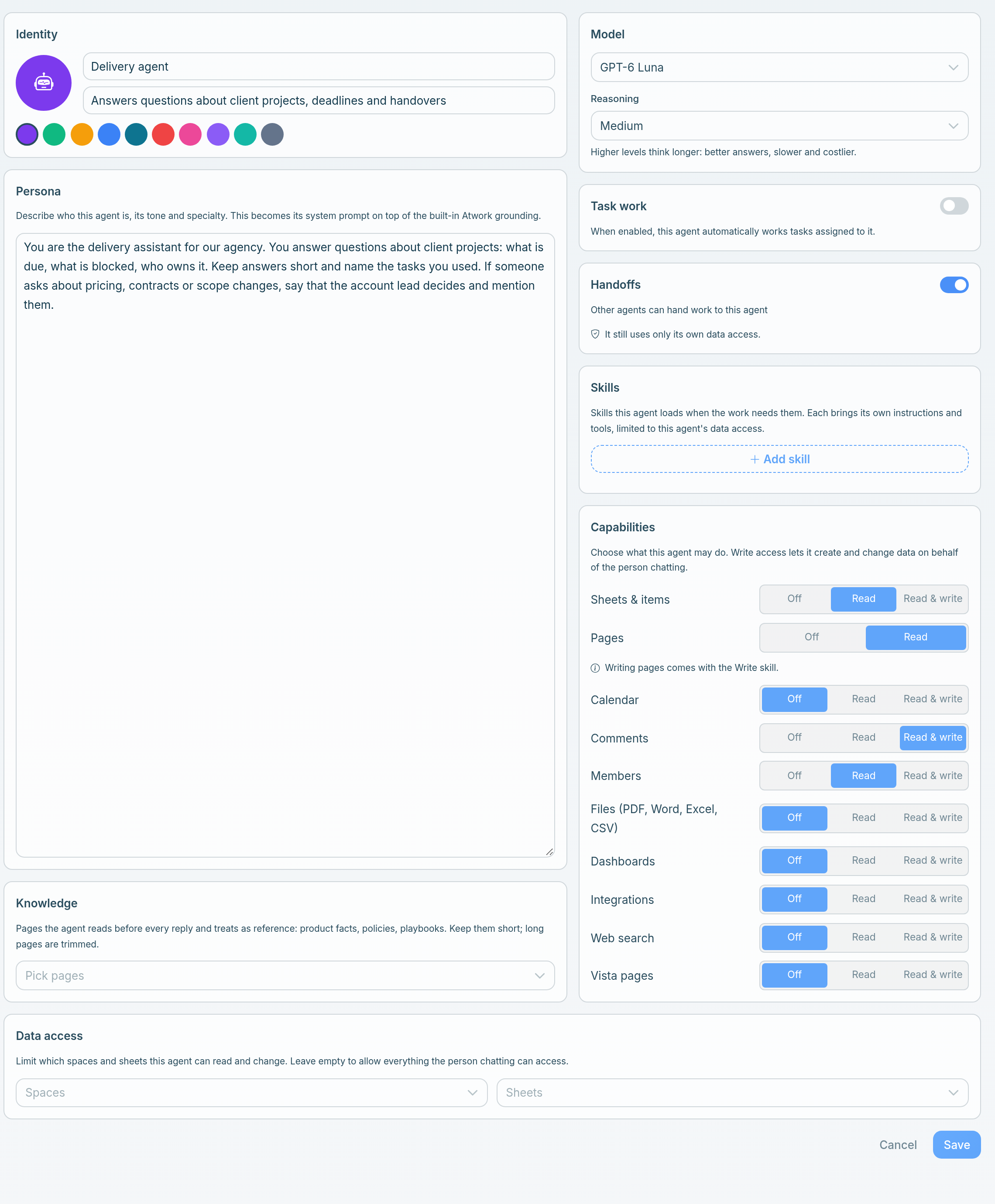
Choose Create agent to open the builder. It has a card for each part of the agent, from its name to the data it may touch, and the sections below follow them in order. Save stays disabled until the agent has a name, a persona and a model. A new agent is on as soon as you save it.
Identity
Give the agent an icon, an Agent name (up to 128 characters), a Short description (shown in the agent picker) (up to 500 characters) and a colour.
The agent appears as a member of the workspace, so pick a name that is obviously an agent rather than a person, such as "Delivery agent". The short description is what teammates read when they choose an agent, so say what it is for.
Persona
The persona is required, up to 20,000 characters. It becomes the agent's system prompt, on top of Atwork's built-in grounding. This is where most of the quality comes from. Cover:
- What it is for, in one sentence.
- Who it is talking to: colleagues, or customers.
- Tone, and what to avoid.
- What it must not do. Where it should hand over to a person instead of answering. This matters more than anything else you write.
Be specific. "Answer questions about our delivery process using the playbook; if asked about pricing, contracts or anything legal, hand over to a person" is a working brief.
Knowledge
Choose Pick pages to attach pages from your workspace. The agent reads them before every reply and treats them as reference. This is how an agent stops being generic: it works from your process, your terms, your product.
Practical notes:
- Keep pages accurate. An agent repeats what you give it. A stale page becomes a confidently wrong answer at scale.
- After editing a page, allow up to 10 minutes before testing. Knowledge is cached for that long.
- Long pages are trimmed: 12,000 characters per page, and 40,000 characters across all pages. A few well-written pages beat everything you have ever written.
- Write for the agent as well as the reader: explicit statements, not implications.
Model and reasoning
Choose Pick a model. There is no default, and the picker groups the models by cost. Each model shows chips for Reasoning and Frontier where they apply, its context size, and a $ to $$$ cost mark.
| Group | What it is for | Models today (October 2026) |
|---|---|---|
| Fast & affordable | Everyday tasks | DeepSeek V4 Pro, GPT-5.4 Mini, GPT-5.4 Nano, GPT-5.6 Luna, GPT-6 Luna, Grok 4.3 |
| Balanced | Strong quality for the cost | GPT-5.6 Terra, GPT-6.1 Sol |
| Advanced | Most capable, premium cost | GPT-5.6 Sol, GPT-6 Astra |
Once you pick a model that supports it, a Reasoning select appears below it: "Higher levels think longer: better answers, slower and costlier."
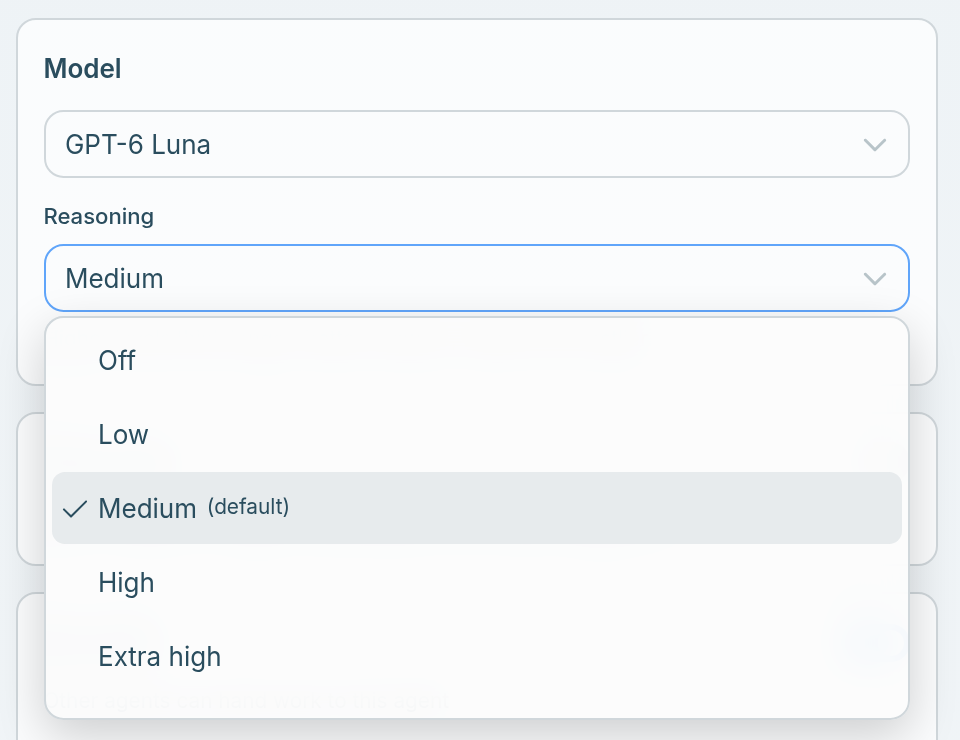
- The levels are Off, Low, Medium, High, Extra high and Max. Each model offers its own set, and its default is marked "(default)".
- DeepSeek V4 Pro has no reasoning levels, so the select doesn't appear. GPT-6.1 Sol and GPT-6 Astra have no Off.
- If you switch models, the level stays when the new model has it.
Start with a Fast model at its default level, and raise it only when you can point at a specific failure. Which AI model should power your agent? explains how to choose.
Task work
Switch on Task work and the agent automatically works tasks assigned to it. It is off by default.
- Max active tasks: 1 to 20, default 3.
- Pick up in status (default Todo), Working status (default In Progress) and Hand back to status (default Review) set how a task moves while the agent works on it.
- Status names are matched per sheet, ignoring case. Sheets without a matching status are ignored.
See Assign work to an agent for how assigned work runs.
Handoffs
Switch on Handoffs ("Other agents can hand work to this agent") and Dana or your other agents can pass requests to this one in a conversation. It is off by default. The agent still uses only its own data access. See Agents in chat: mentions and hand-offs.
Skills
Choose Add skill to give the agent skills from Your skills and Atwork skills, up to 10. The agent loads a skill when the work needs it, and each skill brings its own instructions and tools, limited to the agent's data access. See Skills for custom agents.
Capabilities
Each row is Off, Read or Read & write, and every row starts at Off. Write access lets the agent create and change data on behalf of the person chatting.
The rows are Sheets & items, Pages, Calendar, Comments, Members, Files (PDF, Word, Excel, CSV), Dashboards, Integrations, Web search and Vista pages.
- Pages is Read or Off. Writing pages comes with the Write skill.
- Integrations at Read & write: write actions ask for approval in chat before they run.
Give the agent only what its job needs. An agent that answers questions rarely needs write access.
Data access
Under Data access, choose the Spaces and Sheets the agent may read and change. Leave both empty to allow everything the person chatting can access.
Scope an agent to the spaces its job covers. A delivery agent scoped to your client spaces stays out of finance sheets.
Test it properly
Before relying on it, ask it ten real questions, including two it should refuse. The refusals matter as much as the answers: an agent that guesses at pricing or policy is worse than one that says "let me get a person".
Change or delete an agent
- To change an agent, choose Edit on its card, make the change and Save. Changes apply once you save.
- To delete it, choose Delete on its card. Atwork asks you to confirm: "Delete this agent? Its conversations remain but no one can talk to it anymore." Its past AI spend still shows in AI usage, as "Unavailable agent".
Related: What is an agent? · Skills for custom agents · Agents in chat: mentions and hand-offs · The Agent step in workflows