When you build a custom agent in Atwork, one of the setup choices is which AI model powers it. The picker groups the models into four tiers, Fast & affordable, Balanced, Advanced and Premium, and each model now shows what a typical message costs. The instinct is to choose the most capable one on the grounds that better is better. Beside it there is now a second setting, Reasoning: the reasoning effort, or how long the model thinks before it answers.
That instinct is usually wrong, and expensively so. The right way to choose is by the shape of the job rather than by the name on the box — which has the useful side effect of giving you a rule that survives the next generation of models. Tier and reasoning are two separate dials, and you set them in that order: the tier for how capable the model needs to be, then reasoning for how much thinking each request needs.
Why not just always pick the strongest model?
Because you pay for capability whether or not the task uses it, on every single run.
The picker puts a number on it: each model shows the estimated cost of a typical message, about $0.004 on GPT-6 Luna, $0.052 on Grok 4.3, $0.090 on GPT-6.1 Sol and $0.450 on GPT-6 Astra.
Agent work is repetitive, so those figures multiply. An agent triaging forty requests a weekday runs about 880 times a month. At one typical message a run, that is about $4 a month on GPT-6 Luna, $46 on Grok 4.3, $79 on GPT-6.1 Sol and $396 on GPT-6 Astra. For scale, a ten-seat Pro plan includes $50 of AI budget a month.
These are estimates. Long threads, many tool calls and higher reasoning cost more, and the agent's page shows what it actually spent.
There is a second reason, less obvious: stronger models are generally slower. For an agent that comments in a live thread while someone is waiting, the difference between two seconds and twenty is the difference between useful and abandoned. Nobody waits for a teammate that takes twenty seconds to answer a simple question.
And the quality gain is not uniform. On genuinely easy tasks — reformatting, extracting a field, writing a one-line summary — the tiers produce near-identical output. You are paying a premium for a difference you cannot see.
What job shapes map to a cheap, fast model?
Anything where the correct output is largely determined by the input, and the agent is transforming rather than deciding.
Use the cheapest tier that produces acceptable results for:
- Reformatting and extraction — pulling a date, a name, or a product area out of prose
- Short summaries where the source is already well-organised
- Classification into obvious categories — ones a new hire could learn in a day
- Tidying — fixing a description, normalising phrasing, filling an obvious blank
- Anything that runs at high volume and gets reviewed anyway
The common property: a reader can verify correctness at a glance, and the space of reasonable answers is narrow. Where those hold, the expensive model's extra capability has nowhere to show up. A support triage agent is the archetype — high volume, short output, reviewed by a human, and perfectly well served by the bottom tier.
What job shapes justify the expensive tier?
Work where the agent has to hold several things in mind at once and reach a conclusion that is not implied by any single one of them.
Reserve the strongest tier for:
- Synthesis across many sources — reading a long thread plus related items and producing a coherent picture
- Judgment calls with real consequences — anything where a subtly wrong answer would be acted upon
- Drafting that will be read externally, where tone and nuance matter
- Ambiguous input that requires working out what someone meant before doing anything
- Multi-step work where an early mistake compounds through everything that follows
That last one deserves emphasis. On single-step tasks a weaker model's occasional error is a single visible error. On multi-step work, an early misreading propagates, and you get a confidently wrong result with plausible-looking reasoning behind it. Capability buys you more than average quality there — it buys you fewer compounding failures.
What does the Reasoning setting change?
Reasoning sets how long the model thinks before it answers. A higher level gives better answers on multi-step work, where the model has to plan, compare or check its own reading. It is also slower and costlier on every run, because the extra thinking happens each time the agent is called. The picker's per-message figure is for a typical message, so on a high level each run costs more than that figure suggests.
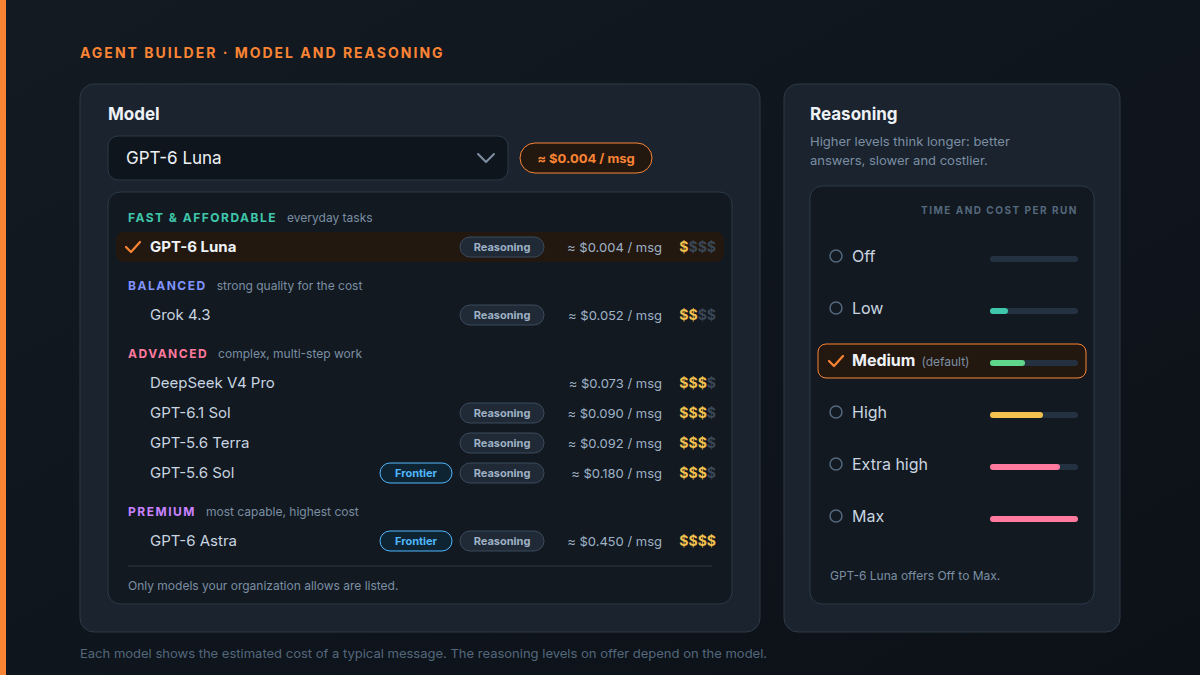
The levels run Off, Low, Medium, High, Extra high and Max, and each model offers its own set. The picker marks the model's default, and the Reasoning setting only appears for models that have reasoning levels at all. Switch models later and the level stays when the new model offers it.
The tier decides how capable the model is. Reasoning decides how long it thinks about each request.
For an agent that runs forty times a day, a higher level is not a free upgrade. Every step up is paid on every run, so a level you never needed quietly multiplies out the same way an oversized model does.
Should you raise reasoning or the tier first?
Raise reasoning first when the misses are thinking errors on multi-step work: the agent read the request correctly but drew the wrong conclusion, skipped a step or lost track of a condition. Raise the tier when it lacks knowledge or writing quality, because more thinking time won't give a smaller model either.
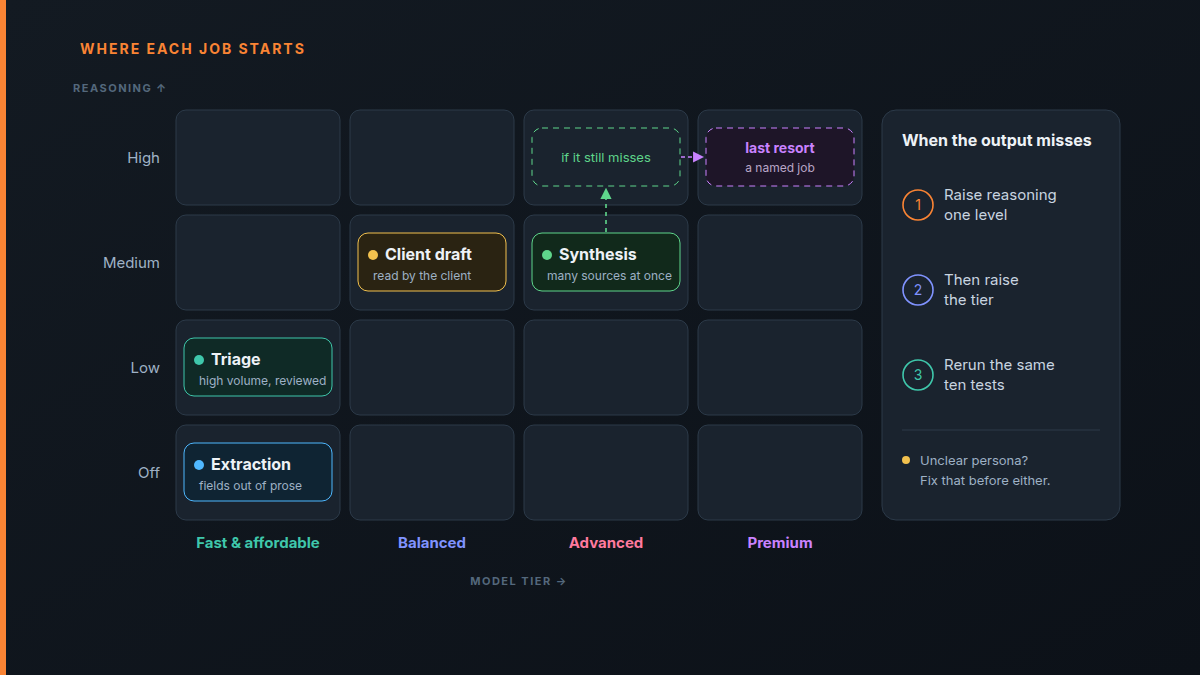
Where each job shape usually starts:
| Job shape | Tier | Starting reasoning |
|---|---|---|
| Extraction and reformatting | Fast & affordable | Off |
| Triage and classification | Fast & affordable | Low |
| Client-facing drafts | Balanced | Medium |
| Synthesis across many sources | Advanced | Medium, then High if it still misses |
Premium has no row. GPT-6 Astra is for a named job that still misses on Advanced at High, not a starting point.
Treat the table as a starting point, not a verdict. The ten real tests below decide where an agent ends up.
How should you actually decide, in practice?
Start one tier below where instinct puts you, and upgrade only when you can point at a specific failure.
The procedure:
- Pick a mid or low tier model when you build the agent, and leave Reasoning at the model's default.
- Run it on ten pieces of real work.
- Read the output and ask: are the misses caused by reasoning, or by instructions?
- If the persona was ambiguous, fix the persona — a better model will not fix an unclear job description.
- If the persona is precise and the output is still wrong in ways that require more thinking, raise reasoning one level and rerun the same ten; if that doesn't fix it, upgrade one tier and rerun them again.
Step 3 is where most of the value is. A great deal of disappointing agent output traces back to an underspecified persona rather than an underpowered model, and upgrading the model in that situation costs more and fixes nothing. Fix the instructions first; it is free.
Test the same inputs on both
When you do compare tiers, run the identical set of real items through each and read them side by side. Comparing a cheap model on Monday's requests with an expensive one on Tuesday's tells you nothing, because the requests differ more than the models do.
If you cannot tell the outputs apart, keep the cheap one. That is a real result, not a failure to detect a difference.
Does the choice have to be permanent?
No, and treating it as reversible removes most of the anxiety from the decision. The model behind an agent, and its reasoning level, can be changed later without rebuilding the agent, rewriting the persona, or touching anything on your board. Its identity, scope and history all stay as they are. If your organization's AI policy later rules out the agent's model, the agent runs on the policy's default model and keeps its persona and history.
This is why starting cheap is low-risk. The downside of guessing low is a week of slightly weaker output on work you were reviewing anyway. The downside of guessing high is a bill you do not notice until it has run for a quarter.
And the cheapest model of all is no model: if the job turns out to be a fixed rule, an automation does it instantly and for nothing.
Which models are in the picker today?
As of October 2026 the custom agent builder offers seven models in four groups, sorted by the estimated cost of a typical message. The policy class is what your organization's AI policy allows or rules out.
| Group | Model | ≈ per message | Policy class |
|---|---|---|---|
| Fast & affordable | GPT-6 Luna | $0.004 | Cheap |
| Balanced | Grok 4.3 | $0.052 | Standard |
| Advanced | DeepSeek V4 Pro | $0.073 | Standard |
| Advanced | GPT-6.1 Sol | $0.090 | Standard |
| Advanced | GPT-5.6 Terra | $0.092 | Standard |
| Advanced | GPT-5.6 Sol | $0.180 | Frontier |
| Premium | GPT-6 Astra | $0.450 | Frontier |
Reasoning levels differ by model: DeepSeek V4 Pro has none, GPT-6.1 Sol and GPT-6 Astra have no Off, and Grok 4.3 stops at High.
GPT-5.4 Mini, GPT-5.4 Nano and GPT-5.6 Luna have left the picker. Agents already on them keep running.
Treat the list as dated. The names in the picker change, the tiers get faster and cheaper, and today's premium model is next year's default.
What does not change is the mapping from job shape to tier. Transformation and classification sit at the bottom. Synthesis and judgment sit at the top. Anchor your decision to that, check the current picker for which model occupies each tier, and you will not have to relearn this every time the industry ships something new.
Can admins limit which models agents use?
Yes. The workspace owner sets Allowed model classes (Cheap, Standard and Frontier) and a Reasoning switch in Settings › AI policy. Agents can then only pick models from the allowed classes, and the picker hides the rest. With Reasoning off, their reasoning stops at Medium. The policy applies to every custom agent, including the Agent step in a workflow. Dana, the built-in assistant, picks its own model.
- Classes map onto the picker's groups. Cheap is Fast & affordable. Frontier is Premium plus GPT-5.6 Sol, the one Advanced model with the Frontier chip. Standard is everything else.
- Your plan sets the ceiling. Custom agents come with Pro, and Frontier is available on Business. A class above your plan shows "Needs a higher plan".
- A ruled-out model falls back. An agent whose model is no longer allowed runs on the policy's Default model for new agents, the same model the builder preselects when you start a new agent.
- Only an owner changes the allowed models. Admins can open the page and set agent caps, but only an owner changes the allowed models and approvals.
The same page holds spend caps and approvals. An AI policy for a 10-person agency walks through those settings.
Frequently asked questions
Does a higher reasoning level cost more?
Yes. A higher level makes the model think for longer before it answers, and you pay for that thinking on every run, along with a slower reply. On an agent that runs dozens of times a day, the difference adds up the same way a bigger model does. The per-message figure in the picker is for a typical message, so expect a high level to cost more than it shows. What AI costs an agency per month walks through the arithmetic.
What does the cost per message in the model picker mean?
It is the estimated cost of one typical message on that model: about 20K tokens in and 500 out. Long threads, many tool calls and higher reasoning levels cost more, so use it to compare models rather than to budget to the cent. The agent's page shows what it actually spent this month.
Can my organization stop agents from using expensive models?
Yes. The owner chooses the allowed model classes in Settings › AI policy, and agents can only pick models from those classes. Leave Frontier off and GPT-5.6 Sol and GPT-6 Astra drop out of the picker. Can admins limit which models agents use? covers the rest of the policy.
Can I change the model later?
Yes. Edit the agent, pick another model and save. The persona, knowledge and history stay as they are, and the reasoning level carries over when the new model offers it. See Create an agent for each setting in the builder.
Which level should a high-volume agent use?
Start a high-volume agent on a Fast & affordable model at its default level, or lower if its job is extraction or triage. Raise the level only when you can point at a multi-step failure in your ten real tests.
The short version
Match the tier to the job, not to your ambition for the agent. Start one tier lower than instinct, at the model's default reasoning level. Fix the persona before you upgrade the model, and raise reasoning one level before you raise the tier. Compare tiers on identical inputs, and keep the cheap one when you cannot tell the difference. Read the per-message figure before you pick, and remember that your AI policy decides what you can pick from.
See what custom agents can do on the agents page, then follow Create an agent to build one. Write the job description first, then pick the model and its reasoning level — in that order.