Meet Dana, your AI assistant
Dana is the AI assistant built into Atwork. It can see the data you can see, so you can ask about your own work rather than a general-purpose model's idea of it. It also does the work: it updates records, builds sheets and forms, writes pages and plans your day. And it answers questions about Atwork itself.
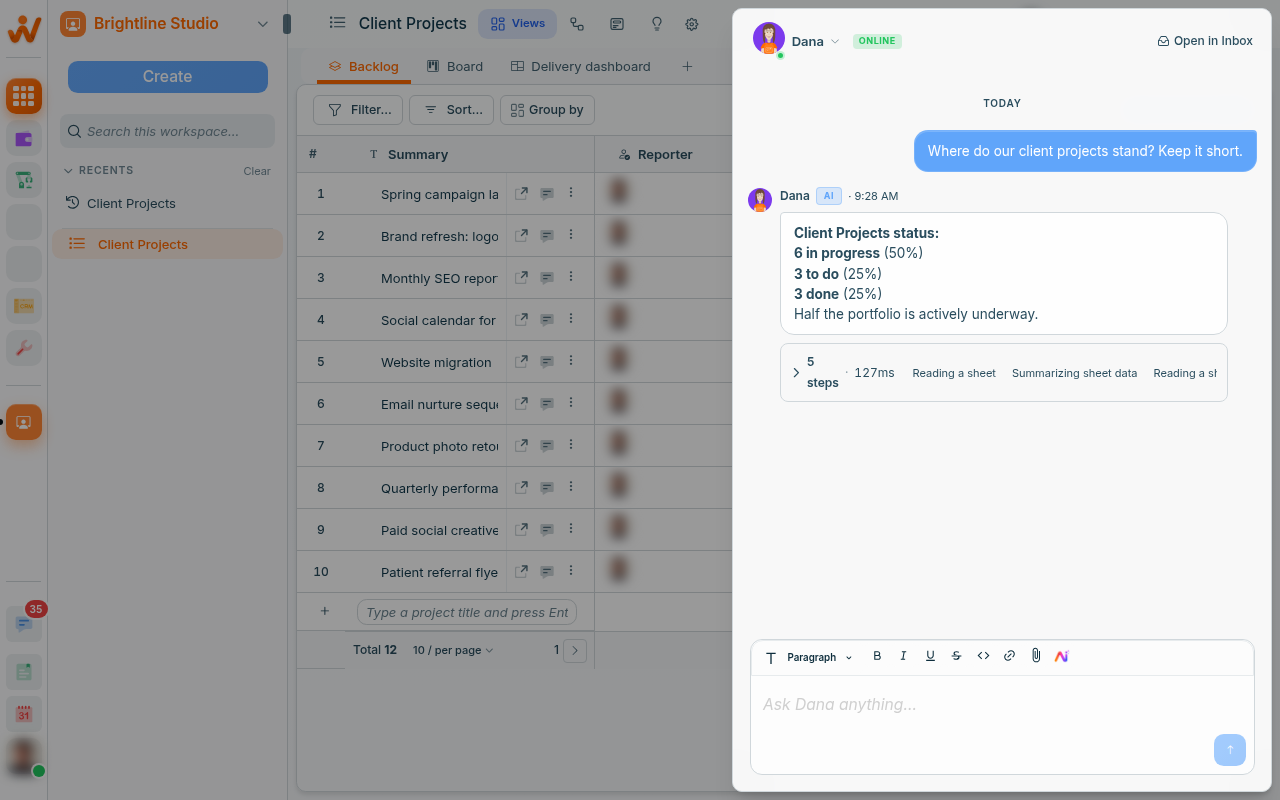
Where can you ask Dana?
You can ask Dana from the header, the omnibox, a sheet's Insights tab, the page editor, Build with AI, Vista, the Planner and workflows. It is the same assistant in every place.
- The header: Ask Dana opens Dana in the sidebar, to ask about anything in your workspace.
- The omnibox: type a question into Ask Dana or search… and press Enter, or press Ctrl+Enter (⌘+Enter on a Mac) to send anything to Dana.
- A sheet's Insights tab: ask about that sheet's records. See Insights: ask Dana about a sheet.
- The page editor: type
/askand choose Ask Dana, or select text and click Ask Dana in the toolbar. See Write and edit pages with Dana. - Build with AI, and setting up an empty table: describe what you need and Dana builds it. See Build sheets and forms with Dana.
- Vista views and pages: describe a page and Dana builds it from the sheet's live data. See Vista pages: describe a page, Dana builds it.
- Today in the Planner: Plan my day has Dana draft a time-blocked plan. See The Planner: Today, Week and My Tasks.
- Workflows: the Agent step runs Dana from its Built-in group. See The Agent step in workflows.
What can Dana do?
Dana answers questions about your work and about Atwork, and does the work itself, within your access: it finds, counts and charts, updates records, makes files, builds, writes and plans.
- Answer questions about Atwork: how to do something, whether we have a feature, and where to find it.
- Find things: "which client projects are due this week and not in review?"
- Summarise: "summarise what changed on this project since Monday."
- Count and chart: totals, breakdowns and charts from your records.
- Update records: create, update and archive records, up to 200 rows at a time, or every row that matches a condition, up to 1,000, with a preview first when more than 20 would change; create tasks and leave comments.
- Search the web for context from outside your workspace.
- Read files you attach: PDFs, Word, Excel and PowerPoint files, text files and images.
- Make files: a PDF or Word document, or an Excel or CSV export of rows.
- Work in connected tools: look things up and act in the integrations your workspace has connected.
- Build: sheets, fields and forms from a description, or change and remove fields on an existing sheet.
- Write: draft and edit pages.
- Build Vista pages and draft your day plan, each on its own screen.
It knows where you are. Ask "what is blocked here?" while looking at a sheet and it uses that sheet.
What are skills?
A skill is the extra know-how Dana takes on when a job needs it. Ask it to build a sheet or a form, or to write a page, and it loads the matching skill by itself: a Load skill step shows among its steps in the conversation. The skill then stays for the rest of that conversation. Vista pages and the day plan have their own skills, which Dana uses on those screens only.
Can you ask Dana how Atwork works?
Yes. Ask Dana how to do something in Atwork, whether we have a feature, or where something is, and it answers with the exact clicks. When the Help center has an article on it, Dana links it. When we don't have a feature yet, Dana says so plainly and gives you the closest way to do it today.
Try asking:
- "How do I share a board with a client who isn't in our workspace?"
- "Can a sheet get its own email address?"
- "Where do I see how much of our AI budget is left?"
Dana answers from what Atwork does today. If a step looks different on your screen, follow the linked article.
How do you request a feature through Dana?
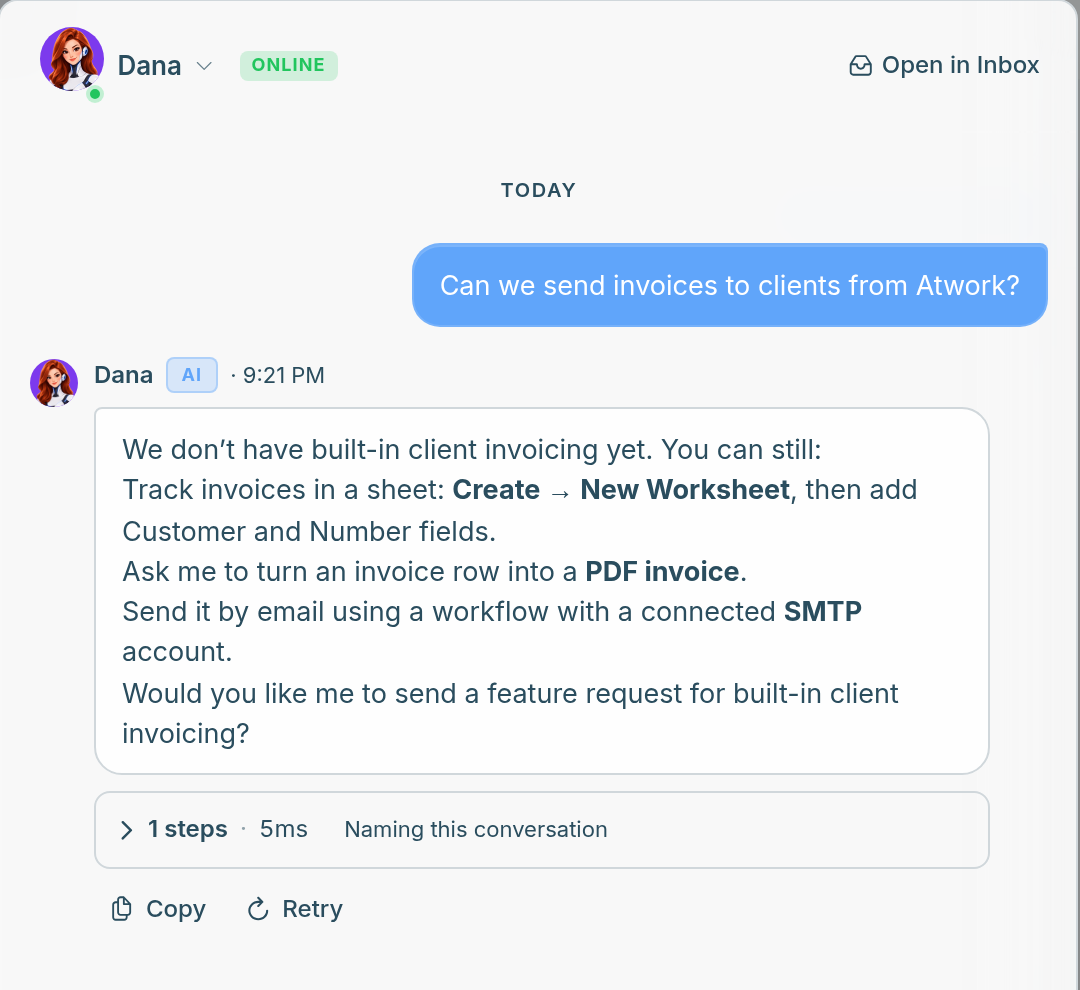
When we don't have what you need, or Dana isn't sure we do, it offers to send us a feature request. It asks first and sends nothing unless you say yes. When you do, it opens a ticket on our support desk under your name and replies with the ticket number.
- Ask Dana about what you need.
- If we don't have it yet, Dana says so, gives the closest way to do it today, and asks whether to send a feature request.
- Say yes. Asking more about the feature is not a yes: nothing is sent until you agree.
- Dana replies with the ticket number, such as TK-1042, as a link to the ticket.
- Follow the ticket under My tickets in the Help center. See Track and reply to your ticket.
What does the ticket contain?
- A one-line summary that Dana writes.
- Your request, in your own words.
- The screen you were on, such as "Sheet 'Client Projects', view 'Board'".
Nothing else from the conversation is sent.
Limits
- One request per feature in a conversation: ask again about the same feature and Dana gives you the same ticket.
- You can't send a feature request from a workflow's Agent step, or from an AI assistant connected to Atwork through the MCP server.
- If Dana can't send it, use Contact support instead. See Contact support.
What does Dana ask before doing?
Dana asks first in these cases. Everything else inside your workspace runs without asking, and a bulk change can be undone from its step for 7 days.
- Acting in a connected tool, such as sending a Slack message or an email: an Approval required card with Approve, Deny and Always allow in this conversation. Always allow lifts the ask for every later action in a connected tool in that conversation.
- Using your personal connection for the first time: a Use your connection? card with Allow this agent, Allow all agents or Not now. Sending still asks you first, unless you already clicked Always allow in this conversation in that chat.
- Updating more than 20 rows by a condition: a preview with the count and a sample of the changes, and Update N rows or Decline.
- Changing a field's type in a way that would empty or shorten values: Dana asks before it makes the change.
- Sending a feature request: Dana offers to send one, and nothing is sent until you say yes.
Permissions still apply
Dana works as you. It cannot see a space you are not a member of, or a sheet your role does not allow. Asking it for something you do not have access to does not reveal it. It can change only what you could change yourself, and its changes are saved as yours.
Getting better answers
- Name the thing. "In Client Projects…" beats "in my tasks…".
- Say the shape you want: a list, a table, three bullets.
- Follow up rather than restarting. "Only Meridian Health" refines the previous answer.
Check the important ones
It reads real data, but it can still misread a question. For anything you are about to send a client or make a decision on, glance at the underlying records, which it will point you to.
Agents are the next step
Dana helps you, on demand. An agent is a workspace member you build, with its own persona and job, that can be assigned work and act on it. Same technology, different shape. See What is an agent? and Create an agent and give it knowledge.
Frequently asked questions
Can Dana change my data?
Yes, within your access. Dana can create, update and archive records, create tasks, leave comments and, when you ask it to build, add, change or remove fields. Each change shows as a step in the conversation and is saved as yours. Archiving a record loses nothing: an archived record keeps its data, and you bring it back by setting Archived items to Shown in the view's settings, opening the record and clicking Unarchive (see Archive and restore rows). A removed field keeps its data too, except a File List field, whose uploaded files are deleted with it. A sheet admin can restore a removed field from Deleted fields in the sheet's Fields settings. Dana never deletes records outright. It shows a preview before it updates more than 20 rows by a condition, a bulk change can be undone from its step for 7 days, it asks you before it acts in a connected tool, such as sending a Slack message, and it uses your personal connections only after you allow it.
Can I undo what Dana changed?
Yes, for bulk changes. When Dana creates or updates many rows at once, the step in the conversation has an Undo for 7 days, and any value someone changed since keeps the newer value. Undo does not take back what a workflow already did, such as an email it sent. A page edit has an Undo for 30 seconds. A single-record edit has no Undo button; the record's history shows what changed. A message Dana sent cannot be recalled.
What happens to my feature request after Dana sends it?
It is a ticket like any other. Our team reads it, and you follow its status and reply to it under My tickets in the Help center. See Track and reply to your ticket.
Does Dana use the AI budget?
Yes. Every answer draws on your workspace's monthly AI budget. See The AI budget.
Related: Write and edit pages with Dana · Build sheets and forms with Dana · Vista pages: describe a page, Dana builds it · Insights: ask Dana about a sheet · The Planner: Today, Week and My Tasks · What is an agent? · The AI budget · Files and agents