Track and reply to your ticket
Every ticket you file is listed under My tickets in the Help center, with its current status. To open the Help center, click your avatar, then Help.
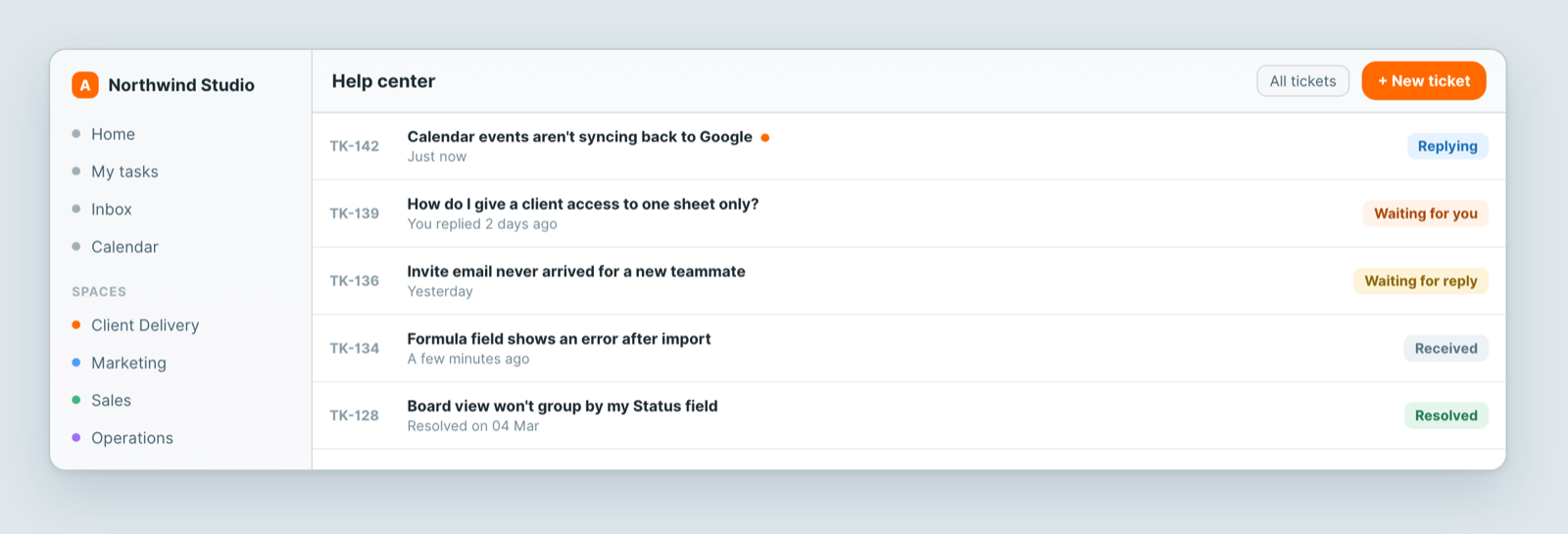
What the statuses mean
- Received — your ticket arrived and is queued.
- Replying — someone is working on an answer right now.
- Waiting for reply — the ball is with us.
- Waiting for you — we asked you something and are waiting to hear back. Nothing moves until you answer, so this is the one to watch.
- Resolved — closed.
Reply
Open the ticket and write in the box at the bottom. The whole history is on one page, so you can see exactly what was already tried. You can attach files to a reply too.
You will also get replies by email — the email links straight back to the thread. When a reply is waiting, the Help row in your avatar menu shows a count.
Resolve, or reopen
Sorted it yourself? Click Mark as resolved. If a resolved ticket turns out not to be fixed, click Reopen on the same ticket rather than filing a new one — it keeps the history together, so nobody starts from scratch.
On a business's client portal the buttons are Close ticket and Reopen, on the ticket page.
Rate the help
After a ticket is resolved you can rate it. One tap is enough, and it is genuinely read.
Opened a ticket on a portal without an account?
If you used Contact support on a business's client portal without signing in, you follow the ticket by email:
- Open it from the confirmation email. The View your ticket button opens a page with the ticket's status, every reply, and a box to answer in.
- The link works for 30 days. Every reply email carries a fresh one, so use the newest email.
- Replies arrive by email, at most one email per ticket every 10 minutes. The email shows the start of the reply and a View the conversation button.
- Answer on the ticket page, so your answer lands in the same conversation.
- The link is the key. Anyone you forward it to can read the ticket and reply.
- To close it, sign in to that portal with an account and use Close ticket, or ask in a reply and the team closes it for you.
Related: Contact support