Your delivery board says four things are in progress. Two of them have not moved since Tuesday, because they are sitting in a client's inbox waiting for a reply. The board has no way to say so, and it will keep reporting four until somebody asks.
That gap is what most searches for an agency project management template are actually about: not a methodology, but a structure that holds the parts of client work a task list ignores. This article covers what that structure contains and the one column most templates leave out, using Atwork's Agency Client Delivery template as the worked example.
What should an agency project management template actually contain?
Four linked objects and a dashboard: clients, briefs, deliverables and freelancers. The deliverables have to be real tasks rather than rows in a tracker, so work you assign lands in that person's own task list. Atwork's Agency Client Delivery template ships exactly those four, and everything else in agency delivery hangs off them.
An object earns its place if it answers a question someone asks you out loud, repeatedly. "What did we actually agree to?" is a brief; "who is booked, and are they free after the 22nd?" is a freelancer record. Keep those in comments and you have a task list with footnotes.
| Object | What it holds | The field that earns it |
|---|---|---|
| Clients | One record per account: contact, account lead, how the relationship is going | Retainer hours per month |
| Briefs | The agreed scope for one piece of work | Who signed it off |
| Deliverables | The work itself, assignable and schedulable | Approval, kept apart from status |
| Freelancers | Who you bring in and on what terms | Availability |
The relations turn four lists into a structure: a deliverable points at its client, its brief and the freelancer booked on it — three links on one row. "Everything for Harbor Dental, and who signed it off" becomes a filter.
Why does a task list stop working around the fourth client?
Because a task list records what is being done and nothing about who agreed to it, who is paying for it, or who is waiting on it. With one client you carry those three facts in your head. With four you carry twelve, and you start getting them wrong.
The usual response is a list per client, and it drifts — three people, three clients, three sets of stage names, and no report spans them. How to structure an agency workspace covers that trap; the client belongs in a field on the work, not a folder around it.
Why should client approval be its own column instead of a task status?
Because internal progress and client position are two independent facts, and one status column can only hold one of them. A deliverable can be in progress for your designer and changes requested by the client in the same hour. Choose a single field for both and you lose whichever half you did not record.
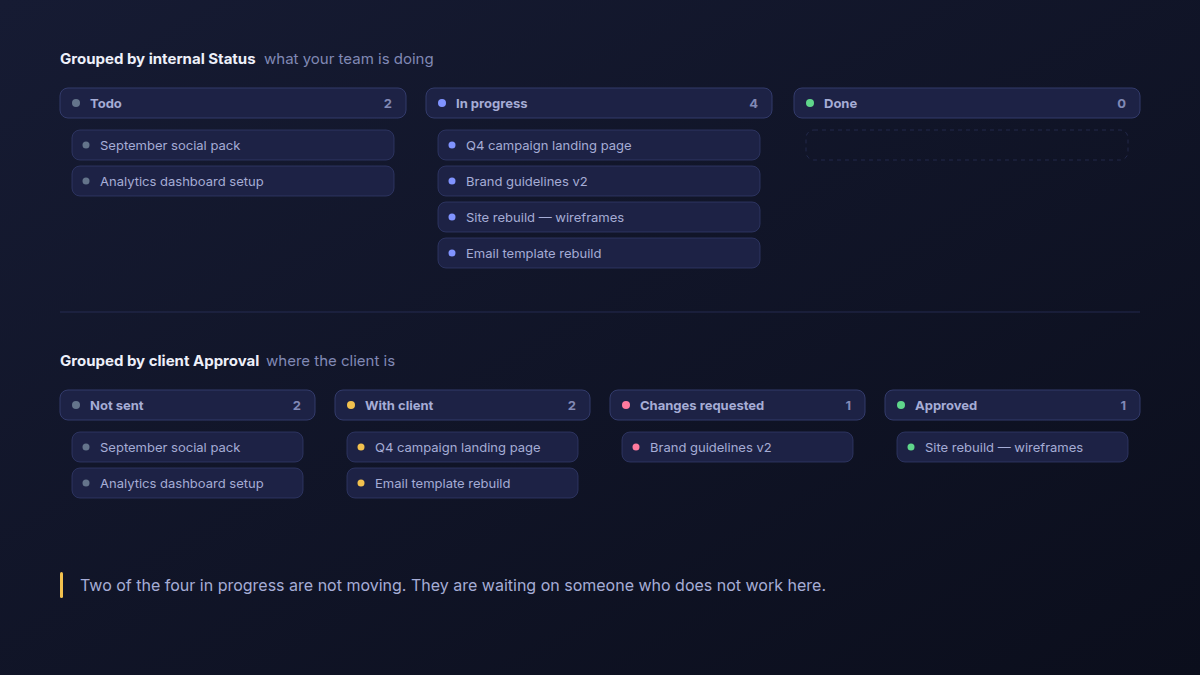
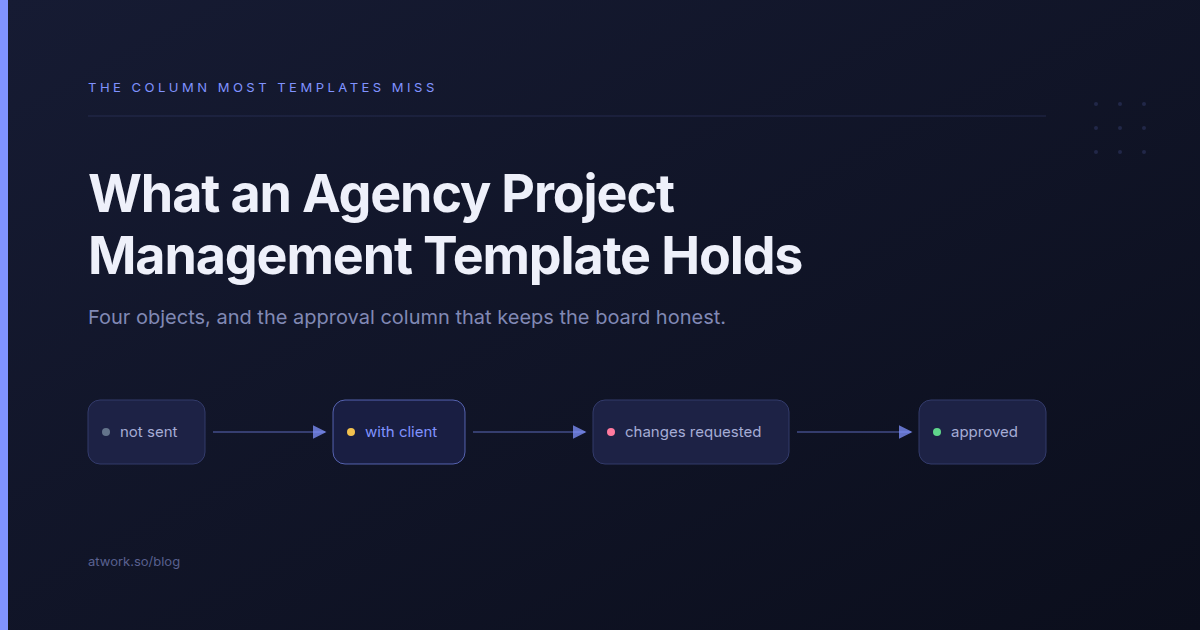
The template gives every deliverable an Approval field with four states — Not sent, With client, Changes requested, Approved — alongside the ordinary Todo, In progress and Done. In its six sample deliverables, the Q4 campaign landing page and the email template rebuild are With client, Brand guidelines v2 is Changes requested, the wireframes are Approved, and two have not been sent at all.
Those approval states arrive filled in; the internal statuses do not, because that half is yours to drive. The figure above is those same six rows, grouped each way.
Group them by status and the board looks healthy. Group them by approval and half of what looks like motion is a waiting room.
A board that cannot tell you what is waiting on a client is not reporting your delivery. It is reporting your intentions.
The companion field is Round. A third round of the same landing page is not a design task any more, it is a scope conversation, and a template that does not count rounds cannot tell you which one you are in. Why revision rounds multiply makes that argument; the column is what makes it countable.
What else does the template hold besides the work?
Three records a task list has nowhere to put: the client you sold the retainer to, the brief somebody signed off, and the freelancer booked on the work. Each one carries the field you reach for when a client asks a question your board cannot answer on its own.
The client record: retainer hours sold and a health flag
Each client carries an account lead, a main contact, retainer hours per month, and a health flag set to On track, At risk or Needs attention — the two things worth checking before you agree to one more favour: how much you sold them, and whether the relationship can absorb it.
The brief: budget hours and who signed it off
A brief holds the scope in its description, the budget hours, and the name of whoever signed it off. That last field earns its place six weeks later, when "we never agreed to that" needs a fact rather than a memory of a call.
Freelancers: discipline, day rate, availability
Freelancers get their own records — discipline, day rate, email, and whether they are Available, Booked or Unavailable — and the booking is a link on the deliverable rather than something you remember. Managing agency freelancers covers the rest of that relationship.
What should the delivery dashboard answer on a Monday morning?
Four things, without anyone assembling a report: how many hours are committed, how much is waiting on a client, how many rounds the average deliverable takes, and how much retainer you have sold. The template ships two dashboards that answer exactly those.
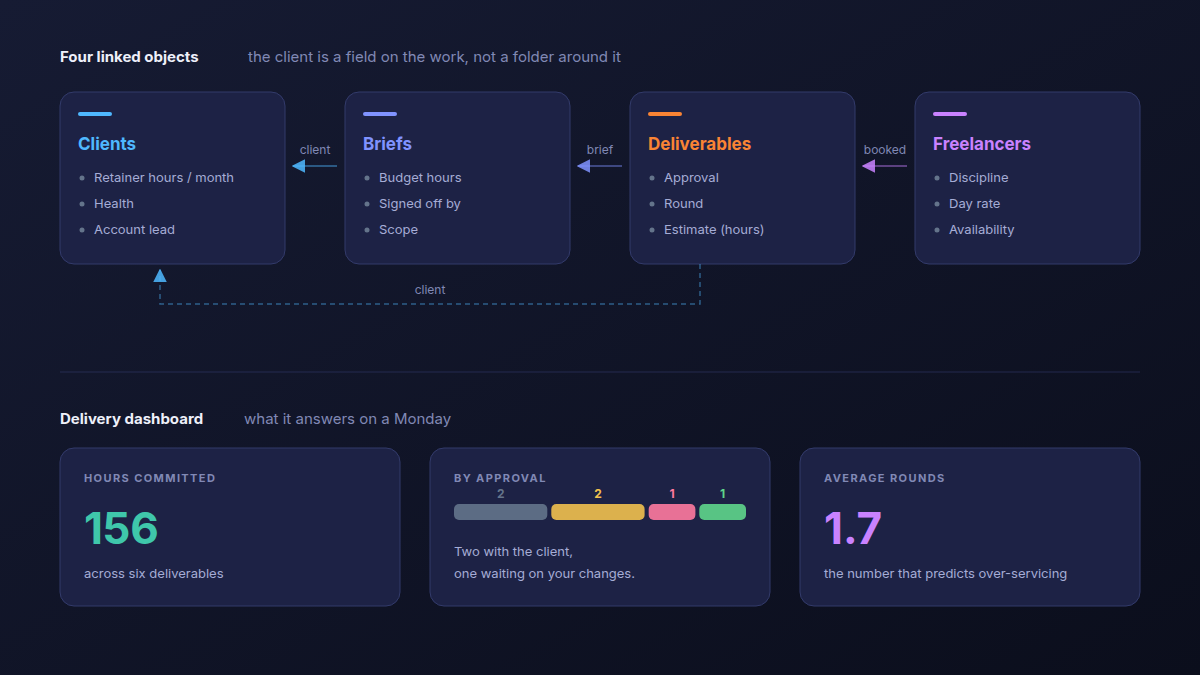
The Delivery dashboard carries Hours committed, a By approval split, and Average rounds — on the sample data, 156 hours and an average of 1.7 rounds. The Clients dashboard carries Retainer hours sold and Client health: 140 hours a month across four accounts, one flagged Needs attention after roughly nine hours of over-servicing.
Average rounds is the number nobody tracks and the one that predicts over-servicing. Both dashboards here answer delivery questions; the money ones belong on an agency financial dashboard.
How do you judge a project management template before you install it?
Ask five questions, answerable in two minutes of looking at any template: where approval lives, what a brief is, who is booked on the work, whether it knows what you sold, and whether you can report across every client at once. A template that fails three of them is a task list with an agency-shaped name.
- Where does client approval live? If the answer is "a status", the template will overstate how much is moving, and it will do so quietly.
- What is a brief in this template? If it is a long task description rather than a record with a budget and a sign-off, no one can answer a scope question later.
- Who is booked on the work? A name typed into a comment is not a resource whose availability you can check.
- Does it know what you sold? Retainer hours have to be a number on the client, or utilisation is a conversation rather than a figure.
- Can you report across every client at once? If each client is a separate board, the answer is no, and it does not improve as you grow.
| Dimension | A generic task-list template | A spreadsheet | Atwork |
|---|---|---|---|
| Where client approval lives | The same column as task status | A cell colour someone remembers to change | Its own field, four states |
| What a brief is | A long task description | A tab nobody opens twice | A record with budget hours and a sign-off name |
| Who is booked on the work | A name in a comment | Another tab | A linked freelancer record with availability |
| Retainer hours sold | Not held anywhere | One cell per client | A field on the client, summed on a dashboard |
| Reporting across clients | Per board, by hand | A pivot you rebuild monthly | One dashboard over every client |
| A two-person shop with three clients | Genuinely the better fit | Works, and costs nothing | More structure than the work needs |
That last row is the honest one. Four linked sheets earn their keep around the fourth or fifth concurrent client; below that, the coordination they remove was not costing you anything. Airtable's marketing agency template also ships a client-facing interface and this one does not — the client portal is built separately, on the same sheets.
Those five questions are about structure, not about which vendor to buy from. That decision turns on seat minimums and what a client contact costs, and choosing project management software for a small agency works through it.
How do you set it up in an afternoon?
Install it, swap the four sample clients for real ones, add one live brief, create its deliverables, and move one to With client. It arrives populated with sample clients, briefs, freelancers and deliverables, so you can see the shape before you replace anything.
- Install the template and open the Client Delivery space.
- Replace the four sample clients with your real ones, and set retainer hours per month on each.
- Add one brief for a live piece of work, with the real scope in its description and the name that signed it off.
- Create that brief's deliverables, link them to the client, and assign them.
- Move one deliverable to With client and watch the dashboard change.
One thing to know: the built-in status buckets are Todo, In progress and Done. If your process has different stages, edit the status options on the Deliverables sheet after install — the approval states are separate and stay as they are.
The 9-step client onboarding checklist covers the week before this starts; client status updates without the weekly call covers what the client sees once work is moving.
FAQ
Is there a free agency project management template?
The template itself is free and needs no add-on module. Installing it is a paid-plan matter: it builds its own space with four sheets and two dashboards, and dashboards alone sit on the paid plans. What carries onto a free workspace is the decision, not the structure — approval as its own field, separate from status.
What is the difference between an agency CRM and a delivery template?
A CRM covers the sales side — inquiries, deals, proposals, the moment a retainer is agreed. A delivery template covers everything after that: briefs, deliverables, approvals and the people doing the work. Agency CRM: from project inquiry to retainer covers the first half.
Do I need a separate project per client?
No, and it is the setup most worth avoiding. The client is a field on the work, so one delivery process serves every account and every cross-client report is a grouping rather than a reconciliation. Agency workspace structure covers why per-client boards drift.
Can a client see the board?
Through a published surface, not an account. You put the view you want them to see on a client portal and publish that, so they reach one scoped page and never become a member of your workspace. What your client should actually see covers that decision.
The structure above ships built in the Agency Client Delivery template, and the agencies overview covers how it fits with the rest.
Put one live brief in, create its deliverables, and move one to With client. You will know by Friday whether your board was telling the truth. Start free