There is no best project management software for small agencies, and any page that gives you a ranked list is answering a different question from the one you asked. The tools in this bracket are more alike than their marketing suggests. What separates them for an agency is not the feature grid. It is which pricing tier you end up on, what a client costs once they need to do more than look, and whether anybody at your shop is going to own the configuration.
What actually decides this for a small agency?
Three things, none of which appear in a feature grid: who owns the setup, what your clients cost, and which tier your must-have features actually sit on. Feature grids are close to useless here because every tool in this category has tasks, boards, custom fields and automations. You are not choosing capability, you are choosing where the friction lands.
Agencies that regret their choice almost never say the tool lacked a feature. They say one of three things:
- Nobody kept it current. The setup drifted until the board stopped being trusted.
- The bill grew as clients were added. Not as staff were added — clients.
- The thing we bought it for was one tier up. Discovered after the trial.
This page answers those three questions in order. Sometimes the honest answer is a competitor, and where it is, we say so.
Why is the price you compared never the price you pay?
Because the capability that made you shop is usually priced above the tier you compared. It is the most consistent pattern in the category: you look at entry prices, then find the specific thing you came for sits one or two tiers up.
| Tool | Entry tier | The tier you need | What the jump buys |
|---|---|---|---|
| Productive | $10 Essential | $25 Professional | Invoicing, rate cards, approvals |
| Notion | €9.50 Plus | €19.50 Business | Granular database permissions |
| Monday | €9 Basic | €12–19 Standard to Pro | Guests, then the automation ceiling |
| ClickUp | $7 Unlimited | $12 Business | Dashboards, guests with permissions |
| Teamwork | $9.99 Basics | $24.99 Accelerate | Retainers, invoicing from logged time |
| Scoro | €15 Time-billing | ×5 seats | Five-seat minimum on every plan |
| Asana | $10.99 Starter | same tier | Nothing — it is all included |
Prices are as published by each vendor, in the currency they quote, on annual billing (Scoro does not label its prices monthly or yearly). Scoro and Productive checked against their pricing pages on 29 September 2026.
Almost every agency lands a tier above the one in the article that sent them here.
Two honest exceptions, and they deserve naming. Asana puts forms, dashboards, rules and unlimited free guests in Starter, its cheapest paid tier. Teamwork includes unlimited client users on its entry paid plan too. If client access is the only thing you need, neither will make you climb a tier for it.
Who is going to own the setup?
Answer this honestly before you look at a single product, because it splits the category cleanly. Configurable tools reward an owner and punish their absence. Opinionated tools do the reverse: less range, but they hold their shape when nobody is maintaining them.
- You have someone who owns operations. The flexible end pays off. ClickUp's configurability is the widest at its price and Monday bends into almost any process, so a competent owner can model your actual workflow rather than bending your workflow to the tool.
- The founder is still the ops hire. True of most 5-to-15-person agencies. Pick something that arrives with a working shape, or something with a strong opinion.
The configurable option does not fail loudly. It drifts, for eighteen months, until nobody trusts the board.
What will your clients cost?
Count the client contacts who need to comment, approve or upload, as opposed to just look. That single number moves the bill more than the per-seat price does, and it is the question comparison pages never ask.
| Tool | Client contacts who can comment | Seat minimum | Gated behind a tier? |
|---|---|---|---|
| ClickUp | Metered — overflow adds a paid seat per 2 guests | None | Yes, Business |
| Notion | Row-level access needs Business | None | Yes, Business |
| Monday | Guests from Standard upward | None | Yes, Standard |
| Scoro | Included | Five, every plan | No |
| Teamwork | Unlimited, free (max 5 projects each) | Three on Basics, five on Accelerate | No |
| Asana | Unlimited, free | None | No |
| Atwork | Unlimited, never billed | None | No |
Read-only access is generous nearly everywhere, so if you report by email and deck this whole section is free and you should optimise for what your team enjoys using. The moment clients need to act, the models diverge sharply — we worked a five-person shop through the arithmetic in ClickUp vs Asana for agencies, where the cheaper-looking tool finishes about forty percent more expensive.
Seat minimums are the other thing to check before you compare per-seat prices. Scoro bills five on every plan, so a three-person agency pays for five. Teamwork bills a minimum of three on Basics and five on Accelerate, which catches the smallest agencies buying the retainer features. Everyone else in this table bills what you use.
So which tool should you actually shortlist?
Match the shortlist to the problem you actually have rather than the category you searched.
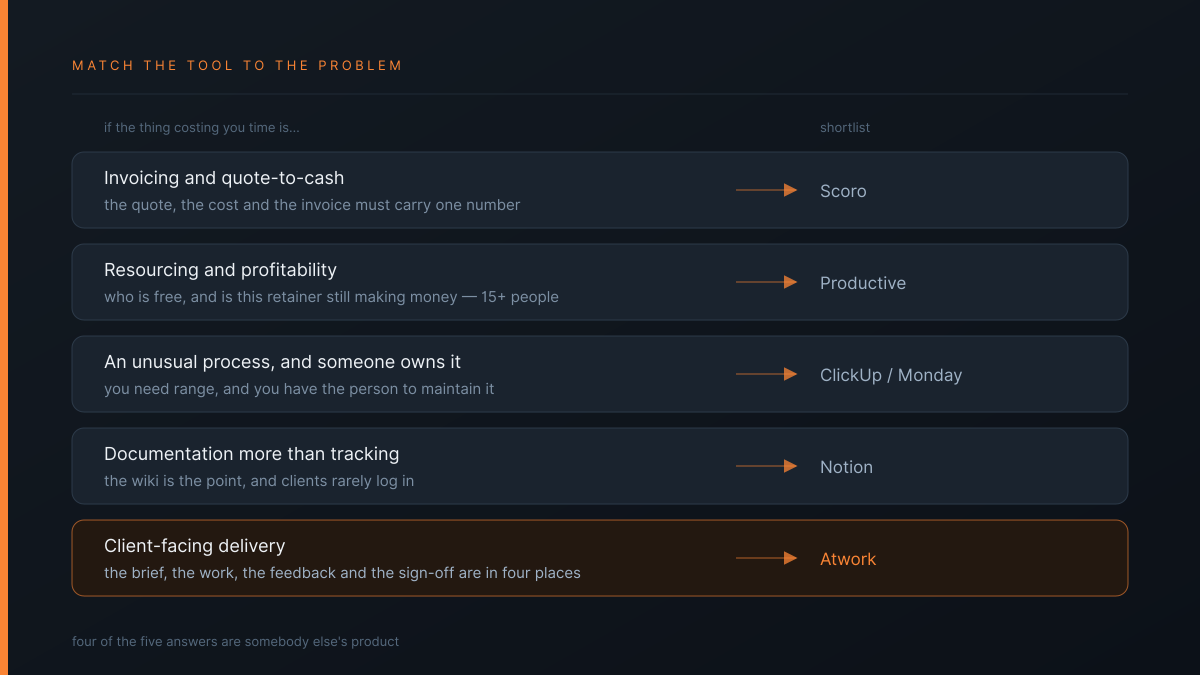
| If the thing costing you time is… | Shortlist | Read first |
|---|---|---|
| Invoicing and quote-to-cash | Scoro | When leaving it is a mistake |
| Resourcing and profitability, 15+ people | Productive | What you are actually buying |
| Billing by the hour, invoices from logged time | Teamwork | Do you bill by the hour? |
| An unusual process, and someone owns it | ClickUp or Monday | What you end up bolting on |
| Documentation more than tracking | Notion | The client access problem |
| Twenty-plus people who want calm | Basecamp | When flat pricing wins |
| The brief, work, feedback and sign-off being in four places | Atwork | Below |
Six of those seven rows are somebody else's product. That is not modesty — it is what an honest reading of the category produces.
Where does Atwork fit?
The last row. Atwork is built for agencies whose real cost is coordination: chasing approvals, rebuilding the same setup per client, and answering status questions that a client could have answered themselves.
| Atwork | The usual alternative | |
|---|---|---|
| Client contacts | Unlimited, never counted against your licence | Metered, or gated a tier up |
| Seat minimum | None — three people pay for three | Five on Scoro, three on Teamwork Basics |
| What a client sees | A view you choose, scoped to their own rows | A whole page, board or project |
| New client setup | Template installs the workspace in minutes | A blank board somebody configures |
| Where feedback lives | On the item, with the brief and the approval | Email, a proofing tool, or a DM |
The Agency CRM template is the usual entry point, and the agencies overview covers the scope.
What we do not do, plainly:
- Quote-to-cash accounting — buy Scoro.
- Resource planning with capacity modelling and utilisation reporting — buy Productive.
- Invoices built from logged time — buy Teamwork.
- A large integration catalogue — Monday's and ClickUp's are bigger, and our automation engine is less mature than Asana's.
If any of those is the reason you are shopping, one of the tools above is the better answer and you should stop reading here.
What should you do this week?
Write down three numbers before you open another comparison page:
- Staff who need a seat. The number every pricing page asks for — and check whether the plan bills a minimum above it.
- Client contacts who need to comment, not just look. The number that actually moves the bill.
- Which tier your one must-have feature sits on. Check the vendor's own pricing page, not a comparison article.
Those three settle most of this, and none of them appear in a feature grid.
Then run one client through your shortlist in parallel for thirty days. Not the biggest and not the most difficult — one where a slow week costs nobody anything. Thirty days exposes what a demo hides and costs an afternoon to walk away from.
Three numbers settle this: staff who need a seat, client contacts who need to comment, and which tier your must-have feature sits on. If the client-facing row is the one you have been reading, put one client in for thirty days. Start free