Most small agencies that run on Notion did not choose it after an evaluation. They already used it for notes, someone built a project tracker in it one weekend, and it worked. That is a good story, and for a while it is a good setup. It runs into a wall at one specific moment: the first time a client needs to see something.
Why do agencies start with Notion?
Because it is genuinely good and almost free to try. Notion puts documents and databases in the same tool, which matches how agency work actually exists: a brief is a document, a deliverable is a row, and in most other tools those live in different products. Being able to write a scope and embed the tracker underneath it is a real advantage.
It is also pleasant to use, which matters more than feature lists admit. Adoption is the thing that kills most tool rollouts, and Notion has the lowest resistance of anything in this category. People fill it in without being chased.
So the case for Notion is strong, and this article is not an argument that agencies should not use it. It is an argument about knowing where the wall is before you hit it at speed.
What breaks when a client needs access?
Notion's sharing model is built around pages. You invite a guest to a page and they can see that page.
That is exactly right for a document and exactly wrong for a database with more than one client in it.
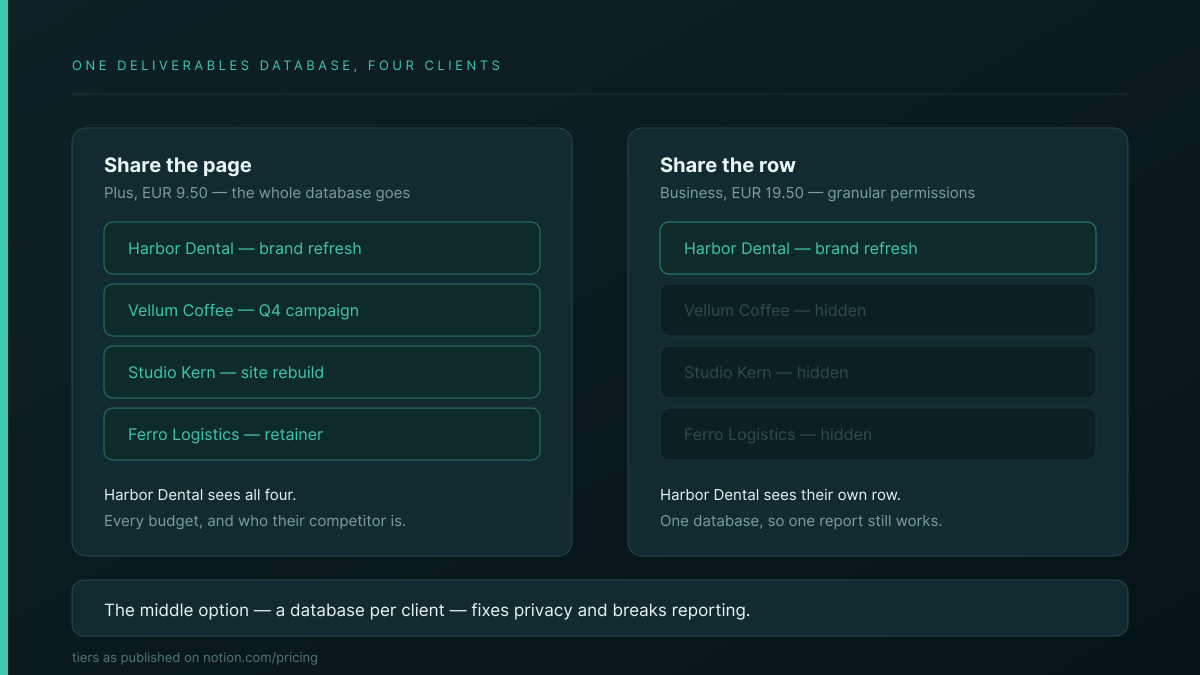
If your deliverables live in one database and you share it with a client, you have shared all of it. Every other client's rows, every budget, and the fact that you work for their competitor.
| Approach | Privacy | Reporting |
|---|---|---|
| Share the whole database | Broken — every client sees every client | One view of all work |
| A database per client | Fine | Broken — no single view exists |
| Granular database permissions | Fine | Fine — but Business tier, EUR 19.50 |
The workaround most agencies reach for is the middle row, which trades the privacy problem for a reporting one. The real fix is the third, and it costs the same per member as Monday Pro.
What else catches agencies specifically?
Three things, and the first one surprises creative shops in particular.
- File uploads on the Free plan cap at 5 MB. A single layered design export or a short video clears that without trying. If your deliverables are files, the free tier is not a starting point, it is a demo.
- Blocks are limited once you have two or more members. Fine for one person, a slow squeeze for a team that writes a lot of briefs.
- Nothing enforces structure. Notion will happily let every client space be shaped differently, because that flexibility is the product. Six months in, four people have built four conventions, and onboarding someone means teaching them all four.
That last one is the failure that arrives quietly rather than the one you can see in a pricing table.
Which plan do agencies actually need?
Not the free one, and usually not the cheap one either.
| Plan | Price | Guests | Uploads | Client sees their own rows |
|---|---|---|---|---|
| Free | €0 | 10 | 5 MB | No |
| Plus | €9.50 | Unlimited | Unlimited | No — whole databases only |
| Business | €19.50 | Unlimited | Unlimited | Yes — granular permissions |
Agencies adopt Notion partly because it is cheap, and the tier that supports client-facing work costs the same as Monday Pro.
If client visibility is the reason you are shopping, price Notion at Business or the comparison is not honest.
When should you stay on Notion?
Often. Specifically:
- Clients never log in. If you report by email and deck, the whole permissions problem evaporates and Plus is plenty.
- Your documentation matters more than your tracker. Nothing here beats Notion as a writing tool. If the wiki is the point, stay.
- You are under five people with a shared way of working. Structural drift needs a few people and a few months to become painful.
- It is working and someone owns it. A functioning Notion setup with a maintainer beats a migration for its own sake, every time.
How does Atwork compare?
The difference is what a guest gets.
| Notion | Atwork | |
|---|---|---|
| Unit of sharing | A page | A view |
| Several clients in one database | All or nothing below Business | Each sees only their own rows |
| Tier gate on scoping | Business, EUR 19.50 | None |
| Guests count against your bill | No | No |
| One report across all clients | Only if you keep one database | Always |
| Client spaces stay consistent | Nothing enforces it | Templates ship the shape |
| Writing and block editing | Better — clearly | Younger |
| Template ecosystem | Enormous | Growing |
Where Notion is better, plainly: the editor. Writing in Notion is nicer than writing in us, the block model is more expressive, and the template ecosystem is enormous. Plenty of agencies run Atwork for delivery and keep Notion for the wiki, which is a perfectly sensible arrangement.
The Agency CRM template is the usual entry point, and the agencies overview covers the rest.
If you are also weighing the agency suites, we looked at whether to leave Scoro, what Monday costs once you count the add-ons, and the full selection framework for small agencies.
Where should you start?
Answer one question: do your clients need to see anything, ever? If the honest answer is no, stop reading and stay on Plus. You do not have this problem.
If the answer is yes, price Notion Business rather than Plus, then compare properly. It also helps to settle what your client should actually see in a portal before you shop, because the honest answer is usually narrower than a whole database and it changes which tier you need. And if you want to see the difference in practice, put a single client in something view-scoped for thirty days.
Share one view with one client for thirty days. You will know within a week whether page-level sharing was the thing quietly costing you time. Start free