Monday.com works perfectly well for agencies, which is why so many use it. The question is not whether the board is good. It is what you attach to the board over the following year, what those attachments cost, and who ends up owning them. Nobody plans a stack of four tools. Agencies arrive at one, a bolt-on at a time.
What is Monday.com genuinely good at?
Flexibility and adoption. Monday's boards bend into almost any process, the interface is pleasant enough that people actually use it, and a new starter is productive on day one without training. For a general work tool that is a strong combination, and it is the reason Monday wins on trials.
It is also honest about what it is. Monday does not claim to be an agency system. It gives you columns, views, automations and integrations, and expects you to shape them into whatever you run. For teams with an unusual process that is a genuine advantage over an opinionated tool that fights you.
The difficulty for agencies is not a missing feature. It is that the board has no concept of a client, so everything client-shaped has to be added.
What does an agency end up bolting on?
Four things, near universally, and usually in this order.
| Bolt-on | Why it arrives | Who owns it afterwards |
|---|---|---|
| Client portal add-on | A client asks for visibility without a seat | Whoever set it up |
| Form tool | Briefs and inbound requests need structure | Whoever set it up |
| Lightweight CRM | New business is living in a spreadsheet | Whoever set it up |
| Proofing and approvals | Creative rounds become unmanageable | Whoever set it up |
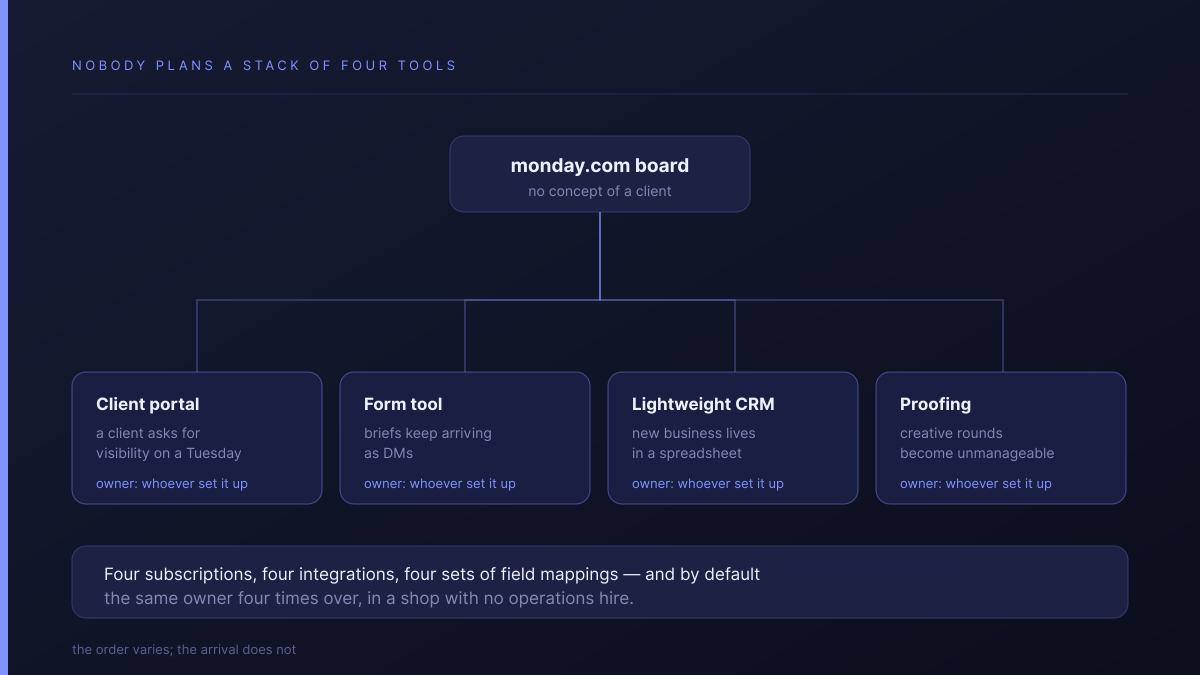
Each one is defensible on its own. Together they are four subscriptions, four integrations, four sets of field mappings, and four things that break quietly when somebody renames a column. There is rarely a decision to build a stack. There is a Tuesday where a client asks for visibility, and a portal add-on is the fastest answer. Before you buy one, it is worth deciding what your client should actually see in a portal — the requirement is usually smaller than the add-on you are about to pay for.
The part that catches agencies out is that last column. In a shop with no operations hire, it is the same person four times over, and it is not in their job description.
Which plan do agencies actually land on?
Not the cheap one. Monday's pricing tiers it like this:
| Plan | Price | What it adds | Automations |
|---|---|---|---|
| Free | €0 | Capped at 2 seats | — |
| Basic | €9 | Boards and views | — |
| Standard | €12 | Guests, time tracking, automations | 250 actions/month |
| Pro | €19 | Higher ceilings | 25,000 actions/month |
Guest access, time tracking, automations and integrations start at Standard, so agencies effectively begin at €12 rather than €9. Standard then caps automations and integrations at 250 actions per month each, and that number is the one worth doing arithmetic on before you commit.
| Clients | Automations firing | Actions per month | Against a 250 ceiling |
|---|---|---|---|
| 3 | 3 each, ~3×/week | ~108 | Comfortable |
| 6 | 3 each, ~3×/week | ~216 | Close |
| 10 | 3 each, ~3×/week | ~360 | Over — Pro at €19 |
Take three unremarkable automations per client: a submitted brief creates the project, a status change posts an update, an overdue approval nudges the account manager. That is a worked example rather than a benchmark, and your mix will differ. The point stands regardless: automation limits scale with client count, and somewhere around the seventh client Standard stops being the plan you are on.
What does the assembly actually cost?
The money is the smaller half. Four add-on subscriptions on top of €19 per seat is real but survivable. The larger cost is that the integration surface becomes somebody's unpaid second job, and that person is usually the one who can least afford it.
There is also a slower cost that only shows up at handover. When the brief lives in the form tool, the approval in the proofing tool, the conversation in the board and the invoice somewhere else, nobody can reconstruct a project's history without opening four systems. That is fine while the person who ran it is still around, and expensive the week they leave.
Budget honestly for both: the subscriptions, and about half a day a month of somebody keeping the joins working.
When is Monday still the right answer?
Often, and it is worth saying plainly:
- Your process is genuinely unusual. A tool with no opinion is an asset; an opinionated one will fight you.
- You already have the stack working. A functioning assembly that somebody owns beats a tidier system you have to migrate to.
- Most of your work is not client-facing. Three of the four bolt-ons never get installed and the argument mostly evaporates.
- You need one specific integration Monday has and others do not. Check this before anything else; it settles the question quickly.
How does Atwork compare?
Atwork ships the parts that get bolted on.
| Monday.com | Atwork | |
|---|---|---|
| Client-facing views | Portal add-on | In the product |
| Forms and intake | Form tool | In the product |
| CRM for new business | Add-on or spreadsheet | In the product |
| Approvals | Proofing tool | On the item, with the brief |
| Guest access | From Standard, €12 | Never counted against your licence |
| Automation ceiling | 250/month on Standard | No per-action cap |
| Integration marketplace | Far larger | Smaller — check before assuming |
| Board interface polish | More refined | Younger |
| Template ecosystem | Years ahead | Growing |
Where Monday is better is the bottom three rows, and they are not small. If you need a specific third-party connector, check whether we have it before assuming. We often will not.
Where we differ is the top half: the brief, the work, the client's comment and the sign-off sit on the same item, and clients join as guests on the views you pick without consuming a paid seat. The Agency CRM template is the usual entry point, and the agencies overview covers the scope.
If you are weighing the agency suites instead, we have written about whether to leave Scoro, what Productive is actually built for, and the full selection framework for small agencies.
Where should you start?
Count your bolt-ons before you count anything else. Open your billing and list every subscription attached to the board, then add the half day a month somebody spends keeping them talking to each other. That total is the real comparison figure, not the per-seat price.
If the list is one add-on you are happy with, stay where you are. If it is four and nobody owns them, run one client through something consolidated for thirty days. Start free, or check the pricing first.
Count what is already attached to your board, then run one client through something consolidated for thirty days. If the status emails stop, you have your answer. Start free