Basecamp is the odd one out in this category, and the two things that make it odd are the two things worth deciding on. It is the only serious option with a flat price rather than a per-seat one, and it gives you a fixed set of tools rather than a system you extend. Both are deliberate. Whether they suit an agency depends on how many people you have and how much your projects differ from each other.
What does Basecamp actually give you?
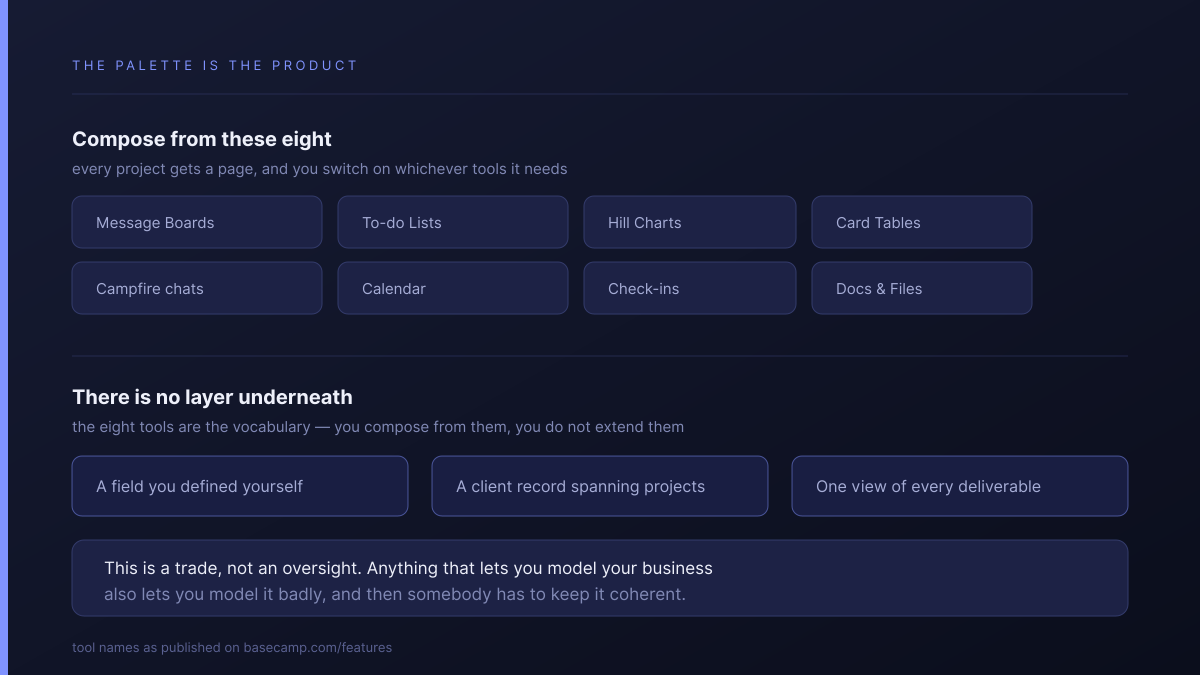
A fixed palette of eight tools, switched on per project. Basecamp's own features page names them: Message Boards, To-do Lists, Hill Charts, Card Tables, Campfire chats, Calendar, Automatic Check-ins, and Docs & Files. Every project gets a page, and you add whichever of those tools that project needs.
That is the whole model. You compose from the palette, you do not extend it. There is no layer underneath where you define your own fields, your own record types or your own reporting — the eight tools are the vocabulary, and the product is the opinion that this vocabulary is enough.
For a lot of agencies it genuinely is. The reason Basecamp keeps its users is that this constraint removes an entire class of work: nobody configures it, nobody maintains it, and it looks the same in month forty as it did in week one.
When is $299 a month cheaper than per-seat?
At twenty people. Basecamp's pricing offers Pro at $15 per user per month, and Pro Unlimited at $299 per month flat, billed annually, with unlimited users.
| Headcount | Pro at $15/user | Pro Unlimited | Cheaper |
|---|---|---|---|
| 5 | $75 | $299 | Per-seat |
| 10 | $150 | $299 | Per-seat |
| 15 | $225 | $299 | Per-seat |
| 19 | $285 | $299 | Per-seat |
| 20 | $300 | $299 | Flat |
| 25 | $375 | $299 | Flat |
| 30 | $450 | $299 | Flat |
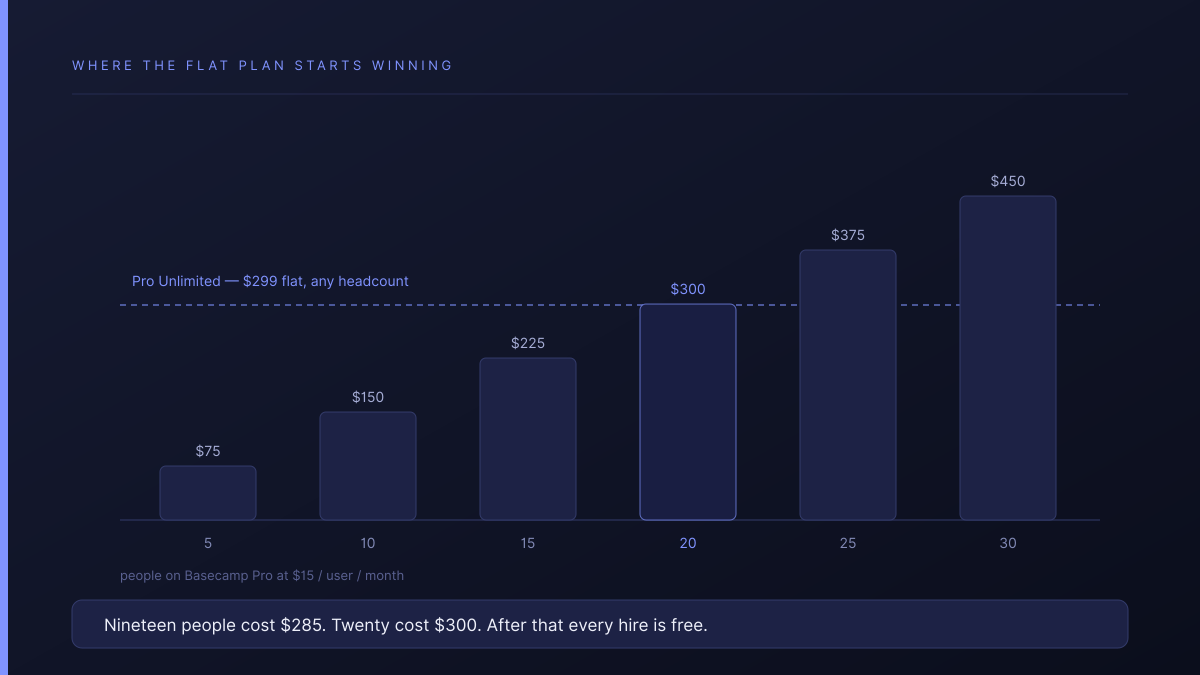
Nineteen people cost $285. Twenty cost $300. After that every hire is free.
For a 5-to-30-person agency this line runs straight through the middle of the market, and it is a genuinely different economic shape from every competitor in this comparison, all of which charge more as you grow. If you are near the line and hiring, the flat plan is the better bet even before you reach it. If you are eight people and stable, it is not close.
What does the fixed palette cost you?
The ability to model anything specific to your business. If your work has a shape the eight tools do not express — a deliverable with an approval state separate from its status, a client record that spans projects, a rate that varies by engagement — Basecamp's answer is to put it in a to-do list or a doc and hold the rest in your head.
That is fine until it is not. The point where agencies notice is usually cross-project reporting: every individual project is legible, and there is no straightforward view of all deliverables across all clients, because nothing underneath is a queryable field.
Weigh that against what the constraint buys. Every tool in this category that lets you model anything also lets you model it badly, and then requires somebody to keep it coherent. Basecamp removes that failure mode by removing the capability. Whether that is a bargain depends entirely on whether your projects are alike.
Is Basecamp's client access good enough?
Better than most of this category, and it is the part agencies most often underrate. Clients and guests are free on every plan — the pricing page puts it plainly: invite guests and clients for free, and only employees are billed. There is no guest seat allocation to track and no overflow charge, which is exactly the trap we counted in ClickUp vs Asana for agencies.
Basecamp calls the mechanism Client mode, and describes it as deciding what your clients should and should not see on a project-by-project basis. So the control is per project rather than per record. If a client should see four of the six things in their own project, that works. If several clients share a project and each should see only their own rows, that model does not express it.
For most agencies running one project per client, this is sufficient and cheaper than the alternatives.
Who should pick Basecamp?
- Twenty or more people, and growing. The flat plan is the best value in this comparison and the advantage widens with every hire.
- Projects that resemble each other. If a new engagement is genuinely the same shape as the last one, the fixed palette is a feature and not a limit.
- Nobody who wants to own the configuration. Basecamp is the strongest answer in the category to the question of who maintains it, because the answer is nobody.
- You need calm more than capability. This is a real requirement and agencies are often embarrassed to state it. Basecamp is designed around it.
If two or more of those describe you, the rest of this comparison probably does not matter much.
How does Atwork compare?
The difference is whether you can define your own structure.
| Basecamp | Atwork | |
|---|---|---|
| Pricing shape | $299 flat, unlimited users | Per seat, no minimum |
| Cheaper at 25 people | Yes — $299 vs per-seat | No |
| Client users | Free, unlimited | Free, unlimited |
| What a client sees | A project, in Client mode | A view, scoped to their own rows |
| Define your own fields | No — eight fixed tools | Yes — sheets, attributes, views |
| One view of every deliverable | No | Yes |
| Who maintains the setup | Nobody — there is nothing to maintain | A template ships the shape |
Where Basecamp is better, plainly: at twenty-plus people it is cheaper than us and every other tool here, and no per-seat product can match a flat fee at scale. It is also calmer. If your projects are alike and your priority is that nobody ever has to think about the tool, Basecamp is a better fit and the price argument is on its side.
Where we differ is the last three rows. A deliverable can carry an approval state separate from its status, a client record can span projects, and you can see every deliverable across every client in one view — the things Basecamp declines to offer. Templates address the maintenance question differently: instead of removing the capability, each account starts from a shape somebody already designed. The Agency CRM template is the usual entry point and the agencies overview covers the scope.
If you are still narrowing the field, the selection framework for small agencies covers the three numbers that decide most of this.
Where should you start?
Do the arithmetic first, because it is decisive and takes a minute. Multiply your headcount by fifteen. If the result is comfortably above $299 and you are hiring, Basecamp Pro Unlimited is very hard to beat on price and you should test whether the fixed palette holds your work.
If the result is well under $299, price is not your reason and the real question is the palette. Write down the one thing about your delivery you would want to track that is not a to-do, a message or a file. If nothing comes to mind, Basecamp will probably serve you for years. If something does, try modelling it somewhere that lets you. Start free and give one client a scoped view, or read the pricing first.
Multiply your headcount by fifteen. If it lands well under $299, price is not your reason — the question is whether the eight fixed tools hold your work. Give one client a scoped view and find out. Start free