Most comparisons of ClickUp and Asana are written for teams, and they reach a sensible verdict: ClickUp gives you more for less, Asana gives you less but breaks less often. For an agency that verdict is incomplete, because it scores the tools only on what your own staff do in them. A large part of agency work is client-facing, and on that axis the two behave very differently. The cheaper one stops being cheaper at a specific, predictable moment.
What's the real difference between ClickUp and Asana for an agency?
ClickUp is built on breadth: more views, more fields, more configuration, at a lower price. Asana is built on restraint: fewer ways to model work, but the ones it has are mature and behave predictably at scale. Choosing between them is mostly a question of whether you want range or fewer decisions.
For an agency there is a second difference that matters more, and neither vendor frames it. Both tools model an internal team working on projects. Neither has a first-class concept of a client. Your client is represented as a guest, and the guest model is where the two diverge sharply.
That is not a criticism of either product. They are team tools, used successfully by thousands of agencies. It just means the comparison you have read is missing the column you most need.
Which one is cheaper on paper?
ClickUp is, by a wide margin — until you check which tier carries the feature you came for.
| Plan | Price | What it includes |
|---|---|---|
| ClickUp Unlimited | $7 | Automations and basic forms. No dashboards. |
| ClickUp Business | $12 | Dashboards, guests with permissions |
| Asana Starter | $10.99 | Forms, dashboards, rules, unlimited guests |
| Asana Advanced | $24.99 | Portfolios, workload, advanced reporting |
Figures from ClickUp's pricing and Asana's pricing, per user per month on annual billing.
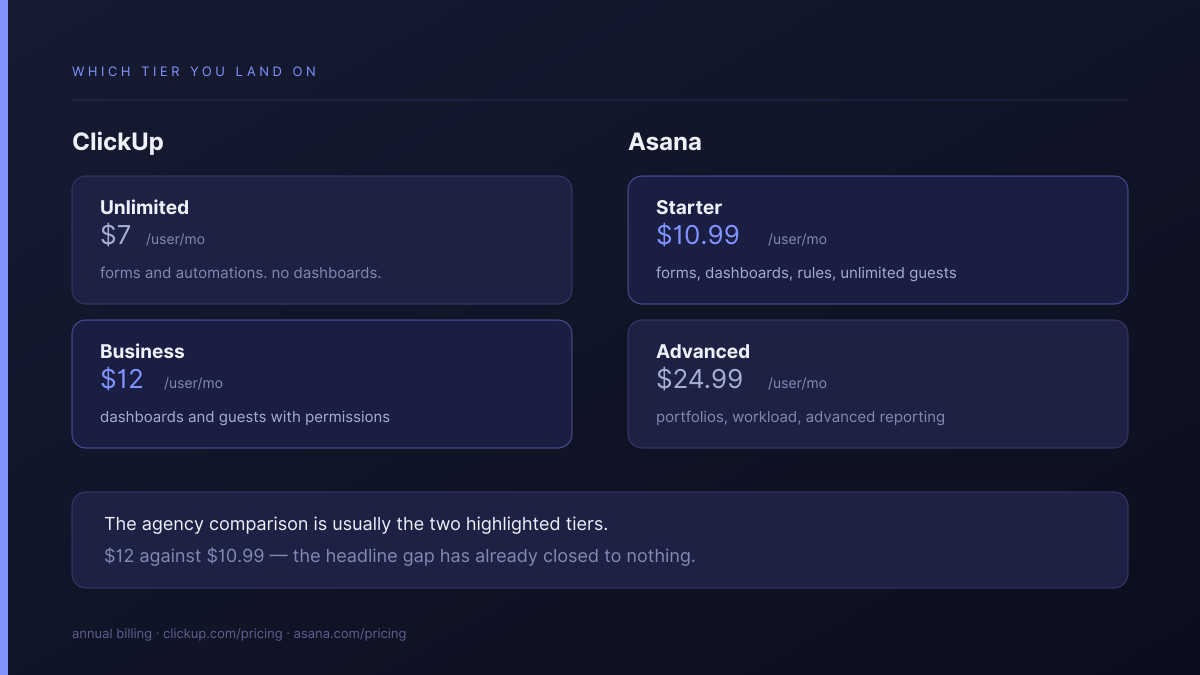
The tiers are not equivalent, and that is where the first surprise sits. Asana puts forms, dashboards, rules and custom fields all in Starter, its cheapest paid plan. ClickUp splits them: automations and basic forms appear early, but dashboards and permission-controlled guests arrive at Business.
The honest per-seat comparison for an agency is Business at $12 against Starter at $10.99. The headline gap has already closed to nothing.
When does a client contact start costing money?
The moment a client needs to do more than look. Both tools let you show work to an outsider for free, without limit. Both then treat a guest who can comment, approve or upload as something closer to a user. Asana includes those guests. ClickUp meters them, and the overflow lands on your invoice.
Asana's Starter plan includes unlimited free guests. ClickUp allocates permission-controlled guest seats by plan: a one-member workspace gets 5 on Unlimited and 10 on Business, rising by 2 and 5 respectively for each additional member. Read-only guests are unlimited and free on both.
What happens at the boundary is documented plainly. ClickUp's help centre states that you are automatically charged for a new member seat when you run out of permission-controlled guest seats and invite another one. The part worth understanding is what that seat does: adding it also raises your guest allowance, by 2 on Unlimited. So the overflow costs one paid seat per two extra client contacts, not one per contact.
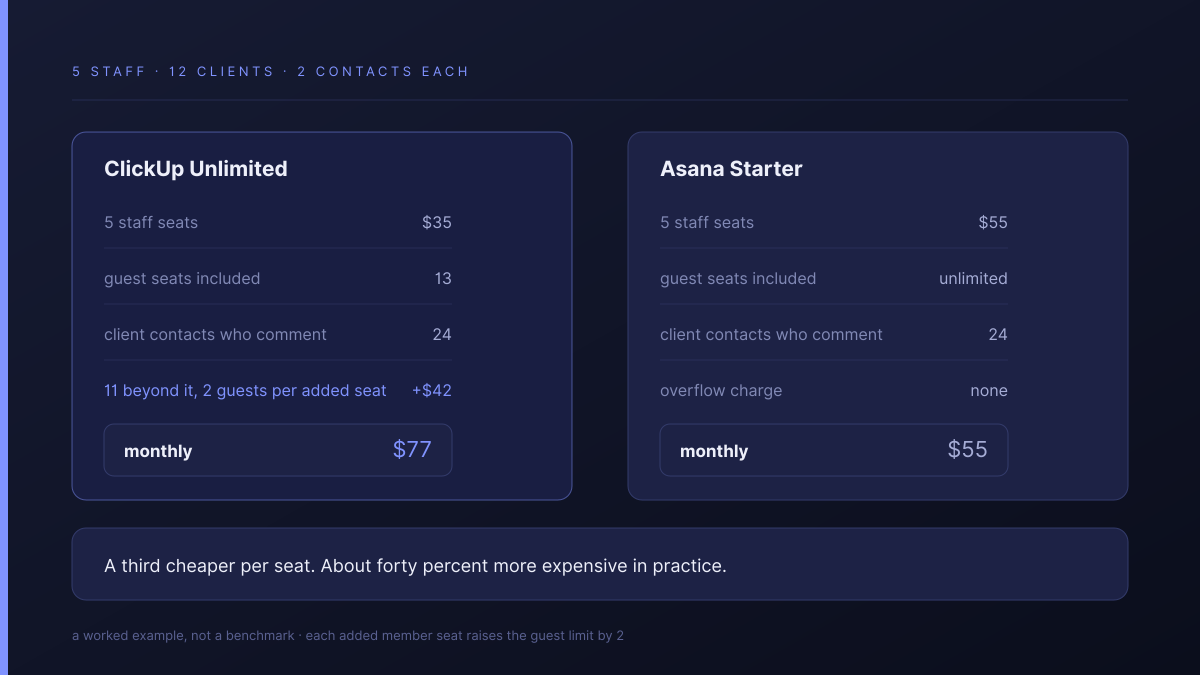
Put numbers on a five-person agency with twelve clients at two contacts each:
| ClickUp Unlimited | Asana Starter | |
|---|---|---|
| Five staff seats | $35 | $55 |
| Guest seats included | 13 | Unlimited |
| Client contacts who comment | 24 | 24 |
| Overflow | 6 added seats, +$42 | None |
| Monthly | $77 | $55 |
The tool that was a third cheaper per seat finishes about forty percent more expensive. That is a worked example, not a benchmark — your client count and how many of those contacts genuinely need to comment will move it in either direction, and the seat-raises-the-allowance rule means it moves in steps of two rather than smoothly.
What does neither tool do for client work?
Neither keeps the brief, the work and the approval in the same place. Both are excellent at tracking tasks your team owns. Neither has an opinion about the artefacts that surround client work: the signed-off scope, the round of feedback, the version the client actually approved, and the record of who said yes.
So agencies build the missing half elsewhere. Briefs arrive in a form tool or an inbox. Feedback happens in email or a proofing app. Approvals live in whichever thread the account manager remembers. This is the same assembly problem we described in what agencies end up bolting on to Monday.com, and it costs the same way: not in subscriptions, but at handover, when nobody can reconstruct a project without opening four systems.
If your clients never log in and you report by email and deck, none of this applies and you should optimise purely for what your team likes using.
Which should you pick if you're staying put?
Both are good choices for the right shop. The deciding factors are unglamorous:
- Pick ClickUp if your process is unusual and somebody owns the setup. Its configurability is genuinely the widest at this price, and no other tool in the bracket gives you as many ways to model work. It rewards an owner and punishes their absence.
- Pick Asana if you would rather have fewer decisions and no surprises. Its rules engine and reliability are more mature than most of the category, ours included, and unlimited guests on the entry tier removes the whole guest-seat question.
- Pick either if you already have one working. A configured tool with a maintainer beats a better tool you have to migrate to, every time.
- Count your permission-controlled guests first. If clients only ever look, ClickUp's metering never bites and the price advantage is real.
How does Atwork compare?
The difference is what a client costs and what they see.
| ClickUp | Asana | Atwork | |
|---|---|---|---|
| Client contacts who comment | Metered, overflow billed as seats | Unlimited, free | Unlimited, never counted |
| Gated behind a tier | Business, $12 | No | No |
| What a client sees | A list or board you share | A project you share | A view, scoped to their own rows |
| New client setup | Configure a space | Configure a project | Template installs the workspace |
| Where the approval lives | Wherever you put it | Wherever you put it | On the item, with the brief |
Because access is scoped to a view rather than a whole board, several clients can share one sheet and each see only their own rows — one source of truth, one report across every client. The Agency CRM template is the usual entry point, and the agencies overview covers the scope.
Where both are better, plainly: ClickUp's integration marketplace and Asana's automation engine are ahead of ours, and both have far more mature mobile apps. If you depend on a specific connector, check we have it before assuming.
If you are weighing other options, we have written about the client access problem in Notion, whether it is worth leaving Scoro, and the selection framework for small agencies.
Where should you start?
Before you compare anything, count two numbers: how many client contacts need to comment or approve rather than just look, and which tier your must-have features actually sit on. Those two decide the real price, and neither appears in a comparison table.
Then take one client and run them in parallel for thirty days. Give them access, and watch whether the status emails stop. Thirty days is long enough to expose whatever a demo hid and short enough that walking away costs an afternoon.
Count the client contacts who need to comment rather than just look. Then give one client a scoped view for thirty days and watch what happens to the bill. Start free