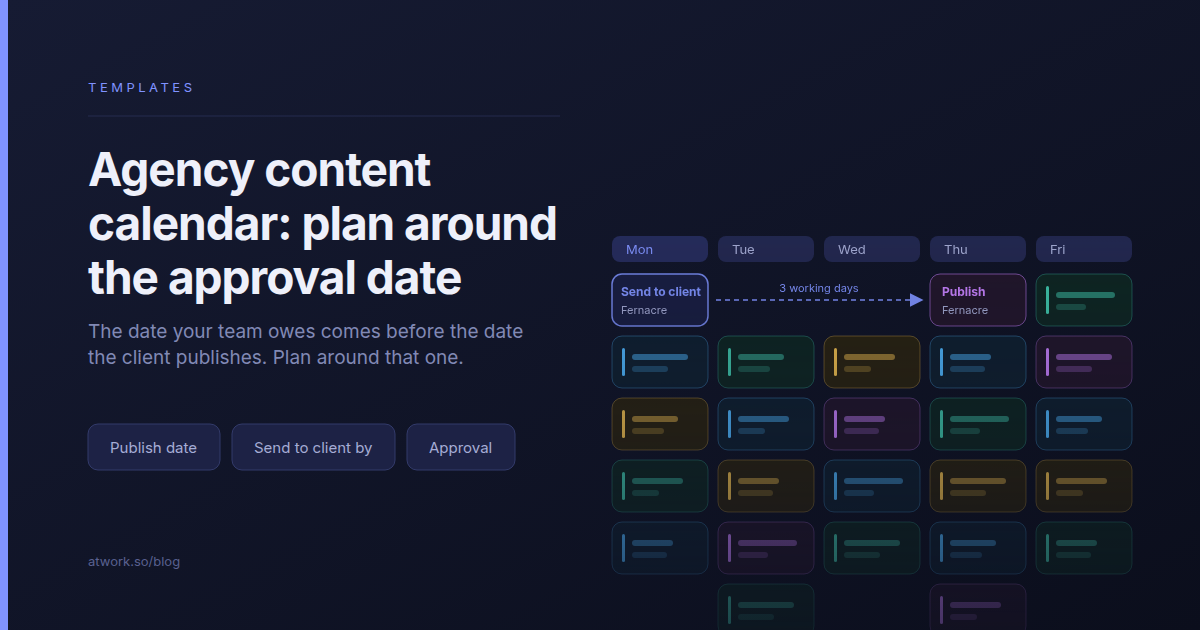
On the publish-date calendar, Thursday's post for a physio clinic looks fine: drafted, reviewed, ready to send. But the clinic has a clinician check every health claim, which takes three working days, so the draft had to reach them on Monday. Nobody sent it, and nothing on the calendar said so.
That gap is what this article is about. An agency content calendar template has to plan around two dates per piece, not one: the day it publishes, and the earlier day it must reach the client's approver. The worked example throughout is Atwork's Agency Content Calendar template, which carries both.
What should an agency content calendar template contain?
One calendar for every client's content, where each piece is a row tied to a client, a channel and a campaign. Each row carries two dates, the publish date and the send-to-client date, plus an approval state kept separate from production status and one owner who is responsible for getting it to the client.
| Column | What it holds | Why an agency needs it |
|---|---|---|
| Client | The account the piece is for | One calendar serves every retainer, and any view can be narrowed to one client |
| Channel | LinkedIn, Instagram, the client's blog, the newsletter | Formats and lead times differ by channel |
| Publish date | The day it goes live | The commitment the client sees |
| Send to client by | The day the draft must reach the approver | The date your team can still miss |
| Client approval | Not sent, With client, Changes requested, Approved | Finished on your side is not approved on theirs |
| Owner | The person who sends it | Someone has to own the send date, not only the draft |
| Campaign | The launch or theme the piece belongs to | Pieces that move together stay together |
Templates built for in-house teams have neither the client column nor the second date, so with five clients in them they show output, not obligations.
Why is the publish date the wrong date to manage?
The publish date is a promise to the client, and by the time it is close, the date that decided it has already passed. The date you can still miss is earlier: the day the draft has to reach the approver. The gap between the two is that client's review turnaround, and it is different for every client.
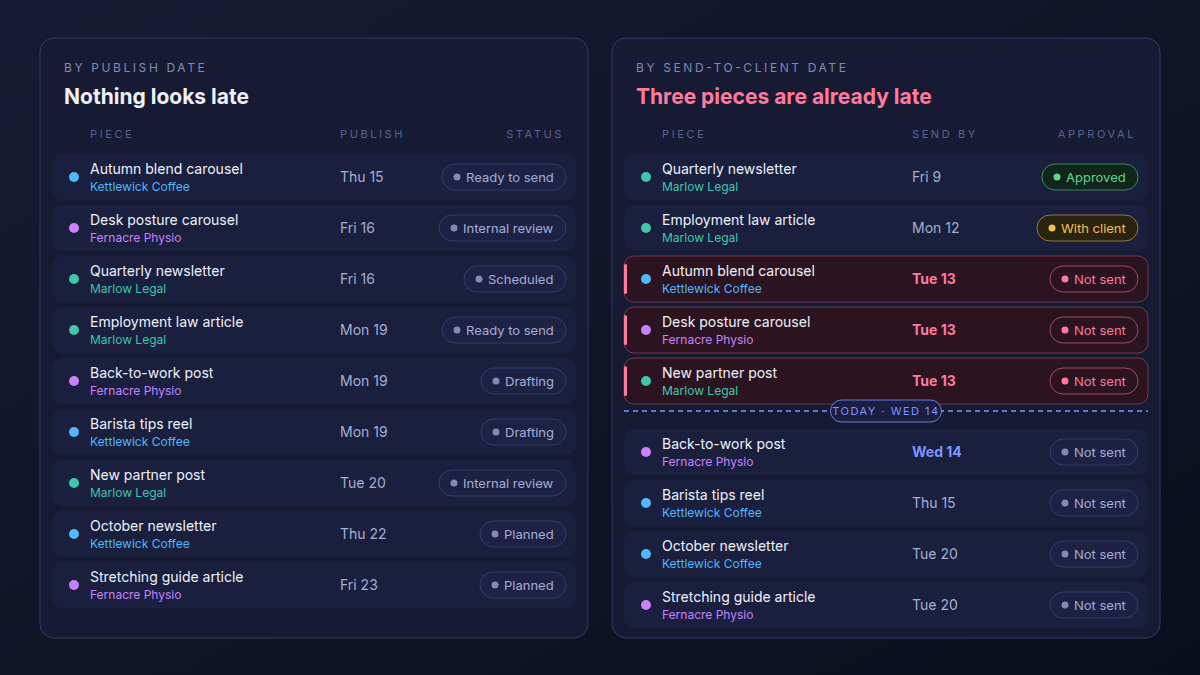
On the left, nothing publishes before tomorrow and nothing is red. On the right, three of the same nine pieces were due at the client yesterday, and one of them publishes tomorrow. Whatever happens to that piece now, a rushed review or a slipped date, was decided on Tuesday.
Sorted by publish date, a content calendar tells you what goes out. Sorted by send-to-client date, it tells you what is already late.
Most calendar guides assume one review window for every client, often 48 hours. That breaks with the second client, because review time belongs to the client, not to the calendar.
How do you set a send-to-client date for each client?
Agree each client's review turnaround at kickoff, in working days, and write it on the client's record. Then set every piece's send-to-client date to its publish date minus that turnaround, with internal review the working day before. The client's own process sets the date, so the date fits that client.
- Ask at kickoff. How many working days does sign-off take, and who signs? A founder may answer the same day; legal or clinical review can take a week.
- Write it on the client record, next to the named approver.
- Count back from the publish date by that many working days. That is the send-to-client date.
- Put internal review one working day earlier, so what reaches the client has been checked.
- Make the send date the owner's due date, the one on their task list.
An example: two pieces publish on the same Thursday. Fernacre Physio has a clinician check every health claim, three working days, so its draft goes out on Monday after internal review on Friday. Marlow Legal needs a partner and then legal review, five working days, so its draft goes out the Thursday before. Same publish date, drafts due four days apart.
When a send date slips, move the publish date in the open rather than quietly shrinking the client's review window. A squeezed review is how a clinician misses a claim.
Should every client get their own calendar?
No. Keep one calendar with the client as a field, and give each client a filtered view for anything they see. Separate spreadsheets per client drift apart in stage names and columns, and they hide the week when four clients' approvals land on the same copywriter.
Some guides recommend a calendar per client, others a master calendar with filtered client views. The second is right; the addition is which date you sort it by. Sorted by send-to-client date, the top of the master list is every piece, for every client, that has to leave the agency this week. Filter it by owner and you see one copywriter's real week.
The case for one shared structure is made in what an agency project management template should contain: the client belongs in a field on the work, not in a folder around it.
How do you keep client approval from becoming the bottleneck?
Batch it. Send one approval request per client per week, covering every piece due that week, to one named approver, and keep the approval state on the piece rather than in an email thread. One request gets a faster answer than five, and nobody searches an inbox to find out where a post stands.
- One approver. A named person whose yes is final, agreed at kickoff. Feedback from anyone else is input for them, not a decision.
- One batch a week. Every piece with a send-to-client date that week goes in the same request, on the same day.
- Feedback on the row. Copy the client's comments onto the piece, so whoever opens it next sees what changed and why.
- Approved is not scheduled. Approved means the client said yes. The piece still has to be loaded into its channel, and production status says whether it has been.
Why rounds multiply without a named approver, and how many to put in the contract, is covered in client approvals and revision rounds.
How many pieces did the retainer actually sell?
Write the monthly piece count from the retainer on the client record, then count the pieces scheduled for that client each month against it. Content over-servicing arrives one extra post at a time, a reactive story here and a second carousel for a launch there, and the calendar is the only place it shows before the month closes.
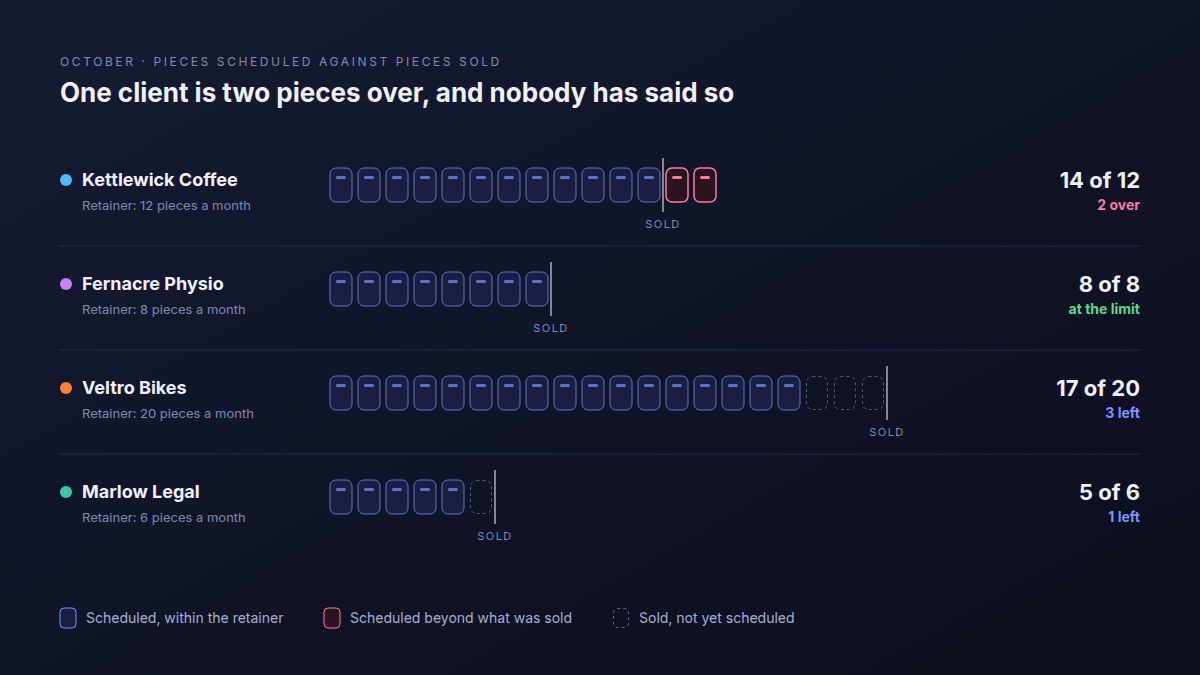
Each extra piece is a reasonable yes on its own. Thirteen posts in a twelve-post month is the scope conversation nobody has, repeated monthly until it becomes the retainer. Counting is enough to start: when a request would take a client over their number, the account lead decides on purpose to swap it, bill it, or give it away.
How to tell if a retainer is actually profitable has the arithmetic for what those extra pieces cost.
What does this look like in Atwork?
Install the Agency Content Calendar template and you get a Content sheet where each piece links to a client and a channel and carries both dates, a Clients sheet with each approver, review turnaround and pieces per month, two dashboards, and a getting-started guide with sixteen sample pieces across four clients.
- Two dates on every piece. Content is a task sheet, so each piece lands in its owner's My Tasks on the send date. You set that date; nothing calculates it.
- Production and approval apart. Status runs from Planned to Published; Client approval runs Not sent, With client, Changes requested, Approved, with a Revision round count beside it.
- Two lists, two calendars. The Due to send view sorts by send-to-client date, By publish date by publish date. Add a calendar view on each date, coloured by Client approval.
- The late list. Filter Due to send to send dates before today with approval still Not sent. It should be empty every morning.
- Retainer counts. Pieces per month sits on each client. Filter Content to one client and this month's publish dates and compare the two numbers.
If a piece runs on a LinkedIn profile connected to your workspace, a workflow can publish it when its row reaches the right status; see publishing to LinkedIn from Atwork. Client company pages and other networks still go through your scheduler.
| Dimension | A spreadsheet | A social scheduler | Atwork |
|---|---|---|---|
| Every client in one view | One tab per client, or filters you maintain by hand | Usually organised by brand or workspace | One Content sheet with a Client field, filtered per client |
| Per-client review turnaround | A column you keep up to date yourself | Approval is a step on each post; the lead time is up to you | Stored on the client record; you set the send date from it |
| Approval state | A column nobody enforces | Client approval flows with post previews built in | Client approval as its own field, apart from production status |
| Pieces sold against scheduled | Formulas you build and maintain | Not what schedulers are for | Pieces per month on the client; count by filter |
| Publishing to networks | None | Multi-network publishing, previews and best-time suggestions | LinkedIn profiles through a workflow |
| Cost and learning curve | Free, and fine for one or two clients | A separate subscription and another login | Paid plans for dashboards and workflows; an afternoon to set up |
Frequently asked questions
Is there a free agency content calendar template?
Yes. A spreadsheet with the seven columns above is a free agency content calendar template, and it holds up for one or two clients. The Atwork template carries no charge of its own and needs no add-on module; its dashboards, and workflows such as LinkedIn publishing, need a paid plan. Pricing lists what each plan includes.
How far ahead should an agency plan a content calendar?
Far enough that the earliest send-to-client date is still ahead of you. Plan the coming month in full and the one after in outline, and set the horizon by your slowest client: with a five-working-day legal review, a piece has to be drafted more than a week before it runs.
What is the difference between a content calendar and an editorial calendar?
An editorial calendar plans themes and stories over months: what you will say, and roughly when. A content calendar plans individual pieces: this post, on this channel, on this date, with this owner. For client work the content calendar is the one with deadlines, because every row carries an approval and a send date.
Can a client approve content without joining our workspace?
Yes. In Atwork a client sees their work through a published portal, not a seat in your workspace, and whether they can comment or move a status there is decided when you publish that surface. Otherwise the account lead sets Client approval when the answer comes back. Client portals for agencies covers what to show a client.
Where should you start?
Install the Agency Content Calendar template, replace the sample clients with your three busiest, and give each one their real review turnaround. Then open Due to send for next week: the top of that list is what your team owes on Monday, whatever the publish dates say. The rest of the agency setup is on Atwork for agencies.
Put your three busiest clients in and sort next week by the date each piece must reach them. It takes an afternoon, and Monday stops being a surprise. Start free