
Your agency already pays for ClickUp or Notion, and in 2026 the AI comes inside the plan. So ClickUp Brain vs Notion AI is no longer about which add-on to buy, and writing quality is too close to decide it. What decides it is what you will let the AI do to client work: what it can see, when it must ask, what it may spend, what it knows about your agency, and how you find what it changed. Below, ClickUp Brain and Notion AI meet Atwork's agents on all five, plus a short look at monday AI. Prices were read on each vendor's pricing page on 30 October 2026, in USD, billed yearly.
Which is better for an agency, ClickUp Brain or Notion AI?
It depends where your delivery lives. If projects run as tasks, statuses and timesheets, ClickUp Brain reaches more of that work than Notion AI can. If they run as documents, such as briefs, SOWs, meeting notes and a client wiki, Notion AI is the better fit.
| Tool | Strongest at | AI on the mid-tier plan | Billed as |
|---|---|---|---|
| ClickUp Brain | Task-heavy delivery | Brain² with premium models and 1,500 pooled credits per user | Seat plus pooled credits |
| Notion AI | Briefs, SOWs, wikis and meeting notes | Notion Agent, AI Meeting Notes and Enterprise Search | Seat plus credits per member |
| Atwork | Client work under one AI policy | Dana, custom agents, approvals and spend caps | Seat plus a dollar AI budget |
If you are weighing a move off ClickUp altogether, our ClickUp alternatives guide covers the rest of the product.
What does each AI cost a 10-person agency in 2026?
On the mid-tier plans billed yearly, ten seats cost $170 a month on ClickUp Business, $200 on Notion Business and $100 on Atwork Pro, before any extra AI usage. Each then meters AI differently.
- ClickUp Business: 10 × $17 = $170 a month. Each user adds 1,500 credits to a shared pool, 15,000 for the team, with no rollover.
- Notion Business: 10 × $20 = $200 a month. Each member gets 1,500 Standard and 500 Select credits, not pooled. Custom Agents cost $10 per 1,000 Notion credits after a free trial.
- Atwork Pro: 10 × $10 = $100 a month, with a $5 AI budget per seat, so $50 for the team.
| Dimension | ClickUp Brain | Notion AI | Atwork |
|---|---|---|---|
| Mid-tier seat, billed yearly | $17 (Business) | $20 (Business) | $10 (Pro) |
| Included AI each month | 1,500 pooled credits per user, unlimited standard models | 1,500 Standard and 500 Select credits per member | $5 per seat, shared by the organisation |
| Extra usage | $10 per 10,000 credits | $10 per 1,000 Notion credits | Top-up from $1, never expires |
| Cap per agent | Not listed on the pricing page | Spending cap per Custom Agent | Monthly cap per agent |
| Limit per member | Not listed on the pricing page | Notion credit limit per member | Monthly limit per member |
ClickUp's included allowance is the most generous, and Notion Business matches Atwork on caps for agents. Atwork costs least per seat, and its budget and caps are set in dollars rather than credits. For a fuller model of agency AI spend, see what AI actually costs an agency per month.
What can each AI see, and when does it ask before changing client work?
An Atwork agent sees only what the person chatting with it can access, and its Data access setting can narrow that to chosen spaces and sheets. Notion's Custom Agents use their own permissions, and ClickUp's Super Agents can inherit access or be given it. On asking first in chat, an Atwork owner sets one rule for every agent, while in Notion each person picks a mode per chat.
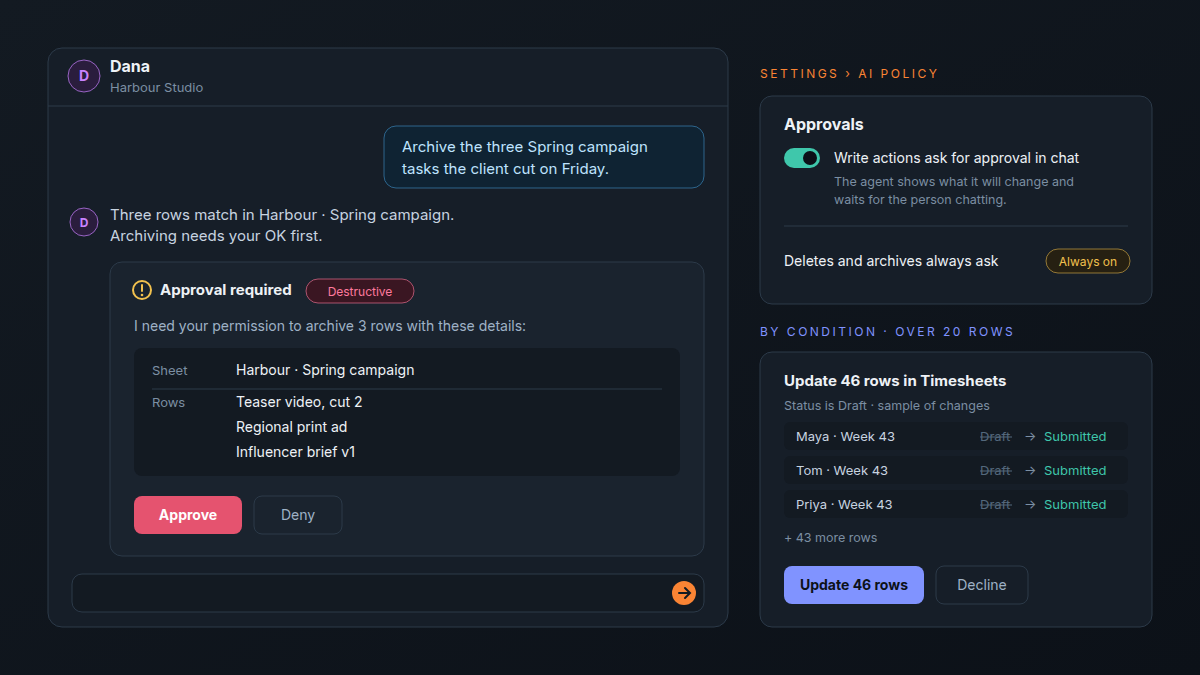
In Atwork, an owner switches on Write actions ask for approval in chat in Settings › AI policy. The agent then shows what it will change and waits for the person chatting. Deletes and archives always ask, whatever the setting. When an agent updates rows that match a condition and more than 20 match, you see a sample of the changes and a count before anything is written. What happens when an AI agent wants to change 300 rows walks through that preview and the limits on listed rows.
Notion's help centre gives Notion Agent three approval modes, picked per chat: Always ask before every change or use of a connected app, Review for me (the default), which asks when the agent flags an action as potentially unsafe, and Skip all approvals. Admins can switch off Skip all approvals for the workspace, and each Custom Agent has its own approval settings. So Notion gives each person more say, while an Atwork owner's rule applies to every member's chats with every agent. ClickUp's Super Agents page focuses on permissions and an audit trail for every action, and its pricing page lists AI governance as coming soon, included on Enterprise and MAX.
Who controls what the AI spends?
In Atwork, an owner sets it in one place on Pro: a monthly cap for each agent, a monthly limit for each member, and the model classes agents may use. Notion Business is the closest match, with a spending cap per Custom Agent and a credit limit per member. ClickUp's pricing page pools credits across the workspace and lists neither.
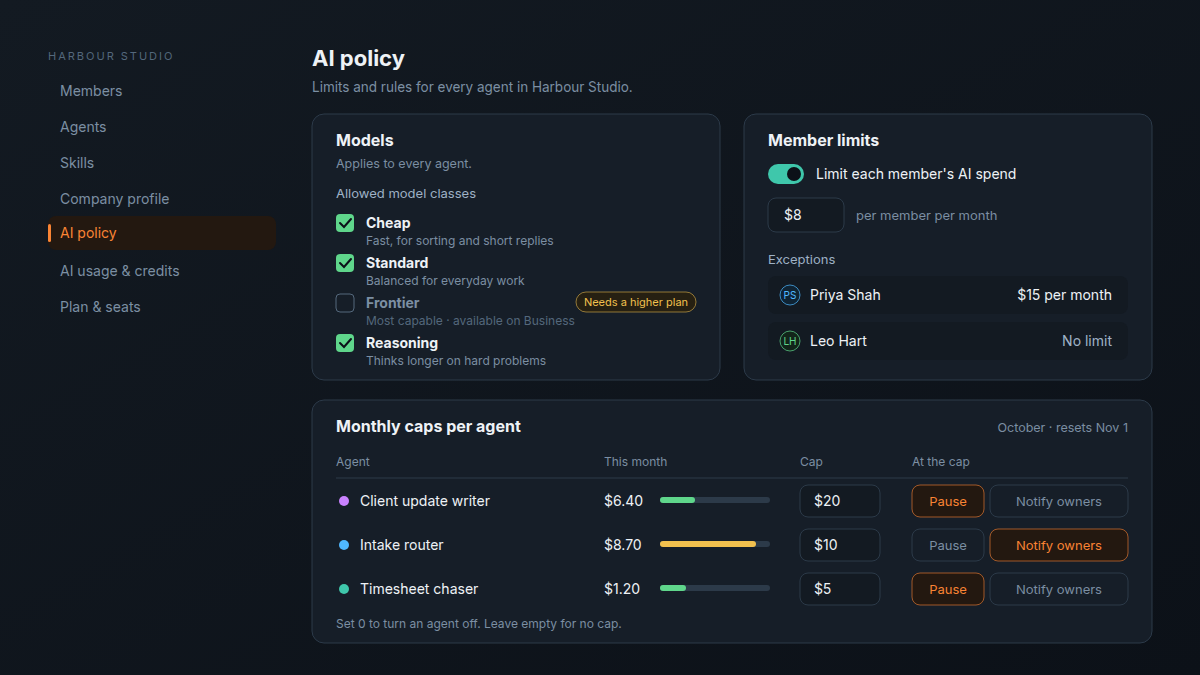
- Monthly caps per agent. Give the client update writer $20 and the intake router $10. At the cap, choose Pause, which stops the agent until the cap resets, or Notify owners, which keeps it running on top-up credit and sends owners one email. Set 0 to turn an agent off.
- Member limits. One amount per member per month, with exceptions for the people who need more. Members see what is left in the avatar menu and can ask an owner for more.
- Models. Tick the classes agents may pick from: Cheap, Standard, Frontier and Reasoning. Frontier is on Business.
Notion deserves credit here: admins also choose whether the workspace keeps using Notion credits after the AI limit. Atwork's controls sit in one AI policy beside the approval rules, at half the seat price. More on the agents themselves is on the Atwork agents page.
Does the AI know your agency, or start from a blank prompt?
Atwork agents read a Company profile before every reply. It is drafted from your website, and you accept or edit each section. Each member also keeps a private AI profile that owners and teammates cannot see. Skills give an agent instructions for a kind of work, and you can test a skill first, with write actions only previewed.
ClickUp goes further on memory, at a price: Context Engine & Auto-Memory and Custom Skills are on its MAX plan, at $100 per user a month. Notion Agent works inside your Notion workspace, and Business adds Enterprise Search, still in beta. If your agency's knowledge already lives in Notion pages, that is a real head start.
How do you find what the AI changed?
Open the row. Every Atwork sheet can show a Source field that says where each row came from: an agent, a workflow, a form, a CSV import, the portal, a connected assistant such as Claude, or a person. You can filter and group by it, and item history shows each later change and what made it.
ClickUp's pricing page puts audit trails on Enterprise and MAX, and Notion's puts the audit log on Enterprise.
What about monday AI?
monday meters its AI on credits, with a monthly allowance that grows with the plan: 1,000 credits on Basic, 2,000 on Standard and 3,000 on Pro. Sidekick, the Vibe app builder and a limited set of AI agents start on Basic, which monday's agents page prices from $9 a seat a month. AI columns and an AI meeting notetaker come on Standard, and an AI workflow builder on Pro. The pricing page does not say whether the credits are per seat or per account, so ask before budgeting for ten people.
Where monday stands out is the meter itself. Its homepage describes an AI cost center that tracks usage and spend per team, with limits and alerts, and a simulation mode for checking an agent's actions before you switch it on. The pricing page does not name the plan for either. If your agency already runs on monday, read Monday vs ClickUp for agencies before you switch on its agents.
Where does each one win?
ClickUp Brain wins on included usage, Notion AI on documents, monday AI on tracking spend by team, and Atwork on control per dollar.
The bill is now a seat plus a meter. The agency question is who holds the meter, and who gets asked before the AI touches a client's work.
- ClickUp Brain wins on included usage. The largest pooled allowance, unlimited standard models subject to fair use, and the deepest memory on MAX.
- Notion AI wins on documents. Agent, meeting notes and search in Business, plus caps for Custom Agents. For a documents-first agency it is the better fit, as our piece on Notion for agencies explains.
- monday AI wins on tracking spend by team. An AI cost center with limits and alerts per team, plus a simulation mode before an agent goes live.
- Atwork wins on control per dollar. Approvals, caps, member limits and a Source on every row, on Pro at $10 a seat.
- Where Atwork is behind. No AI meeting notetaker, no image generation and a smaller integration catalogue. It is the younger product.
Frequently asked questions
Is ClickUp Brain still a paid add-on?
Not on ClickUp's pricing page, read on 30 October 2026: every plan ships with Brain² and a monthly credit allowance. Business adds premium models and 1,500 pooled credits per user a month, and Core gets a Brain² trial plus 1,000 pooled credits per user a month. Older roundups still list Brain as an add-on from $9 per user, so budget from the pricing page.
Is Notion AI included in the Business plan?
Yes. Business includes Notion Agent, AI Meeting Notes and Enterprise Search in beta, with 1,500 Standard and 500 Select credits per member each month. Free and Plus get a trial of Notion AI. Custom Agents are free to try, then $10 per 1,000 monthly Notion credits.
Which AI tool lets you cap spend per agent or per member?
Atwork and Notion both do. Atwork sets a monthly cap per agent and a monthly limit per member in Settings › AI policy on Pro. Notion Business lets admins cap each Custom Agent's spend and limit the Notion credits a member's agents use. ClickUp's pricing page pools credits per workspace and lists no such cap.
Does Atwork charge extra for AI?
No. Every plan includes a monthly AI budget: $1 per organisation on Free, $5 per seat on Pro and $15 per seat on Business. Top-ups are optional, start at $1 and never expire. They are used only after the monthly budget runs out.
Can my team keep using ChatGPT or Claude with Atwork?
Yes. You can connect ChatGPT or Claude to your Atwork workspace, so people keep the assistant they know while the work lands in your sheets. Our guide to connecting your agency workspace to ChatGPT or Claude shows the setup, and rows they add name the assistant in their Source field.
Where should you start?
List the three things you would let an AI do to client work this week, such as drafting the Friday update, sorting new requests or chasing timesheets. Then check which plan of your current tool lets you cap and approve each one. If the answer is Enterprise, compare it with Atwork's pricing.
Cap one agent at $10, let it draft one client's Friday update, and read what it cost. Start free