Monday and ClickUp are the two tools most agencies end up choosing between, and most comparisons of them are a feature checklist that concludes they are broadly similar. They are. Both will model your process, both are priced within a few euros of each other, and both will feel excellent in the first month. The difference that actually costs money shows up later, in what each one meters once your configuration starts doing real work.
What is the real difference between Monday and ClickUp?
Monday is more opinionated and easier to keep tidy; ClickUp is more configurable and harder to keep consistent. That is the whole trade. Monday gives you fewer ways to model the same thing, which is a limitation when you want precision and a gift when five people are setting up boards without talking to each other.
Everything else — views, fields, integrations, dashboards — is close enough that it should not decide your purchase.
What does each cost an agency?
Within a couple of euros of each other at the tier an agency actually lands on.
| Plan level | Monday | ClickUp |
|---|---|---|
| Entry paid | €9 Basic | $7 Unlimited |
| The one you end up on | €12 Standard | $12 Business |
| The tier above | €19 Pro | Enterprise, on request |
Monday's figures are from monday.com/pricing on annual billing in euros; ClickUp's from clickup.com/pricing on annual billing in dollars. The currencies differ, so read the shape rather than the exact gap.
The tier you land on is not the entry one in either case. On Monday, automations, integrations and the timeline view all begin at Standard. On ClickUp, dashboards begin at Business. In both products the thing that makes the tool worth having sits one step above the price you compared.
What happens when your automations start doing real work?
You hit a monthly action cap, and the two products have wildly different ideas about where it should sit. This is the single biggest practical difference between them and it is invisible during a trial, because a trial never runs a month of real volume.
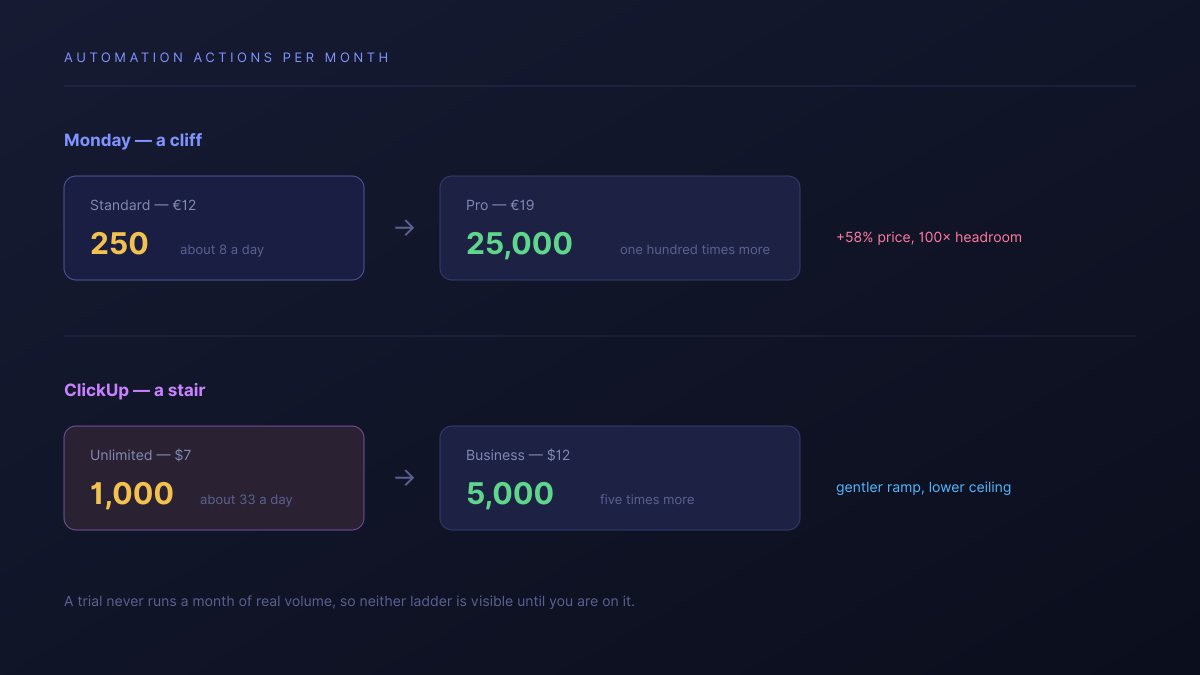
- Monday Standard allows 250 automation actions a month. That is roughly eight a day across your whole account, and integrations draw from the same allowance.
- Monday Pro raises it to 25,000. A hundredfold jump, for a move from €12 to €19 a seat.
- ClickUp Unlimited allows 1,000 a month, rising to 5,000 on Business.
Monday's middle tier is not really an automation tier. It is an introduction to automation, and the next step is a cliff rather than a stair.
The practical consequence: on Monday you will make one large decision fairly early, and once you make it you have effectively unlimited headroom. On ClickUp you get a gentler ramp, but the ceiling at the tier most agencies sit on is lower, so a heavily automated shop can brush against it repeatedly.
Neither is wrong. They suit different appetites — Monday asks you to commit, ClickUp lets you drift.
Which one is easier to keep consistent?
Monday, clearly, and it matters more than the feature comparison suggests. Its narrower range means two people setting up two client boards produce something recognisably similar. ClickUp's depth means they produce two different models of the same idea, and six months later nothing can be compared across them without a person reconciling field names first.
We went into that failure mode in ClickUp alternatives. The short version is that configurability is a standing cost, paid by whoever owns the setup, and Monday charges less of it.
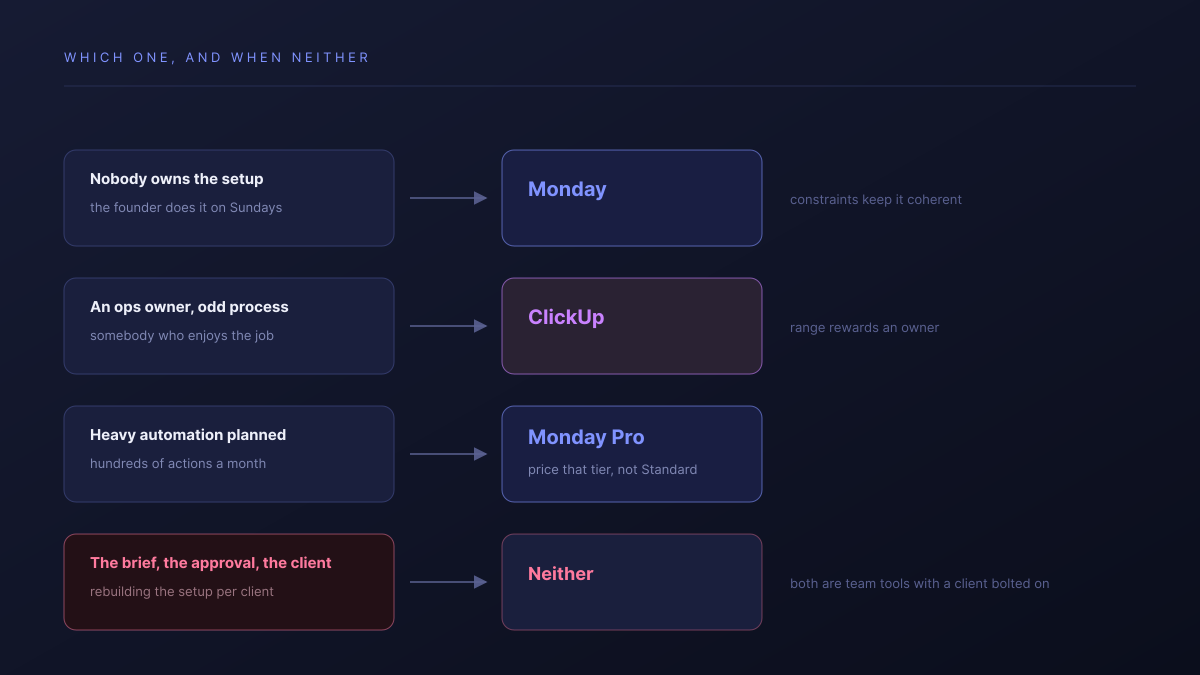
If you have a genuine operations owner, ClickUp's range rewards them. If your ops owner is the founder doing it on Sundays, Monday's constraints are doing you a favour.
What does each do about clients?
Both let clients look for free and both start charging when clients act, but they draw the line in different places. Monday includes unlimited free viewers from its Basic plan, so read-only client access is genuinely free. ClickUp also makes read-only guests unlimited and free, then meters permission-controlled guests — the ones who can comment, approve or upload — by plan.
If your clients only ever read, this section does not decide anything. If they need to act, the arithmetic matters, and we worked it through properly in ClickUp vs Asana for agencies.
Which should an agency pick?
The honest routing, which is mostly not about features:
- Pick Monday if nobody owns the configuration. Its constraints keep the setup coherent without a person policing it, and that is worth more than range you cannot maintain.
- Pick Monday if you know you will automate heavily. Standard's 250 is a starter allowance, but Pro's headroom effectively removes the question for good.
- Pick ClickUp if you have an ops owner and an unusual process. Nothing at this price models a bespoke workflow as precisely.
- Pick ClickUp if you want to grow into automation gradually rather than making the decision up front.
- Pick neither if the actual problem is client-facing — the brief, the approval, rebuilding the same setup per client. Both of these are team tools with a client bolted on.
| Monday | ClickUp | Atwork | |
|---|---|---|---|
| Automation headroom | 250/mo, then 25,000 | 1,000/mo, then 5,000 | Not metered per run |
| Keeping setups consistent | Constraints do it | A person does it | The template does it |
| New client setup | A new board | A configured space | Template installs the workspace |
| What a client sees | A board you share | A shared view, guests metered | A view, scoped to their own rows |
The row that matters for this comparison is the last one. Both of these products model a team's work and then add client access to it; the alternative is a product where the client is a field on the work itself. The Agency CRM template is the usual entry point, and the agencies overview covers the scope.
Where both are better than us, plainly: their integration catalogues are much larger than ours, and both have more mature mobile apps. ClickUp's range of views and field types is wider than ours too. If you depend on a specific connector, check we have it before assuming.
Where should you start this week?
Count the automations you would build in your first month if the tool let you, and multiply by how often each would fire. If that number is above a few hundred, Monday Standard is not the plan you are buying and you should price Pro instead — better to know now than when a rule quietly stops running mid-month.
Then answer the question that actually decides this: who is going to own the setup in a year. If there is a name, take the configurable one. If there is not, take the opinionated one, or take something that arrives already shaped.
Price the tier you will actually be on, not the one in the comparison table. Then name the person who will own the configuration in a year. Start free