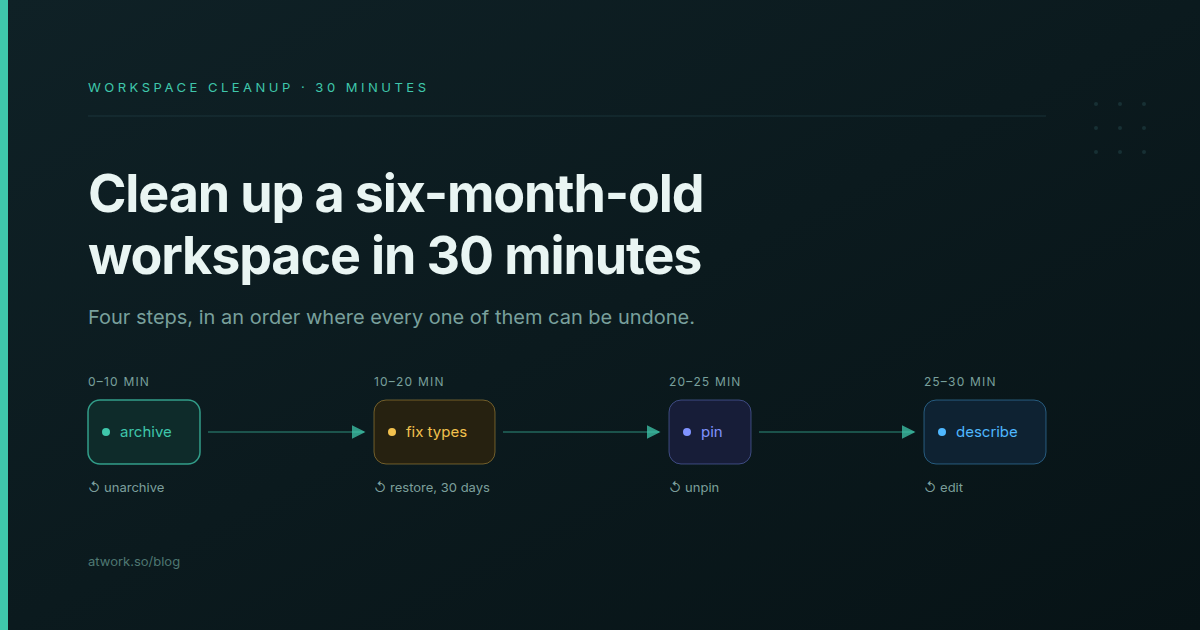
Six months into a workspace, the signs are familiar. Finished client projects still fill every board, a field called Status 2 sits next to Status, and the newest account manager asks which of three sheets is the real one. A workspace cleanup would fix it, yet it rarely happens, because nobody wants to be the person who lost a client's history. Here is a 30-minute pass in Atwork: four steps, ordered so that every one can be undone. For which fields a sheet should have at all, read how to structure a sheet so it's still useful in six months.
Why do teams abandon a workspace instead of cleaning it?
Because every cleanup step looks permanent. Archiving rows, retyping a field and removing a column each feel like they could quietly erase a client's history, so starting a fresh workspace seems safer than tidying the old one. The way out is to do only the steps you can undo, easiest first, and to skip the one you can't.
| Step | What it changes | How to undo | Window |
|---|---|---|---|
| Archive finished rows | Hides them from views, counts, charts, search and exports | Unarchive | No time limit |
| Change a field's type | Converts every value in the field | Restore previous type | 30 days |
| Pin fields | The top of every item | Unpin | Any time |
| Write the sheet description | The sheet header | Edit it | Any time |
| Delete a dead field | Hides the field and keeps its data | Restore from Deleted fields | While it's listed there |
| Delete rows | Removes them for good | None: rows have no trash | Skipped in this pass |
The last row is the one the next 30 minutes leave out. If sheets, fields and views are still new terms, the building blocks of Atwork explains how they fit together.
Minutes 0–10: How do you archive finished work without losing it?
Tick the finished rows and click Archive in the bar that appears above the table. They leave views, counts, charts, search and exports, while their values, comments, history and links are kept, and Unarchive brings them back at any time. Before you start, add a view named Archive with Archived items set to Only.
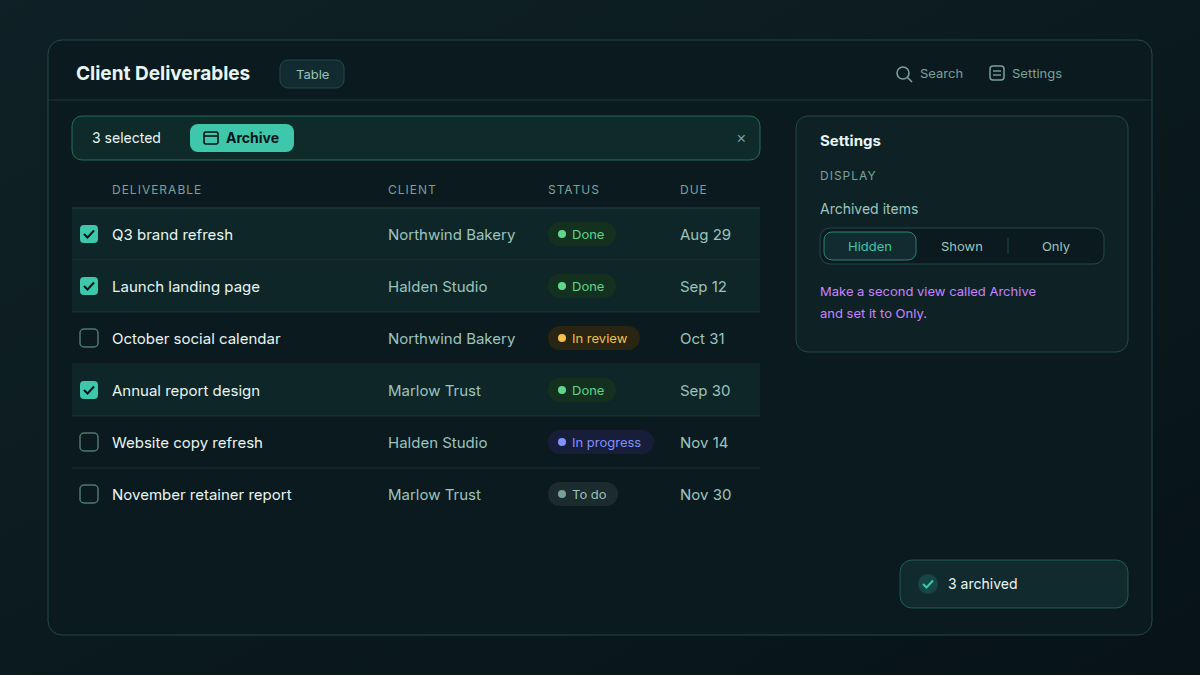
Archived items sits in each view's Settings › Display, so every view keeps its own choice: Hidden for working views, Only for the Archive view. The help article archive and restore rows walks through the same controls.
Which rows should you archive?
Delivered client projects past handover, closed requests, last quarter's content calendar. Filter the view to Status is Done and sort by last modified, oldest first. Archiving doesn't change a row's modified date, so the sort still holds when you come back to it.
For a single stray row, such as a test entry or an onboarding-week duplicate, use Search in the toolbar of a table or board view. It matches the title or the row number only, and it clears when you switch views.
What changes for reports and automations?
- Workflows and autofill skip archived rows. Archiving fires no workflow and notifies nobody.
- Dashboards and charts stop counting them. A "delivered this year" widget drops the moment you archive the year's projects, so archive after the report goes out, or read totals from a view set to Shown.
- Links survive. A relation cell that points at an archived row still shows it, so an active retainer keeps its reference to last quarter's campaign.
Minutes 10–20: How do you fix a field with the wrong type?
The usual culprit is a text field holding categories: client tier, region, channel. Open the column header, choose Change type and pick Select. Before anything changes, a preview counts the values that convert and any that would become empty, shows before-and-after examples, and lists what uses the field. You can restore the previous type for 30 days.
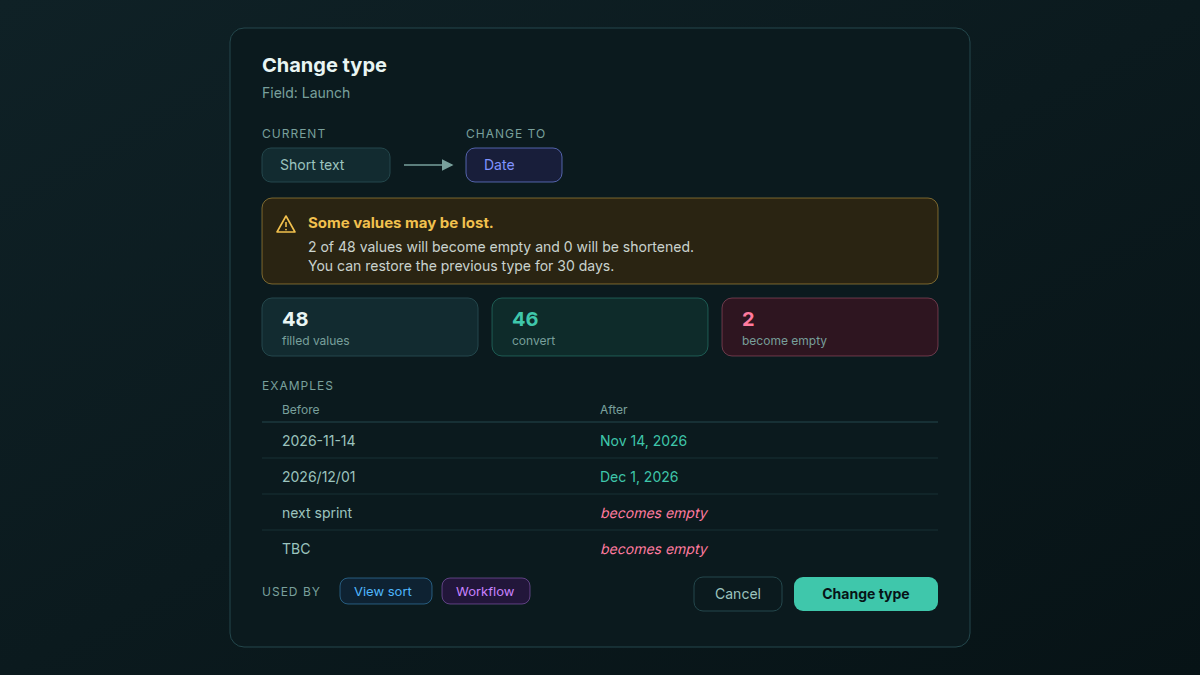
When text becomes a Select, every distinct value becomes its own option, so "EMEA" and "emea" arrive as two. Fix the stray spellings in the text column first. Afterwards, open whatever the preview listed under Used by: view filters, sorts and groupings, other fields and workflows.
If you change your mind, Restore previous type puts back the values from before the change. Values edited since go back to their originals, and rows added since come back empty in that field, so decide within the week, before the team builds on the new type.
Which wrong types are worth fixing first?
- Text that names a category. Region, client tier, lead source. As text, every spelling is its own group in a report.
- Text that holds a date. A launch date typed as text can't be sorted by date or shown on a calendar. Only dates written year first, like 2026-11-14, convert; "TBC" becomes empty.
- Numbers stored as text. Budgets and hours typed as text don't total. Values with a currency sign or a word in them become empty, so the preview is where you decide whether to clean them first.
For which choice field suits which job, see Select, Multi-Select, Status or Checkbox: choosing a choice field; the data management page lists every field type.
What about a field nobody fills in?
Delete it. A deleted field is hidden and keeps its data, and an Owner or Admin can bring it back from Config › Fields › Deleted fields. That retires the older advice to hide a field and wait a fortnight. Rows are different: deleting a row is permanent, which is why this pass archives them.
Minutes 20–25: Which fields belong at the top of every item?
Pin up to four compact fields under the item title: the four a person opening the row needs first. For a client deliverable that is usually Status, Client, Due date and Owner. Open any row, click a field's label and choose Pin to top. Pins are saved on the sheet, so everyone who opens a row sees the same four.
- Task sheets start with Status, Due date and Assignee pinned, so there you are choosing the fourth.
- Only compact fields pin: statuses, selects, people, dates, numbers, checkboxes, ratings, short text, links, email and phone.
- Drag pinned fields to reorder them. At the limit, choosing Pin to top shows "Up to 4 fields can be pinned".
- Owners, Admins and Editors can pin, and pinning a hidden field unhides it.
Minutes 25–30: What should a sheet description say?
Two or three sentences: what one row is, who owns the sheet, what "done" means and when rows get archived. An Owner or Admin writes it in Config › General › Description. It shows on hover in the sheet header and in the sidebar, and agents read it too, so Dana works from the same definition your team does.
| Line | Agency example |
|---|---|
| One row is | One client deliverable, from brief to sign-off |
| Owner | Delivery; ask before adding a field |
| Done means | Client approved; archived at month-end |
| History lives in | The Archive view |
This is the sheet-level version of the structure guide's last step, writing down what each field means. If you are still deciding which sheets an agency needs, see how to structure an agency workspace for multiple clients.
While you are in the header, open Participants next to the description. It lists the owner and everyone the sheet is shared with; check for anyone who has left or finished their engagement. An Admin can change access from Manage access in the same panel.
How do you keep it tidy after the first pass?
Repeat a ten-minute version once a month. Archive at month-end, glance at the Archive view for anything archived by mistake, and settle any type change before its 30 days run out. Month-end suits agencies because retainer reports and invoices already force a look at what closed.
Dana, the assistant built into Atwork, can do the archiving when you ask in plain words, for example "archive the Done rows in Client Deliverables from last quarter". It asks for your approval before it archives. What happens when an AI agent wants to change 300 rows covers how those approvals work, and the help article keeping a workspace tidy covers the same ground.
Archive is a decision you can take back. Delete isn't.
Frequently asked questions
Is archiving the same as deleting?
No. An archived row is hidden but keeps its values, comments, history and links, and Unarchive restores it at any time. A deleted row is gone for good.
Can I undo a field type change?
Yes, for 30 days, with Restore previous type. Values edited since the change go back to their originals, and rows added since come back empty in that field.
Do archived rows still count in dashboards?
No. Dashboards, charts and rollups across relations leave them out. Column totals follow each view's Archived items setting.
How many fields can I pin to the top of an item?
Four, saved on the sheet, so everyone sees the same ones.
Does archiving a row start a workflow or notify anyone?
No. Archiving fires no workflow and sends no notification, and autofill skips archived rows.
How often should a team clean up its workspace?
One full pass when the workspace stops feeling trustworthy, then ten minutes at each month-end.
When should you book the 30 minutes?
The week before the next client kickoff, while the last engagement is fresh and before the new one adds its own rows. Open the sheet the new client's work will live in and start with the archive.
Pick one sheet, archive what's finished and write its description. Thirty minutes, and every step can be undone. Start free