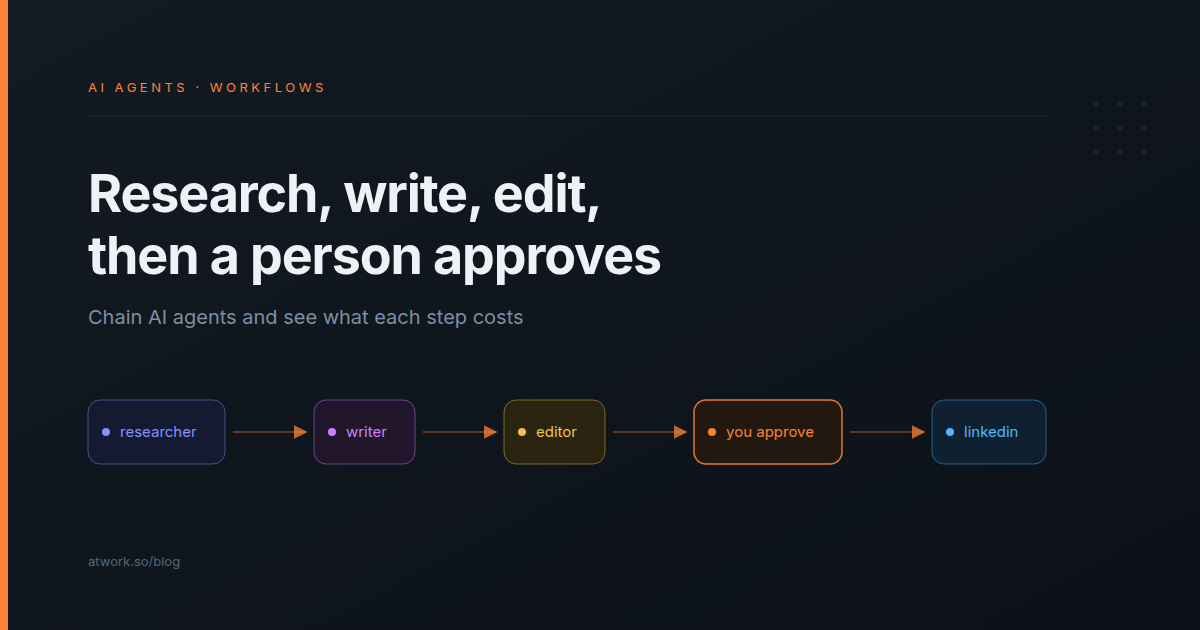
Agencies already write in stages: someone gathers the material, someone drafts, someone edits, and someone signs off before a post goes out under the founder's name. One long AI prompt folds all four into a single answer you can't take apart, so when the post comes out generic you can't tell which part failed. You can chain AI agents instead. In an Atwork workflow, each stage is its own Agent step with its own instructions and model, each answer feeds the next, and run history shows what every agent did and cost. The post reaches LinkedIn only after a person moves it to Ready.
This goes deeper on chaining than AI agents in workflows: a research, write and edit chain for a LinkedIn post, where the person approves, what each step costs, and what to do when one agent fails.
What does it mean to chain AI agents in a workflow?
Chaining AI agents means putting Agent steps one after another on the workflow canvas, so one agent's answer becomes the next agent's input. Each step can use a different saved agent, with its own instructions, model and tools. The trigger starts the chain, and nobody passes the work along by hand.
- The hand-off: in a later step's task, Insert variable adds the answer of any earlier step, the one right before it or one further back.
- Saved agents: build a Researcher, a Writer and an Editor once as workspace agents, then pick them in the step and reuse them in other workflows and in chat. Custom AI agents in Atwork covers building one.
- What passes between them: plain text, or structured fields that later steps can use one by one. Use fields when the next agent has to check something specific.
Every setting of the step is in the Agent step reference.
Why use three agents instead of one long prompt?
Because each split gives you something to inspect: a short instruction for one job, the model that job needs, and a separate answer and cost in run history. One prompt is cheaper and quicker per post. Three agents show you which stage went wrong and what each one costs.
| One long prompt | Atwork | |
|---|---|---|
| Instructions | One prompt that does research, voice and checks at once | One short instruction per agent: gather, write, edit |
| Model | One model for every stage | A model per step: fast to gather, strongest for the draft |
| What you can read afterwards | The final post | Each agent's answer, and what it looked at |
| Cost | One number | One number per step, plus the run's total |
| When the post is wrong | Rewrite the prompt and run it all again | Fix the agent whose answer was wrong and Try it on that step |
| Model calls per post | One: cheaper and quicker | At least three: one per agent, more when an agent looks things up |
| Who sends it to LinkedIn | Whoever pastes it | A person moving the row to Ready |
A narrow job is also easier to describe, as in how to write an AI agent persona, and each step gets the tier which AI model should power your agent would pick for it. If you already hand first drafts to an agent by assigning it a task, as in AI agents for marketing agencies, the chain is the workflow version: a status change starts it.
The trade-off is real: a chain makes at least three model calls where one prompt makes one, more each time an agent looks something up, and it takes longer. If a single Ask AI step already gives you posts you would publish, keep it. Split only where you would check the work anyway.
What does a research, write and edit chain look like for a LinkedIn post?
A brief goes on a row in a LinkedIn posts sheet. When its status moves to Brief ready, a researcher agent gathers points from your own pages, a writer agent drafts the post, and an editor agent tightens it and checks each claim against the sources. The workflow then sets the row to In review.
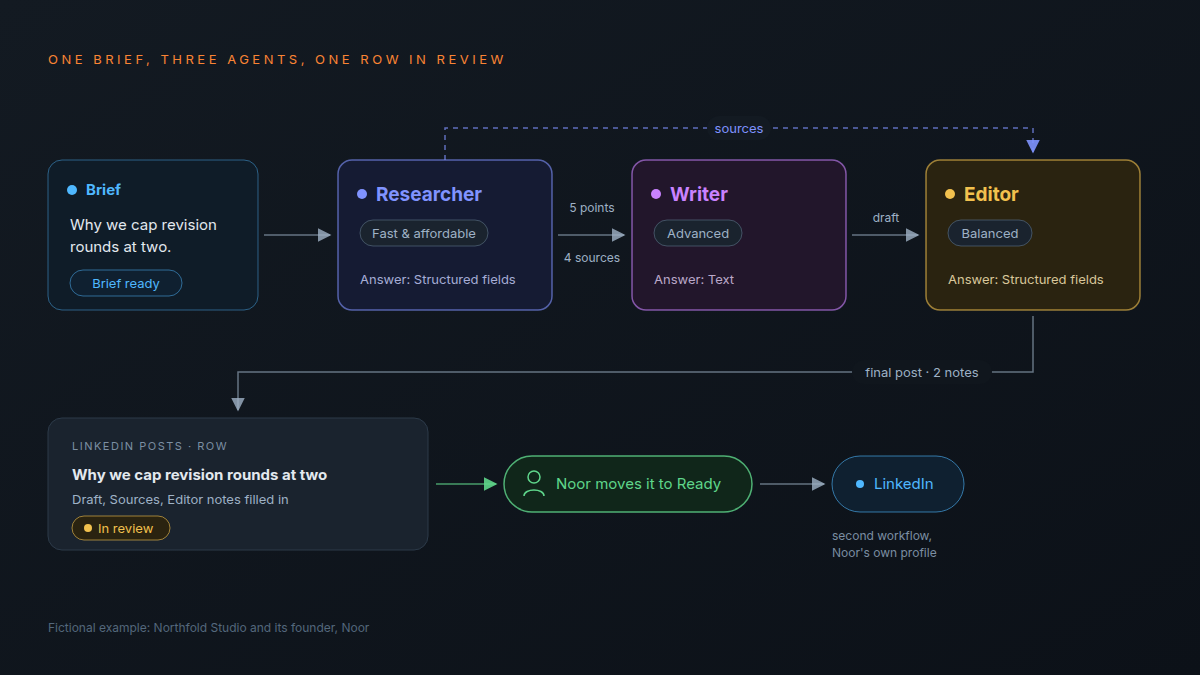
Take Northfold Studio, a fictional agency whose founder, Noor, posts from a personal profile. This week's brief: "Why we cap revision rounds at two. Our view: unlimited rounds hide a weak brief. Mention the kickoff checklist we use." The chain:
- Field Changed trigger on the LinkedIn posts sheet, with Status set to Brief ready. The sheet holds Topic, Brief, Draft, Sources, Editor notes and Status (Idea, Brief ready, In review, Ready, Posted).
- Researcher, a saved agent on Fast & affordable that can read Pages and Sheets & items. Knowledge pages: "Northfold voice on LinkedIn" and "Posts we've published". Its task inserts the row's Topic and Brief; it answers in four Text fields: Key points, Sources (the page each point came from), Angle and Already said.
- Writer, a saved agent on Advanced, with no tools and the voice page as knowledge. Its task inserts the brief and the Researcher's fields; it answers in text: the draft post.
- Editor, a saved agent on Balanced, with "Our LinkedIn checklist" as knowledge: a hook in the first line, under 1,300 characters, no link in the post, at most three hashtags. Its task inserts the Writer's draft and the Researcher's Sources; it answers in three Text fields: Final post, Changes made and Claims without a source.
- Update Item writes Final post to Draft, Sources to Sources, and Changes made with Claims without a source to Editor notes, then sets Status to In review.
- Send Notification tells Noor a LinkedIn draft is waiting.
- On each Agent step, If the agent fails is set to Error branch, which leads to a second Send Notification.
| Step | Model | Hands to the next step |
|---|---|---|
| Researcher | Fast & affordable | Key points, sources, angle, what we've already said |
| Writer | Advanced | The draft post |
| Editor | Balanced | Final post, changes made, claims without a source |
| Update Item | None | The row, set to In review |
Give the editor the research, not only the draft
Insert variable reaches back past the Writer to the Researcher, so the Editor sees the sources as well as the draft and can list every claim with no source behind it, such as a figure the Writer added for colour. That list lands in Editor notes, the first thing Noor reads on the row.
Pass fields when the next agent has to check something
The Researcher answers in fields, so the Writer gets clean points and the Editor gets the sources on their own to check against. Plain text is enough when the next reader only rewrites it, as with the Writer's draft. Make each field Text, so Update Item can write it straight into a column on the row.
Where does a person approve before anything is posted?
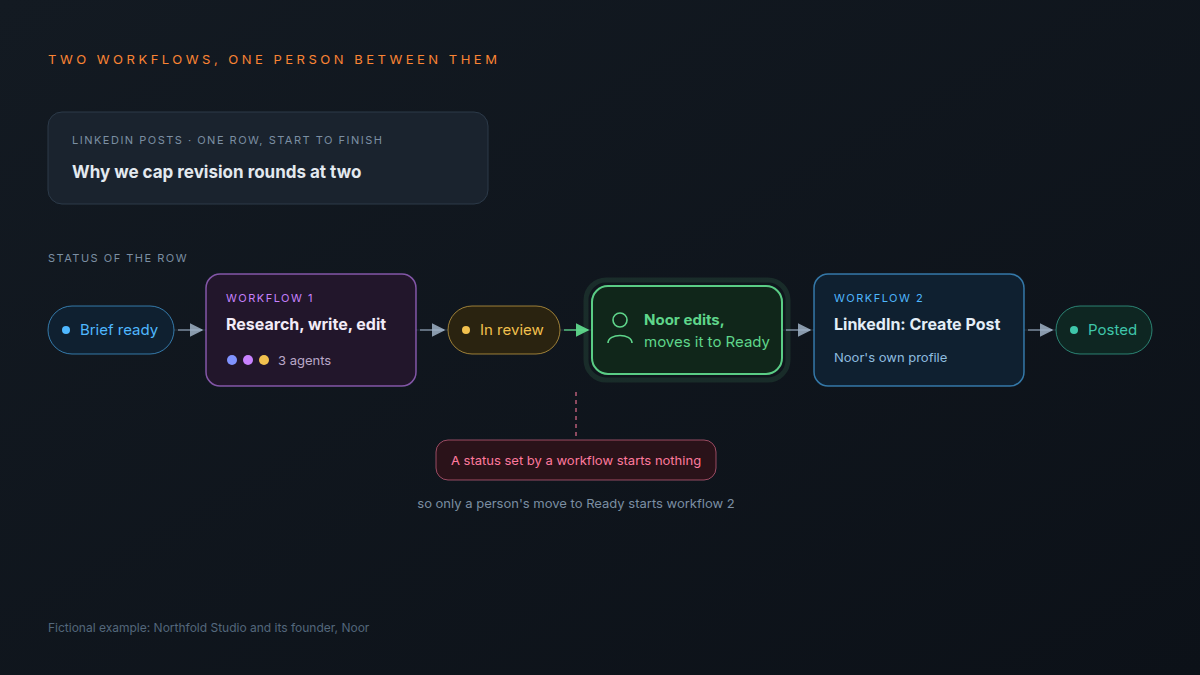
On the row. The chain stops at In review: a person reads the draft and the editor's notes, edits the text if needed, and moves the row to Ready. A second workflow watches for Ready and runs the LinkedIn step, which posts to the connected person's own profile; Update Item then marks the row Posted. The agents never post.
- Field Changed trigger, with Status set to Ready.
- LinkedIn: Create Post, with Text from the row's Draft and Visibility set to Public or Connections only.
- Update Item sets Status to Posted.
If you followed publish to LinkedIn from the sheet you plan in, you already have this half, and that post covers connecting LinkedIn.
Only a person can start it: changes a workflow makes never start other workflows, so even if the first workflow set the status to Ready by mistake, nothing would post.
Agent steps also have Ask before making changes, which pauses the run until the person it runs as approves each change an agent makes to records. A post going out under someone's name needs a reader who can also rewrite it, and a status gives them that. The Agent step reference covers the setting.
The agents write. A person moves the row to Ready. Only then does anything reach LinkedIn.
How do you see what each agent did and what it cost?
Open the run in the workflow's run history. Each Agent step shows its model, the tokens in and out, and its own cost, and Show steps lists what the agent did, such as looking up a page or a sheet. The run itself shows the AI cost of the whole run, so you can see which stage costs most.
| What run history shows | Where | What it tells you |
|---|---|---|
| Model | On each Agent step | Which model actually answered |
| Tokens in and out | On each Agent step | How much the agent read and how much it wrote |
| Cost | On each Agent step | What that one stage cost in this run |
| Show steps | Under each Agent step | Every page or sheet the agent looked up before it answered |
| AI cost of this run | On the run | The total for one post |
- The most expensive step is usually the one to tune. If the Writer costs most and the Editor still rewrites most of its draft, try the Writer one tier down and compare five drafts.
- Read Show steps before you trust a cheap step. If the Researcher answered without looking anything up, run history says so, and its points came from its knowledge pages, the brief or the model itself.
- Price it per post. Each run draws on your workspace's monthly AI budget, and what AI actually costs an agency per month shows how to plan for it.
What an AI teammate actually does in an agency argues for reading the trace, not the summary; a chain gives you one trace per stage.
What happens when one agent in the chain fails?
Each Agent step has its own failure setting: stop the run, skip the failed item, or send it down an Error branch with the reason attached. In a content chain, an Error branch to a notification is the safer choice, because a post that stopped halfway should reach a person, not sit unseen on the row.
- Stop the run suits nothing here. The run is marked failed and the row sits at Brief ready until someone opens run history.
- Bound each agent. One that runs past its time limit or max steps fails the way you chose; AI agents in workflows covers both limits.
- Fix one step, not the chain. Try it runs a single step on the data from the latest run, read-only, using AI credits like a normal run. Use it on the agent whose answer was wrong.
- The Researcher only knows what it can read. Point it at the pages that hold your material and ask for a source on every point. It doesn't read PDFs or images.
Frequently asked questions
Can one AI agent pass its work to another?
Yes. Put Agent steps in a row and use Insert variable to add an earlier step's answer to the next step's task. Any earlier step works, not only the one right before.
Can each agent in a chain use a different AI model?
Yes. A saved agent brings its own model, and an agent set up in the step picks from Fast & affordable, Balanced and Advanced.
Do the agents post to LinkedIn themselves?
No. A LinkedIn step in a second workflow posts after a person moves the row to Ready, and it posts to the connected person's own profile.
Is it better to use several AI agents or one prompt?
One prompt is cheaper and quicker. Several agents are easier to fix and to price, so split where you would check the work.
What does a three-agent chain cost per post?
It depends on the models and how much each agent reads. Run history shows each step's cost and the AI cost of the whole run, so price your chain from a few real runs.
Do you need to write code to chain AI agents?
No. Add the steps on the canvas, pick an agent for each, and write each task in plain language.
Where should you start this week?
Take one post you would write anyway. Build the Researcher, Writer and Editor as saved agents, keep every step read-only, and stop the chain at In review. Read five drafts, and the run history for each, before you connect the workflow that posts.
The agents page shows the agents you can put in each step, and the pricing page lists which plans include workflows, event automations and custom AI agents.
Build the three agents, stop the chain at In review, and read five drafts before anything posts. Start free