Most advice about working with AI agents is really advice about prompting. That is the wrong problem for an agency. If you want to delegate work to an AI agent the way you delegate to a junior, the question is not how to phrase the request. It is where the request lives, what the agent can see when it picks the job up, how you check what it did, and how you take the work back when it goes sideways. That is handover, and handover is a thing agencies already know how to do badly.
What does delegating to an AI agent actually mean?
In Atwork, it means the agent is the assignee, not the chat window. The work sits on a task with a brief, a status and a thread, the same as work you give a person. The agent picks it up from there, does it, and leaves what it did on the item. Nobody has to paste context into a separate tool for it to begin.
That distinction is the whole difference between an assistant and a teammate, and it changes what you get back.
| What you're handing over | A chat assistant | Atwork |
|---|---|---|
| Where the request lives | A chat window only you can see | The task itself |
| What it can see | Whatever you paste in | The item, its fields and its thread |
| Who sees the result | You | Anyone who can open the item |
| Record of what it did | Chat scrollback | A step-by-step trace |
We wrote about the shape of this in what an AI teammate actually does in an agency. This piece is the practical half: the handoff itself.
How do you hand a task to an agent?
There are four ways to start an agent, and they are all things you already do to hand work to a person. There is no separate "run agent" button, deliberately, because a button would be one more thing to remember and one more place for work to hide.
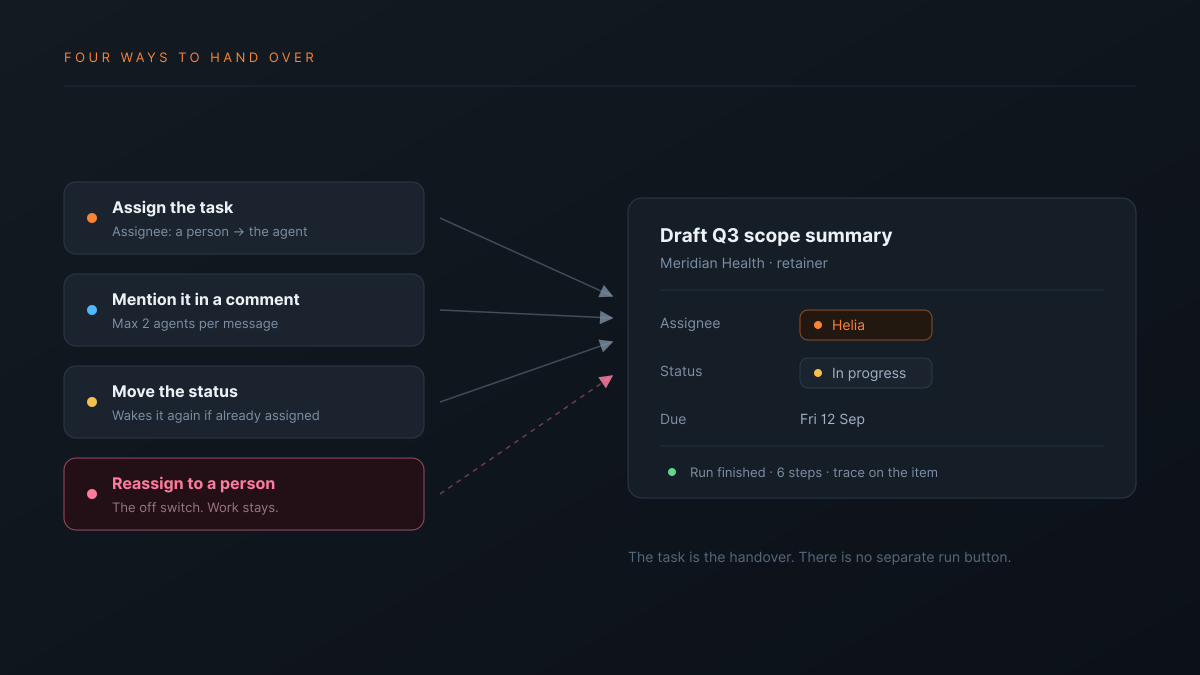
- Assign the task to the agent. The most common one. Change Assignee from a person to the agent and it starts, using the item's title, description and fields as the brief. If it needs approval along the way, it waits, and the task's creator gets a request to approve or deny it.
- Mention it in a comment. Type the agent's name in the item thread and it replies there. Useful when the task belongs to a person and you want a second pair of hands on one part of it.
- Move the status. If the agent is already the assignee, changing the status wakes it again. This is the one nobody expects, and it is how you say "the brief has changed, look again" without reassigning anything.
- Reassign it to a person. That is the off switch. More on it below.
Two limits worth knowing before you lean on the mention route: one message can wake at most two agents, and there is a cap on how often the same agent will answer on the same item within an hour. Both exist so a thread cannot turn into two agents talking to each other.
What should you delegate first?
Start with work that is bounded, written down, and cheap to check. The first delegation should be something where you would notice a bad result in under a minute. Research and drafting fit. Anything that sends something to a client does not, at least not until you trust it.
Good first candidates, in rough order:
- Drafting from a brief that already exists. A scope summary, a first-pass agenda, a project description for a new client's space.
- Pulling a thread together. Twelve comments on an item and one question: what did we actually agree.
- Filling in the boring fields. Summarising a long description into the fields the view groups by, so the board stops lying. For one column at a time, AI autofill does this on every new row.
- Answering the question you have answered before. Anything where the answer exists in your workspace and the asker cannot find it.
What to keep away from it at first is the mirror image: work with no written brief, work where the cost of being wrong is a client relationship, and work you could not check quickly. An agent asks for approval before a sensitive action, but approval only helps if you understand what you are approving.
The test for a first delegation is not "is this important". It is "would I notice within a minute if this came back wrong".
How do you know what it did?
Every run leaves a trace: each step the agent took, which tool it used, what came back, how long it took, and whether the step needed your approval. You read it the way you would read a junior's working, and it is the reason you can hand over work you would not hand to a black box.
Two honest limits, because they change how you should use this.
Sensitive actions stop and ask. Anything that reaches outside the workspace is classed as sensitive and waits for a person to approve it. That is a real gate, not a setting. An update to more than 20 rows by a condition shows you a preview first, and nothing changes until you confirm it.
Undo is narrower than people assume. A bulk change the agent makes to your rows has one Undo on that step, kept for 7 days. A page edit has an Undo for 30 seconds. You cannot recall a message it sent or an action it took in another system. A sent message is sent. Plan the first few delegations around that asymmetry rather than around the trace. See what happens when an AI agent wants to change 300 rows.
How do you take work back?
Reassign the item to a person. The agent stops, the thread stays, and the work carries on with whatever it had already produced. There is no separate cancel, and nothing to clean up afterwards.
This matters more than it sounds. The reason a lot of AI pilots stall inside agencies is that nobody can describe what happens when it goes wrong, so the safe move is not to start. Here the answer is the one your team already uses ten times a day: change the assignee.
Worth knowing: an agent has no calendar and does not read notifications. It will not be double-booked and it will not chase you. If you need a person to know something happened, the item is where they will see it.
Can a workflow delegate for you?
Yes. A workflow's Agent step runs an agent on each item or once for all, so a recurring job can call an agent directly; AI agents in workflows walks through it. When the agent should own the task instead, use the assignee route: a workflow can hand work to an agent by updating a task's assignee to the agent. It cannot create a task that is already assigned to an agent and expect it to start. So that route needs two steps: create the item, then set the assignee.
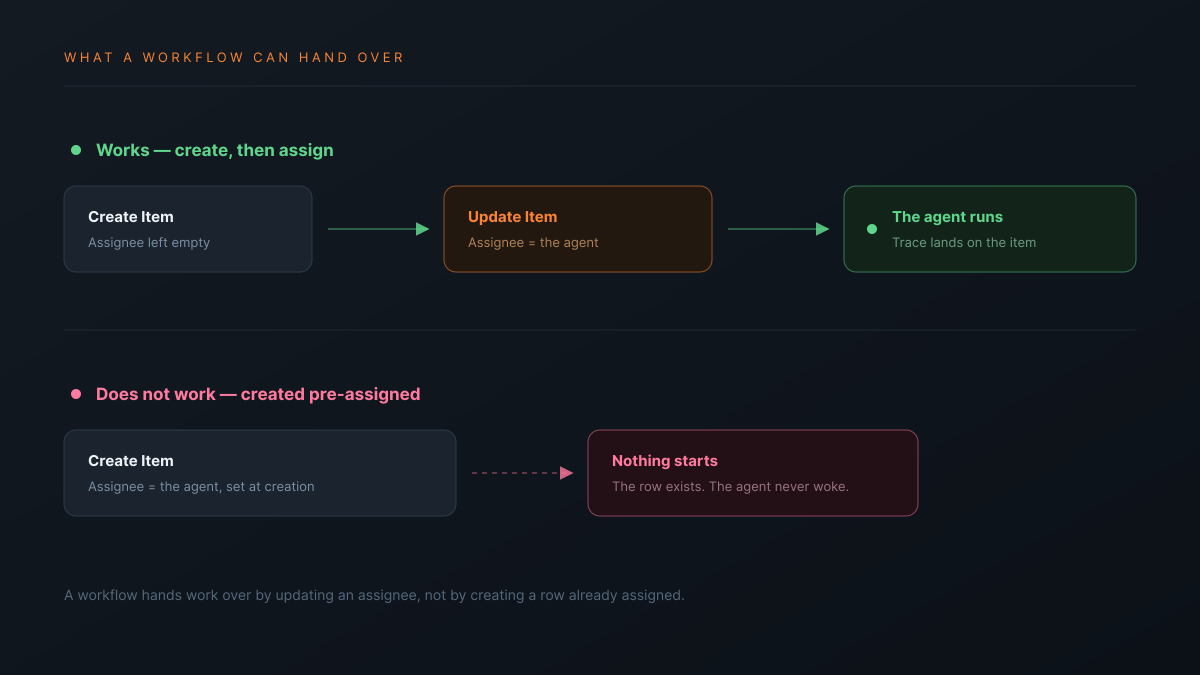
That is a narrower limit than "workflows cannot use agents", which is what we said in an earlier piece and is not right. If you are planning a recurring hands-off job on this route, build it and watch one run end to end before you rely on it.
If you are still working out where an agent fits against a plain rule, an AI agent and an automation are not the same thing covers that split. The agents page introduces the teammates themselves, and the agencies overview has the wider picture.
Where should you start this week?
Pick one task you would give a junior on their second week. Something written down, bounded, and quick to check. Assign it to an agent instead of a person, then read the trace before you read the output. The trace tells you whether it approached the job the way you would have, which is the thing you actually need to know before you give it anything bigger.
Then do it four more times before you decide. One run tells you almost nothing. Five runs on similar work tells you where the line is for your shop, and that line is the only useful answer.
Take one bounded task this week, assign it to an agent instead of a person, and read the trace before the output. Start free