
A client's voice note is the quickest way to send a request and the quickest way to lose one. Two minutes of audio lands in a chat. Someone listens between meetings. The three changes inside it now live in one person's memory.
You can't search audio, and you can't assign it. A client request isn't logged until it's text on a row. Below: why voice notes slip through, what retyping them costs, and how Atwork's Transcribe step and an AI step turn each one into a row filed under the right client.
Why do client requests sent as voice notes get lost?
Client requests sent as voice notes get lost because audio can't be searched, skimmed or assigned. Search a chat for "pricing" and the typed messages come up; the voice note doesn't. It reaches one person, holds several requests at once, and becomes work only after somebody writes it down.
Voice notes aren't niche. In March 2022, WhatsApp said its users send 7 billion voice messages a day on average. Clients send them because they're easy. In WhatsApp's own words: "we’ve made recording and sending a voice message as quick and easy as writing a text."
Quick to send. Slow to handle:
- Nobody can find it. A week later the client asks if you got their note about the pricing table. You scroll and replay.
- One person heard it. Usually the account lead, not the designer.
- It bundles requests. A photo swap, a new pricing tier and a date change in one note. Retype it from memory and it's easy to drop one.
| What you need later | Voice note left in the chat | Atwork |
|---|---|---|
| Find it next week | Scroll and replay | Search finds the row |
| Who knows about it | Whoever heard it | Everyone who can see the sheet |
| What exactly was asked | Someone's notes, if any | Each change on its own line |
| When it's due | Somewhere in the audio | A due date, when the client said one |
| Tone and emphasis | Kept: the audio is the original | Lost in the text: replay the original |
What does retyping a voice note cost a small team?
Retyping a voice note costs listening time, then typing time, and the listening repeats whenever someone checks a detail. People already find the listening long. In a YouGov survey, 65% of UK smartphone users with an opinion said a one-minute voice note is too long, and 48% had lost patience by 45 seconds.
YouGov's write-up, from June 2022, names the trade: "While articulating a message verbally can be more convenient for the sender, it can be more of a chore for the recipient as reading speeds are generally faster than verbal delivery."
The typing is slower still. In a Stanford-led lab test, people entered English at 153 words a minute by speaking and 52 on an iPhone keyboard. As a rough guide, a two-minute note holds about 300 words, and typing it back on a phone takes close to six minutes. Most teams write a one-line summary from memory instead. That's where a change goes missing.
A voice note moves the typing from the client to your team. The only choice is whether a person or a workflow does it.
How do you turn a client's voice note into a row automatically?
In Atwork, build one workflow. The voice note arrives, a Transcribe step turns it into text, an Agent step reads the text and picks the client and the request type, and Create Item adds the row. Started from Telegram, it runs the moment the client sends the note. Nobody has to listen first.
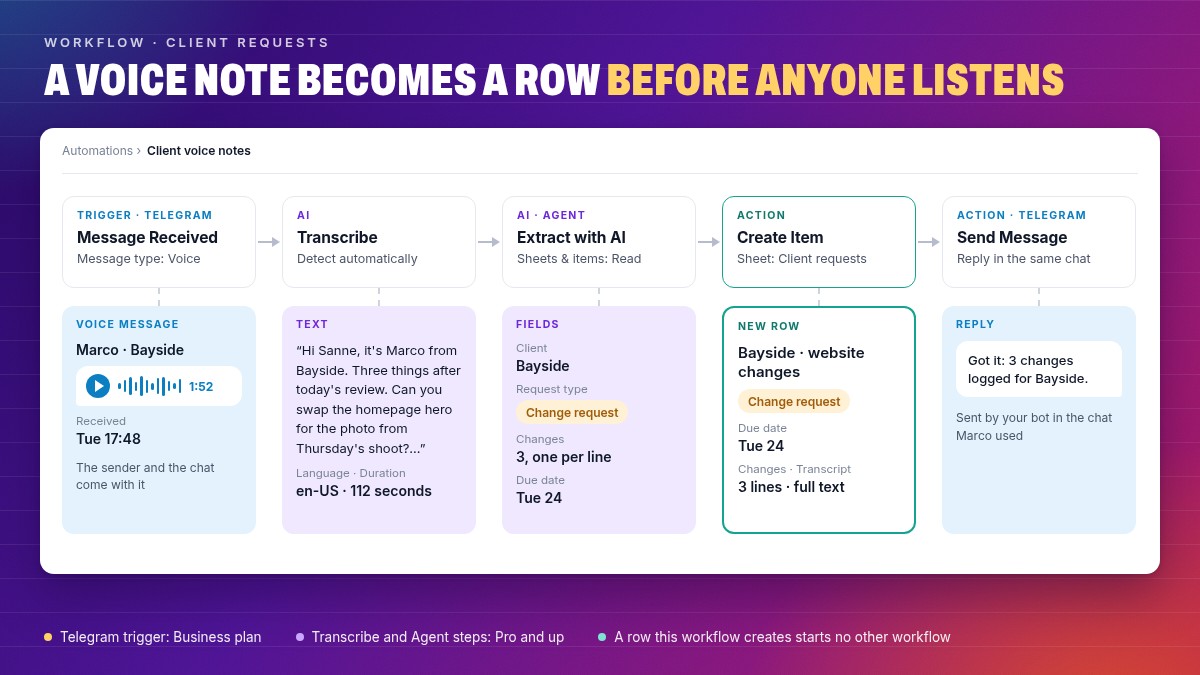
- Message Received. Under Triggers, open Telegram, pick Message Received and set Message type to Voice. Connect your bot first.
- Transcribe. Under AI, add Transcribe and point Audio at the trigger's voice message. Add client and product names to Vocabulary so they come out spelled right.
- Agent. Use the Extract with AI preset and insert the transcript's Text into its instruction. Set Sheets & items to Read, so it can look the sender up in your Clients sheet.
- Create Item. Add the row to your Client requests sheet with the agent's fields and the full transcript.
- Send Message. Reply in the Telegram chat: "Got it: 3 changes logged for Bayside."
The Agent step reads text and documents, not audio. That's why Transcribe comes first.
The Telegram trigger needs the Business plan; Transcribe and the Agent step need Pro. On Pro, start from a File List field instead: save the voice note to the request's row, set its Status, and a Field Changed trigger on Status runs Transcribe on the file. One catch: a row this workflow creates doesn't start your other workflows, so put any alert in this one. Bot and group setup: running client updates through Telegram.
What should the Agent step pull out of the transcript?
Ask for fields, not a summary. A field goes straight into a column, a rule can check it, and a person can sort by it.

| Field on the row | Filled by | From Marco's note |
|---|---|---|
| Client | The agent, from your Clients sheet | Bayside |
| Request type | The agent: In scope, Change request or Question | Change request |
| Changes | The agent, one per line, each starting with a verb | Swap the hero, add the Pro tier, move the launch |
| Due date | The agent, only when the client said a date | 24 Nov |
| Transcript | Transcribe, word for word | "Hi Sanne, it's Marco from Bayside…" |
Say the same in the instruction: if unsure, choose Question, and never guess a date.
Want each type on its own path? Classify with AI turns each label into a branch: see how to classify client requests with AI and AI agents in workflows.
When is talking to Dana faster than typing?
Talking to Dana, Atwork's AI teammate, is faster when the request is long and the words are plain: three changes after a client call, a new row with five fields, an update on four projects. Speech beat a phone keyboard almost three to one in the Stanford-led test. For a one-word edit or an unusual name, typing still wins.
In Dana's chat, click the microphone, Talk to Dana, say the request and click Stop. The text waits in the message box, so you can fix a misheard name before you send. That check matters: the same study found speech left slightly more errors in the finished text than typing, 1.30% against 0.79%. Once you trust it, set After transcribing to Send right away in your Voice messages settings.
"Add three requests to Bayside's sheet: swap the homepage hero for the shoot photo, add the Pro tier to the pricing table, and move the launch to 24 November. Assign the first two to Sanne."
Dana adds the rows, and rows Dana adds in chat do start your workflows. Have the client's voice note as a file? Attach it with the paperclip and ask Dana to log each change. Recordings can run up to 10 minutes.
How accurate is transcription, and what does it cost?
No transcript is perfect, so keep the full text on the row beside the agent's fields, where anyone can check the client's words. Atwork's Transcribe step detects the language or takes one of 14 you pick, takes up to 100 names to spell right, labels speakers if you ask, and charges your AI budget by the audio minute.
| What you get | Transcribe step in a workflow | Talk to Dana |
|---|---|---|
| Plan | Pro and up; a Telegram trigger needs Business | Pro and up |
| Longest recording | 2 hours | 10 minutes |
| Languages | Detect automatically, or one of 14, such as English, Dutch and German | English and Farsi, detected for you |
| Cost | AI budget, by the minute of audio | AI budget, by the minute of audio |
A client's voice note has one speaker, so leave Label who is speaking off; turn it on for a recorded call. On the pricing page in November 2026, Pro includes $5 of AI budget per seat a month and Business $15.
Frequently asked questions
Can Atwork pick up voice notes from WhatsApp?
No. WhatsApp isn't one of Atwork's connected apps; Telegram is. For a WhatsApp voice note, save the audio file to the request's File List field, or attach it in Dana's chat.
Will the Telegram bot hear voice notes in a client group?
Only after one setting. In groups, Telegram shows a bot only commands, replies to the bot and @mentions. Turn off Group Privacy for your bot in @BotFather, or make the bot a group admin.
Does the client need an Atwork account?
No. The client sends voice notes in Telegram as usual. The workflow, the transcript and the row live in your workspace.
Where do you start this week?
Start with the client who sends the most voice notes. Connect your Telegram bot to their chat and build the five steps above, or, on Pro, attach their next voice note in Dana's chat and ask her to log each change. Two weeks later, search the requests sheet for a word they said. If it comes up, it was logged.
Email works the same way: it can land as tasks through a forwarding address. For where an AI step fits in client work, read what an AI teammate actually does in an agency.
Add a Transcribe step to the workflow that receives your client messages, and the next voice note lands as a row. Transcribe runs on Pro and up. Start free