Automated client reporting usually means one thing in this category: connect your ad accounts and analytics, and a branded dashboard assembles itself on the first of the month. That works, and if metrics are the whole report you should buy one of those tools. But the document most agencies rewrite by hand every week is a status report about the work, not a metrics report — and no dashboard can write it, because the source material is the work itself.
What do clients actually want in a weekly report?
Two different documents get called the client report. The metrics report answers how the campaign performed. The status report answers where the work stands, what is blocked, and what needs a decision from them. Dashboard tools solved the first one years ago. The second is the one still being written by hand on a Friday afternoon.
The split matters because only one of them is expensive. Pulling last week's numbers is a solved problem. Writing the paragraphs that explain what those numbers mean for this client, what slipped and what you need from them is most of an hour per account — and that hour scales with how many clients you have, which is exactly the wrong thing for it to scale with. What belongs in the document itself is covered in what to put in a monthly client report. This piece is about which parts of producing it can run without you.
Why don't reporting tools solve this?
Because they read from ad platforms, analytics and CRMs — systems that know what happened to the campaign, not what happened to the work. A tool that has never seen your task board cannot tell a client that the landing page slipped a week because their own legal review is still open.
That is a category boundary rather than a flaw. If your reporting problem is that pulling numbers out of six platforms takes all morning, a reporting dashboard is the correct purchase and Atwork is not a substitute for one.
| Dimension | Reporting dashboard | Atwork |
|---|---|---|
| Where the data comes from | Ad platforms, analytics, CRMs | The work items your team already updates |
| The question it answers | How did the campaign perform | Where does the work stand |
| Who assembles the draft | The tool, on a schedule | An agent, on a schedule |
| Explains why something slipped | No | Yes, when it is written on the item |
| The metrics half | Genuinely better than us | Not what we are for |
What can actually run on a schedule without you?
The draft. In Atwork, a schedule fires, a task is created for each client, and an agent assembles the update from the items on that account — what moved this week, what is blocked, what is waiting on the client. That much happens while nobody is logged in.
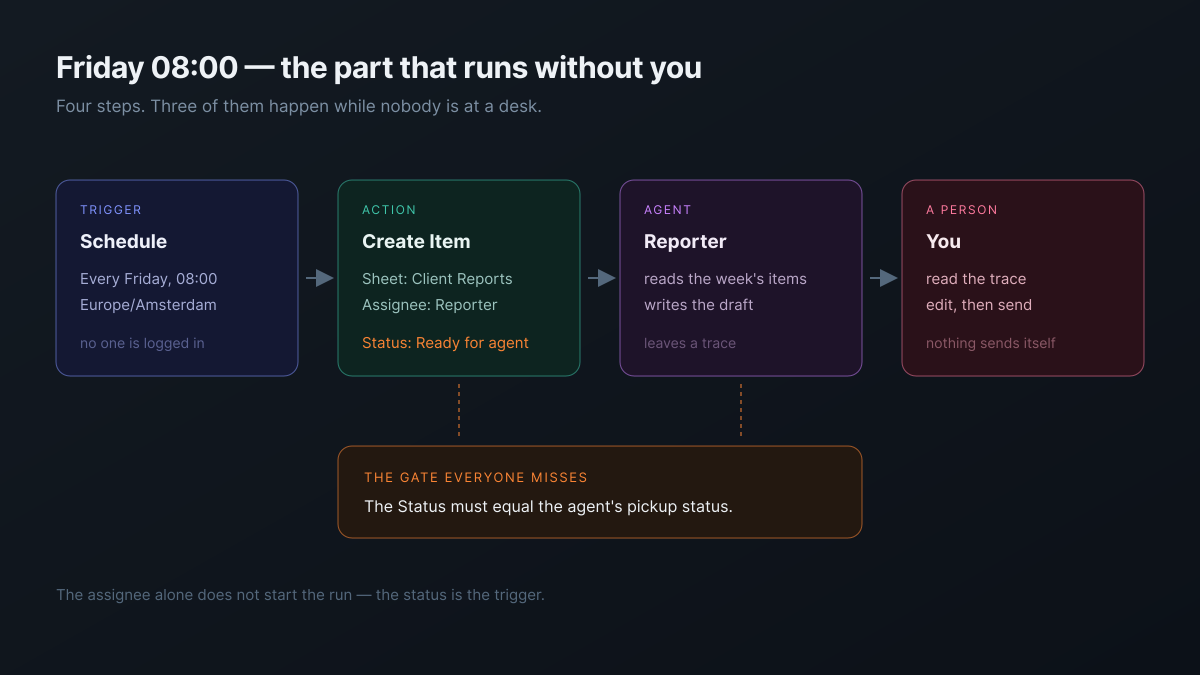
What the agent reads is what your team reads, which is why the quality of the draft tracks the quality of your boards rather than the quality of the prompt.
- The items that changed this week — the actual unit of a status report, and the thing no external tool can see.
- The status each one sits in — provided the statuses mean something specific rather than being three synonyms for in progress.
- The threads on them — where the reason something slipped is usually recorded, if it is recorded anywhere.
- What is waiting on the client — the single most valuable paragraph in any agency status report, and the one people forget to write.
The mechanics of handing a job over are in how to delegate work to an AI agent.
What still needs a person?
Sending it. Every version of this worth recommending stops before the client sees anything, and that stop is deliberate rather than a missing feature. Undo puts back a bulk change to rows for 7 days and a page edit for 30 seconds; a message that has reached a client cannot be recalled.
A draft you still have to read is most of the hour saved. A report that sent itself is a liability you hear about from the client.
| Step | Runs without you |
|---|---|
| The schedule fires | Yes |
| A report task is created per client | Yes |
| The agent drafts the update | Yes |
| The draft gets checked | No — you read the trace |
| The report reaches the client | No — you send it |
How do you set it up without it silently doing nothing?
One rule decides whether any of this works: the task's status must match the status the agent is configured to pick up. The assignee is not the trigger. Create the task at the sheet's default status and the workflow will report success while the agent does precisely nothing.
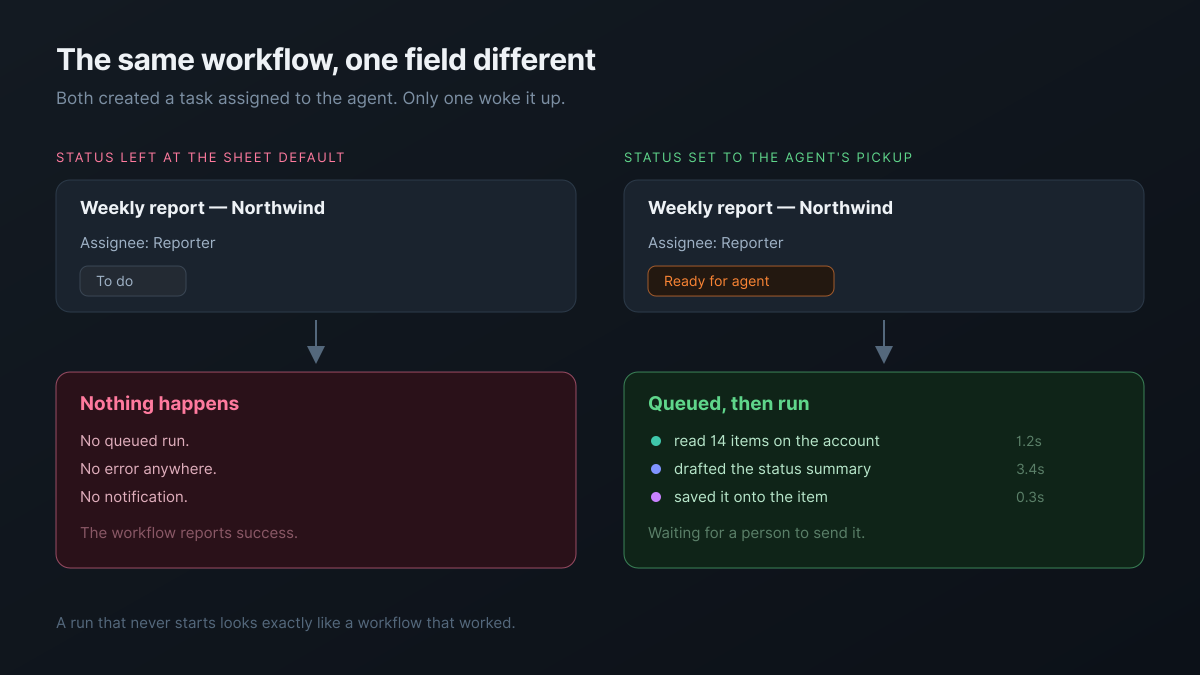
This is the failure worth planning around, because nothing about it looks like a failure. There is no error, no queued run and no notification — the workflow turns green and the report simply is not there. So treat the setup as two fields rather than one:
- Assign the report task to the agent, which is what makes the work its own.
- Set the status to the agent's pickup status in the same step, because that is what actually starts the run.
- Put the brief on the item, since an agent reads what is written rather than what everyone in the studio knows.
- Expect one run at a time — a schedule firing over a run that is still in flight is dropped rather than duplicated.
There is also a more direct route: a Schedule trigger followed by an Agent step set to run once for all, with no task in between, so there is no status to get wrong. The status-matching setup above stays the better fit when you want a task per report, with its own thread and history.
One caveat, stated plainly: we have traced this path and we run agents on assigned work daily, but we have not yet watched a scheduled client report run end to end. Until we have, build it for an internal weekly summary before you point it at a client. The exact clicks are also better learned in the workflow builder than from a diagram — the shape above is the part that matters.
What does it cost, and where does Atwork fit?
It is metered per run rather than per seat, priced from the tokens and tool calls a job actually used. A weekly drafting job across a handful of accounts is small, and the cost tracks how much you hand over rather than how many people you employ. The arithmetic is in what AI actually costs an agency per month.
Where Atwork fits is narrow enough to state directly: the workspace the work already lives in can draft the report about that work. An agent is a member with an assignee field rather than a tool pointed at your data from outside — the shape of that is in what an AI teammate actually does in an agency, and which jobs survive the handover is in what you can actually hand over.
If you would rather not build the sheets, the Client Reporting Hub template ships one report per client per period with the fields already in place, the agents page covers the teammates themselves, and the agencies overview covers the wider setup.
Where should you start this week?
Build it for yourself before you build it for a client. Point the schedule at your own internal weekly summary, let it run three or four times, and read the trace each time rather than the output — the trace tells you whether the agent reached its conclusion the way you would have, which the finished draft never shows.
If three runs in a row approach the job the way you would, your boards are good enough to report from and you can move it to a client account. If the trace shows it guessing at something that should have been on the item, you have found a gap in how your work is written down rather than a problem with the agent, and the fix is worth making either way.
Build the scheduled draft for your own internal weekly first. Read three runs of the trace before a client ever sees one. Start free