Airtable is the most capable data modelling tool an agency can buy without hiring a developer, and it is priced accordingly. What catches agencies out is not the headline number. It is that the cost of letting a client comment on your work changes completely between two adjacent plans — and changes in the direction nobody expects.
What is Airtable genuinely good at?
Modelling your business properly. Airtable is a real relational database with a usable interface on top: typed fields, links between tables, rollups, formulas, and Interfaces that turn a base into something a non-technical person can operate. Nothing else in this comparison lets you shape the data as precisely.
For an agency that matters in a specific way. A deliverable can carry an approval state, a round number, a rate, and a link to the client record, and you can build a view that answers a question none of the off-the-shelf tools anticipated. If your delivery process is genuinely unusual, this is the tool that will not fight you.
The trade is that Airtable has no opinion about agency work. It gives you the material and expects you to build the thing, which is a real cost paid in somebody's time rather than in subscription fees.
What does a client actually cost on each plan?
It depends entirely on whether they need to comment, and the answer is not monotonic. Airtable's own billing documentation is explicit: read-only collaborators are free on every plan, commenters are free on Free, billable on Team, and free again on Business.
| Plan | Price | Read-only client | Client who comments |
|---|---|---|---|
| Free | $0 | Free | Free — up to 50 |
| Team | $20 | Free | Billable — a full $20 seat |
| Business | $45 | Free | Free |
Prices are per seat per month on annual billing, from Airtable's pricing.
On Business, only Owner, Creator and Editor roles are charged. On Team, a client who leaves a note on a record costs exactly what a member of your staff costs.
If your clients need to comment, Airtable's $45 plan is cheaper than its $20 plan.
Why is the middle tier the trap?
Because it is the one an agency naturally lands on. Free looks too limited, Business looks expensive, so Team is the sensible-looking choice — and Team is the only plan where client collaboration is metered by the seat.
The shape is unusual. Most tools in this category get steadily more generous as you pay more. Airtable's commenter treatment is generous, then restrictive, then generous again. There is a defensible logic to it, since Business is sold on external collaboration, but the practical effect is that the middle plan punishes exactly the behaviour an agency needs.
Nothing about the Team plan warns you. You add clients, they start commenting, and the bill grows with your client list rather than your headcount.
What does that do to a five-person agency's bill?
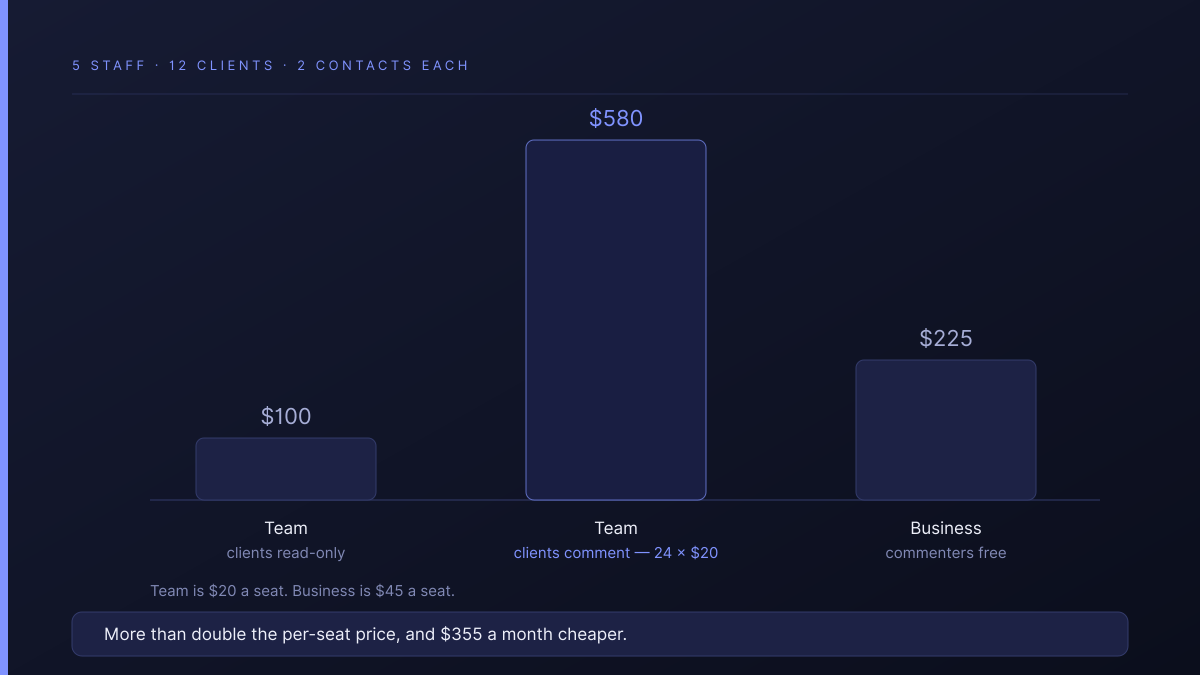
It decides it. Take five staff and twelve clients with two contacts each — twenty-four people who need to leave feedback on deliverables.
| Setup | Staff | Client seats | Monthly |
|---|---|---|---|
| Team, clients read-only | 5 × $20 | 0 | $100 |
| Team, clients comment | 5 × $20 | 24 × $20 | $580 |
| Business, clients comment | 5 × $45 | 0 | $225 |
Moving from Team to Business more than doubles your per-seat price and cuts the bill by $355 a month. That is a worked example rather than a benchmark — your client count moves it — but the ordering holds for any agency with more commenting clients than staff.
The cheapest arrangement is still the first one, and it is worth naming: if your clients only ever need to look, Team at $100 is perfectly good and none of this applies.
What does Airtable not do for agency delivery?
It does not arrive knowing what an agency is. There is no brief, no approval, no retainer and no client record until you build them, and building them well takes someone who enjoys database design and will keep the base coherent as it grows.
That is the same trade we described in what agencies end up bolting on to Monday.com and in the client access problem in Notion, with one difference: Airtable's ceiling is much higher. A well-built base beats an off-the-shelf tool. A half-built one, maintained by nobody, is worse than either.
So the honest question is not whether Airtable can model your delivery. It obviously can. It is whether the person who would build it has the time, and whether anyone will own it in eighteen months.
How does Atwork compare?
The difference is what arrives on day one and what a commenting client costs.
| Airtable | Atwork | |
|---|---|---|
| Data modelling depth | Better — genuinely | Sheets, attributes, views |
| Client who comments | $20 seat on Team, free on Business | Never counted |
| Read-only client | Free | Free |
| Arrives knowing agency work | No — you build it | Template installs the workspace |
| Approval beside the brief | Build it yourself | On the item |
| Extension ecosystem | Far larger | Smaller |
Where Airtable is better, plainly: as a database it is stronger than we are. Richer field types, formulas, and an extension ecosystem we do not match. If your requirement is a bespoke data model and you have someone to build it, Airtable is the more capable tool and this is not a close call.
Where we differ is the starting point. A template installs a working client workspace in minutes, clients join as guests on the views you choose without ever counting against your licence, and the approval sits on the item with the brief. The Agency CRM template is the usual entry point, and the agencies overview covers the scope.
If you are still narrowing the field, the selection framework for small agencies walks through the three numbers that decide it.
Where should you start?
Answer one question before you price anything: do your clients need to comment, or only to look?
If only to look, stay on Team, keep every client read-only, and enjoy the best data model in this comparison for $20 a seat. If they need to comment, price Business rather than Team — and then ask whether you want to spend $45 a seat on a tool you still have to build, or the same effort on one that arrives already shaped.
Count the client contacts who need to comment rather than look. On Airtable that number decides your plan; here it changes nothing at all. Start free