Pitch prep is unbilled time. A chat assistant will hand you a confident prospect brief in a minute, with no way to tell which line came from the prospect's site and which one it filled in. AI prospect research is only usable in a pitch when every fact comes with the page it came from, and when it sits on the deal your team pitches from.
In Atwork, Dana (the built-in assistant) and your custom agents can now read web pages and list the pages they used. Below is one run on a sample deal: the prompt, the result, where it was saved and what checking caught.
What should prospect research cover before a pitch?
Prospect research before a pitch should answer four questions the deck will lean on: what the prospect sells and how they describe it, who they compete with and at what price, what has changed recently, and where your agency fits. Anything that feeds none of those four is background reading, not pitch prep.
- Their own words. How the prospect describes what they sell, so the pitch can echo it.
- Their competitors. Who else chases the same customers, and at what entry price. This is where made-up numbers creep in.
- What changed recently. Launches, new pricing and hiring on their own site.
- The gap you fill. The first three sit on public pages; this one needs someone who knows your agency.
How does an AI agent research a prospect in Atwork?
You ask in plain words. The agent searches the web, opens the pages that matter (the prospect's site, competitors' pricing pages, any link you paste), reads their main text and answers from what those pages say. When quick results are thin it searches more deeply, and it reads long pages in parts.
Dana does this in every workspace with nothing to set up (what an AI assistant can and can't do); a custom agent does it when its access includes Web search.
The prompt
We asked in Dana's sidebar on the Deals sheet of the Agency CRM template, next to its sample deal "SEO retainer pitch — Cloudpeak". Cloudpeak is made up, so there was no real website to lean on:
Cloudpeak is a cloud-hosting company we're pitching for an SEO retainer. Find five companies that compete for the same customers, read each one's pricing page, and give me their entry price and how each describes itself. List your sources.
What you get back
The run took 22 steps and about a minute and a half. Dana opened with the caveat you would want from a junior researcher: it could not confidently find Cloudpeak's website (its first search turned up a same-name company in another business), so its five picks were plausible competitors, not confirmed ones.
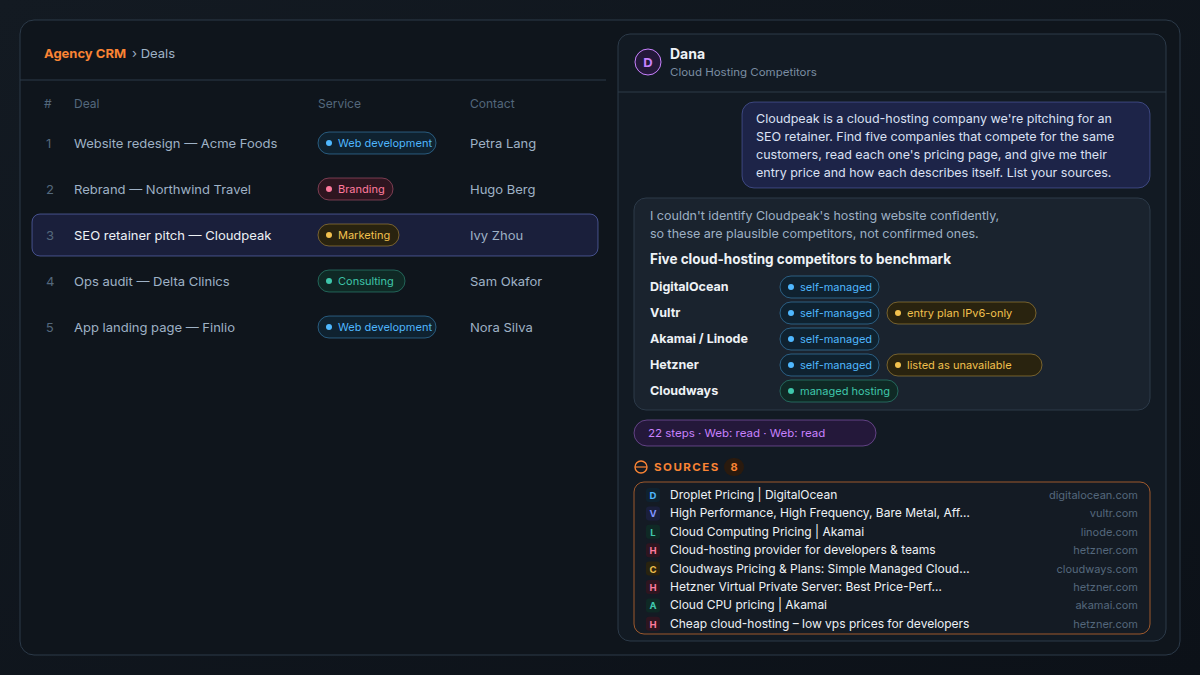
It read the pricing pages of DigitalOcean, Vultr, Akamai (Linode), Hetzner and Cloudways and returned a table of entry plans and positioning. Under the reply sits a Sources list of the pages it actually read, each linking to the page: eight here, including three it opened to find the entry plans. Dana also flagged that Vultr's cheapest plan is IPv6-only and Hetzner's entry plan was listed as unavailable.
Where does the research land?
On the deal. Ask Dana to save the brief to the deal's Description with each source link inline. Saved text does not carry the Sources list that sits under a chat reply, so the links have to be in the text itself. Anyone who opens the deal then sees each claim and its page side by side.
We asked: "Save this brief to the deal's description with each source link inline." Within half a minute the Description held the brief with a "Source:" link in every row.
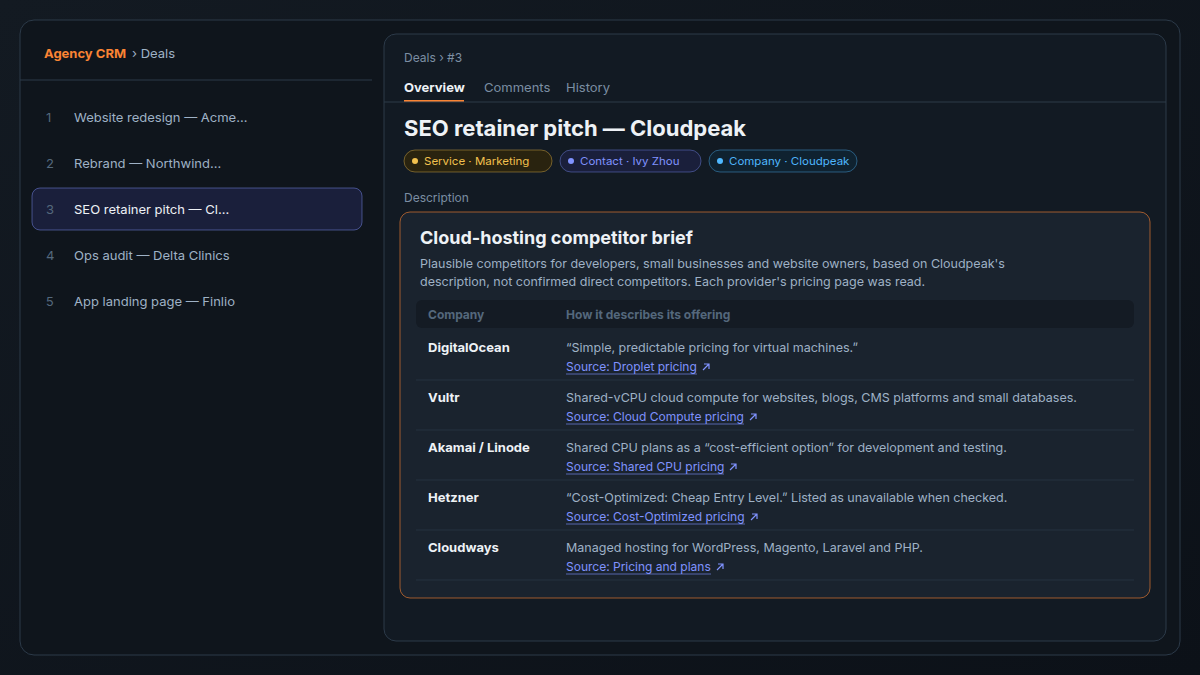
Check that every line with a figure carries its link. In the Agency CRM a won deal links to the project that follows, so the research is still one click away at kickoff and handover (agency CRM guide).
Assign the research to an agent
To skip the chat, assign a research task to a custom agent with Web search in its access (custom agents come with Pro), as you would a teammate (Assign work to an agent). It posts the brief as a comment, with links inline when the task asks for them.
Working on its own, an agent opens only pages it found by searching, links a person typed into the request and links inside pages it read. A website that only sits in a column of the deal is not opened directly, so name the company in the task. With Web search in its access, the researcher in how to chain AI agents can read the prospect's pages too.
How do you check the sources before the pitch?
Open the source behind every fact that goes in the deck, find the sentence that says it and check it is current. A figure with no source, or a source that does not say what the brief says, comes out or goes back to the agent. The links are on the deal, so checking means clicking, not searching again.
- Open each link next to a figure you plan to use.
- Find the sentence that says it.
- Check the conditions: sold-out plans, monthly versus yearly billing.
- Strike or re-ask anything you could not confirm.
We tried all five pricing pages in a browser on 29 October 2026:
- DigitalOcean held up. The $4-a-month Basic Droplet (512 MiB of memory, one vCPU, 10 GiB SSD) and the line "Simple, predictable pricing for virtual machines" were on the page as the brief said.
- Hetzner's entry plan could not be ordered. Every plan in the "Cost-Optimized: Cheap Entry Level" table read "not available", confirming Dana's flag. The price did not display for us, so it stays out of this post.
- Three pages would not open for us. Vultr and Cloudways showed a security check and Akamai an access-denied page, so their figures stay out too. In a pitch, that is a figure nobody on the team has seen.
If a figure has no page behind it that someone on the team has opened, it does not go in the deck.
What can't AI research tell you?
Anything that is not written on a public page. An agent cannot tell you what the buyer is worried about or why the last agency left, and it cannot open pages behind a login or a paywall. Dedicated deep-research tools also run longer and read far more sources per question.
| Research job | Atwork | A person |
|---|---|---|
| How the prospect describes itself | Reads their public pages and quotes them, with the page | Checks the quote is current |
| Competitors and entry prices | Reads public pricing pages and lists each source | Opens every page behind a figure in the deck |
| Recent launches and hires | Reads news and careers pages on their site | Decides which ones matter |
| Pages behind a login, a paywall or LinkedIn sign-in | Cannot open them | Pastes the text in, where the terms allow |
| What the buyer is worried about | Cannot know | Asks on the discovery call |
| Why the last agency left | Cannot know | Asks, and listens |
For a broad market scan, a deep-research tool will go wider. Atwork's case is narrower: the pages behind one pitch, saved where the team works.
| Dimension | A chat deep-research tool | Atwork |
|---|---|---|
| Breadth of one run | Runs longer and reads many more sources | Reads the pages the brief needs; lists up to 10 |
| Where the sources live | In the chat history or a pasted doc | Inline in the brief, on the deal |
| Who on the team sees them | The person who ran it | Anyone who opens the deal |
| Checking a figure | Search again, or trust the summary | Click the link in the same row |
| After you win | Copied into a kickoff doc | Linked from the project at kickoff |
What does it cost, and which plan do you need?
Dana's web research is on every plan, Free included, and draws on the monthly AI budget: $1 for the whole workspace on Free, $5 per seat on Pro and $15 per seat on Business, with custom budgets on Enterprise. There is no separate fee per search or per page. Custom agents, including the assigned-research path, need Pro.
You pay for the model reading and writing, so a brief that reads five pricing pages uses more budget than a quick answer; if the budget runs out, the run stops and says so. Dana uses the same model on every plan; for a custom agent you pick the model, and higher plans allow more capable ones. More in the pricing page, what AI costs an agency per month and an AI policy for a 10-person agency.
Frequently asked questions
Can an AI agent read a prospect's website?
Yes. Dana, and any custom agent with Web search access, can open a public page, including a link you paste, and answer from its text.
Does Atwork's AI show where its information came from?
In chat, yes: a Sources list under the reply links every page the agent read. Text saved to a field or a comment has no Sources list, so ask for the links inline and check they are there.
Can the agent read pages behind a login or a paywall?
No. It reads public pages only, so logged-in pages, paywalled articles and pages behind LinkedIn sign-in are out of reach. When a site refuses to be read, the agent says so; paste the text into the chat instead.
Which Atwork plan includes AI web research?
All of them, Free included, drawing on the AI budget. Custom agents with Web search need Pro or above.
Can an agent research a prospect without anyone asking?
Yes, two ways. Assign the research task to a custom agent, which works through it unwatched and posts the brief on the task, or add an Agent step to a workflow that runs when a deal is added. The pricing page shows which plans include automation triggers.
Does AI research replace talking to the prospect?
No. What the buyer is worried about and why they want an agency now only come out in conversation.
Where should you start this week?
Pick the next deal in Lead, run the prompt with your prospect's name, open three of the sources behind figures you would quote, then ask for the brief to be saved to the deal with links inline. That is one pitch's research, checked, and where your team will look for it.
The agents page shows what a custom agent can take on; for the wider picture, read what an AI teammate actually does in an agency and Meet Dana.
Run the prompt on your next deal in Lead, then open three of its sources before anything goes in the deck. Start free