Most agencies already pay for an AI assistant. It lives in a browser tab, knows nothing about your clients, and needs the context pasted in every time someone asks it something. An AI assistant for agencies earns its keep when it starts from the work instead: the client projects sheet, the retainer hours, the briefs and the handover notes.
That is the job of Dana, the assistant built into every Atwork workspace. This post covers what Dana does with your agency's own data, where you reach it, what it costs, and the places where it stops and a custom agent or a person should take over.
What is Dana?
Dana is the AI assistant built into Atwork. It reads and changes the sheets, pages and records in your workspace, working as you and within your access. You ask in plain language from wherever you are working, and it answers with numbers, lists, charts, files, or the change itself.
It is one assistant everywhere. The Dana that answers a question on your delivery sheet is the same one that drafts a kickoff agenda in a page and plans your Tuesday. It picks up the know-how a job needs as it goes: ask it to build a sheet and it works like a builder, ask it to tighten a paragraph and it works like an editor.
Two properties matter more than any feature list. Dana sees only what you can see: a space you are not a member of does not exist for it. And it knows where you are, so "what is blocked here?" asked on the Meridian Health project sheet means that sheet. What an AI agent in your workspace can actually see covers the permission model in detail.
Where do you ask Dana?
You ask Dana in the place where the question comes up. The header and the omnibox reach it from anywhere; a sheet, a page, the planner and a workflow each have their own entry point that starts Dana with that context already loaded, so you never paste a client's data into a prompt.
| Where | What you use it for | An agency example |
|---|---|---|
| Header and omnibox | Anything across the workspace | "Which client projects are due this week and not in review?" |
| A sheet's Insights tab | Counts, totals and charts for one sheet | "Total budgeted hours by client, as a bar chart." |
| The page editor | Drafting and rewriting text | "/ask a kickoff agenda for the Kestrel Foods rebrand" |
| Build with AI | Sheets, fields and forms from a description | "A client onboarding tracker with a kickoff form" |
| A Vista view or page | Live pages built on your data | "A status page for the Atlas Logistics retainer" |
| Today in the Planner | A time-blocked plan for your day | Plan my day |
| A workflow's Agent step | Dana as one step in an automation | Summarise each new request before it is routed |
What can an agency hand Dana this week?
Five kinds of work go to Dana on day one, with no setup: answering from your records, counting and charting, building the structure for a new client, writing and rewriting, and planning the day. Each one replaces a task an ops lead currently does by hand or copies between tools.
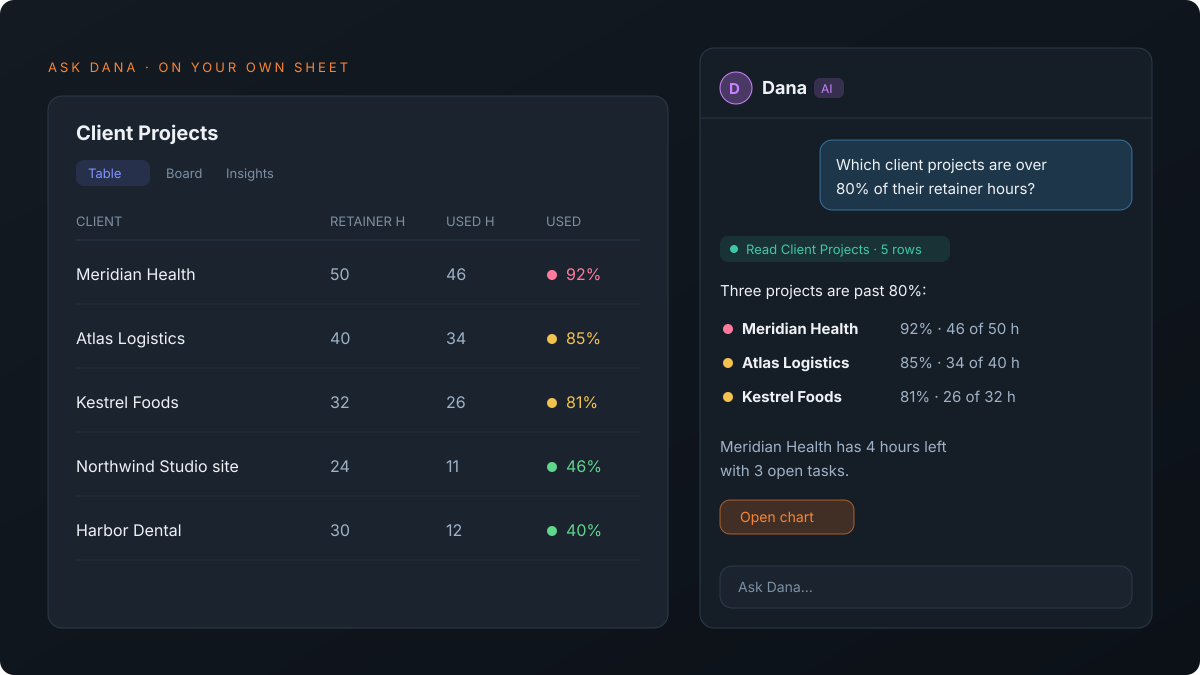
- Answer from the records. "Summarise what changed on the Meridian Health project since Monday." Dana reads the records themselves, so the answer reflects the sheet rather than someone's memory of it.
- Count and chart. On a sheet's Insights tab, "open requests per client" or "hours by account manager, as a donut" comes back as a number or a chart.
- Build the setup once. Describe a client onboarding tracker in Build with AI and Dana drafts a plan of sheets, fields, links and a form. Nothing is created until you click Create workspace, so you review the structure first.
- Write and rewrite. In any page, select a paragraph and choose Make shorter, Fix grammar or Translate, or type /ask for a first draft of an agenda or a status update.
- Plan the day. Plan my day in Today drafts a time-blocked plan from your open tasks, your calendar and your working hours, with a reason for every task it left out. Nothing lands on your timeline until you click Looks good.
It also makes files (a PDF or Word document, or an Excel export of rows), searches the web for context from outside your workspace, and acts in the integrations your workspace has connected. For where AI fits across the rest of agency delivery, see AI for agency operations.
Can you ask Dana how Atwork itself works?
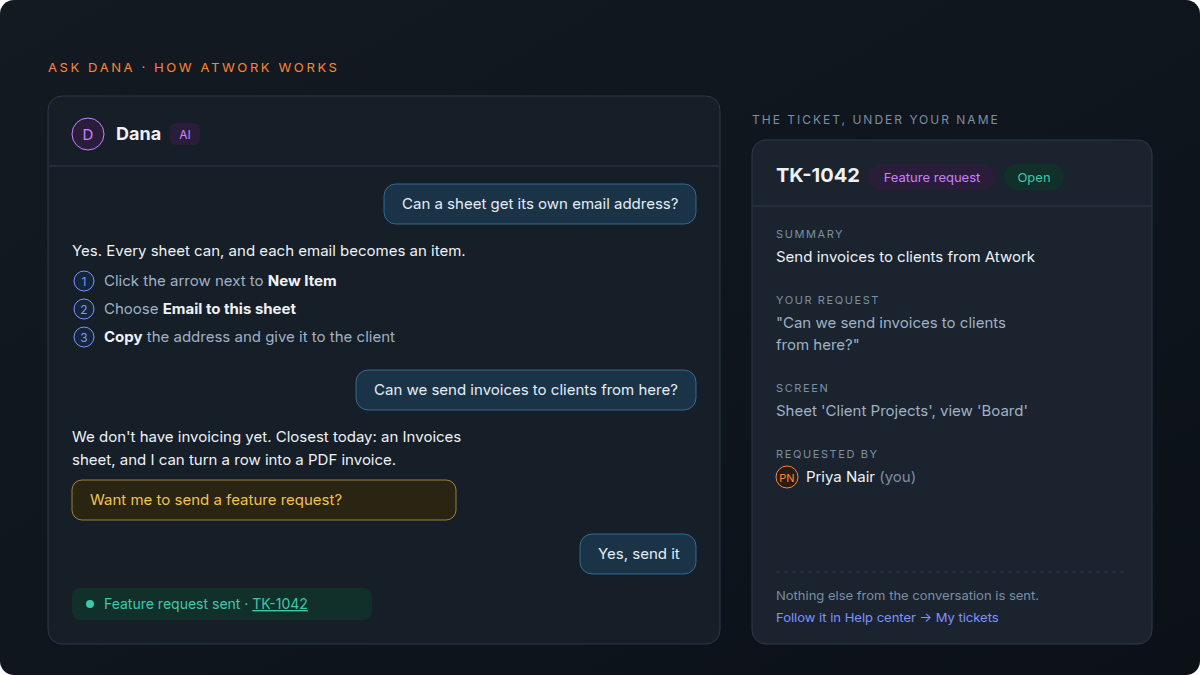
Yes. An ops lead setting up a client asks "can a sheet get its own email address?" and gets the clicks. Ask about something Atwork doesn't have yet, such as invoicing clients, and Dana says so plainly, gives the closest way to do it today and offers to send a feature request.
That changes who answers the "how do I…" questions. In most agencies one person, usually whoever set the tool up, fields them from account managers all week. Dana answers from what Atwork does today and links the Help center article when there is one, so that person stops being the help desk. Meet Dana lists questions to start with.
A feature request goes nowhere until you agree. Dana asks first, and on yes it opens a ticket under your name with three things in it: a one-line summary, your request in your own words, and the screen you were on. You follow it under My tickets in the Help center.
Can Dana build pages your clients see?
Yes. A Vista page is a live page Dana builds from a description, such as a client status page, an intake form or a capacity overview. It reads your sheets as they are now, and you can publish it as an app that one client segment opens, seeing only the data behind that page.
You describe the page in a chat beside it and refine it the same way: "move the approval list above the chart", "use our brand orange". Dana edits the existing page rather than starting over, and every version is kept, so a change you do not like is one click back. Vista: describe a page, get an app on your live data walks through a full example.
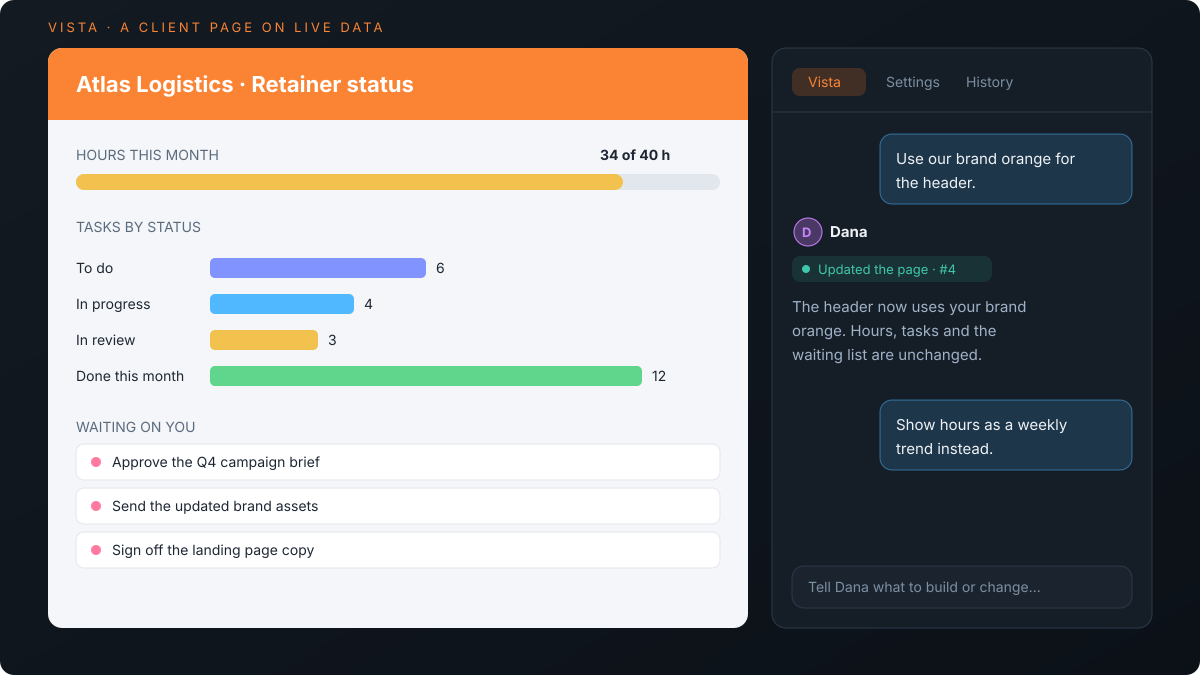
The status page you rebuild for every client on Friday becomes one description and a link.
What won't Dana do?
Dana works when you ask. It holds no standing job, it makes most changes without asking first, and it can misread a question. Knowing those limits up front is what keeps an assistant useful instead of quietly wrong in a client report.
- It does not watch your work overnight. Dana has no queue and no assignments. Work that should be picked up the moment a status changes belongs to a custom agent.
- It acts as you, mostly without a confirmation step. Ask it to archive a record and it does. It stops to confirm only before updating more than 20 rows at once, before a field type change that would lose values, before acting in a connected tool and before filing a feature request. Archived records and removed fields can be restored, and a batch of updates can be undone, but read the steps it shows before you move on.
- It can misread a question. The numbers come from your records, but the question is still interpreted. Open the rows before a figure goes into a client update.
- In the page editor it only writes. It drafts and rewrites text there; changes to records go through the sidebar or Insights.
General chat assistants are better at open-ended writing and research that has nothing to do with your workspace. If your team already lives in one of them, connect it to Atwork rather than choosing between the two.
When do you need a custom agent instead of Dana?
Use a custom agent when the work repeats and has a clear handover: triaging new requests, drafting first-pass client updates, chasing missing timesheets. Dana is on demand; a custom agent is a workspace member with its own persona, instructions and knowledge, which you assign work to like anyone else.
| Dana | Custom agent | |
|---|---|---|
| Who starts the work | You, when you ask | Its job: an assignment, a status change, a workflow |
| Instructions | Built in | Yours: persona, job description, knowledge |
| Shows up as | The assistant you ask | A member you can assign |
| Best for | Questions, setup, drafts, plans | Repeating work with a clear owner |
| Setup | None | An admin builds it once |
Most agencies end up with both: Dana for the questions everyone asks, and two or three agents for the handovers that happen every week. What an AI teammate actually does in an agency and custom AI agents in Atwork cover the second half.
What does Dana cost?
Dana is included in every Atwork plan and draws on the workspace's monthly AI budget: $1 per workspace on Free, $5 per seat on Pro and $15 per seat on Business, pooled across the team. Ordinary work such as creating records, views and forms uses none of it.
When the budget runs out, the conversation shows AI budget used up, and owners can top up or upgrade from there. Opening a finished Vista page does not draw on the budget; building and changing one does. For the wider picture of what AI costs an agency across tools, see what AI actually costs an agency per month, and the pricing page lists each plan.
Frequently asked questions
Can Dana see client data I don't have access to?
No. Dana works as you. It cannot open a space you are not a member of or a sheet your role does not allow, and asking it for something you cannot reach does not reveal it. Its changes are saved as yours.
Does Dana ask before changing records?
For most changes, no. Within your access, Dana creates, updates and archives records, adds tasks and comments, and changes fields when you ask. It asks first before updating more than 20 records at once, before a field type change that would empty or shorten values, before acting in a connected tool such as Slack, and before sending a feature request. Each change appears as a step in the conversation and is saved as yours, and a batch of created or updated records can be undone from that step.
Can Dana tell me whether Atwork has a feature?
Yes. Dana answers from what Atwork does today, with the exact clicks, and links the Help center article when there is one. When Atwork doesn't have the feature, it says so, suggests the closest way to do it now, and offers to send a feature request, which it files only if you say yes.
Can Dana run without anyone asking it?
Yes, inside a workflow. Add an Agent step and pick Dana from the Built-in group, and the workflow's trigger starts it, for example on every new client request.
Do I need to set Dana up?
No. Dana is built into every workspace. Open Ask Dana in the header, or the Insights tab on any sheet, and ask.
Where to start
Pick the question you answer by hand every Monday, the one that means opening three sheets and a calendar, and ask Dana on the sheet where the answer lives. Then see the agents page for what an agent with a standing job adds on top.
Ask Dana the question you answer by hand every Monday. If the answer is wrong, you have lost five minutes. Start free