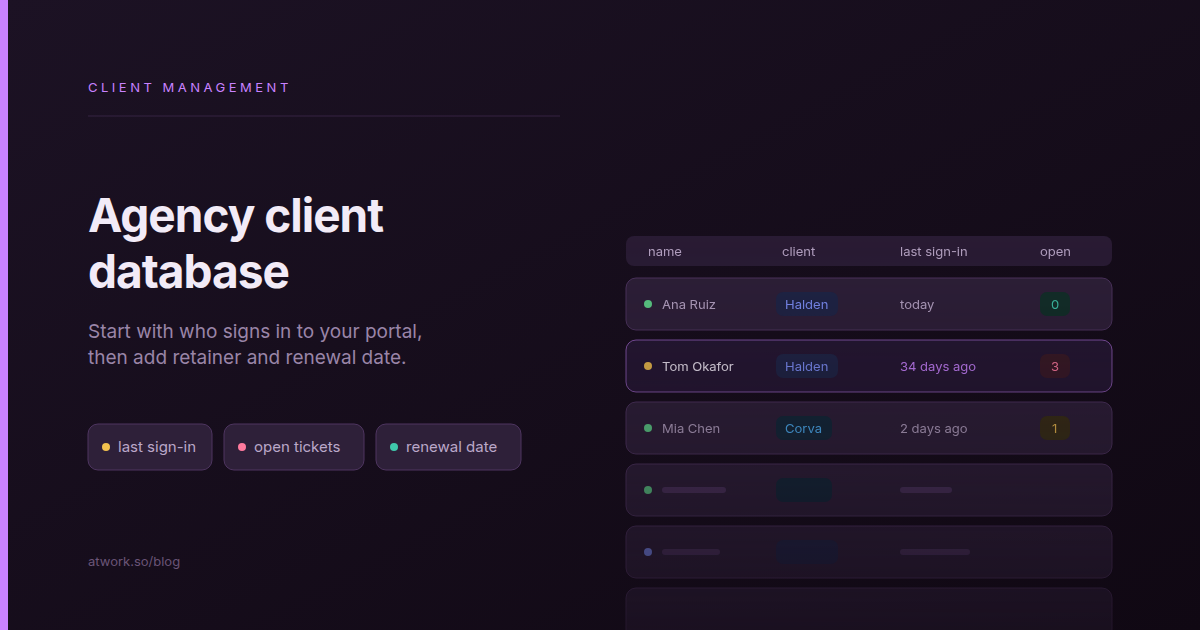
An agency client database is one record per person on the client side, with your account facts (which client, who leads the account, the retainer tier, the renewal date) next to two things only your portal knows: when that person last signed in, and how many of their requests are still open. The usual version is a spreadsheet beside the portal that holds the first half and never sees the second.
This guide builds one on the list your portal already keeps: the Customers sheet in Atwork.
What should an agency client database hold?
An agency client database should hold three layers for each client-side person. Identity: who they are and which client they work for. Your account facts: account lead, retainer tier, renewal date and notes. Live signals: when they last signed in and what they are waiting on. You keep the first two; the third should come from the system your clients actually use.
| Field | Who keeps it current | Why it matters |
|---|---|---|
| Name, email, mobile | Atwork, from the person's portal account | The renewal email goes to someone who still has a login |
| State | Atwork | Shows who registered but never confirmed their email |
| Last sign-in | Atwork | Tells you whether anyone at the client still uses the portal |
| Open tickets | Atwork | Counts this person's requests you haven't closed |
| Client | You | Groups people by the company they work for |
| Account lead | You | Says who on your side owns the relationship |
| Retainer tier and renewal date | You | Puts the commercial facts next to the signals |
A spreadsheet can carry all seven rows, but the top four go stale the moment nobody looks. Let the portal keep those, and spend your effort on the three only you know.
Why does a client spreadsheet drift away from the portal?
A client spreadsheet drifts because nobody edits it when something changes on the client side. A contact leaves, a new approver gets a login, requests pile up. The portal registers all three the day they happen; the spreadsheet registers none of them until someone updates a row, usually in the week of the renewal.
- The wrong contact on the renewal call. The marketing lead who signed the retainer left in the spring. The spreadsheet still lists them; the portal shows no sign-in since March.
- The approver nobody added. The client's new head of brand got a portal login to approve a campaign, but never made it onto the spreadsheet, so they never see the renewal proposal.
- The retainer that quietly turned into support. A trickle of small requests, each one reasonable. The spreadsheet shows a happy top-tier client; the open requests show where the hours went.
None of this is a discipline problem. A spreadsheet can hold the same columns; it just can't notice.
How does the Customers sheet work in Atwork?
The Customers sheet lists everyone who can sign in to your customer portal, one row per person. The workspace owner opens it from Settings › Organization › Customers, next to Customer portal. Atwork keeps the built-in columns current from each person's account, and you add your own fields and views as you would on any other sheet.
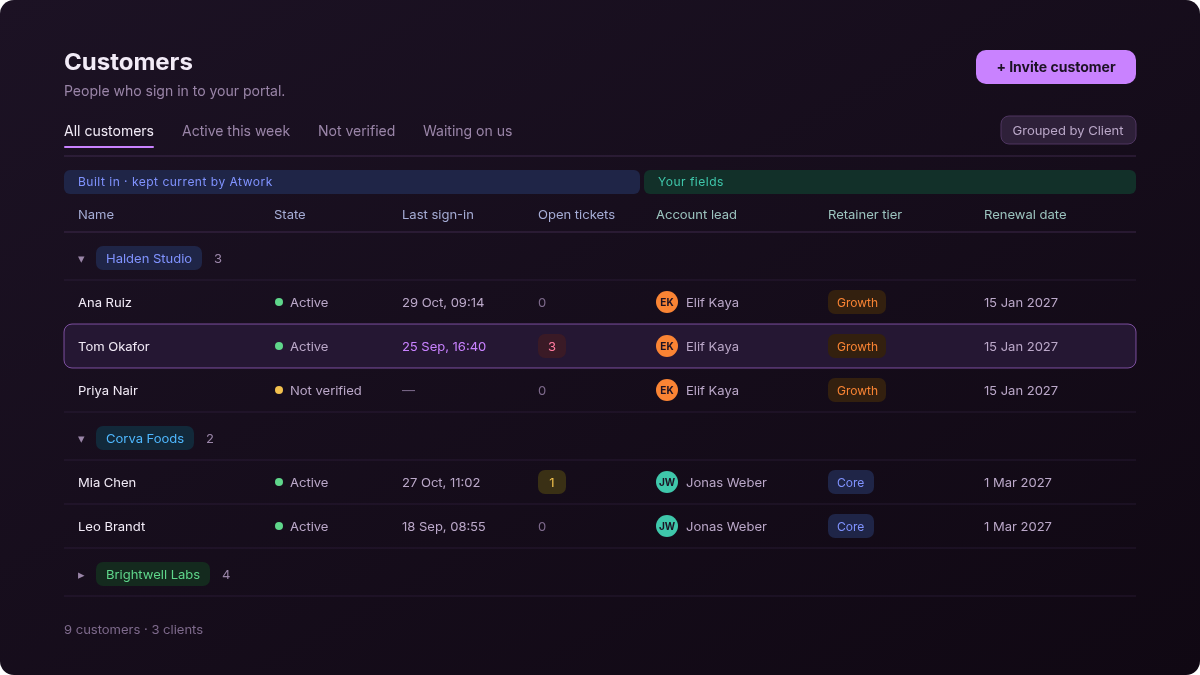
The built-in columns are Name, Email, Mobile, State (Active, Not verified or Blocked), Created, Last sign-in, Open tickets and Contact. You can't type into them, and don't need to: they change within seconds of the account changing. Three views come with the sheet: All customers, sorted by last sign-in; Active this week, for the last seven days; and Not verified.
Two things to know first. A row is a person, not a company: if three people at one client sign in, the client appears three times, and you group them with a field you add (next section). And only the workspace owner can open the sheet for now, so the setup below is the owner's job.
How do people get on the list?
People get on the list in one of two ways, and neither is typing a row: the owner invites them, or they register on the portal. Either way the row appears on its own, linked to the person's CRM contact.
- Invite. Click Invite customer at the top of the sheet, then pick an existing CRM contact or create one. The person gets an email with a password and starts as Active. Inviting needs the CRM app installed.
- Registration. Tick Allow customer registration in your portal settings, and people can sign up from your portal page. They start as Not verified and become Active once they confirm their email.
Rows can't be imported from a CSV file or deleted from the sheet. Portal users and access covers invites in more detail. If you are still deciding whether clients should sign in at all, start with client portals for agencies.
How do you add retainer, account lead and renewal date?
Add four fields to the Customers sheet, then group the view by client. The values you enter stay as you set them when a customer's name, email or state changes, because Atwork only updates the built-in columns.
- Client: a Select field with one option per client company. If you already keep a sheet of your clients, a Relation to it works too.
- Account lead: a Member field, set to the person on your team who owns the relationship.
- Retainer tier: a Select field, with one option per tier you sell.
- Renewal date: a Date field.
- Group by Client: in the view's grouping, choose Client. Each client becomes a group, with its people underneath.
Because a row is a person, a renewal date entered here repeats for everyone at that client. If your clients have several people each, keep the account facts once on a sheet of your own clients, link it with the Relation from step 1, and add Mirror fields to show them on each row.
Which views are worth saving?
Three saved views turn the sheet into a renewal checklist. Give each a name your account leads will recognise, so nobody rebuilds it before a call.
- Renewals coming up. Filter Renewal date to From today and sort it soonest first. The next renewal is always the top row.
- Quietest first. Sort Last sign-in oldest first, so the people who have stopped signing in rise to the top, grouped under their client.
- Waiting on us. Filter Open tickets to greater than 0 and sort it highest first.
What do last sign-in and open tickets tell you before a renewal?
Last sign-in and open tickets answer two questions no spreadsheet can: do the client's people still use the portal, and are they waiting on you right now? Together they put every person on the list into one of four situations, each with a different conversation before the renewal.
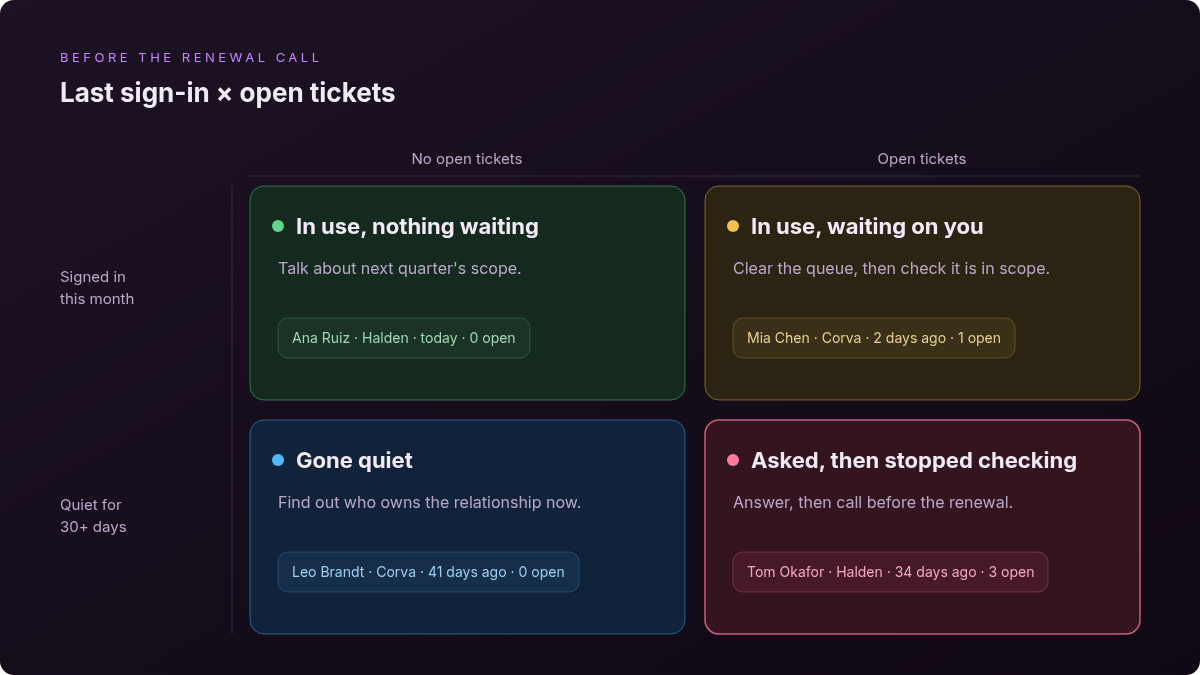
Someone who signed in this month with nothing open is the easy case: talk about next quarter's scope. Someone who signs in and keeps asking for things needs a closer look, because a retainer can drift into support one small request at a time. Stop over-servicing retainers covers how to tell and how to raise it.
The quiet row matters more. A person quiet for a month with nothing open is often no longer the person who matters at that client: find out who is, and invite them. A person who is quiet with tickets open asked for something and stopped checking. Answer them, then call before the renewal, not at it. For how requests reach your Support Desk from the portal, see client requests without another login.
The most accurate client list an agency has is the list of people who sign in to its portal.
Atwork doesn't score account health for you. There is no health score or risk alert on the sheet; you read the two signals and decide. A customer success tool with health scoring does more here, and if you already run one, keep it.
Is the Customers sheet the same as your CRM?
No. Your CRM holds everyone you sell to or work with, and your team shares it. The Customers sheet holds only the people who can sign in to your portal, and each row links to that person's CRM contact through the Contact column. Run sales in the CRM, and run the accounts you already have from the Customers sheet.
| CRM contacts | Customers | |
|---|---|---|
| Who is in it | Everyone you sell to or work with | Only people who can sign in to your portal |
| Who opens it | Members of the CRM space | The workspace owner |
| How a row gets there | You or a form add it; a portal invite or sign-up adds one too | An invite or a portal registration |
| Where portal groups (segments) are set | Here, on the contact | Not here |
| What you add yourself | Fields and views for selling | Fields and views for account management |
Pipeline stages and forecasting belong in your CRM, and a client list is no substitute for them. If you sell from Atwork, that is the CRM app. Clicking the Contact chip on any Customers row opens the person's CRM record.
Frequently asked questions
Is the Customers sheet a CRM?
No. It lists only the people who can sign in to your portal, and each row links to a CRM contact. Your sales pipeline and forecasting stay in your CRM.
Who can open the Customers sheet?
The workspace owner, from Settings › Organization › Customers. Admins and members can't open it for now.
Can I add a customer by typing a new row?
No. Rows appear when you invite a customer or someone registers on your portal. The Invite customer button opens a dialog where you pick a CRM contact or create one.
What counts as an open ticket?
A ticket on your Support Desk that this person raised, that isn't archived and isn't in a Complete status. The number updates within seconds when a ticket is opened or closed.
Do my own fields survive when a customer's details change?
Yes. Atwork updates only the built-in columns, such as Name, Email, State and Last sign-in. Fields you added, like Account lead or Renewal date, keep the values you set.
Where should you start this week?
Open Customers this afternoon and start with your three biggest retainers. Add Client, Account lead and Renewal date for the people at those clients, then save the Quietest first view. Whoever sits at the top is the first conversation to have before the next renewal. For how the portal, projects and retainers fit together, see Atwork for agencies.
Put your three biggest retainers on the Customers sheet and see who has gone quiet before the renewal call. Start free