Trello is the easiest tool in this category to start with and the one agencies most often outgrow without noticing. Nothing breaks. There is no bill that suddenly jumps and no feature that gets taken away. What happens is quieter: the number of boards climbs, the free plan's ceiling arrives, and the work is spread across so many boards that no single screen can answer a question about all of it. Knowing which limit you will hit first is most of the decision.
Is Trello enough to run an agency on?
For a while, genuinely yes. A board per client, a list per stage, a card per deliverable is a real system and plenty of agencies have billed years of work out of it. It stops being enough at a specific and predictable point: when you need to answer a question that spans clients, because Trello is built to show you one board at a time.
That is a design choice, not a defect. Trello is the clearest board tool there is, and the clarity comes from the narrow frame.
What actually runs out on the free plan?
Boards, not people. The free plan is generous about collaborators and strict about how many boards a Workspace may hold, which is the opposite of how agencies grow. Trello's pricing page states "Up to 10 boards per Workspace" and "Free for up to 10 collaborators per Workspace", alongside "Unlimited storage (10MB/file)" and "250 Workspace command runs per month".
Ten boards sounds like ten clients. It rarely is. Most agencies end up with more than one board per client — delivery, a content calendar, a retainer tracker — plus a few internal ones for hiring and admin.
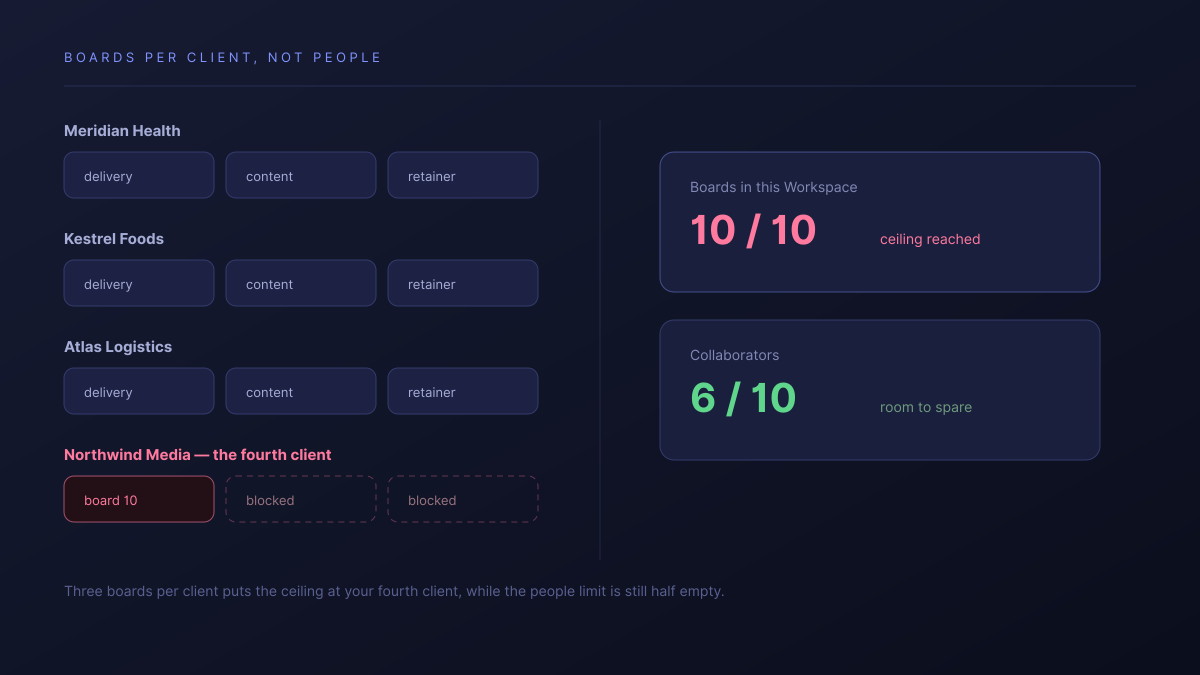
- Three boards per client puts you at the ceiling around your fourth client.
- The 10MB per file cap is the other early one for anyone moving creative work.
- 250 command runs a month is roughly eight automations a day across the whole Workspace.
None of these is a seat limit, which is why the free plan feels fine right up until it does not. You are not adding people. You are adding clients.
What does Trello cost once you outgrow free?
Less than most of the category at the entry tier, and level with it by the time you have what an agency needs.
| Plan | Price per user, per month | What it adds |
|---|---|---|
| Free | $0 | 10 boards per Workspace, 10 collaborators |
| Standard | $5 | Unlimited boards, custom fields, single board guests |
| Premium | $10 | Calendar, Timeline and Table views, Observers |
| Enterprise | $17.50 | Organisation-wide administration |
Prices from Trello's pricing page, on annual billing. Standard at $5 is the cheapest honest tier in this whole category, and if unlimited boards is the only thing you were missing, that is a very good deal.
The catch is which tier holds the cross-board views. Calendar, Timeline and Table arrive at Premium, $10 — and $10 is within a rounding error of Asana's Starter plan at $10.99, where guests are unlimited and free. At that point you are no longer choosing the cheap option; you are choosing the board model.
The free plan does not run out of people. It runs out of boards, and an agency makes boards faster than it makes hires.
Where does the per-client board model break?
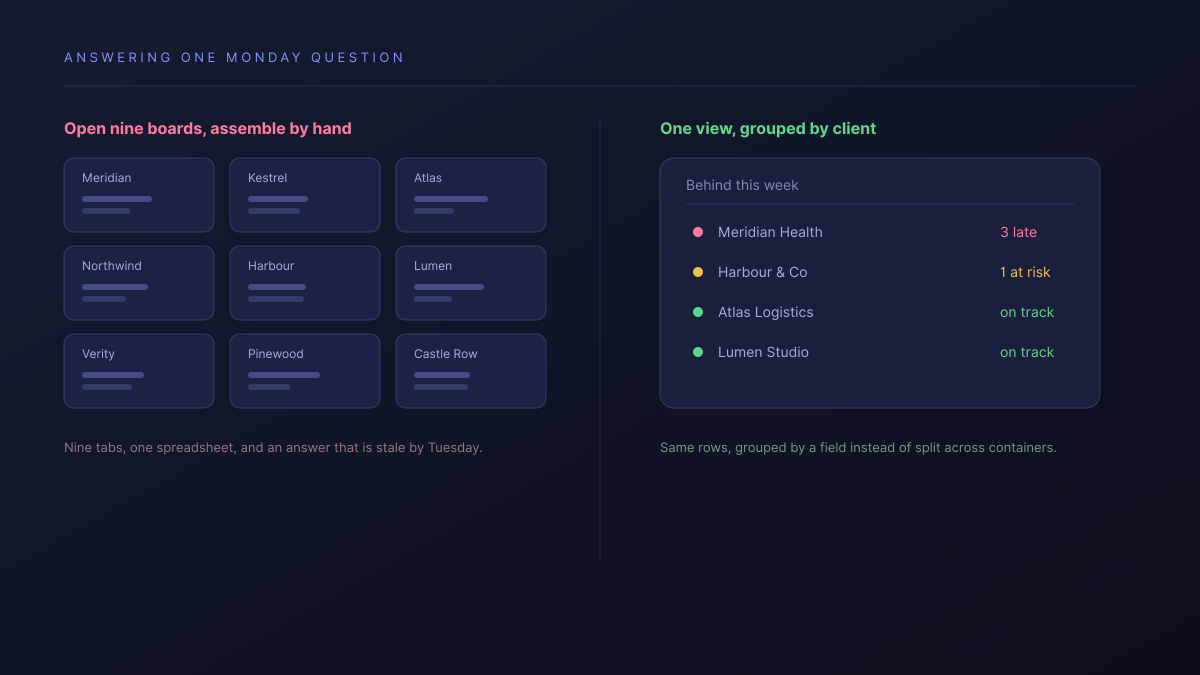
At the second question anyone asks about the whole business. A board answers "how is this client going" perfectly. It cannot answer "which clients are behind", "what is everyone working on this week", or "what did we deliver for this client last quarter", because each of those spans boards and the board is the unit.
The workaround is a person. Somebody opens nine boards on a Monday morning and assembles the answer by hand, and that answer is stale by Tuesday. This is the same assembly cost we described in what agencies end up bolting on to Monday.com, arriving from a different direction.
What do you lose by working one board at a time?
The cross-client view, and with it most reporting. It is worth being precise about what that costs, because it is easy to dismiss until a client asks a question you cannot answer quickly.
- Capacity. You cannot see who is overloaded without opening every board.
- Status across clients. The weekly update is assembled by hand, from memory as much as from the boards.
- History. What you delivered for one client last quarter is spread across boards that may since have been archived.
- Consistency. Nine boards drift into nine shapes, because nothing enforces one.
Should you stay on Trello?
For a lot of readers, yes, and the honest routing matters more than the pitch:
- Stay on Free if you have a handful of clients, one board each, and no reporting needs. You are getting a real tool for nothing.
- Stay, on Standard if boards were the only thing running out. At $5 nothing in this category beats it, and unlimited boards may buy you another two years.
- Look further if you are paying Premium mainly for cross-board views, because that is the point where you are paying full category price for a model that works against you.
- Look further if the weekly status update is assembled by a person opening boards. That is a structural cost, not a habit.
| Trello | Atwork | |
|---|---|---|
| The unit of work | A board per client | One sheet, every client in it |
| Seeing across clients | Open each board | A view that groups by client |
| What limits you first | Boards per Workspace | Nothing per-client |
| What a client sees | A board you share | A view, scoped to their own rows |
| Cross-client reporting | Assembled by a person | A view or a dashboard |
Because the client is a field rather than a board, the same rows can be grouped by client, by owner or by week without anything being copied. The Agency CRM template is the usual starting point, and the agencies overview covers the scope.
Where Trello is better, plainly: it is the fastest tool here to get a team actually using, the board metaphor needs no explanation to a client, and its free plan is more useful than most paid tiers in this bracket. If your work genuinely fits one board per client and you never need to look across them, Trello is the right answer and we would be more machinery than you need.
Where should you start this week?
Count two numbers before you upgrade anything: how many boards you have per client, and how many times last month somebody assembled an answer by opening several of them. The first tells you when the ceiling arrives. The second tells you whether the ceiling is even the problem.
If the second number is high, upgrading to Premium buys you views inside each board and changes nothing about the work of stitching them together. Put one client somewhere that treats the client as a field instead of a container, for thirty days, and compare the Monday morning.
Count how many boards you keep per client, and how often someone assembles an answer by opening several of them. Then try one client with the client as a field, not a board. Start free