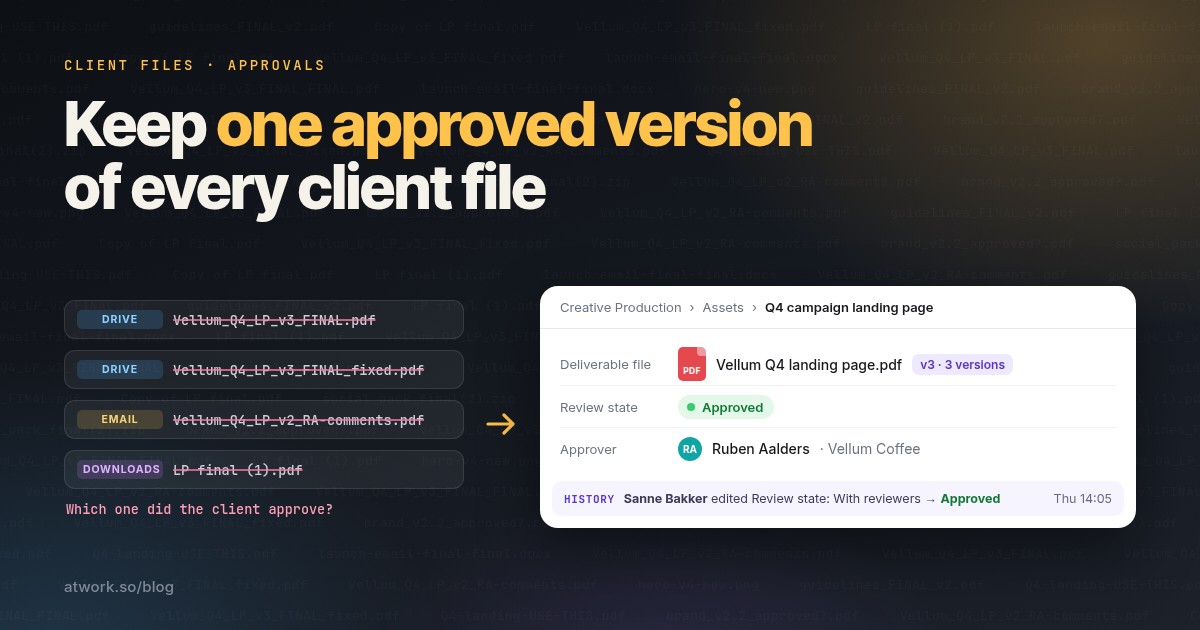
Every agency has the folder: Vellum_Q4_LP_v3_FINAL.pdf, Vellum_Q4_LP_v3_FINAL_fixed.pdf and an "LP final (1).pdf" someone saved from an email. Ask which one the client approved and you get three answers. To keep one approved version of every client file, stop asking the file name to answer. Keep one record per deliverable: the file, every earlier round as a version of it, who approved it and when. In Atwork, that record is a row with a File List field. The example here is a landing page for Vellum Coffee, a fictional client, approved in round three.
Why do agencies lose track of the final version?
Agencies lose track of the final version because the approved file leaves the place where it was approved. A design goes out by email, comes back with comments and lands in Drive, Slack and a Downloads folder. Every hand-off makes a copy with its own name, and the approval, one line in an email, sits in nobody's folder.
The cost is well documented. In 2004, Susan Feldman, then a research vice president at IDC, summed up studies by IDC and others: "Knowledge workers spend from 15% to 35% of their time searching for information." In Microsoft's 2023 Work Trend Index, 62% of the 31,000 workers surveyed said they struggle with too much time spent searching for information. Versions make it worse: in M-Files' 2019 survey of 1,500 office workers, 68% said it is always, mostly or sometimes difficult to find the right version of a document. Of those, 83% had recreated a document that already existed because they couldn't find it.
Do naming conventions work?
Naming conventions work inside your team, partly. A convention such as client_deliverable_v03 sorts well and stops some duplicates. It breaks at the boundary: clients rename attachments, save "(1)" copies and reply with edits of their own. And "final" in a name is a promise no file can keep, because there is always another round.
Asked what makes searching for documents hard, 42% of the same M-Files respondents said documents aren't labelled or named correctly. The UK's National Archives puts the limit plainly in its guidance on managing digital records. "The introduction of rules on the creation of version controls really only works where the business recognises a real need for these conventions. If not, they are rarely used and become redundant." Your client never signed up to your convention. The University of St Andrews' file-naming guidance goes further: "Avoid confusing, accumulating labels, for example, revision, final, final2, definitive_copy." It points to versioning in the tools instead.
A file can't know whether the client said yes to it. The record that holds it can.
So move the version out of the name. In Atwork, every round of a deliverable is a version of one file: right-click the file in its field and choose Upload a new version, or drop the new file on the Versions panel. Atwork asks What changed?, and the answer becomes a note on that version. The name stays Vellum Q4 landing page.pdf from round one to sign-off.

What if the client goes back to an earlier round?
It happens: "actually, the hero from round two was better". Click the file's version chip (v3 · 3 versions), open v2 and click Restore this version. Atwork adds it on top as v4, marked Restored from v2, and keeps every version in the list, so the change of mind is on record too. Anyone who can edit the row can restore a version.
What should the approved version record: file, approver, date?
The approved version needs four things kept together: the file as it was approved, the one person whose yes counts, when they said it, and every earlier round, kept but no longer current. When any of the four lives somewhere else, the next disagreement about what was approved turns into an email search.
Agree who that person is with the client at kickoff, as our post on why revision rounds multiply explains.
| Question | A file name | A shared folder | Atwork |
|---|---|---|---|
| Which file is the approved one? | Whichever says "final" last | Usually the newest, not always the approved | The file on the deliverable's row, at its current version |
| Who approved it? | Not recorded | Not recorded | The Approver field |
| When? | A date, if someone typed one | The last edit, which moves with every change | History shows who set Approved, and when |
| What changed between rounds? | Not recorded | The file's own version history | A note on each version |
| Co-editing a live document with the client | No | Yes | No: the client gets a copy, not the live Doc |

In Atwork the record is a row in your deliverables sheet, with three fields and one thing you get for free:
- Deliverable file, a File List field limited to one file. In the field's settings, under Files, set At most to 1. A second file is refused; new versions of the first still go in.
- Review state, a status with With reviewers, Changes requested and Approved.
- Approver, the one person on the client's side whose yes counts.
- History, which every row keeps. Open the row's History, or click a field's label and choose View changes, to see who set Approved and when.
Add the approval to the version note too: "Approved by Ruben Aalders by email." Notes take up to 200 characters and can be edited later.
Where should client files live: your drive, theirs, or the project?
Working files live where your team edits them, usually your own Google Drive. The approved file lives on the deliverable's record. The client's own drive is where finals go at handover, when the contract says the files are theirs. Mixing those three jobs is how one deliverable ends up in three drives, each with a different "final".
| Where | Good for | Weak at |
|---|---|---|
| Your Google Drive | Co-editing a live Doc, large source files | Recording who approved what |
| The client's drive | Handover, files the client owns | Seeing what changed after handover |
| Atwork | The approved version, who approved it and when, every round | Co-editing: a Doc reaches the client as a copy, not the live file |
You don't have to move working files out of Drive. In the Deliverable file field, click Add from Google Drive: Atwork stores a link, not a copy, and your team keeps editing in Drive. The catch is that a link points at a live file. Edit the Doc after the client approved it, and the link shows the edit.
So freeze it at sign-off. Open the file's ⋮ menu and click Save a copy to Atwork: the link becomes an Atwork file, and later edits in Drive no longer change it. Docs are saved as Word files, Sheets as Excel and Slides as PDF. Only the person who added a Drive file can save a copy of it. From then on, a change after approval is a new version with its own note, never a silent edit. The details are in Google Drive and Dropbox.
How do you share the final with the client without sharing your Drive?
Give the client the record, not the folder. Publish a view of your deliverables that shows only that client's approved rows. The client opens the approved files there, with no access to your Drive and no seat in your workspace. A file still linked from Drive reaches them as a copy, so your sharing settings never change.
- Make a view of the deliverables sheet filtered to the client's project and to Review state Approved.
- Open the view tab's menu and choose Publish. Next to Customers, choose Segments and pick a segment that holds only that client's contacts.
- Open it as a test customer and check which rows and files they see before you send the link.
Don't skip step three. A sheet shown on your client portal shows its rows to every customer who signs in, so the view's filter and audience are what keep one client's files from another. Share a view walks through the Publish dialog, and how to share Google Drive files with clients covers what the client gets from a Drive file. For what else a client should see, read client portals for agencies.
Frequently asked questions
What if the client approves by email?
Set Review state to Approved yourself, write "Approved by Ruben Aalders by email" in the version note, and paste the client's reply into a comment on the row. History records who made the change, and when.
Does a Google Drive file keep its versions in Atwork?
No. A linked Drive file keeps its versions in Google Drive. Once you save a copy to Atwork, the copy gets Atwork versions from then on.
Can I get back a file someone removed from the field?
Yes, for 30 days. Under the field in the row's record, click recently removed, then Restore. The file comes back with all its versions.
Start with the next approval
You don't need to clean up last year's folders. Give the next deliverable that goes to a client its own row: one file with every round as a version, a review state and a named approver. When someone asks which version is final, the row answers, and History shows who said so.
The Creative Production & Review template already tracks assets with a round, a review state and an approver. Add a File List field limited to one file, link the working file from Google Drive, and save a copy at sign-off.
Give your next deliverable one row: the file, its rounds, the approver and the date of the yes. Start free