The question usually arrives as a percentage. What share of revenue should an agency spend on software? You can find numbers for this, and they are all unusable, because the figure they describe is the sum of your invoices — which is the smallest and least interesting part of what your stack actually costs you.
Why is the percentage answer unusable?
Because a percentage of revenue only counts what appears on a card statement, and most of what a tool consumes never does. Two agencies with identical software invoices can have wildly different real costs depending on how much labour those tools create or remove.
It is also a target that responds to the wrong lever. An agency that is under its percentage can hit it by buying something, and one that is over can hit it by cancelling the tool that was saving the most time. Neither move tells you anything about whether the stack is working.
What is the better question?
What does each tool do to your cost base. There are only three answers, and knowing which one you are buying is worth more than any benchmark.
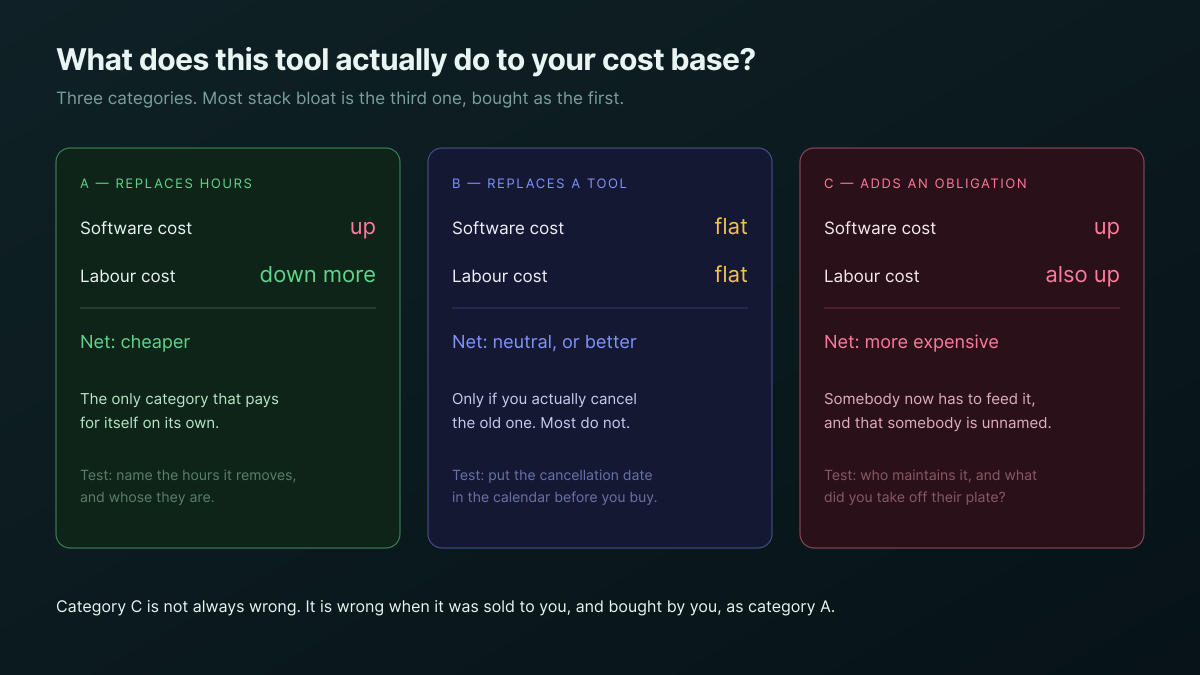
- It replaces hours. Software cost goes up, labour cost goes down by more. This is the only category that pays for itself without help, and the test is concrete: name the hours it removes and whose they are.
- It replaces another tool. Costs stay flat or fall, provided you actually cancel the thing it replaced. Put the cancellation date in the calendar before you buy, because the intention alone has a poor record.
- It adds an obligation. Software cost goes up and so does labour, because somebody now has to feed it. This is not automatically wrong — it is wrong when it was sold to you, and bought by you, as the first category.
Most stack bloat is category three. It rarely arrives as an obviously bad decision; it arrives as a good tool nobody had capacity to run.
What does a tool actually cost per month?
More than the subscription, and the extra is almost entirely labour. This is the arithmetic a percentage target cannot see, because six of the seven lines never reach an invoice.
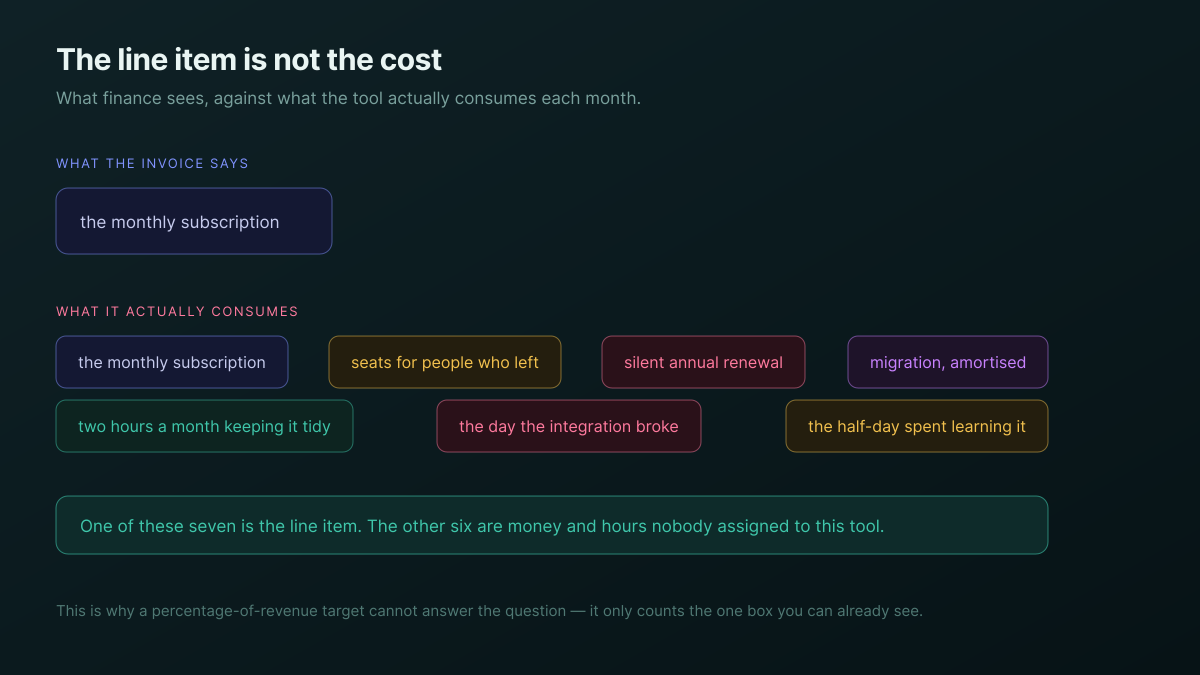
The two that catch most agencies are the seats belonging to people who left, and the annual plan that renewed without anyone deciding to renew it. Both are pure waste, both are trivially findable, and neither will surface on its own because nobody owns the review.
A tool nobody owns is not cheaper than a tool somebody owns. It is the same price with the maintenance deferred until it breaks in front of a client.
How do you audit the stack without it becoming a project?
List every tool with three columns: what it replaces, who owns it, and when it renews. That is the whole audit, it takes under an hour, and the empty cells are the finding.
- What it replaces — if the answer is nothing, it is category three and needs a reason.
- Who owns it — a named person, not a team. Unowned tools accumulate seats and lose configuration.
- When it renews — with a reminder that fires before the cancellation window closes, not after.
- What it would cost to stop — the migration you would have to do, so the decision is honest in both directions.
The last column is the one people skip and then regret. A tool you cannot leave is more expensive than its price, and knowing that before renewal is what gives you a position in the conversation.
Where does AI spend fit?
It is the one line that does not behave like a subscription, because it is metered against work rather than against headcount. That makes it the easiest category to evaluate honestly: you can point at a job and read what it cost.
We worked that through separately in what AI actually costs an agency per month, including why a per-run cost answers a question a per-seat uplift cannot. For the purposes of this article the point is narrower — metered spend is the only part of a stack where the category-one test is trivially checkable, because the hours it removes and the cost it adds appear in the same place.
What should you do when the number really is too high?
Cut by category rather than by price. The instinct is to cancel the most expensive line, which is frequently the one doing the most work, and the saving lasts until somebody has to do that work by hand again.
| Dimension | Cutting by price | Cutting by category |
|---|---|---|
| What you remove first | The biggest invoice | The tools that replace nothing |
| Effect on labour | Often increases it | Neutral, by construction |
| How long the saving lasts | Until the work comes back | Permanently |
| Difficulty | Easy — one conversation | Harder, needs the audit first |
| Risk | Cutting the one that was working | Being slower to act |
The honest concession is in that fourth row. Cutting by price is genuinely faster, and if you are in a cash crisis this month, speed may be the right trade. Just be clear that you are buying time rather than fixing the stack.
Where should you start this week?
Open your card statement and your subscription list side by side, and find the tools nobody has opened in ninety days. Every agency has some. That is your category-three list, already assembled, without anybody needing to do an audit.
Then pick the single most expensive tool you kept and write down the hours it removes. If you cannot name them, you have not found a problem with the tool — you have found that nobody ever established what it was for, which is a decision waiting to be made rather than a cost to be defended.
If the underlying question is whether the accounts are carrying this cost at all, how to tell if a retainer is actually profitable is the arithmetic, and three ways to price an agency retainer covers where the overhead belongs in a price.
The Agency Client Delivery template ships the sheets this sits alongside, and the agencies overview covers the wider setup.
Find the tools nobody has opened in ninety days, then write down the hours your most expensive tool removes. Both take an afternoon. Start free