Picture an agent drafting a client update for a bank's compliance lead. It opens with "Hey there", offers unlimited revisions, and suggests a website rebuild your agency doesn't do. The prompt was fine. Nobody had told the agent that you work in two revision rounds, that you write plainly, or that websites go to a partner.
A company profile for AI agents is where you tell it once. In Atwork it is a page in Settings › Company profile that Dana and every other agent in your workspace read before they reply. Here is what an agency should write in it, what to keep out, and how it stays current.
Why do AI drafts sound like nobody's agency?
AI drafts sound generic because the agent starts every job without what a new hire learns in week one: what you sell, who you sell it to, how you sound and what you never agree to. A sharper prompt fixes one draft. Standing context, written once and read every time, fixes the next hundred.
Pasting that context into each chat breaks down in a team. Five people paste five versions, one of them from last spring, and the agent that answers your clients in the portal gets none of them. The fix is one page that every agent reads, kept by the people who own the answers.
One argument from an agency case study on AI content voice collapse holds up: examples beat adjectives. "Friendly but professional" tells an agent very little. One sentence you would send and one you wouldn't tells it a lot, which is why the tone section below carries a pair.
What is a company profile, and how is it different from a persona or a skill?
A company profile is one page in Settings › Company profile that every agent in your organization reads before every reply. A persona says who one agent is, and a skill says how one job is done. The company profile says who the agency is, so you write it once instead of into every persona.
| Dimension | Company profile | Persona | Skill |
|---|---|---|---|
| Answers | Who is the agency? | Who is this agent? | How is this job done? |
| Who writes it | Owners and Admins, once | Owners and Admins, per agent | Owners and Admins, once |
| Which agents read it | Every agent in the organization | That one agent | Every agent it is attached to |
| When they read it | Before every reply | Every job | When the job needs it |
| Length | Up to 6,000 characters | A few lines | The steps for one job |
If your services list sits in three personas, it belongs in the profile. AI agent skills covers the process half of this split, and the guide to writing an AI agent persona covers the agent half. For where all three fit in a working week, see what an AI teammate actually does in an agency.
What should an agency write in its company profile?
Start from the six headings the profile opens with (What we do, Products & services, Customers, Values, Culture and Our terms) and write facts an agent can act on: the services you sell and the ones you don't, the clients you serve, how you sound, and your terms. Cut anything a new hire wouldn't need on day one.
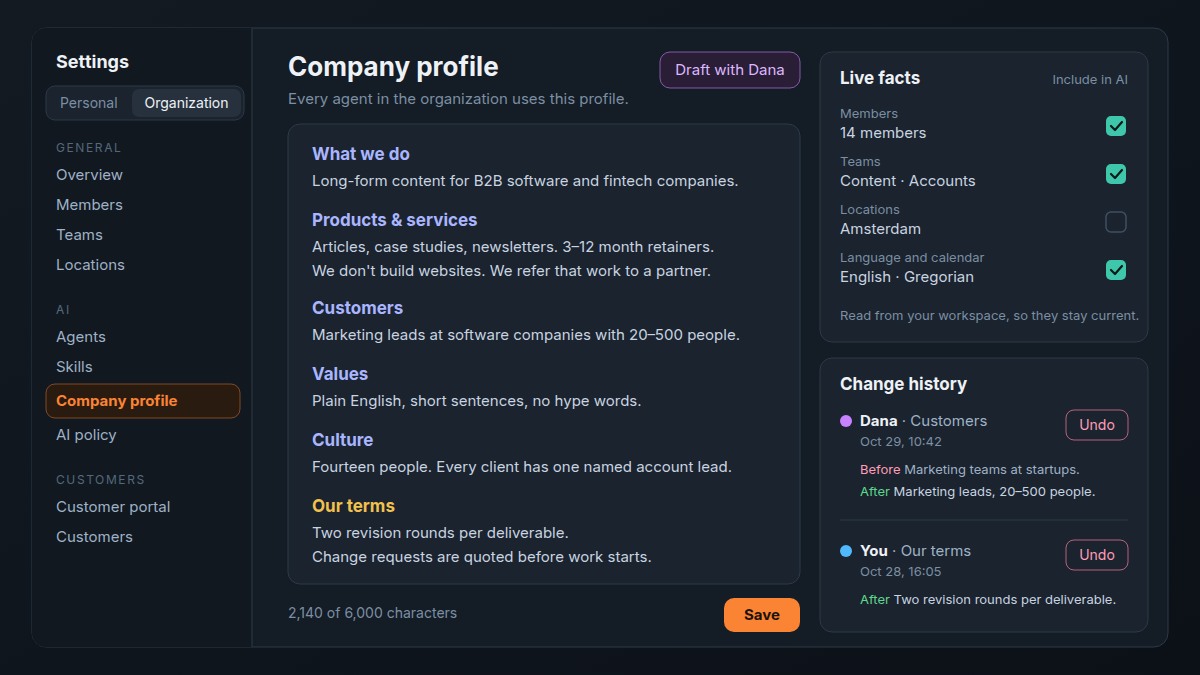
Here is what that looks like for a 14-person agency that writes content for B2B software companies.
What we do, and Products & services
- "We plan and write long-form content for B2B software and fintech companies: articles, case studies and newsletters."
- "Retainers run for 3, 6 or 12 months. One-off projects start at a single case study."
- "We don't build websites. We refer that work to a partner."
The last line does the most work. An agent that knows what you don't do stops offering it.
Customers
- "Marketing leads at software companies with 20 to 500 people."
- "Clients in banking and insurance send every draft through their own compliance review, so we allow a week for it."
Describe types, sectors and sizes. Never name a client under NDA: the same profile shapes replies that clients read.
Values and Culture: how you sound
- "Plain English, short sentences, no hype words."
- We'd send: "The draft is in your folder. Two things need your call: the headline and the second quote."
- We wouldn't: "Hey there, hope you're well, just circling back on that exciting draft."
If tone needs more room, add your own heading, such as How we write. The profile is a free document, and the six headings are only where it starts.
Our terms: the no-gos
- "Two revision rounds per deliverable. A third round is quoted as a change request."
- "Change requests are quoted before work starts."
- "We don't promise delivery dates without the account lead."
This is the section that stops over-servicing, and it is the one Dana's website draft leaves empty. You write it.
What should stay out of the company profile?
Anything that belongs to one client, changes every week, or you wouldn't want an agent to repeat to a client. The same profile shapes the agents that answer customers in your portal and support tickets, so write it as if a client could read every reply it informs.
- Margins and rate floors. An agent that knows your minimum may quote it.
- Client gossip and NDA names. If it can't be said to a client, it can't be in the profile.
- This month's priorities. They go stale before anyone edits the profile.
- Process steps. Numbered steps belong in a skill, which an agent loads only when the job calls for it.
| Context | Where it goes | Why |
|---|---|---|
| What you sell, and what you don't | Company profile | Every agent needs it, every time |
| How you like replies | Your AI profile | It shapes only replies to you |
| Client onboarding steps | A skill | Loaded only for that job |
| One client's voice and approver | That client's space or row | It belongs to one client |
| This week's priorities | The brief or the task | It changes too often |
| Passwords and logins | Nowhere an agent reads | It isn't context |
What agents are allowed to do is a separate decision from what they know. That lives in your AI policy.
What goes in your own AI profile, and who can see it?
Your AI profile, in Settings › AI profile, tells agents about you: My role, How to talk to me, How I work, Expertise and Current focus. Only you can see it, and it shapes only the replies to you, never a workflow, a form reply or a reply to a client.
Dana and your custom agents read it when you chat with them, and so do the editor's AI, agents working on tasks you assign, and agents answering your comment mentions. Owners and teammates can't open it.
An ops lead's How to talk to me might read: "Lead with the answer, then the detail. Flag anything that moves a client deadline. Bullet points over paragraphs." The AI profile holds up to 4,000 characters. Your job, team, time zone, working hours and language come from your workspace as live facts, so you don't retype them.
To start faster, Draft from my resume turns a PDF or DOCX into a short My role and Expertise for you to review. It leaves out contact details and uses a little AI credit.
How do you draft the company profile from your website?
In Settings › Company profile, choose Draft with Dana and enter your website. Dana reads the home page and up to three pages about your company, products or customers, then shows each drafted section next to what you have. Nothing is saved until you press Save.
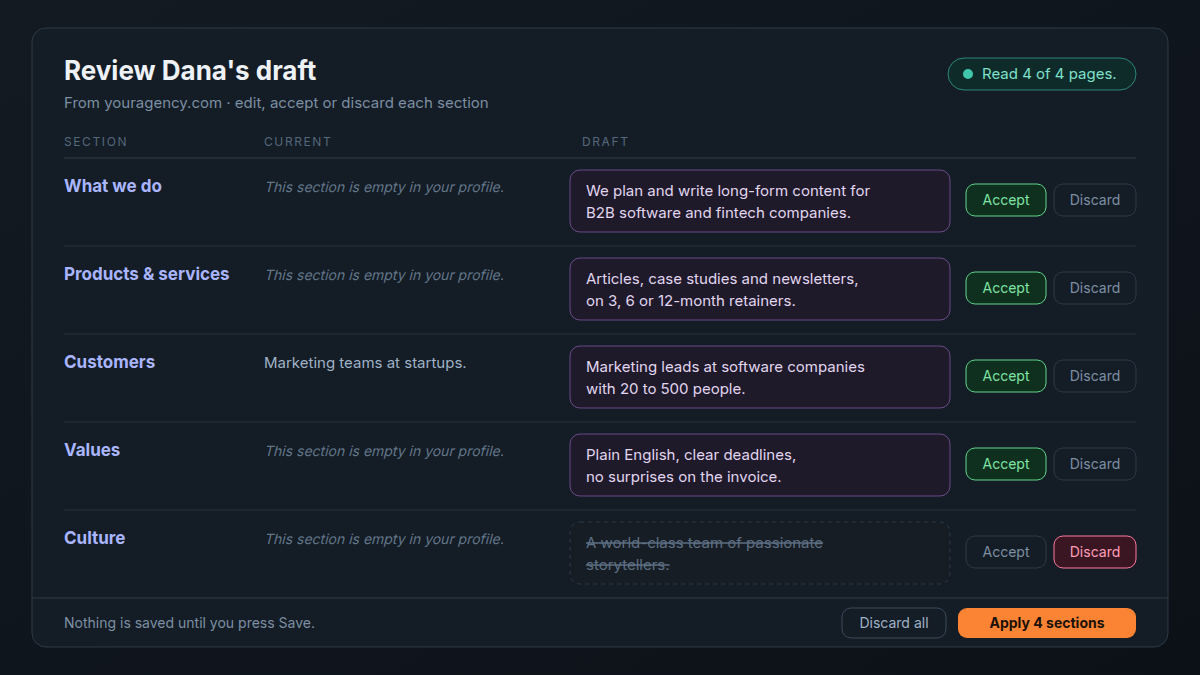
- Open Settings › Company profile and choose Draft with Dana. The Company website field starts with your email's domain, unless you sign in with a free email address.
- Choose Draft. Dana reads the pages and tells you how many she could open.
- For each section, compare Current with Draft, edit the draft if it needs it, then Accept or Discard it.
- Choose Apply to put the accepted sections in the editor.
- Read them in place, choose Keep or Discard for the drafted text, then Save.
Websites oversell, so cut the adjectives Dana picked up from your home page, and write Our terms yourself. Owners and Admins can draft and save. Members see the profile read-only.
How does the profile stay current?
Dana suggests a one-line change when a conversation shows the profile is out of date. The card shows the heading, Before and After, and you approve it, edit it or say no. Every change lands in Change history with who made it and when, and Undo puts a section back.
She suggests at most once per conversation, after she has finished what you asked, and once you say no she doesn't suggest it again. You can also tell her to add something to a profile at any time. Your custom agents don't suggest profile edits, and a company-profile change needs an Owner or Admin to approve it.
Write it as if a client could read every reply it shapes.
Change history keeps one entry per changed section, with Before and After and who made it: you, a teammate, Dana or onboarding. Undo works on a section as long as nobody has changed it since. Reread the profile yourself at three moments: when you add a service, when you take on a new kind of client, and when your terms change.
Frequently asked questions
Which agents read the company profile?
Every agent in your organization: Dana, your custom agents, Agent steps in workflows, fields that fill themselves with AI, AI replies on forms and booking links, and the agents that answer customers in your portal and support tickets.
Can the workspace owner see my AI profile?
No. Only you can see your AI profile. Owners, Admins and teammates can't open it.
Who can edit the company profile?
Owners and Admins. Members can read it in their own settings, under AI and apps.
How long can a company profile be?
6,000 characters, and an AI profile 4,000. A counter under the editor shows how much you have used, and Save waits until you are under the limit.
Does Dana change a profile without asking?
No. Every suggestion waits on an approval card, and nothing from a website draft is saved until you press Save. More on what she can do in Meet Dana.
How soon do agents use an edit?
From their next reply.
Where should you start?
Give it one afternoon. Draft the profile from your website, cut it down to facts, write Our terms yourself and save. Then ask Dana for a client update and read what changed. To see what else agents can take on, look at the agents page.
Paste your website into Draft with Dana, keep what's true, and write Our terms yourself. Start free