Upgrade, downgrade or cancel your plan
Only the workspace owner can change or cancel the plan. It's all under Settings → Billing → Subscription (open your profile menu and choose Administration), on the page titled Plan & billing.
How do I upgrade from Free?
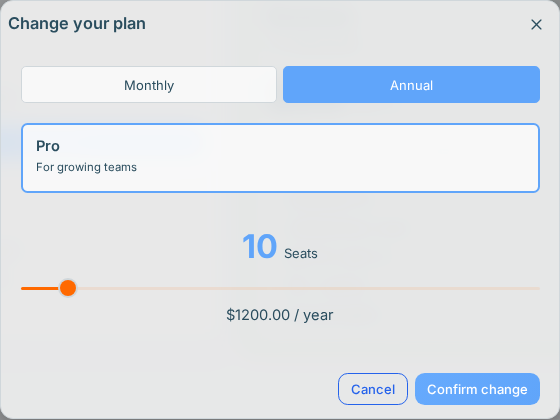
Find Pro or Business on the Subscription page and click Get started. The Change your plan dialog opens:
- Choose Monthly or Annual.
- Set the number of seats. Business starts at 3.
- Click Confirm change, then pay on Stripe's checkout page.
The new plan is active as soon as the payment is confirmed, and your billing period starts that day. To compare what each plan includes, see the pricing page.
How do I switch between Pro and Business, or monthly and annual?
For now, our team makes the switch for you. Raise a ticket with the plan, billing period and number of seats you want, and we'll switch it.
Don't buy the new plan from the plan page while your current one is active. That starts a second subscription alongside the first.
How do I cancel?
You can cancel at any time. On the Subscription page, click Manage subscription. Stripe's billing portal opens, and you cancel your plan there.

The plan cancels at the end of the current billing period, and nothing changes until then. The Subscription page shows the date your plan is set to cancel and confirms you keep full access until then. On that date the workspace moves to Free.
How do I downgrade to Free?
By cancelling. There is no Free option on the plan page: when your paid plan ends, the workspace moves to Free automatically.
What happens to my data when I downgrade or cancel?
Nothing is deleted, and nobody loses access. What changes is how much you can add.
- Members. Everyone keeps their access. Free allows 5 members, so while you have more than that, you can't invite or add anyone new.
- Records. Free allows 1,000 items per sheet. A sheet with more keeps every item, and they all stay editable. You can't add new items to that sheet until it's under 1,000, and an import brings in at most 1,000 rows.
- Spaces, sheets and dashboards. Everything you already have stays, extra spaces included. On Free you can't create another space, and there's a cap on how many sheets a space can hold, how many dashboards a sheet can have and how many widgets a dashboard can hold. Past a cap you can't create more.
- Teams and jobs. Every team and job you have stays. Free caps how many of each a workspace can have, so past the cap you can't add another.
- Automations and agents. They keep running. AI steps and agents draw on Free's AI budget of $1 a month for the whole workspace, so they run out of budget quickly.
- AI credit. The monthly allowance drops to Free's $1 per workspace. Credit you bought stays, and it's used once the allowance runs out.
- Connected apps. Triggers that check other apps for new data do so every 10 minutes on Free, instead of every 5 minutes on Pro or every minute on Business.
- Upgrading again. The limits lift straight away, and everything is where you left it.
What if a renewal payment fails?
Stripe tries the card again over the following days. Update it straight away with Manage subscription, so the next attempt goes through.
If the renewal is still unpaid a couple of days after the renewal date, the workspace moves to Free. Your plan comes back once the payment goes through. While the workspace is on Free, Manage subscription isn't shown, so to update the card at that point, raise a ticket. If the payment can't be collected at all, the subscription ends and the workspace stays on Free. Either way, nothing is deleted. Invoices and payment problems lists the usual causes of a failed payment.
Can I get a refund?
Cancelling stops the next renewal; the current period is not refunded automatically. For a refund request, raise a ticket.
Related: Plans & billing explained · Seats: adding and removing people · Payment methods and AI credit top-ups · Invoices and payment problems · Contact support