Time off and focus time
Availability is not only your working hours. Time you have already committed — to a holiday, or to concentrating — should stop being offered to other people.
How blocking works
A booking slot is offered only when it is inside your working hours and nothing occupies it. So anything on your connected calendar removes that time from what people can book.
That gives you one habit rather than two systems: block it in your calendar, and Atwork respects it.
Days away are simpler still: add them as out of office, and they block bookings on their own, with no calendar event.
How do I set out of office?
Open your profile menu, choose Preferences, then Working hours. Under Out of office, click Add range and pick the From and To dates.
- Leave To empty if you don't know when you'll be back. The range then reads Until further notice.
- Add up to 20 ranges. They are whole days, first and last included, in your profile timezone.
- There is no Save button: each change saves by itself. Wait for Not saved to clear before you leave the page.
- A range that covers today shows Now, and one still to come shows Upcoming.
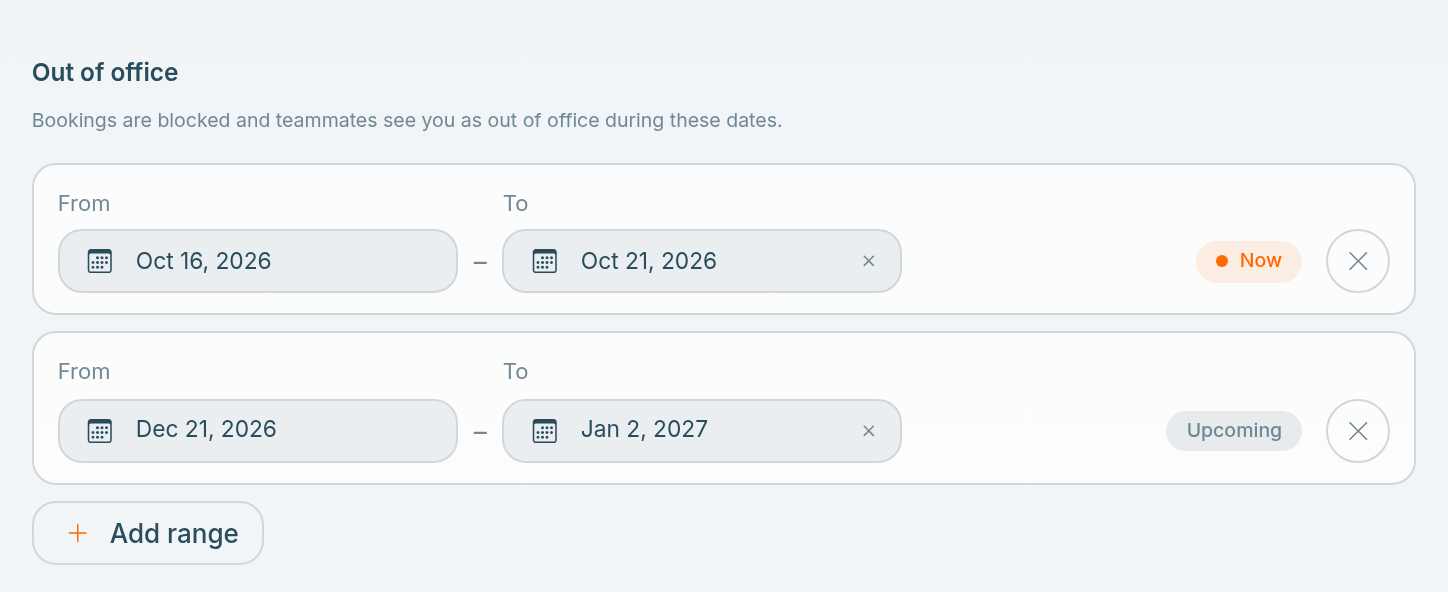
Booking links stop offering every day inside a range. While a range covers today, teammates also see Out of office on your profile.
Do it before you announce it. Time blocked after someone has booked you does not cancel their meeting.
Focus time
Block recurring time for the work that needs a run at it. A standing two-hour block that repeats weekly is the only reliable way to keep it — an unprotected gap in a calendar gets filled.
Setting a buffer on your booking links helps too: it stops meetings landing back to back and eating the gaps entirely. See Create a booking link.
What other people see
A blocked slot simply is not offered. Whoever is booking sees fewer options, not the reason — the content of your calendar events stays private.
Teammates see an Out of office badge on your profile page while a range covers today, with the end date when you set one. People booking you never see it.
If people are still booking over it
Check, in order:
- Is the out-of-office range saved, and does it cover the right days? Ranges are whole days in your profile timezone.
- Is Respect working hours on for that booking link? It is on by default; with it off, the link ignores your working hours and out-of-office days.
- Is the calendar connected, and is its status dot green? A broken connection means Atwork cannot see your events — see Connect Google Calendar.
- Is the block on the calendar Atwork is checking? A block on a personal calendar you never connected does nothing here.
- Is your timezone right? A block in the wrong timezone protects the wrong hours.
Related: Working hours and availability · Create a booking link · The calendar