An AI assistant usually works only while you're in the chat. Close it, and nothing happens until you ask again. Client work slips in the waiting: did the client reply, did the invoice get paid, is the review done before Friday's call.
Scheduled AI tasks fix the waiting, if they check the right thing. In Atwork, you ask Dana, Atwork's AI teammate, or one of your agents to check back at a set time. At that time it runs your request again against your live workspace, in the same chat, and notifies you with the answer.
Why does client work slip in the waiting, not the doing?
Client work slips in the waiting because waiting has no owner. The deliverable is sent, the invoice is out, the review is booked. What's left is remembering to check, and that check competes with everything else that interrupts you. Nobody forgets the work. They forget the follow-up.
In Microsoft's 2025 Work Trend Index, employees using Microsoft 365 are interrupted every 2 minutes by a meeting, email, or notification, and 48% of employees say their work feels chaotic and fragmented.
The waiting also costs money. In Intuit QuickBooks' 2025 late payments report, a January 2025 survey of 2,487 US small businesses, 56% were owed money from unpaid invoices, averaging $17.5K per business, and 47% had invoices overdue by more than 30 days.
A reminder doesn't fix this. You open the sheet, find the row, read the comments, and learn the answer is "not yet". One more interruption, and no answer in it.
A reminder tells you to go and look. A check-back goes and looks.
What does "check back later" mean for an AI agent?
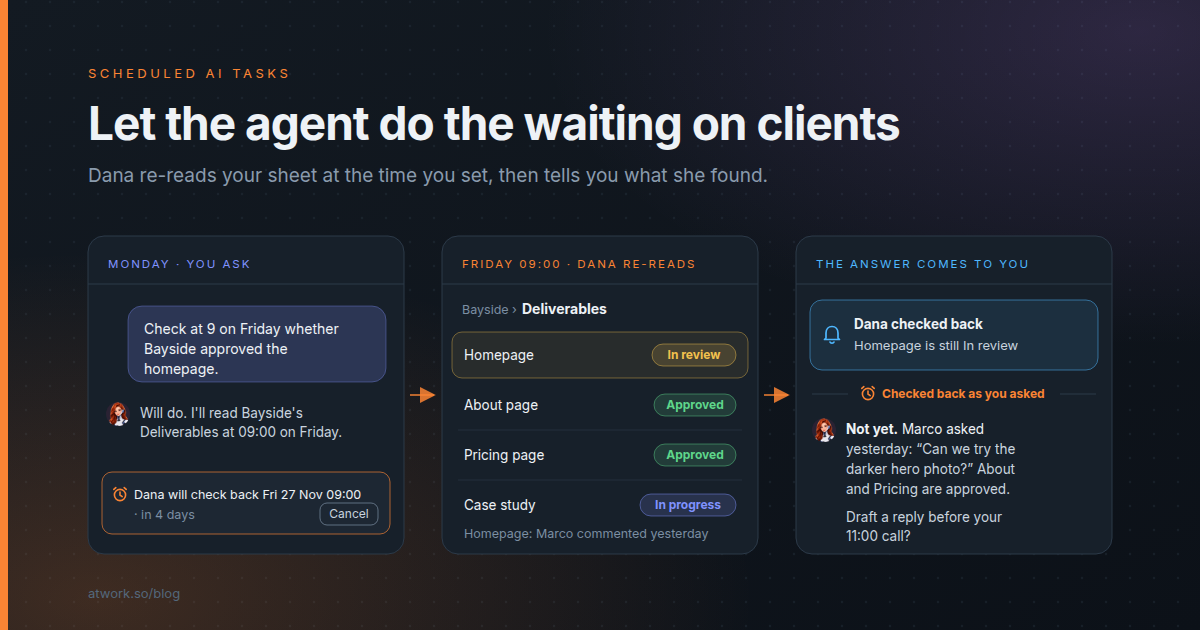
In Atwork, a check-back is a request with a time on it. You ask Dana or an agent in a chat to check back at, say, 9 on Friday. At that time it runs your request again, in the same chat, against your workspace as it is then, and you get a notification with the answer.
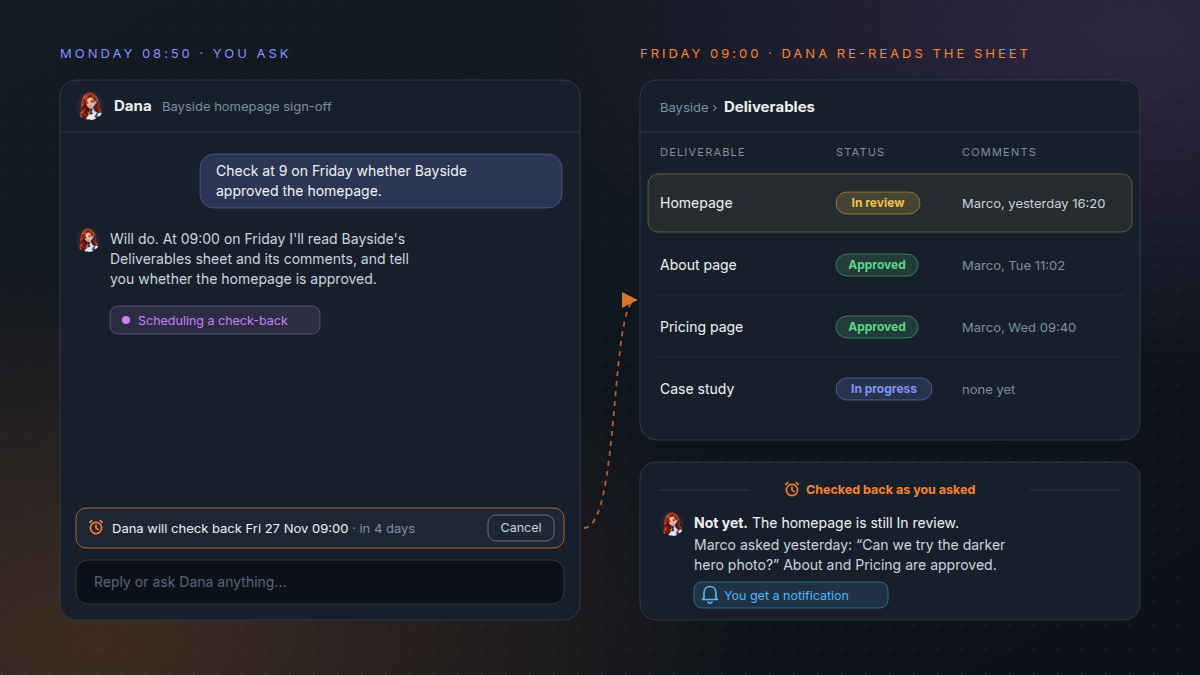
- Ask in plain words. "Check at 9 on Friday whether Bayside approved the homepage." Dana reads the time in your own time zone.
- A marker appears above the message box: "Dana will check back Fri 27 Nov 09:00 · in 4 days", with Cancel.
- At that time, Dana runs the request again. A line in the chat reads Checked back as you asked, quotes your request, and Dana's answer follows.
- You get a notification, so the chat doesn't need to be open.
Why does the re-check matter more than the timer?
A timer is easy. General assistants run prompts on a schedule too, and Google's help page for Gemini is candid about the trade-off: "Responses for schedules are prepared in advance to guarantee timely delivery. As a result, rapidly changing data, like stock prices, won’t be the latest when you receive them."
Client status is rapidly changing data. Bayside can approve the homepage at 8:55. A check-back runs at the time you set and reads your sheets and comments as they are then. If nothing changed, it says so. If something did, you get the answer, not a prompt to go and look.
| What you get | Gemini schedules | Atwork |
|---|---|---|
| When the answer is prepared | Within the hour before your delivery time | At the time you set |
| What it reads | The web, and apps you connect, like Google Workspace | Your sheets, rows and comments |
| Repeats | Daily, weekly or monthly | Once. A repeating job is a workflow |
| How many at once | Up to 10 active schedules | Up to 3 waiting per chat |
| Where the answer lands | The schedule's chat, plus a phone notification | The same chat, plus a notification |
For a daily news digest, Gemini's schedules are the better fit. For whether one client signed off before one call, use a check-back. Gemini figures are from Google's help page, read in November 2026.
Which check-backs are worth setting this week?
Set a check-back with Dana wherever you'd otherwise set a reminder and then go and look. Three that pay off in client work: a client's reply by a deadline, an invoice paid by its due date, and a review finished before a call. Each one reads a sheet you already keep and answers one yes-or-no question.
A client's reply by Thursday
"Check at 4 pm on Thursday whether Northwind has replied in the comments on their brief. If they haven't, draft a short nudge I can send."
At 4 pm Dana reads the comments and either quotes Northwind's reply or hands you a draft.
An invoice paid by the 5th
"On the 6th at 10:00, check the Invoices sheet for retainer invoices due on the 5th that are still unpaid. List them with client and amount."
You hear about late invoices the morning after they're due, not at month-end.
A deliverables review before Friday's call
"At 9 on Friday, check whether Bayside approved the homepage, and list anything on their Deliverables sheet that's still in review before our 11:00 call."
Two hours before the call, you know what to ask for.
What happens when a task agent waits for your answer?
A task agent in Atwork can wait instead of handing the task back. When it needs a person's answer, it asks in a comment and waits. Your comment on the card, or an @mention, wakes it, and it carries on with your answer. It can also wait until a set time, when you've asked it to check back.

When you delegate a task to an agent, a strip above the comments shows what it's doing: Working now, Waiting for what it needs from you, or Waiting until a set time. It also shows how long is left, with a Stop button.
- A wait on a person lasts up to a week. If nobody answers, the agent wakes, says so, and finishes or waits again.
- Only people wake it. The agent's own comments and workflow comments don't.
- Stop ends the wait, and so does a member changing the task's status.
Delegating the task in the first place is covered in how to delegate work to an AI agent. Custom agents come with Pro and up.
Check-back, reminder or workflow: which should you use?
In Atwork, use a check-back for a one-off judgement call on live data: has this happened yet? Use a reminder when you only need a nudge at a time. Use a workflow when the same rule should run again and again, on a schedule or when a date field arrives. A check-back runs once and can't set the next one.
| You want | Use | What happens |
|---|---|---|
| A nudge to call Ruben at 3 | A reminder on the task's date | You get a notification. Nothing is checked |
| To know whether Bayside approved by Friday | A check-back | Dana reads the sheet at that time and answers |
| Overdue invoices listed every Monday | A workflow with a Schedule trigger | It runs every week until you turn it off |
| A nudge two days before each due date | A workflow with a Date reached trigger | It runs once per row, two days before its date |
A repeating job that needs judgement, like a weekly digest of what each client owes you, is a workflow with an Agent step. Ask Dana to build it. Schedule and Date reached triggers come with the Business plan. Where the line between an agent and an automation sits is in AI agent or automation? How to choose the right one.
What doesn't a check-back do?
An Atwork check-back runs once, between five minutes and 30 days from when you ask. It answers in the chat where you asked, and it can't schedule another check-back, so it never turns into a job nobody remembers setting. If you delete the chat or the agent first, it doesn't run.
- Five minutes to 30 days ahead. Further out, use a reminder or a Date reached workflow.
- A few at a time. Up to three waiting per chat and ten per person.
- It uses AI credits when it runs, like any request to Dana.
- Cancel any time. Click Cancel on the marker, or ask Dana to cancel it.
Frequently asked questions
Can Dana check back every week?
No. A check-back runs once. For a weekly check, build a workflow with a Schedule trigger, or ask Dana to build one for you.
Where does the answer show up?
In the chat you asked in, under a line that reads "Checked back as you asked" and quotes your request. You also get a notification.
Can a custom agent check back too?
Yes. Your custom agents can check back in a chat, and an agent working a task can wait until a set time on that task.
What should you hand over first?
Hand over the follow-up you've checked most often this month. If it's a client approval, ask Dana now: check at 9 on Friday whether the client approved the homepage. When Friday comes, you get the answer instead of a reminder to go and look. Then do the same for invoices.
For the wider picture, read what an AI teammate actually does in an agency, or see what agents can take on at the agents page.
Ask Dana to "check at 9 on Friday whether Bayside approved the homepage", and on Friday the answer comes to you. Start free