Welcome to the Atwork blog! Today, we're diving into the fundamental principles of task management.
Whether you're a seasoned manager, a freelancer, or just starting out in your career, mastering task management is essential for steering your workday toward success. In this guide, we'll cover what task management is and why it matters, a five-step process for doing it well, the features to look for in a task management tool, and the habits that make it all stick.
What is task management, and why does it matter?
A task is simply something you need to do—work-related, like finishing a report, or personal, like grocery shopping. Task management is the process of organizing, planning, and tracking those tasks from start to finish: setting goals, prioritizing activities, allocating resources, and monitoring progress so that objectives are met efficiently.
Done well, it pays off in several concrete ways:
- Organization: It brings order to chaos by providing structure and clarity on what needs to be accomplished.
- Efficiency: Prioritizing tasks and allocating resources effectively streamlines workflows and maximizes productivity.
- Time management: With a clear plan in place, you avoid procrastination and focus on high-priority work.
- Collaboration: Teams coordinate efforts, share information, and communicate better when everyone can see who is doing what.
- Adaptability: When priorities shift—and they always do—a managed task list lets you adjust without losing track of anything.
- Progress tracking: Monitoring task progress provides the insight needed for informed decisions and course corrections.
With that foundation, here is the process itself.
Step 1: Identifying your tasks
The journey of effective task management begins with the crucial step of identification. It's about clarifying your objectives, setting priorities, and avoiding the common pitfall of overlooking this fundamental aspect. Start by compiling a comprehensive list of tasks, adding details as needed. This ensures that each task is well-defined and contributes to your overarching goals. Engage your team in discussions to align on objectives and maintain focus. Once you've clarified your goals, create a specific timeline for task completion. Leverage task management tools like Atwork Task Manager to streamline this process, facilitating collaboration and organization.
Here are some methods to structure your tasks effectively:
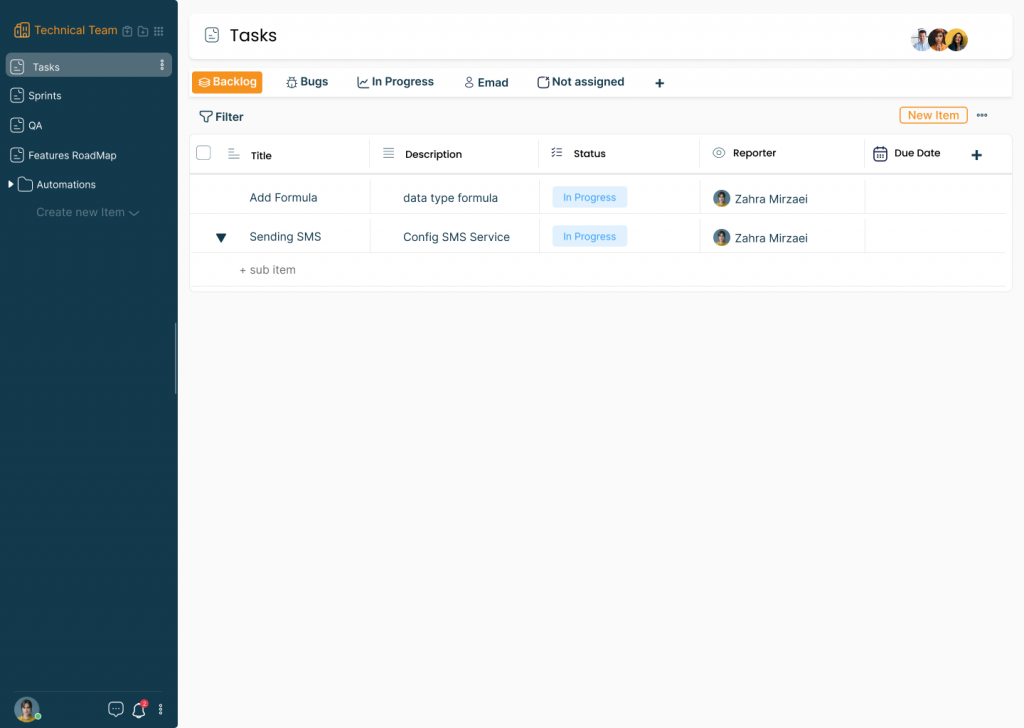
Task sheets
For comprehensive task management, consider using task sheets. They allow you to input various details such as subject, description, status, and due dates, providing a clear overview of your tasks. With Atwork Task Manager, you gain access to visual dashboards for effortless monitoring.
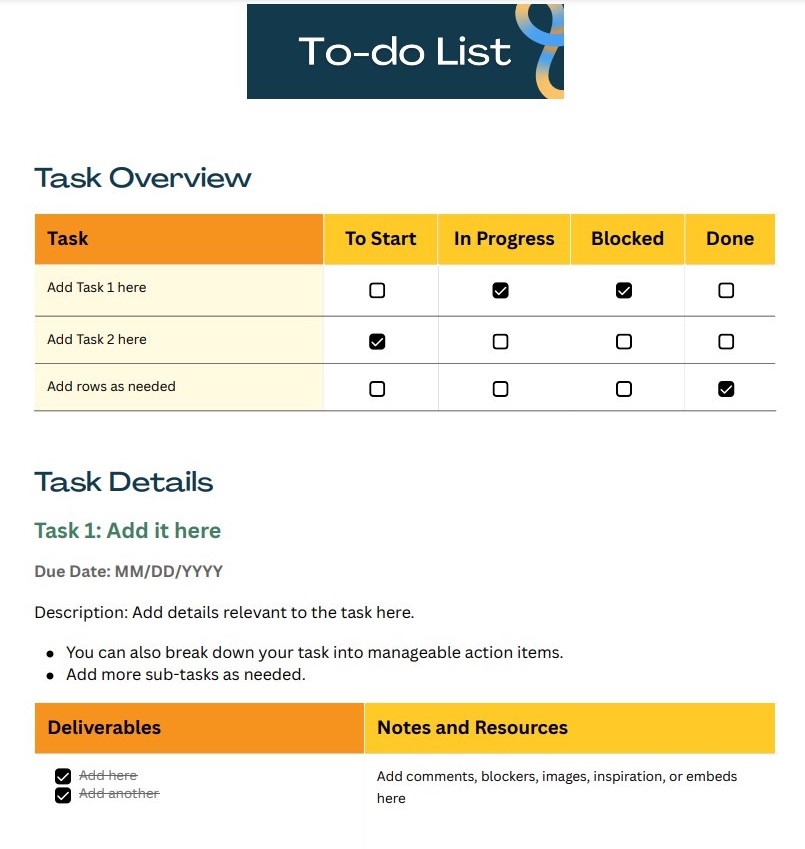
To-do lists
Perfect for simpler, daily tasks, to-do lists offer a straightforward way to track your activities. Simply list your tasks and mark them as completed once done. Atwork's dashboard provides a convenient overview of your progress.
Categorization by projects
For managing multiple projects, organize your tasks into sheets and folders corresponding to each project. This approach ensures clarity and prevents overwhelm. Atwork Task Management allows for categorization and collaboration across projects.
Step 2: Categorizing your tasks
Effective task management involves prioritizing your tasks, ensuring that you focus on what matters most. With a clear list of tasks from the previous step, it's time to categorize and organize them for optimal efficiency. Here are some suggestions for categorizing your tasks:
Deadline-based categorization
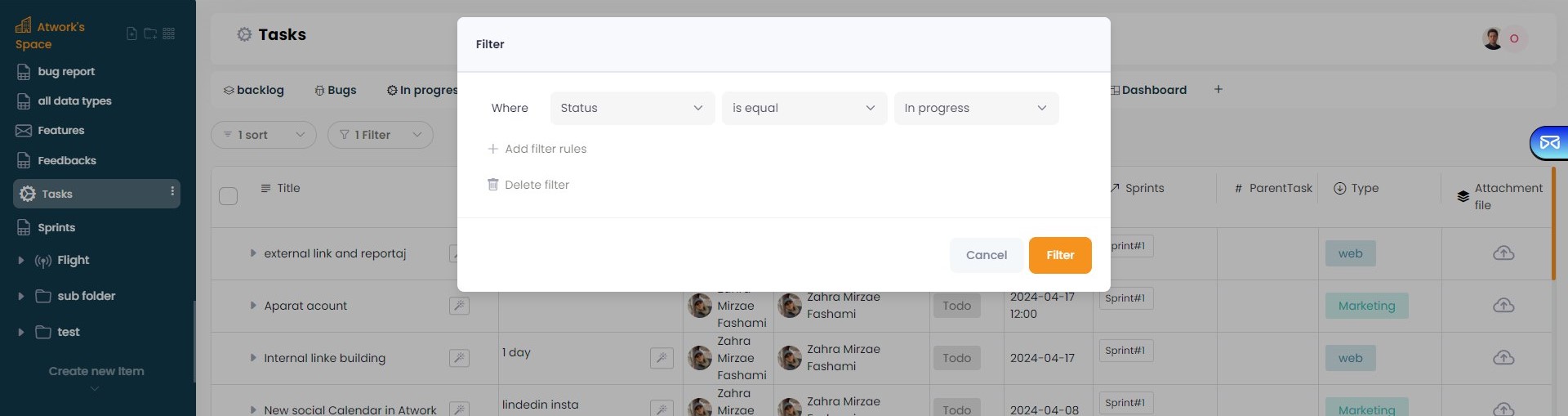
Prioritize tasks based on their deadlines. This ensures that urgent tasks are completed first, preventing any important deadlines from being missed. Utilize filters in Atwork Task Management to streamline this process and keep track of deadlines effortlessly.
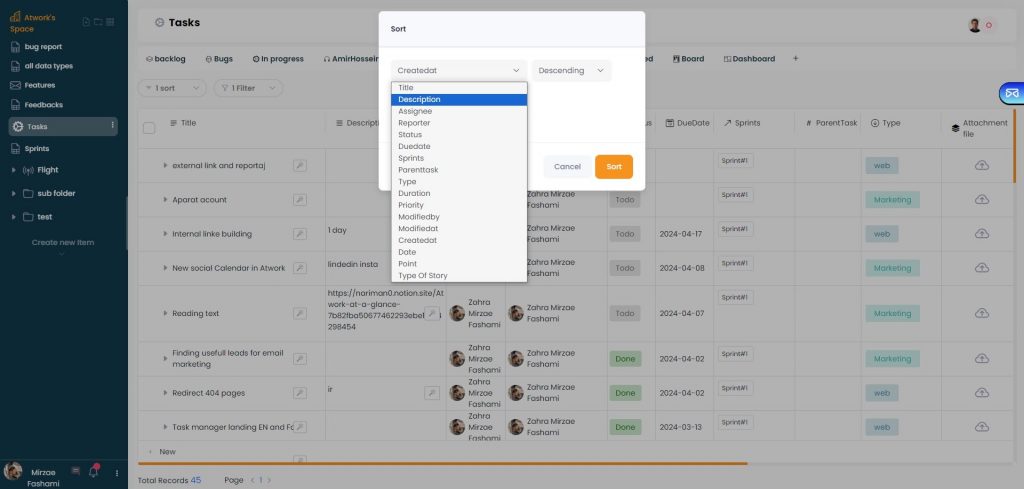
Category-based task management
Organize tasks into categories based on their nature or the teams responsible for them. For instance, categorize tasks into groups like developers, marketers, and more. Atwork's task management system allows you to add tags to tasks for easy categorization and better organization.
Importance-based prioritization
Tag tasks according to their importance level, whether they are high, medium, or low priority. Assign colors to these tags to visually distinguish the urgency of tasks. You can combine this approach with deadline-based categorization for enhanced task management. For a deeper look at prioritization frameworks like the Eisenhower Matrix, see our guide on how to prioritize tasks the right way.
Personal task organization
For personal task management, categorize tasks based on their impact on your life. Prioritize tasks according to their significance, ensuring that you address the most impactful ones first. Whether it's scheduling a doctor's appointment or meeting a friend, organizing tasks by order of importance ensures you stay on top of your personal commitments.
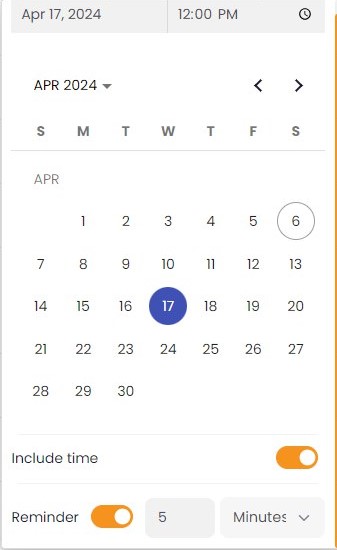
Step 3: Schedule tasks
Once you've prioritized your tasks, the next crucial step is to schedule dedicated time to tackle them. It's a common mistake to stop at prioritization and assume you'll address your tasks eventually. However, without scheduling, your to-do list remains just that – a list.
Avoid distractions by taking the extra step to schedule specific tasks for specific times. Don't just think about it; write it down. Clearly outlining your intentions to complete certain tasks within set timeframes is key to effective time management. Scheduling doesn't have to be complicated or reliant on additional apps. It's simply about looking at your list of tasks, determining what you can realistically accomplish given your available time, and committing to completing them within those timeframes. Whether it's a digital calendar or pen and paper, find a method that works for you and stick to it. It's better to plan what you'll finish within a day or a specific time instead of just working through your list one by one. This way, you'll feel like you're making progress, even if your list is long.
Step 4: Use visual dashboards
Make the most of visual dashboards available in task management tools such as Atwork. These dashboards provide a centralized view of your team's or your own work, offering valuable insights in one place. With Atwork's task management, you can customize your data presentation using various widgets like pie charts and other visual aids, enhancing clarity and organization.
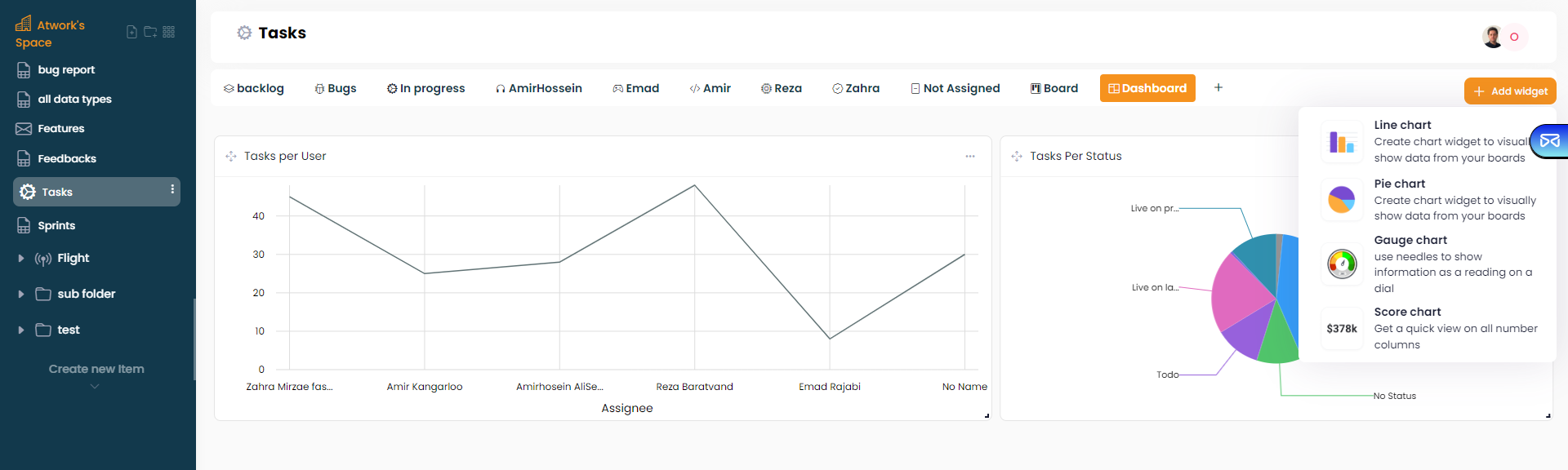
Step 5: Track task progress
Track the progress of your tasks diligently. Keep tabs on completed tasks, urgent ones, and upcoming ones to maintain visibility and control over your workload. By consistently monitoring your task progress, you'll gain a clear understanding of your productivity capacity within specific timeframes. This awareness is essential for effectively scheduling tasks and strategizing future activities. Over time, you'll refine your ability to estimate the duration of tasks, boosting your confidence in task creation and management. Dedicating time for a daily task review creates a feedback loop that continuously improves how you define, break down, and schedule tasks.
What features should a task management tool have?
When you evaluate task management software, a handful of capabilities separate a genuine work hub from a glorified checklist:
- Multiple views: The same tasks should be viewable as a table, a Kanban board, a calendar, or a timeline, because different work calls for different lenses—a sprint reads best as a board, a deadline crunch as a calendar.
- Delegation and assignment: Assigning a task to a teammate, with a due date and clear ownership, should take seconds—and escalating or reassigning it should be just as easy.
- Alerts and reminders: Deadlines only work if the tool actively reminds you of them. Notifications for due dates, mentions, and status changes keep tasks from silently slipping.
- Automation: Repetitive steps—moving a card when a status changes, notifying a reviewer, creating recurring tasks—should run on their own, without manual busywork.
- Mobile access: Tasks get captured and checked off away from a desk; a tool that only works on a laptop loses half its usefulness.
- Integrations: Your task manager should connect to the calendars, files, and messaging tools you already use, so work doesn't fragment across apps.
Atwork covers all of these in one platform, which is exactly the point of a Work OS: tasks, docs, dashboards, and automation in one place instead of five subscriptions.
What are task management tools?
Task management becomes much simpler with the right tools. The basics remain the same regardless of the project, but the tools vary with the size of the organization. There are three main types:
Manual task management tools
These are basic tools like charts, whiteboards, planners, and schedules. They're simple to use and flexible, but they're best suited for personal use, small organizations, or projects with fewer tasks.
Digital task management tools
These tools are electronic devices that assist with task management. They range from digital boards to spreadsheets or more advanced task management software installed on computers. They can integrate with other business systems, providing various capabilities that benefit different departments within the organization.
Online task management tools
These are software systems accessible online, often delivered as software as a service (SaaS). They offer cloud capabilities and facilitate collaboration among team members, particularly useful for remote work or hybrid setups. Online task management tools are scalable, upgradable, and include features like task lists, Kanban boards, and cloud-based task management systems.
Which habits make task management stick?
A tool organizes your tasks; habits get them done. A few that consistently pay off:
- Keep everything in one place: A to-do list scattered across notebooks, phone notes, and calendars isn't really a list. One system, always.
- Break big tasks into smaller ones: A huge project feels less overwhelming split into steps, and small completed steps build visible momentum.
- Set deadlines that leave room to breathe: Deadlines sharpen focus, but ones that require working non-stop lead to burnout, not output. Pair work intervals with real breaks.
- Do one thing at a time: Multitasking feels productive and isn't. Pick the top task, finish it, then move on.
- Limit how much you schedule per day: A plan you can actually complete beats an ambitious one you abandon by noon.
- Review at the end of the day: Note what got done and what got in the way. The review is where your estimates—and your plans—get better.
How can I use Atwork task management?
Sign up: Sign up for an account. You can choose a plan that suits your needs, whether it's for personal use or for your team. Explore features: Familiarize yourself with the features Atwork Task Management offers. These include task lists, Kanban boards, calendars, collaboration tools, and customizable dashboards. Create tasks: Start by creating tasks for your projects or personal to-do lists. Provide details such as task descriptions, due dates, priorities, and assignees if working in a team. Organize tasks: Use folders, tags, or categories to organize your tasks effectively. This helps you stay focused and easily locate specific tasks when needed. Set reminders and notifications: Take advantage of reminders and notifications to stay updated on upcoming tasks and deadlines. This ensures that nothing falls through the cracks. Collaborate with team members: If you're working with a team, invite members to collaborate on tasks and projects. Assign tasks, leave comments, and track progress together. Track progress: Monitor the progress of your tasks and projects using the visual dashboards provided by Atwork Task Management. This allows you to see an overview of your workload and identify any bottlenecks or areas needing attention. Adjust and improve: Continuously review and adjust your task management approach based on your experience and feedback.
If you want to check out the Atwork panel, you can visit our YouTube channel or chat with us online for assistance.