
Three weeks after a client check-in, the client's director emails one line: "Who agreed to drop the blog?" Your account lead remembers the client's project manager asking for it. The project manager remembers asking a question. A client decision log settles this before it starts: one row per decision from each client call, with who made it and the client's written yes. Here is what to record, how to get the yes the same day, and how to set it up with Atwork's Client Decision Log template.
What is a client decision log, and why not just meeting notes?
A client decision log is a list of the decisions you make with a client, one row each: what was decided, who decided it, when, and whether the client has confirmed it in writing. Meeting notes record the discussion. The log records only the outcome, which is the part people argue about later.
Notes alone don't settle it. In a 2023 study led by Vanderbilt psychologist Sarah Brown-Schmidt, 21 pairs of people held one-on-one conversations and recalled them a week later. Only 4.7 percent of what was said was recalled accurately by both partners. Writing a memo straight after helped the note-taker remember more, but not more accurately than the other person.
"This study shows that the same is true for conversational memory—creating a written record of a recent conversation supports the ability to recall it later on." Sarah Brown-Schmidt, Vanderbilt University
Notes hold one side's memory. The log adds the step that notes skip: the client confirms each decision, so the record belongs to both sides.
| Compared on | Meeting notes | Client decision log |
|---|---|---|
| What it holds | the discussion, in order | the outcomes only |
| Who writes it | whoever took notes | you, then the client confirms |
| Length | a page per call | one sentence per decision |
| When a decision changes | the note is edited, or forgotten | a new row; the old one is marked Replaced |
| "Who agreed to that?" | rarely answered | a name, a date and the reply |
What should every decision record?
Every row needs six things: the decision in one sentence the client would agree with, its area, who decided it, whether the client has confirmed it, what it affects, and whether it still holds. Leave out the debate that led there. If a row needs a paragraph, it is two decisions, or none yet.
- The decision, in one sentence. "Launch moves from 14 Nov to 28 Nov", not "discussed the timeline".
- Area. Scope, timeline, budget, creative direction or process.
- Decided by. A name, from either side. "The client" is not a name.
- Client confirmed. Not yet, Confirmed or Disputed, with the date and how: a recap reply, an email, a signed change note or a chat message.
- Affects. The project or deliverable it changes, such as "Website rebuild · launch".
- Standing. Holds or Replaced. A confirmed decision is never edited. It is replaced.
Log every call, not only the booked ones. In Microsoft's Work Trend Index special report of June 2025, 57% of meetings were ad hoc calls without a calendar invite. A quick call can move a launch date as easily as the weekly check-in.
How do you get the client to confirm it the same day?
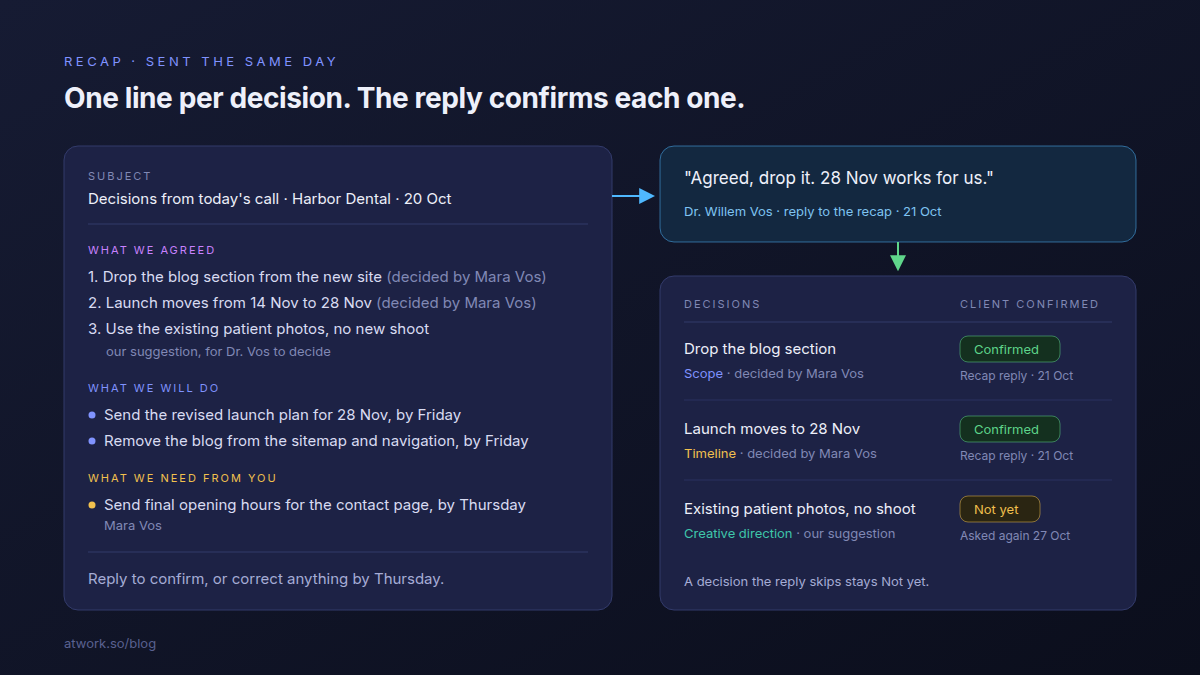
Read each decision back in the last five minutes of the call and add it as a row while everyone is still there. Then send a recap the same day: one numbered line per decision, who decided it, and a day by which the client confirms or corrects it. Their reply is the confirmation.
The readback catches a misunderstanding while the people who can fix it are still on the line. In the Vanderbilt study, the note-taker recalled 46 percent of the points they had written down a week later, and only 9 percent of the ones they hadn't.
The recap has three parts:
- What we agreed: one line per decision, with who decided it.
- What we will do: your actions, each with a date.
- What we need from you: their actions, each with a date and a name.
End on "Reply to confirm, or correct anything by Thursday." Send it to the person who signs off too, even when they weren't on the call. Silence isn't a yes: a decision the reply skips stays Not yet and goes into the next recap.
Whose action is it, ours or theirs?
Every action from a client meeting sits on one side. Ours means someone on your team does it. Theirs means the client owes it, so the action names their contact and the person on your team who chases it. An action without a side is the one nobody does.
In Atlassian's survey of 5,000 knowledge workers, 54% said they frequently leave meetings without a clear idea of next steps or who owns which task. We think the risk is higher between an agency and a client, because the owners on the client's side don't see your task list.
| Action | Whose action | Their contact | Done or chased by |
|---|---|---|---|
| Send the revised launch plan for 28 Nov | Ours | – | Sanne Bakker |
| Remove the blog from the sitemap and navigation | Ours | – | Joris Smit |
| Send final opening hours for the contact page | Theirs | Mara Vos | Sanne Bakker |
| Approve the gift box hero shot | Theirs | Ruben Aalders | Marco Ruiz |
If the opening hours arrive a week late and the launch slips, the log shows which side the week was lost on.
How do you use the log when a client disputes a change?
Open the decision's row in the log instead of comparing memories. It shows the date, who decided, and the reply that confirmed it. If it says Not yet or Disputed, the decision was never settled: say so, and settle it now. When a client changes their mind, keep the old row, mark it Replaced, and log the new one.
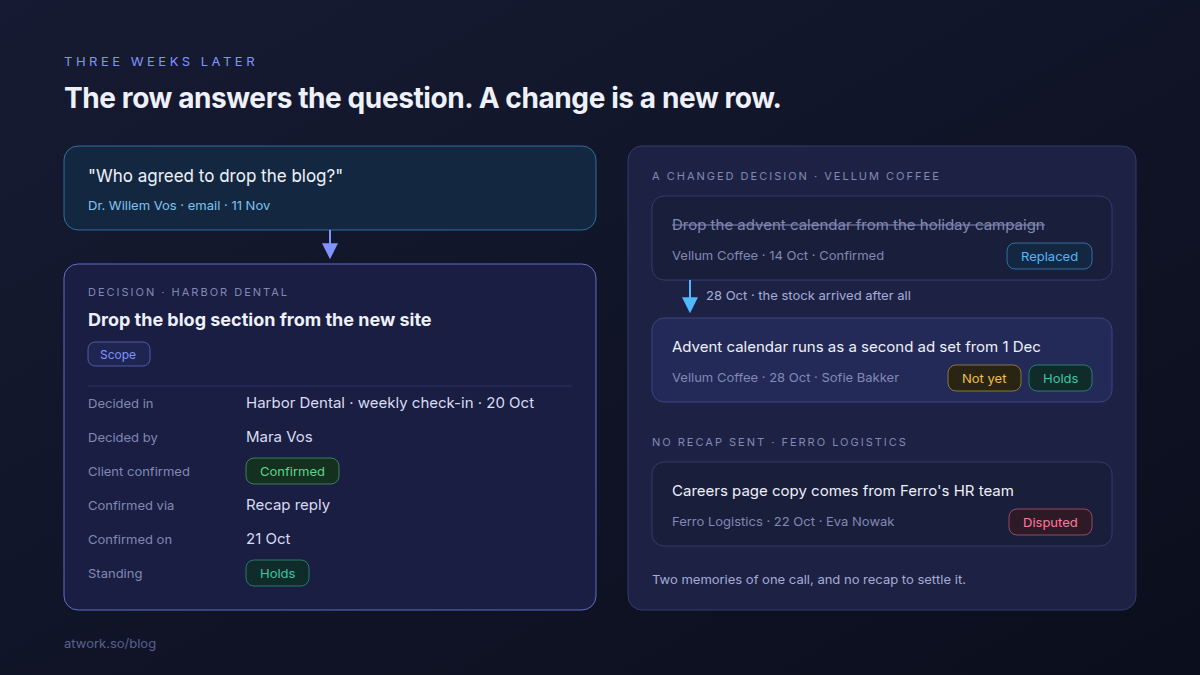
Say Dr. Willem Vos, who signs off at Harbor Dental in the template's example, asks on 11 Nov who agreed to drop the blog. The row answers: decided by Mara Vos in the 20 Oct check-in, confirmed by Dr. Vos's own reply to the recap the next day. Nobody has to be wrong out loud.
Ferro Logistics shows the other case. No recap went out after its 22 Oct call, and a week later each side remembered the other writing the careers page copy. That row is Disputed.
A changed decision gets a new row. Vellum Coffee dropped the advent calendar on 14 Oct and asked for it back on 28 Oct. The log holds both: the first marked Replaced, the second at Not yet. A decision that changes scope or budget also needs a change note before work starts, as the scope creep guide explains.
How do you set it up with the Client Decision Log template?
Install the Client Decision Log template and you get four sheets, Clients, Meetings, Decisions and Actions, plus a Recap email page with a copy-ready recap. Add your clients and who signs off for each, log your next call, and fill in Decisions during its last five minutes.
- Add your clients, with the account lead, the main contact and who signs off.
- Log the meeting: date, type and who was there on each side.
- Add each decision as you read it back. Link it to the meeting and leave Client confirmed at Not yet.
- Add the actions, whose action first. A Theirs action gets their contact.
- Send the recap the same day from the Recap email page, and set the meeting's Recap to Sent.
- Record the reply: Client confirmed, Confirmed on and Confirmed via on each decision it covers.
A Charts view on Decisions shows how much of what was agreed has a written yes. It comes with four example clients and their decisions, including a Replaced row and a Disputed one. For the deliverables a decision changes, pair it with Agency Client Delivery; what an agency project management template should contain covers that side.
Frequently asked questions
Does the client need an Atwork account to confirm a decision?
No. The client confirms by replying to your recap email, and you record the reply on the decision. The client only ever sees the recap.
Do you still need a decision log if you record your calls?
Yes. A recording holds everything that was said. It doesn't say which sentence was the decision, and nobody confirmed anything by being recorded.
Should internal decisions go in the client decision log?
No. Log only what was decided with the client, because those are the decisions the client can confirm or dispute. Who on your team takes the work belongs with the work itself.
Where do you start?
Start with the client whose next call is soonest. Install the template, add that client and who signs off, and keep the Decisions sheet open during the call. Read the decisions back before you hang up, send the recap that afternoon, and record the reply.
Install the Client Decision Log template, log your next client call before it ends, and send the recap the same afternoon. Start free