Hire, onboard and support your people — connected
Run your hiring pipeline, onboarding checklists and people data in one workspace, with forms to collect what you need and automations to move things along.

Why HR ends up being the spreadsheet department
HR work is mostly process — the same sequence, run again for a different person. It gets tracked in spreadsheets not because anyone chose that, but because every proper HR system is priced and scoped for a company three times your size.
Onboarding is a checklist someone rebuilds each time
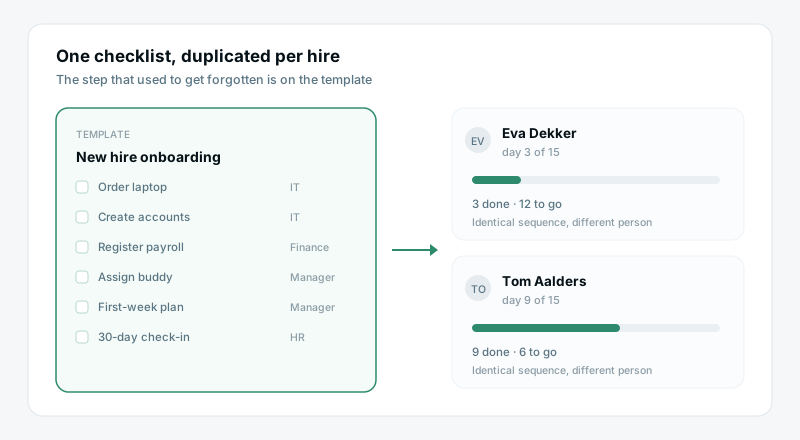
Laptop, accounts, buddy, first-week plan, payroll. It is the same fifteen steps every hire, retyped into a new doc, and the step that gets forgotten is different each time.
Requests arrive as messages, not records
Leave, equipment, a contract letter, a reference — all of it lands in a direct message or an inbox. There is no queue, so there is no way to see what is outstanding or how long it took.
People data lives in three places
Start dates in a spreadsheet, contracts in a drive folder, who-reports-to-whom in someone's memory. Answering a simple question means opening all three and hoping they agree.
Sensitive things sit in the wrong place
Salary bands and performance notes end up in shared files because there was nowhere better. The access question gets deferred until the day it becomes urgent.
What you can do
A pipeline for every role
Track candidates on a board from applied to hired, with notes and files in one place.
Onboarding that runs itself
Templated checklists and automations make sure every new hire gets a great first week.
People data you can trust
Keep records, time-off and org data in structured sheets — with the right permissions.
How to run HR without an HR suite
Four steps. Start with onboarding — it is the highest-volume process and the one where a dropped step is most visible.
Make onboarding a template you reuse
One checklist with the fifteen steps, owners and due dates already on it. Duplicate it per hire and the sequence is identical every time, including the step that used to get forgotten.
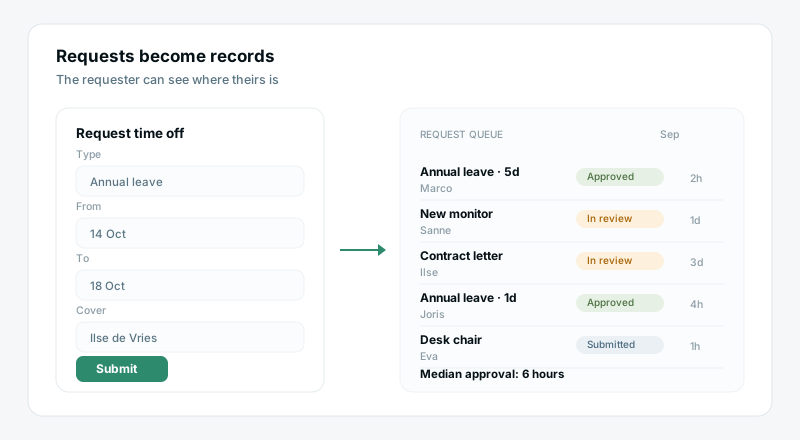
Give requests a queue and a form
Leave, equipment and letter requests come in through a form and land as rows with a status. The requester can see where theirs is, which removes most of the follow-up messages before they happen.
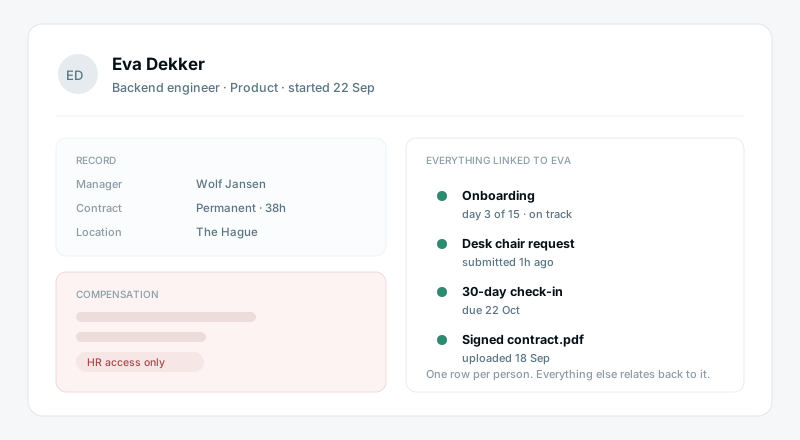
Keep one people record
Start date, role, manager, contract and documents on a single row per person. Everything else — onboarding, requests, reviews — relates back to it, so there is one place that is right.
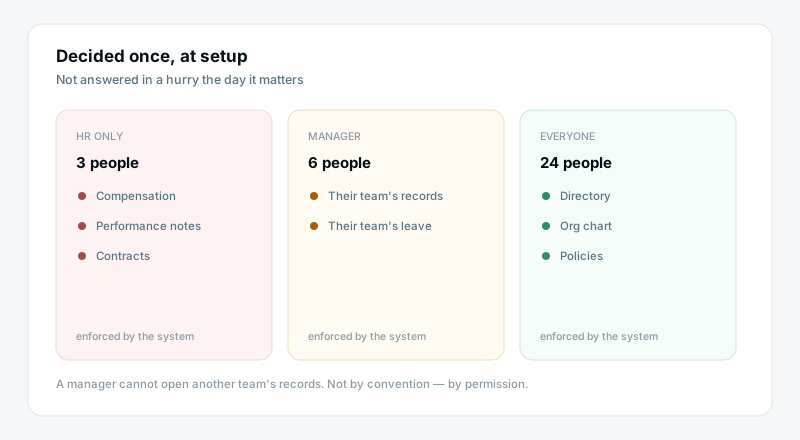
Decide who sees what, deliberately
Salary and performance notes go in sheets only HR can open. Managers see their own team. Everyone sees the directory. It is a setup decision made once, rather than a question you answer in a hurry later.
What you get without buying an HR suite
Processes that run the same way every time
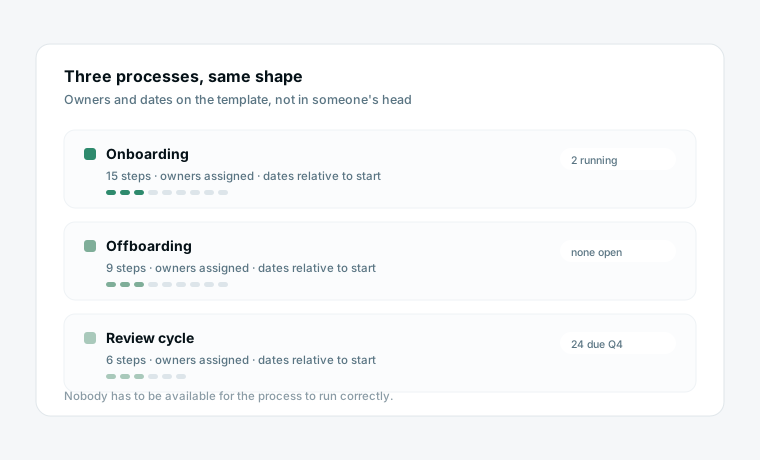
Onboarding, offboarding and reviews are templates with owners and dates. Nothing depends on the person who normally does it being available that week.
A request queue instead of an inbox
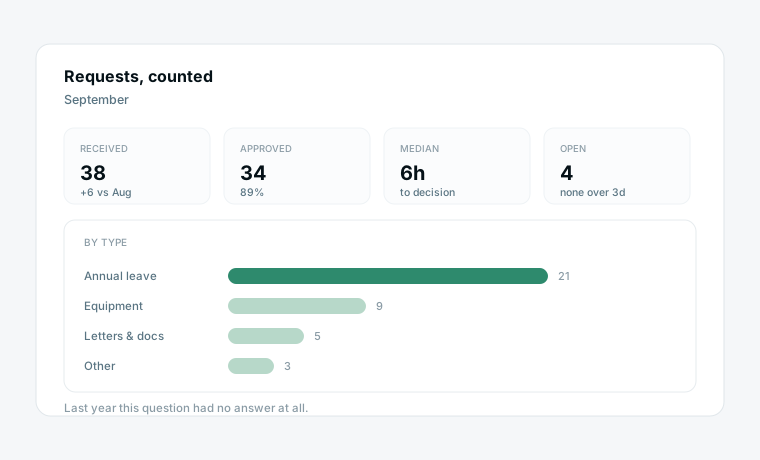
Every leave and equipment request is a row with a status and a timestamp. You can finally answer how many requests came in last month and how long approvals actually took.
Sensitive data with real boundaries
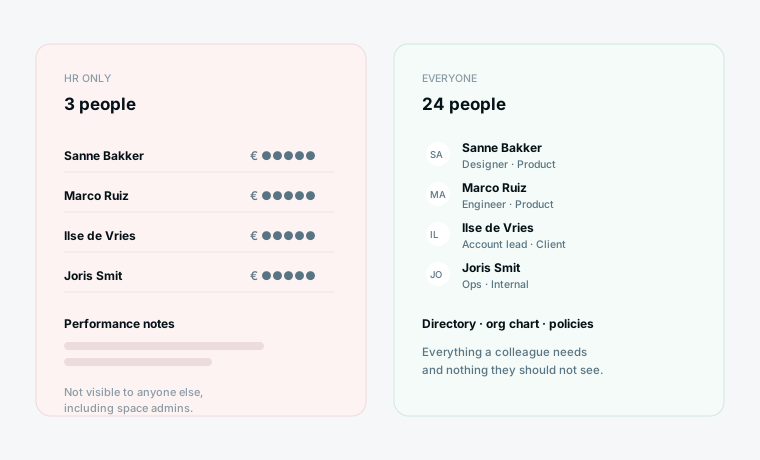
Salary and performance sheets are visible only to the people you name. Managers get their own team, everyone else gets the directory — and it is enforced by the system rather than by convention.
What changes
A new onboarding doc typed for every hire
Leave requests arrive as chat messages
People data across a sheet, a drive and memory
Salary figures in a shared spreadsheet
No idea how long approvals take
One checklist, duplicated per person
A queue with a status and a timestamp
One record per person
A sheet only HR can open
Median approval time, on a dashboard
Start from a template
Two starting points that cover most of what a small HR function runs.
Questions HR teams ask
Is this a replacement for a real HRIS?
Not for payroll, statutory reporting or benefits administration — keep a proper HRIS or a payroll provider for those. This replaces the spreadsheets and shared docs around them: onboarding, requests, people records and reviews.
Can we keep salary data genuinely private?
Yes. Sheets are visible only to the people and roles you grant access to, and that applies to everyone including admins of other spaces. Put compensation in its own sheet and name who can open it.
Do employees need a paid seat to request leave?
They can submit through a public form without any account. If you want them to see their own request status or the directory, that needs access — decide which of the two you actually need before paying for seats.
How does this handle onboarding across departments?
The checklist has an owner per step, so IT owns the laptop, finance owns payroll, and the manager owns the first-week plan. Each person sees their own tasks; you see whether the whole sequence is on track.
What can AI agents do in an HR context?
Draft a job description from a role brief, summarise interview notes, or check an onboarding checklist for steps nobody has picked up. Keep them away from anything involving compensation or performance judgement — those need a person.
Is this GDPR-appropriate for employee data?
We are a Netherlands-based company hosting in the EU and can provide a data processing agreement. Employee data still needs your own lawful basis and retention policy — the tool supports that, it does not decide it for you.
Bring your team’s work together
Start free today — invite your team and shape a workspace that fits hr & people.
Start free