From roadmap to ship, in sync
Keep the roadmap, sprints and specs connected so nothing drifts. Plan in the view that fits — backlog, board or timeline — and let AI turn goals into an organized plan.

Why the roadmap and the sprint stop agreeing
Both documents were correct when they were written. Then the work moved and only one of them was updated, and from that week onward every planning conversation starts by arguing about which one is true.
The roadmap is a slide, the work is a board
The roadmap lives in a deck for leadership and the real work lives in a tracker. Keeping them in sync is somebody's manual job, so it happens before board meetings and not otherwise.
Feedback arrives everywhere and lands nowhere
Requests come from sales calls, support tickets, a customer's email and a hallway conversation. None of it attaches to the roadmap item it concerns, so the same request gets raised four times and counted once.
Specs go stale the moment work starts
The spec is a document somewhere else. Once implementation begins the decisions happen in the ticket, and within two weeks the document describes something nobody built.
Nobody can see shipped against promised
At the end of the quarter, reconstructing what was committed and what actually shipped is a manual exercise in three tools — which is why it usually does not happen.
What you can do
One backlog, many views
The same work as a backlog, a board or a timeline — however each part of the team thinks.
Specs next to the work
Living docs link to the tasks they describe, so context is always one click away.
AI-assisted planning
Turn a goal into an organized, assigned, realistic sprint — then adjust as things change.
How to keep the plan and the work connected
Four steps, and the point of all of them is the same: one item, not four copies of it in different tools.
Put the roadmap where the work is
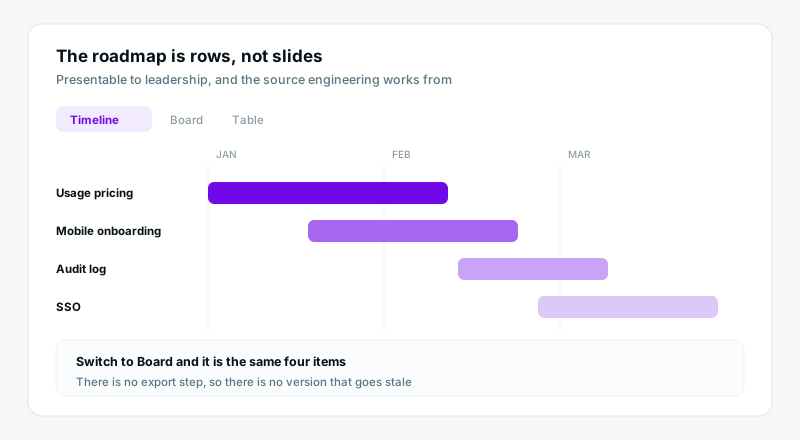
Install Product Roadmap and the themes, releases and statuses exist as real rows, not slides. The timeline view is presentable to leadership and it is the same data engineering is working from, so it cannot drift.
Point every piece of feedback at a roadmap item
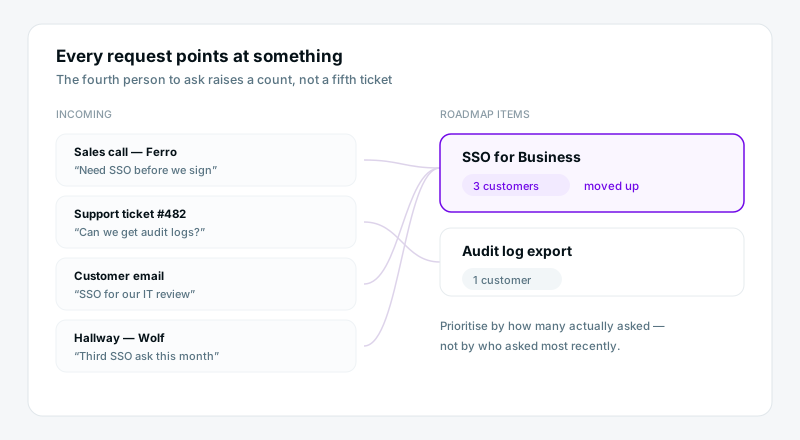
Feature requests and bugs come in through a form and relate to the roadmap item they concern. The fourth person to ask for the same thing increments a count instead of opening a fifth ticket.
Keep the spec on the item
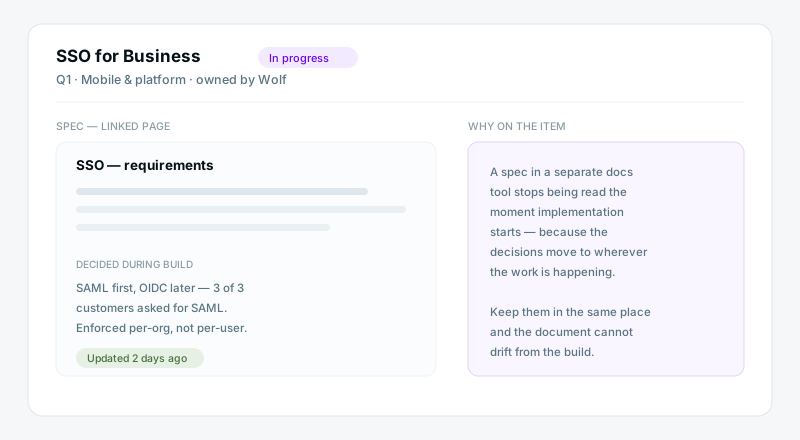
The spec is a page linked to the work, so decisions made during implementation land next to it rather than in a ticket comment. Anyone opening the item six months later gets the reasoning with the requirement.
Plan the sprint from the same backlog
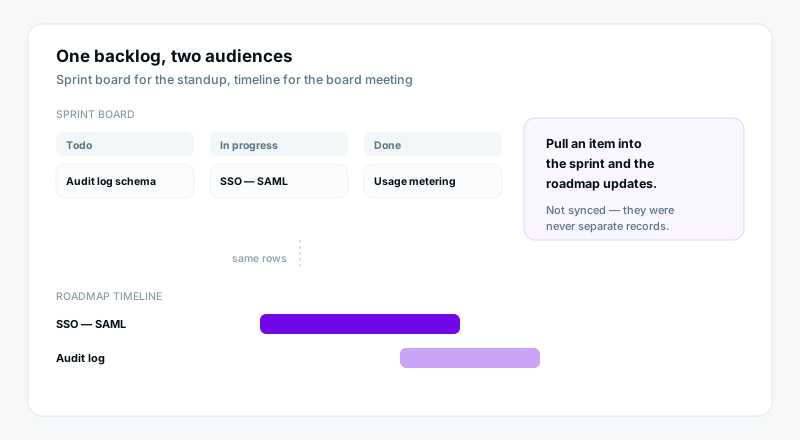
Switch the same rows to a board for the standup and a timeline for planning. Nothing is copied between views, so pulling an item into the sprint updates the roadmap automatically — because they were never separate records.
What you get from one connected backlog
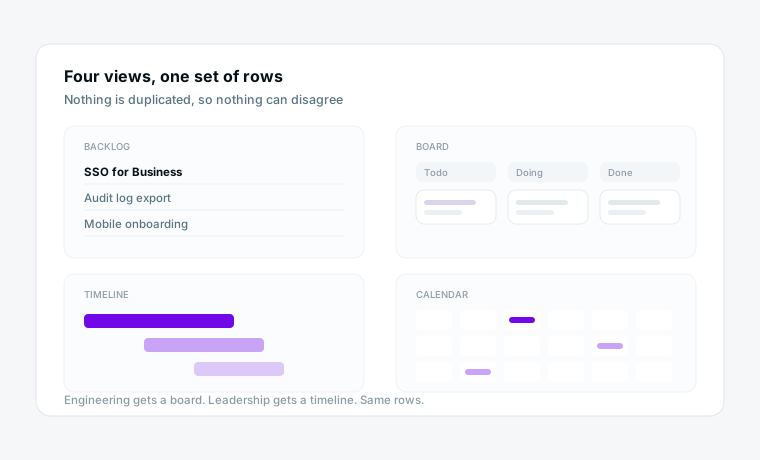
One backlog, every view
Backlog, board, timeline, calendar — the same rows, rendered how each part of the team thinks. Engineering gets a board, leadership gets a timeline, and neither is a copy that can fall out of date.
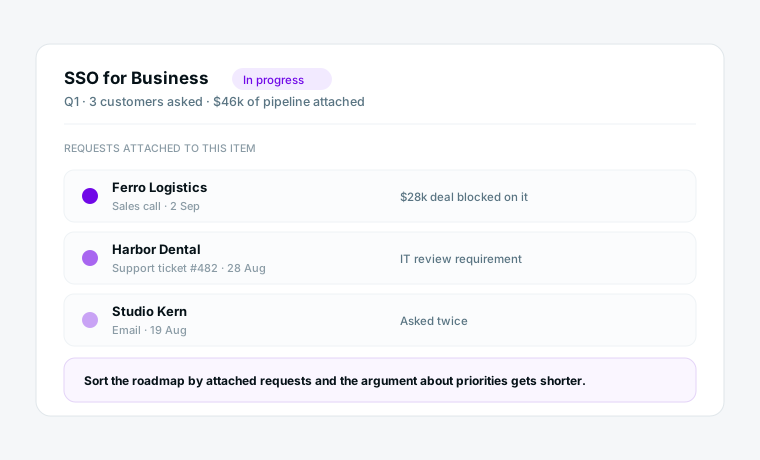
Feedback that points at something
Every request is attached to the roadmap item it argues for, so prioritisation stops being a debate about anecdotes. You can sort by how many customers actually asked.
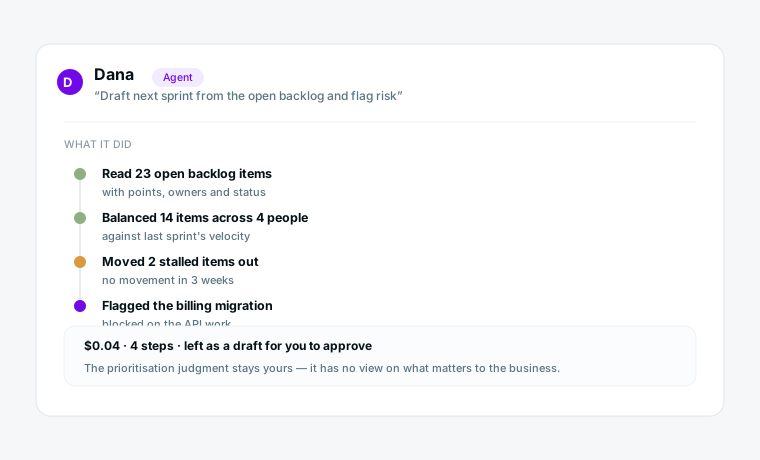
Planning help that reads the real backlog
Ask an agent to turn a goal into an assigned sprint, or to summarise what moved this week. It works from the rows your team maintains, and every run is logged and priced.
What changes
Roadmap in slides, work in a tracker
The same request raised four times
The spec describes something nobody built
Syncing the roadmap before board meetings
Shipped-versus-promised reconstructed by hand
One set of rows, two views
Four requests attached to one item
The spec is on the item and moves with it
Nothing to sync
Visible on the timeline
Start from a template
Each installs a working space in a few minutes, with views and dashboards already set up.
Questions product teams ask
Does this replace Jira or Linear?
For many teams yes, but be honest about the trade. If your engineers live in a deep Git-integrated issue tracker and like it, keep it. Atwork wins where product, design, support and leadership all need the same picture and the engineering tracker is a wall the rest of the company cannot see over.
Can engineering use a board while leadership sees a timeline?
Yes, and that is the main point. Views are renderings of the same rows, not copies, so there is nothing to keep in sync and no version of the roadmap that is quietly out of date.
How do customer requests get in?
Through a public form that writes into the requests sheet, or added by whoever heard it. Each one relates to the roadmap item it concerns, so a repeated request raises the count on an existing item rather than creating a duplicate.
Do you support sprints and story points?
Yes. The Agile Sprint Management template ships sprints, points and a velocity view. If you run continuous flow instead, use the board without them — nothing forces a sprint cadence.
Where does the spec live?
As a page linked to the item. That is deliberate: a spec in a separate documentation tool stops being read once implementation starts, because the decisions move to wherever the work is.
Can AI actually help with planning?
With the assembly parts of it. Turning a goal into a drafted, assigned sprint for you to adjust, summarising what moved this week, flagging items with no movement in two weeks. The prioritisation judgment stays yours — an agent has no view on what matters to your business.
Bring your team’s work together
Start free today — invite your team and shape a workspace that fits product teams.
Start free